


 محول الفيديو النهائي
 مسجل الشاشة
 إصلاح الفيديو
 تنزيل آمن
كيف يمكننا تحويل صيغة M4A إلى صيغة MP3 على الكمبيوتر مجانًا
M4A هو تنسيق ملفات صوتية خاص بشركة Apple، يستخدم ترميز MPEG-4. وهو مشابه جدًا لتنسيق MP4، باستثناء أن MP4 يدعم بيانات الفيديو بالإضافة إلى ملفات الصوت. صدر تنسيق MP3 قبل ذلك بكثير، عام ١٩٩٣، ولا يزال المعيار الأكثر موثوقية لتخزين الموسيقى. ميزته الرئيسية هي ضغط الصوت بكفاءة عالية، مما يضمن عدم حدوث أي فقدان ملحوظ في جودة الصوت مع توفير أحجام ملفات أصغر.
يوفر لنا تنسيق M4A جودة صوت أفضل مقارنةً بـ MP3. إذا كنت تعتقد أن ملفات M4A أكبر حجمًا من ملفات MP3، فأنت مخطئ. في الواقع، يمكن أن يكون حجم ملفات M4A أقل من نصف حجم MP3 تقريبًا، كما أنه يدعم إضافة حماية إدارة الحقوق الرقمية (DRM) لمنع الآخرين من توزيع الصوت بشكل غير مصرح به. يُنظر إلى M4A على أنه خليفة لتنسيق MP3، لكنه لا يزال أقل توافقًا بكثير. لا يمكن تشغيل موسيقى M4A إلا على بعض الأجهزة والمنصات، لذلك من الأفضل تحويل موسيقى M4A إلى MP3 إذا كنا نريد مشاركة الملفات الصوتية مع أصدقائنا بشكل أكثر سهولة. هنا اخترنا خمس طرق لتحويل M4A إلى MP3 لننصحك بها، مع خطوات استخدامها التفصيلية.

الجزء الأول: أفضل طريقة لتحويل M4A إلى MP3 [سريعة وبدون فقدان الجودة]
FVC Video Converter Ultimate
بعد الاختبار الفعلي والمقارنة، يُعد FVC Video Converter Ultimate أفضل محوّل من M4A إلى MP3 يستحق التجربة. باعتباره تطبيقًا لسطح المكتب، فهو متوافق مع نظامي التشغيل ويندوز وماك، ويدعم أكثر من 1000 صيغة إدخال وإخراج. يمكنه إنجاز تقريبًا أي مهمة تحويل ملفات بسهولة. على الرغم من أن ملفات تنسيق M4A عادةً ما تكون بجودة أعلى من MP3، فإننا بالكاد نلاحظ أي تغيير في جودة الصوت عند استخدام FVC Video Converter Ultimate لتحويل M4A إلى MP3. كما أن هذا التطبيق مزود بتسريع عتادي يضمن إخراج الملفات بسرعة أعلى تصل إلى 30 مرة، وحتى معالجة عدد كبير من المهام دفعة واحدة بنقرة واحدة.
يستحق التجربة ليس فقط لأدائه الممتاز في تحويل الصيغ، بل أيضًا لواجهته التي تحتوي على مجموعة كاملة من أدوات تحرير الصوت، والتي تُحسّن جودة الصوت بسهولة، وتزيل الضوضاء، وتقصّص الطول، وغيرها الكثير. مع هذا البرنامج الشامل، سيصبح تحويل ملفات M4A إلى MP3 سهلًا للغاية.
تنزيل مجانيلنظام Windows 7 أو أحدثتنزيل آمن
تنزيل مجانيلنظام MacOS 10.7 أو أحدثتنزيل آمن
إليك كيفية تحويل M4A إلى MP3 باستخدام FVC Video Converter Ultimate.
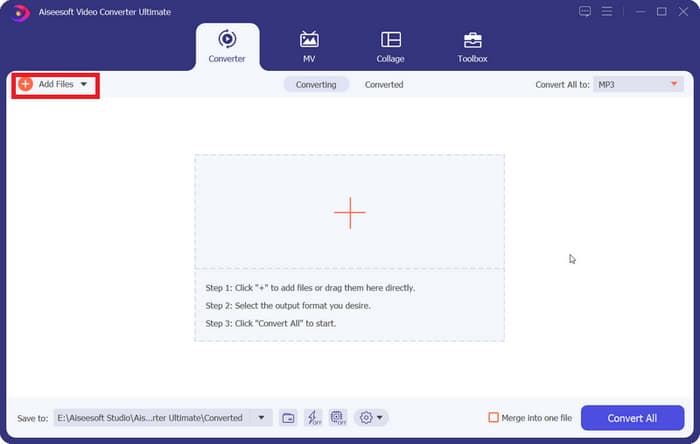
الخطوة 1. قم بتنزيل FVC Video Converter Ultimate على جهازك. أتمم الإعدادات الأساسية ثم شغِّله على سطح المكتب. بعد الدخول إلى الواجهة الرئيسية، انقر على إضافة ملفات لاختيار ملف الصوت M4A الخاص بك.
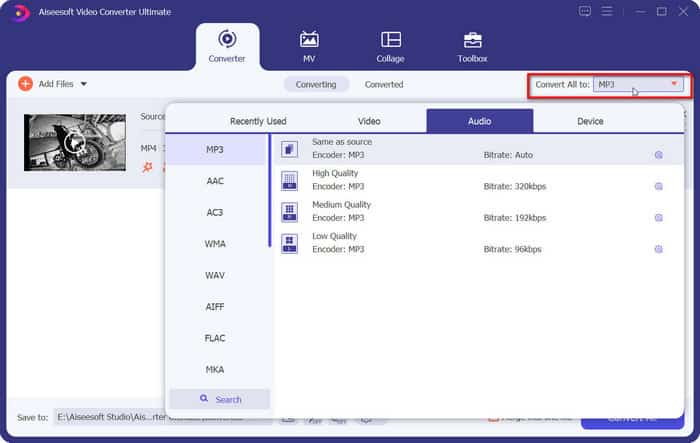
الخطوة 2. سيتم تحميل الصوت المحدد بسرعة كبيرة. انتقل إلى تحويل الكل إلى ثم اختر صوت > MP3. ستظهر على الصفحة عدة خيارات للإخراج بمعدلات بت مختلفة وجودة صوت متفاوتة. اختر الخيار الذي يلبي متطلباتك.
إذا كنت تريد إجراء تعديلات إضافية، انقر على أيقونة قص.
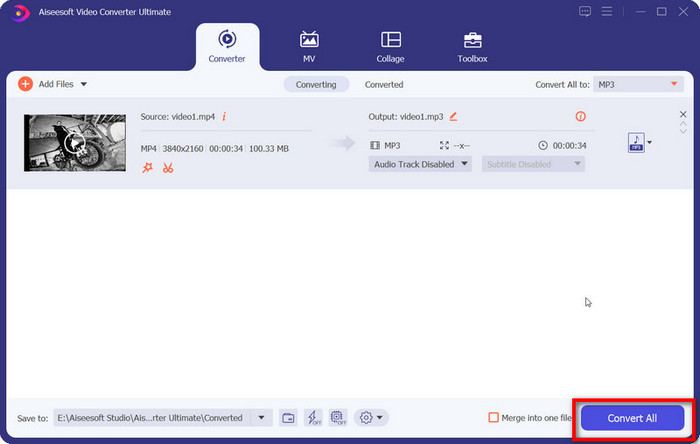
الخطوة 3. انتقل إلى الحفظ في وحدد مسار تخزين لملف M4A المحوَّل. ثم انقر على تحويل الكل.
الجزء الثاني. كيفية تحويل M4A إلى MP3 عبر الإنترنت
FVC Free Audio Converter
مع أن أداة سطح المكتب أكثر استقرارًا وتوفر مزيدًا من الميزات، إلا أننا نحتاج إلى إتمام سلسلة طويلة من عمليات التنزيل والتثبيت قبل أن نتمكن من بدء التحويل. كذلك ستشغل حزمة تثبيت البرنامج مساحة كبيرة من الذاكرة. إذا أردنا بدء التحويل فورًا وتوفير بعض مساحة التخزين، يمكننا الاستعانة بمحوّل M4A إلى MP3 عبر الإنترنت. في هذا المجال، نوصي باستخدام FVC Video Converter Ultimate. فهذه المنصة تدعم العديد من صيغ الصوت الشائعة، بما في ذلك MP3 وWMA وAAC وWAV وAC3 وFLAC وغيرها. بعض المحوّلات عبر الإنترنت تفرض قيودًا على حجم الملف، لكن FVC Free Audio Converter لا يفرض هذه القيود، ويمكننا حتى جعله يحوّل عددًا كبيرًا من الملفات دفعة واحدة.
إليك كيفية تغيير M4A إلى MP3 باستخدام FVC Free Audio Converter.
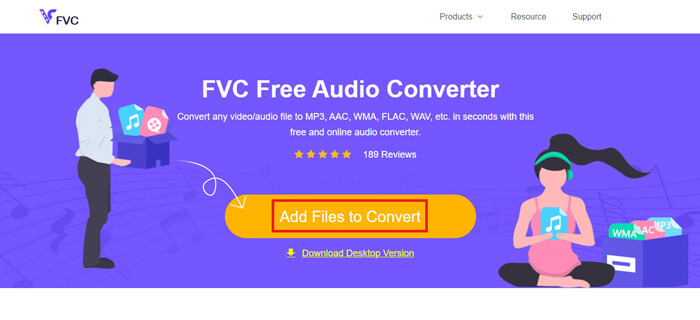
الخطوة 1. افتح FVC Free Audio Converter باستخدام المتصفح. عند تحميل صفحة الويب، انقر على إضافة ملفات للتحويل وارفع ملف الصوت M4A الخاص بك.
الخطوة 2. بعد الإضافة، انتقل إلى القسم السفلي واختر MP3 كصيغة للإخراج. اضغط على أيقونة الإعدادات إذا كنت ترغب في إجراء تعديلات إضافية.
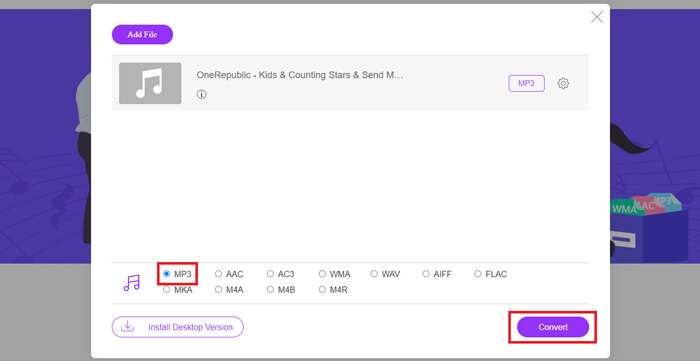
الخطوة 3. أخيرًا، انقر على تحويل لبدء عملية التحويل.
الجزء 3. كيفية تحويل M4A إلى MP3 على جهاز ماك
تحويل M4A إلى MP3 باستخدام iTunes
تعمل كلتا الطريقتين المذكورتين أعلاه على نظامي ويندوز وماك. إذا كنت من مستخدمي ماك وترغب في إيجاد محول مجاني أكثر توافقًا مع نظام التشغيل لديك، فننصحك باستخدام iTunes. هذا البرنامج مدمج في نظام Apple، ورغم أنه يُعتبر غالبًا مشغل وسائط متعددة وأداة لإدارة الملفات، إلا أنه يدعم أيضًا إجراء بعض عمليات تحويل الصيغ البسيطة. ملاحظة: حتى مستخدمي ويندوز يمكنهم تجربة iTunes.
إليك كيفية تغيير M4A إلى MP3 على Mac باستخدام iTunes.
الخطوة 1. إذا كان برنامج iTunes مثبتًا على جهاز الكمبيوتر لديك، فقم بفتحه. إن لم يكن كذلك، قم بتنزيله وتثبيته. يجب عليك تسجيل الدخول باستخدام Apple ID وكلمة المرور.
الخطوة 2. انقر على ملف > إضافة مجلد إلى المكتبة، واختر المجلد الذي يحتفظ بملفات الصوت M4A الخاصة بك. ثم انقر على فتح لتحميل ملف M4A إلى iTunes.
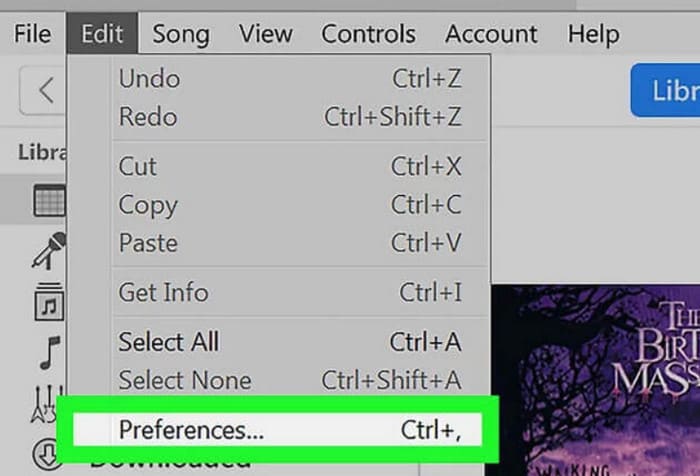
الخطوة 3. اختر تحرير > تفضيلات لفتح نافذة أخرى.
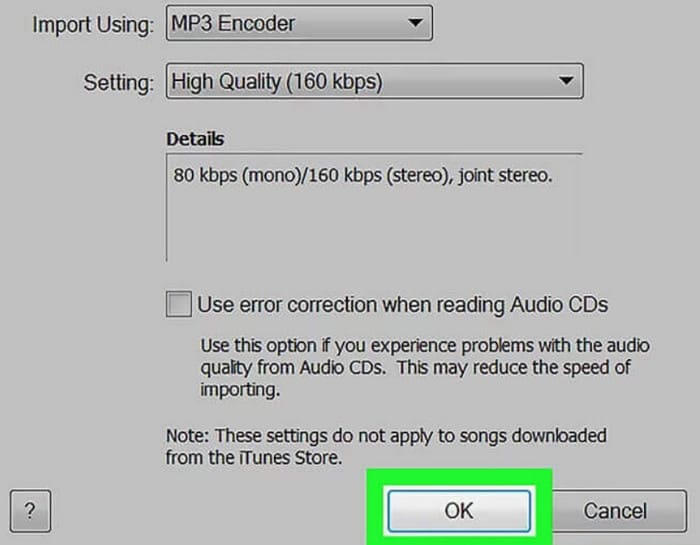
الخطوة 4. في النافذة الجديدة، انقر على إعدادات الاستيراد وانتقل إلى مربع الاستيراد باستخدام. اختر محوّل MP3 ثم انقر على موافق لحفظ الإعدادات.
الخطوة 5. عد إلى مكتبة iTunes وابحث عن ملف M4A المطلوب. انقر على ملف > تحويل > إنشاء إصدار MP4.

الجزء الرابع. كيفية تحويل M4A إلى MP3 مجانًا
من بين الأدوات المجانية الشائعة، هناك أداتان أخريان يمكنهما مساعدتنا في تحويل تنسيقات الملفات، FFmpeg وVLC Media Player. في هذا الجزء سنوضح كيفية استخدامهما على التوالي.
استخدم FFmpeg لتحويل M4A إلى MP3
يُعرف برنامج FFmpeg بتعدد المهام التي يُمكنه تنفيذها. ومع ذلك، مقارنةً ببرامج تحرير الوسائط المتعددة التقليدية المزودة بأزرار ونوافذ معاينة، يتميز FFmpeg بميزة فريدة. نحتاج إلى إعداد قالب الكود وملء مسار تخزين الملف. أدخل أمر الكود في FFmpeg، وسنحصل على الملف المُحوّل. مع ذلك، هذا التطبيق ليس سهل الاستخدام للمبتدئين قليلي الخبرة؛ فإعداد الكود مُرهق.
اقرأ هذا الدليل لاستخدام FFmpeg لنقل M4A إلى MP3.
الخطوة 1. قم بتنزيل وتثبيت FFmpeg على جهاز الكمبيوتر. افتح تطبيق الأوامر (Terminal).
الخطوة 2. جهّز الأمر الذي تحتاج إلى استخدامه.
ffmpeg -i input.m4a output.mp3
استبدل موقع input في القالب أعلاه بمسار التخزين الذي يوجد فيه ملف M4A الأصلي. ثم استبدل output بمسار الإخراج الذي تريده. إذا كنت تريد تحويل MP3 إلى M4A، فقم بمقايضة موقعي مساري التخزين هذين.
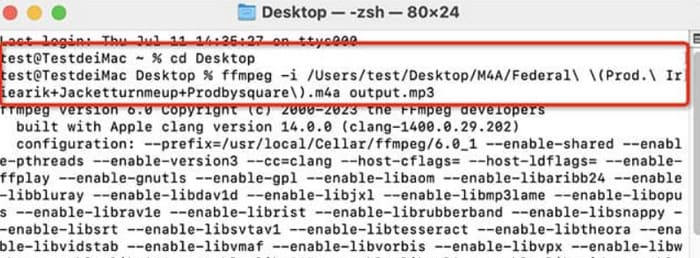
الخطوة 3. اكتب الأمر في FFmpeg ثم اضغط على Enter لبدء عملية التحويل.
قم بإجراء تحويل من M4A إلى MP3 عبر VLC Media Player
يُعد VLC Media Player واحدًا من أشهر مشغلات ملفات M4A ومحوّلات الصيغ المجانية. يشتهر بقدرته على تشغيل ملفات الوسائط المتعددة في معظم الصيغ، كما أنه متوافق مع أجهزة ويندوز وماك ولينكس. على صفحته يمكننا أيضًا العثور على بعض أدوات تحرير الصوت الأساسية.
إليك كيفية تحويل M4A إلى MP3 باستخدام VLC Media Player.
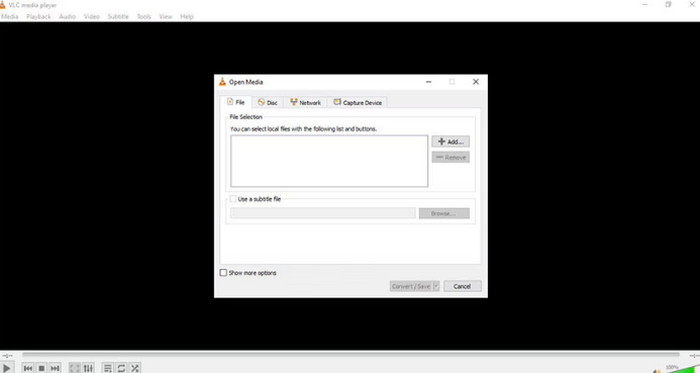
الخطوة 1. افتح VLC Media Player على جهاز الكمبيوتر. انقر على وسائط > تحويل/حفظ.
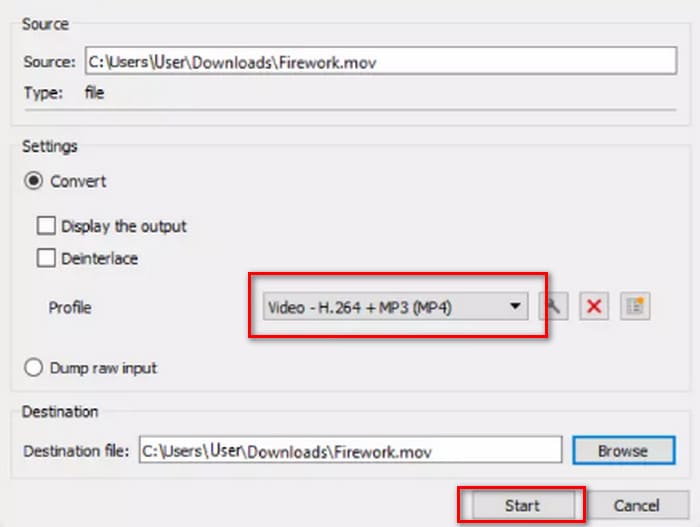
الخطوة 2. افتح نافذة فتح وسائط. ثم اضغط على + إضافة لتحميل ملف M4A الخاص بك. بعد ذلك، انقر مرة أخرى على تحويل/حفظ.
الخطوة 3. ستظهر نافذة تحويل. اختر الملف الشخصي > صوت - MP3. وأخيرًا، انقر على بدء.
الجزء الرابع. الخاتمة
في هذه المقالة، نوصي بخمس أدوات لتحويل M4A إلى MP3 مع شرح كيفية استخدامها. من بين برامج سطح المكتب، يُعتبر FVC Video Converter Ultimate الأكثر شمولاً وسرعة؛ وiTunes مناسبًا لمستخدمي ماك؛ وVLC Media Player مجانيًا بالكامل لكنه يوفر أدوات تحرير أقل؛ بينما يمكن لـ FFmpeg إنجاز العديد من المهام إلا أن استخدامه أكثر صعوبة. إذا كنت تريد تجنب تنزيل البرامج وتثبيتها، يمكنك استخدام FVC Free Audio Converter.
-
 أفضل 4 طرق لتحويل WMA إلى MP3
 هل من الممكن تحويل WMA إلى MP3 باستخدام Windows Media Player؟ كيفية تحويل WMA إلى MP3 مجانًا؟ يشارك هذا المنشور 4 طرق بسيطة لمساعدتك في إجراء تحويل الصوت من WMA إلى MP3 على Mac و Windows PC وعلى الإنترنت.
-
 8 طرق لتحويل MP4 إلى صوت MP3 (تحويل دفعة وحجم كبير)
 إذا كنت ترغب في استخراج صوت MP3 من فيديو MP4 ، يمكنك مراجعة هذه المقالة والحصول على 8 حلول. هناك طرق عبر الإنترنت وغير متصلة بالإنترنت لتحويل MP4 إلى MP3 على هاتفك أو جهاز الكمبيوتر بسهولة.
-
 M4A Player - أفضل 5 مشغلات M4A لأجهزة Android والكمبيوتر
 كيف تلعب ملفات M4A على هاتف Android؟ أي لاعب يمكنه لعب M4A؟ يشارك هذا المنشور أفضل 5 مشغلات M4A مجانية لأجهزة Android و Mac و PC.

