


 محول الفيديو النهائي
 مسجل الشاشة
 إصلاح الفيديو
 تنزيل آمن
MOV to MP3 - أفضل 4 طرق لاستخراج ملفات MP3 من MOV بسهولة
إذا كنت ترغب في استخراج ملف الموسيقى الخلفية من مقطع فيديو ، فكيف يتم تحويل MOV إلى MP3 بالجودة الأصلية؟ MOV هو تنسيق فيديو يستخدم بشكل متكرر لمعظم الأجهزة ، يمكنك معرفة المزيد حول أكثر 4 طرق فاعلية لاستخراج ملفات MP3 من MOV بسهولة. ما عليك سوى اختيار الطريقة المطلوبة وفقًا لمتطلباتك الآن.

الجزء 1: أفضل 5 طرق لتحويل MOV إلى MP3 بسهولة
الطريقة الأولى: كيفية تحويل MOV إلى MP3 عبر الإنترنت
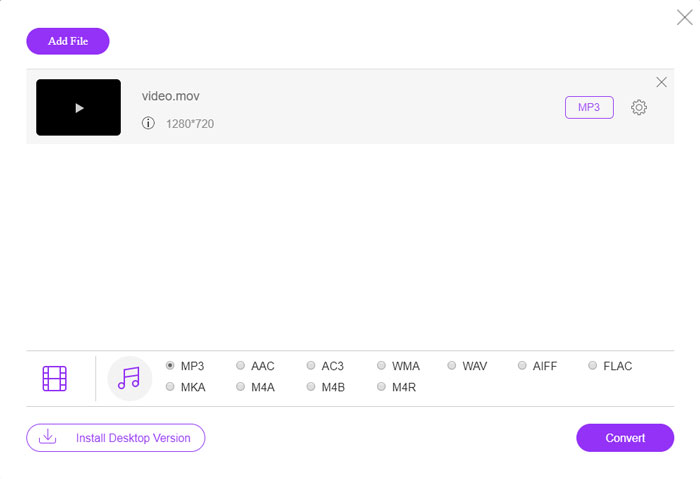
يُعدّ FVC Free Online Video Converter محوِّل MOV إلى MP3 عبر الإنترنت متعدد الاستخدامات، يتيح لك تحويل معظم ملفات الفيديو/الصوت، وضبط إعدادات الصوت والفيديو، وإجراء تحويل مستقر وآمن دون علامة مائية أو قيود على الحجم.
الخطوة 1. انتقل إلى محوِّل الفيديو عبر الإنترنت من أي متصفح ويب، ويمكنك النقر على زر Add Files to Convert لتحميل ملفات MOV التي تريد تحويلها. يتطلّب الأمر تثبيت برنامج PKG مسبقًا.

الخطوة 2. بعد استيراد ملف MOV، يمكنك اختيار MP3 من قائمة Audio ضمن واجهة المستخدم. بالإضافة إلى ذلك، يمكنك أيضًا ضبط الإعدادات مثل معدل العيّنة، وقنوات الصوت وغير ذلك.

الخطوة 3. بعد ذلك يمكنك النقر على زر Convert لتحويل ملفات MOV إلى MP3. يستغرق الأمر بضع ثوانٍ للحصول على الفيديو المطلوب. بعدها يمكنك تنزيل ملف MP3 إلى جهاز الكمبيوتر أو مشاركته على مواقع التواصل الاجتماعي.
الطريقة 2: كيفية تحويل MOV إلى MP3 على Windows
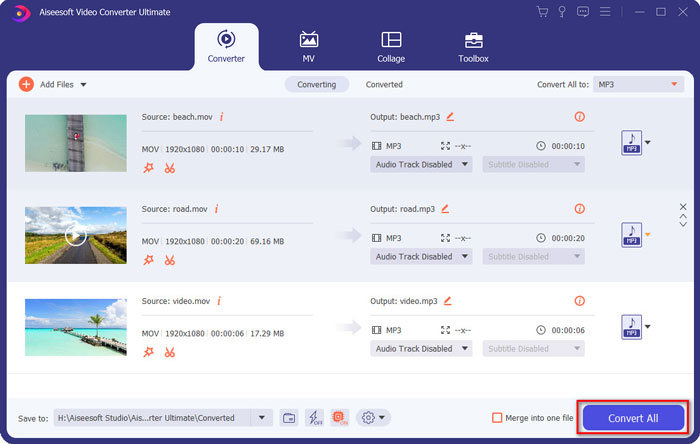
عندما تريد تحويل MOV إلى MP3 بالجودة الأصلية على نظامي التشغيل Windows و Mac ، فإن FVC Video Converter Ultimate هو محول MOV إلى MP3 المطلوب لتحويل معظم تنسيقات الفيديو أو تعديل إعدادات الصوت / الفيديو أو تحرير ملفات الإخراج أو حتى تطبيق مرشحات فيديو متعددة بكل سهولة.
- 1. تحويل MOV إلى MP3 و WAV و WMA والمزيد بالجودة الأصلية.
- 2. قم بتعديل برنامج ترميز الفيديو ومعدل العينة ومعدل البت الصوتي وإعدادات الصوت الأخرى.
- 3. توفير ميزة تحرير الفيديو ، مثل مقطع ، تقليم ، دمج MOV وتطبيق المرشحات.
- 4. تسريع الأجهزة المتقدمة لتحويل ملفات الفيديو بسرعة 70x.
الخطوة 1. قم بتنزيل وتثبيت محوِّل MOV إلى MP3، ثم يمكنك تشغيل البرنامج على جهاز الكمبيوتر. انقر على خيار Add Files لتحميل ملفات MP4 أو اسحب الفيديو مباشرة إلى البرنامج.
تحميل مجانيلنظام Windows 7 أو أحدثتنزيل آمن
تحميل مجانيلنظام MacOS 10.7 أو أحدثتنزيل آمن

الخطوة 2. بعد استيراد فيديو MP4، يمكنك اختيار قائمة Audio وتحديد MP3 كصيغة إخراج. بعد ذلك يمكنك ضبط إعدادات الملف الشخصي، مثل معدل البت، ومعدل العيّنة وغير ذلك.

الخطوة 3. اختر مجلدًا لحفظ الملفات المحوَّلة. بعد ذلك يمكنك النقر على زر Convert All في الواجهة الرئيسية لبدء تحويل MOV إلى MP3 على جهاز الكمبيوتر وفقًا لاحتياجاتك.
الطريقة الثالثة: كيفية تحويل MOV إلى MP3 على Android
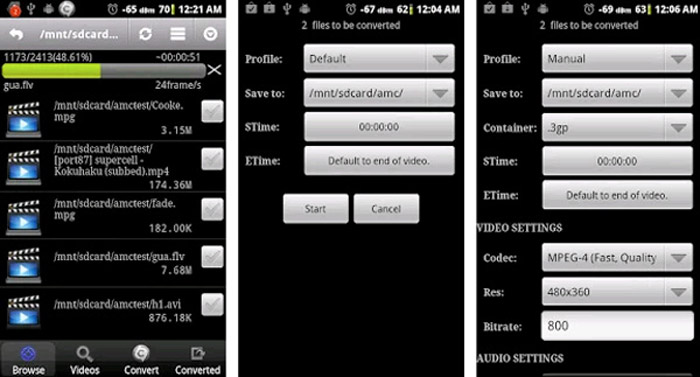
إذا كان لديك بعض ملفات MOV على أجهزة Android ، فلن تحتاج إلى نقل مقاطع الفيديو إلى الكمبيوتر ، فإن Video Converter Android هو تطبيق بسيط موصى به لمحول MOV إلى MP3 والذي يحول فيديو MOV إلى صوت مرغوب في بضع نقرات.
الخطوة 1. بعد تثبيت محوِّل MP3، يمكنك فتح التطبيق لاستعراض وإضافة ملفات MOV من معرض الصور في جهاز أندرويد. ثم يمكنك النقر على أيقونة Refresh في الأعلى.
الخطوة 2. بعدها يمكنك اختيار STime وETime لقص موسيقى الخلفية من ملف MOV وضبط معدل العيّنة والإعدادات الأخرى قبل التحويل.
الخطوة 3. بعد ذلك، انتقل إلى تبويب Convert وحدد MP3 كصيغة إخراج من قائمة برامج الترميز (الترميز). انقر على زر Start للمتابعة في عملية تحويل MOV إلى MP3.
الطريقة الرابعة: كيفية تحويل MOV إلى MP3 على iOS
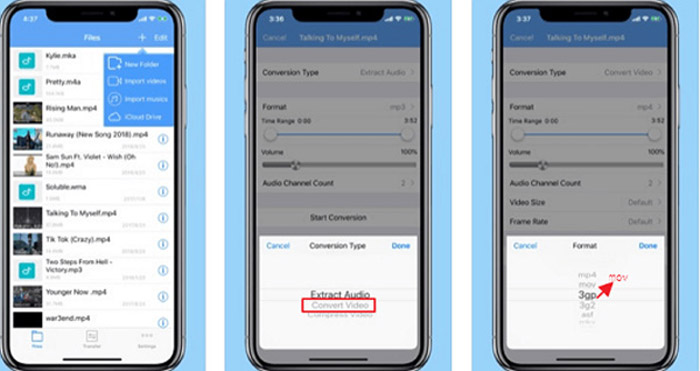
Media Converter هو تطبيق محول من MOV إلى MP3 لجهاز iPhone و iPad. يحتوي على مشغل وسائط مدمج يمكنك من تشغيل معظم تنسيقات الفيديو والصوت. علاوة على ذلك ، يمكنك أيضًا ضغط ملف الصوت باستخدام zip و RAR بسهولة.
الخطوة 1. إذا كنت قد ثبّتَّ بالفعل محوِّل MOV إلى MP3، يمكنك تشغيل البرنامج على جهاز iOS الخاص بك. بعد تحميل ملفات MOV، يمكنك النقر على خيار Extract Audio.
الخطوة 2. اختر MOV كصيغة إدخال وملف MP3 كصيغة إخراج. بعدها يمكنك ضبط إعدادات الصوت، مثل معدل العيّنة وغير ذلك بما يتوافق مع متطلباتك.
الخطوة 3. بعد ذلك يمكنك النقر على زر Convert لبدء تحويل MOV إلى MP3. عند الحصول على الملف المطلوب، يمكنك تصدير ملف MP3 المحوَّل إلى جهازك من تطبيق الصور (Photos) حسب الحاجة.
الجزء 2: الأسئلة الشائعة حول تحويل MOV إلى MP3 على Win / Mac
1. هل هناك طريقة متعددة الاستخدامات لتحويل MOV إلى MP3 لجميع الأجهزة؟
يعد VLC Media Player أكثر من مجرد مشغل وسائط. يمكنك أيضًا تحويل MOV إلى MP3 على أجهزة الكمبيوتر والهواتف الذكية. علاوة على ذلك ، يمكنك أيضًا تعديل الإعدادات المختلفة وتحرير مقاطع الفيديو ببعض ميزات التحرير الأساسية. ولكن عليك استخدام محول فيديو احترافي للحصول على إخراج راضي.
2. ما هو أفضل تنسيق إخراج ، MP3 أو WAV لتحويل MOV؟
عندما تقوم بتحويل MOV إلى MP3 ، يمكنك استخدام تنسيق الصوت لمعظم الأجهزة. لاستخراج الملفات الصوتية من جهاز الكمبيوتر الخاص بك أو مشغل وسائط آخر متوافق ، يمكنك اختيار صوت WAV كتنسيق الإخراج حسب متطلباتك.
3. كيف تختار محول MOV عبر الإنترنت إلى MP3؟
إذا كنت بحاجة فقط إلى اختيار محول MOV إلى MP3 عبر الإنترنت ، فيجب أن تولي اهتمامًا خاصًا لقيود الحجم والعلامة المائية وتسجيل الحساب والمزيد قبل التحويل. FVC Free Online Video Converter هو برنامج متعدد الاستخدامات يستخرج الملفات الصوتية دون أي قيود.
خاتمة
لاستخراج ملف MP3 من فيديو MOV ، يمكنك معرفة المزيد حول أفضل 4 محولات MOV إلى MP3 من المقالة. سواء كنت بحاجة إلى تحويل الفيديو إلى MP3 على جهاز كمبيوتر ، أو تغيير ملفات MOV بسهولة على جهاز iOS / Android ، يمكنك اختيار الحل المطلوب وفقًا لمتطلباتك من المقالة.
-
 كيفية تحويل ملفات الموسيقى OGG إلى MP3 على سطح المكتب وعلى الإنترنت
 كيفية تحويل ملفات OGG إلى تنسيق MP3 للاستماع إليها على الكمبيوتر أو الجهاز المحمول؟ نحن هنا نشارك 5 أسهل طريقة للقيام بذلك على سطح المكتب أو عبر الإنترنت.
-
 كيفية تحويل MP4 إلى MP3 على Windows / Mac / iPhone / Android / Online
 إذا كنت ترغب في استخراج صوت MP3 من فيديو MP4 ، يمكنك مراجعة هذه المقالة والحصول على 8 حلول. هناك طرق عبر الإنترنت وغير متصلة بالإنترنت لتحويل MP4 إلى MP3 على هاتفك أو جهاز الكمبيوتر بسهولة.
-
 كيفية ضغط ملفات MOV على أنظمة التشغيل Windows و Mac و iPhone و Android
 توضح هذه المقالة كيفية ضغط مقاطع فيديو QuickTime MOV على هاتفك أو جهاز الكمبيوتر بالتفصيل. إذا كان فيديو MOV الخاص بك كبيرًا جدًا بحيث لا يمكن إرساله أو مشاركته أو حفظه ، فيمكنك الحصول على 4 حلول قابلة للتطبيق هنا.
