


 محول الفيديو النهائي
 مسجل الشاشة
 إصلاح الفيديو
 تنزيل آمن
أعلى محولات MP3 إلى M4A: تحويل صوتي سريع وسهل
هل تشعر بعدم الرضا عند الاستماع إلى صوت منخفض الجودة لا يفي بحق أغنياتك المفضلة؟ حان الوقت للارتقاء بتجربة الاستماع لديك من خلال قوة التحويل من MP3 إلى M4A! عبر تحويل ملفاتك الصوتية إلى صيغة M4A، يمكنك إطلاق الإمكانات الحقيقية لمكتبتك الموسيقية وسماع الفارق بنفسك. في هذا الدليل، سنأخذك خطوة بخطوة عبر فوائد التحويل من MP3 إلى M4A ونعرّفك بأفضل برامج التحويل لضمان عملية تحويل سلسة. استعد لتحويل تجربتك الصوتية والاستمتاع بموسيقاك كما لم تفعل من قبل.

الجزء 1. أفضل الطرق لتحويل MP3 إلى M4A
فيما يلي بعض من أفضل محولات الصوت من MP3 إلى M4a. هناك طريقة غير متصلة بالإنترنت ، وهي تطبيق سطح مكتب ، وأداة أخرى عبر الإنترنت ، وهي برنامج قائم على الويب. تحقق منهم لمعرفة المزيد.
1. محول الفيديو النهائي
يُعد Video Converter Ultimate برنامجًا مرنًا يقدّم مجموعة واسعة من المزايا لتحويل الملفات الصوتية والفيديو. وعندما يتعلق الأمر بالتحويل من MP3 إلى M4A، فإن Video Converter Ultimate خيار ممتاز، إذ يوفر للمستخدمين عملية بسيطة ومباشرة لتحويل ملفاتهم الصوتية. يدعم هذا البرنامج نطاقًا واسعًا من صيغ الصوت، وتضمن تقنية ترميز الصوت المتقدمة فيه الحصول على مخرجات عالية الجودة. سواء كنت بحاجة لتحويل ملفات صوتية لأغراض شخصية أو مهنية، يجعل Video Converter Ultimate العملية سريعة، بحيث يمكنك التركيز على ما يهم حقًا – الاستمتاع بملفاتك الصوتية عالية الجودة.
الخطوة 1. احصل على البرنامج وقم بتثبيته
للبدء، اختر أحد أزرار التنزيل المجاني ثم اتبع التعليمات الظاهرة على الشاشة لحفظ الملف على جهاز الكمبيوتر. بعد ذلك، شغّل التطبيق وتعرّف إلى واجهته وأدواته السهلة الاستخدام.
تنزيل مجانيلنظام Windows 7 أو أحدثتنزيل آمن
تنزيل مجانيلنظام MacOS 10.7 أو أحدثتنزيل آمن
الخطوة 2. أضف الملفات الصوتية
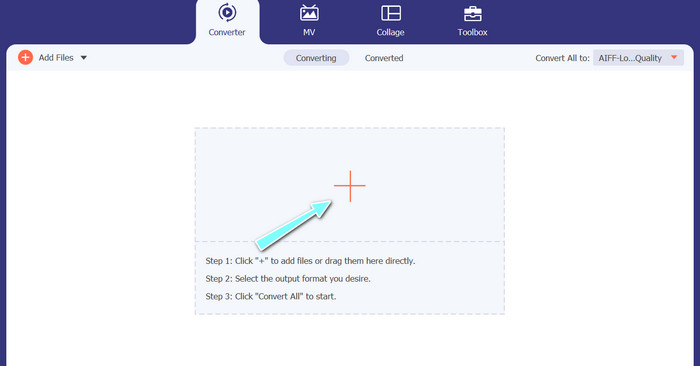
بعد ذلك، اختر علامة الزائد من الواجهة الرئيسية وانتقل إلى موقع الملف الصوتي الذي ترغب في تحويله. بعد رفع الملف، ستظهر معاينة له في واجهة المستخدم. وإذا رغبت في إجراء تحويل دفعي من MP3 إلى M4A، يمكنك رفع مجلد كامل من الملفات.
الخطوة 3. اختر صيغة الإخراج
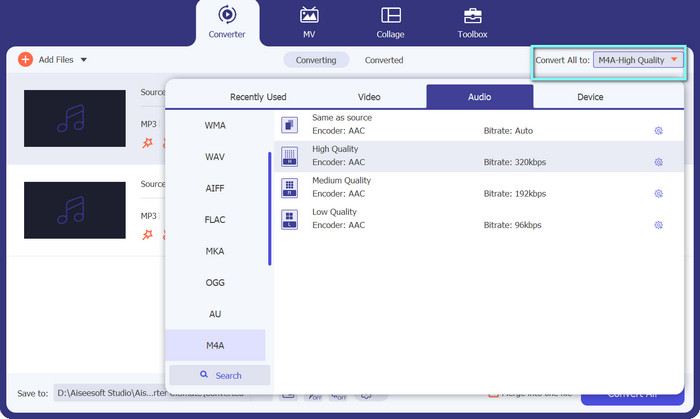
بعد ذلك، اختر صيغة الإخراج من خلال النقر على تبويب الصوت في قائمة الملف الشخصي (Profile) الموجودة في أعلى يمين الأداة. يمكنك التحويل من أو إلى MP3 باستخدام صيغة MP3 أو M4A.
الخطوة 4. احفظ ملف الإخراج
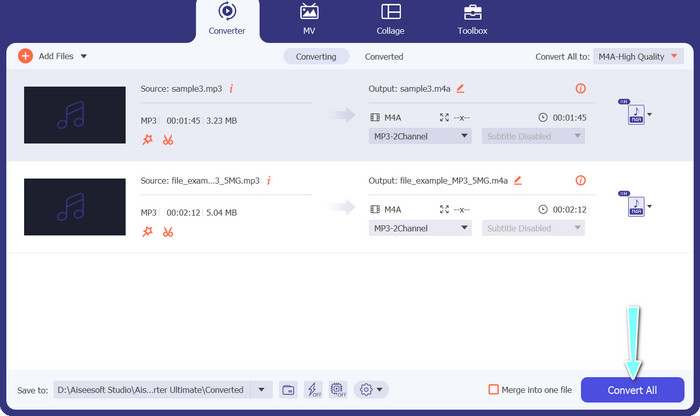
في أسفل الشاشة، اختر مجلد الوجهة الذي سيتم حفظ الملف فيه. وعندما تكون مستعدًا لبدء التحويل، انقر على زر تحويل الكل (Convert All).
2. محول فيديو مجاني على الإنترنت
لا توجد مساحة لتحميل برنامج آخر؟ لا تقلق، إذ يمكنك الاعتماد على أداة عبر الإنترنت لمساعدتك على تحويل الملفات دون الحاجة إلى تثبيت أي برنامج. يتيح لك تطبيق الويب Free Video Converter Online التحويل مباشرة من المتصفح. بالإضافة إلى ذلك، يدعم عددًا كبيرًا من صيغ الفيديو والصوت. ناهيك عن إمكانية إجراء تحويل دفعي للملفات عبر هذه الأداة عبر الإنترنت. وفوق ذلك، فإن تخصيص إعدادات الإخراج للملف الصوتي ميزة أخرى ممتازة في هذه الأداة. اطّلع على كيفية عمل محوّل MP3 إلى M4A عبر الإنترنت هذا.
الخطوة 1. لبدء استخدام Free Video Converter Online، افتح أولًا متصفح الإنترنت المفضل لديك وانتقل مباشرة إلى موقع الأداة.
الخطوة 2. بعد ذلك، حدِّد ملف MP3 الذي ترغب في تحويله إلى M4A عبر النقر على زر إضافة ملفات للتحويل (Add Files to Convert).
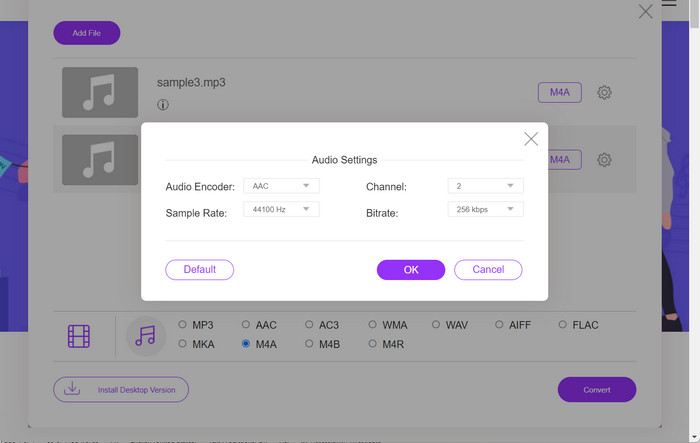
الخطوة 3. من خيار صيغ الصوت، اختر M4A كصيغة الإخراج المطلوبة. كما يمكنك تعديل جودة إخراج ملف M4A، أو معدل البت (bitrate).
الخطوة 4. انقر على زر تحويل (Convert) لبدء عملية التحويل. هكذا يتم تحويل MP3 إلى M4A عبر الإنترنت.
الجزء 2. تحويل MP3 إلى M4A على Windows
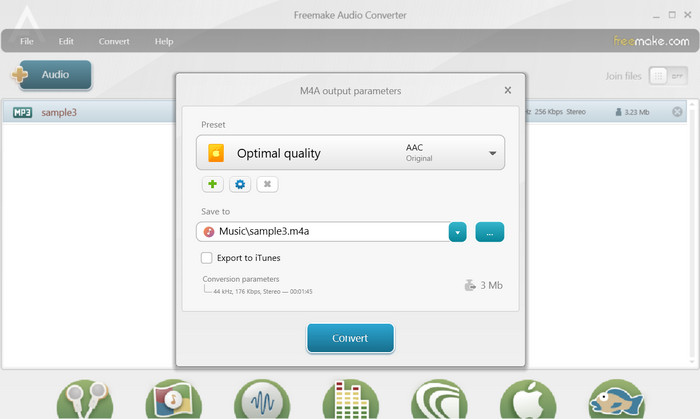
Freemake Audio Converter هو برنامج مجاني وسهل الاستخدام يسمح للمستخدمين بتحويل الملفات الصوتية إلى تنسيقات مختلفة ، بما في ذلك M4A و MP3 و WAV والمزيد. من خلال واجهة السحب والإفلات البسيطة ، يمكن للمستخدمين بسهولة إضافة ملفات MP3 الخاصة بهم وتحويلها إلى M4A دون أي إعدادات أو تكوينات معقدة. تحتوي الأداة أيضًا على مجموعة من خيارات التخصيص ، مما يسمح للمستخدمين بضبط المعلمات مثل معدل البت ومعدل العينة للحصول على جودة الإخراج المطلوبة. الكل في الكل ، إنه أحد أفضل محولات MP3 إلى M4A التي يمكنك استخدامها.
الخطوة 1. قم بتنزيل وتثبيت Freemake Audio Converter على جهاز الكمبيوتر الذي يعمل بنظام Windows.
الخطوة 2. شغّل البرنامج وانقر على زر +Audio لإضافة ملف (أو ملفات) MP3 إلى البرنامج.
الخطوة 3. اختر M4A من قائمة الصيغ المتاحة في أسفل نافذة البرنامج. استخدم القائمة المنسدلة لاختيار إعدادات الجودة المطلوبة لملف الإخراج.
الخطوة 4. اختر مجلد الإخراج الذي تريد حفظ الملف المحوَّل فيه. وأخيرًا، انقر على زر تحويل (Convert) لبدء عملية التحويل.
الجزء 3. تحويل MP3 إلى M4A على Mac
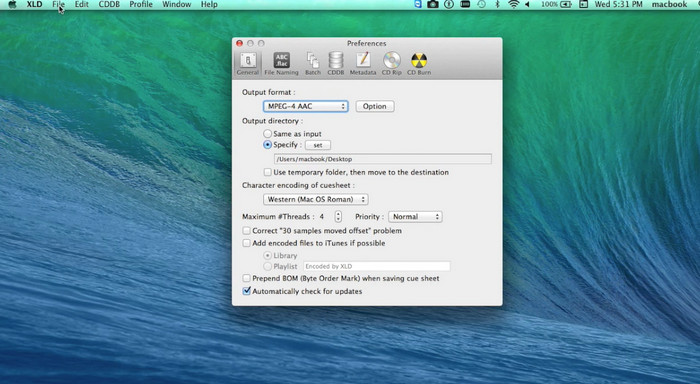
XLD هو برنامج مجاني وسهل الاستخدام يسمح لمستخدمي Mac بتحويل الملفات الصوتية إلى تنسيقات مختلفة ، بما في ذلك M4A و MP3 و FLAC والمزيد. من خلال واجهة السحب والإفلات البسيطة ، يمكن للمستخدمين بسهولة إضافة ملفات MP3 الخاصة بهم وتحويلها إلى M4A دون أي إعدادات أو تكوينات معقدة. يوفر XLD أيضًا مجموعة من خيارات التخصيص ، مما يسمح للمستخدمين بضبط المعلمات مثل معدل البت ومعدل العينة لتحقيق جودة الإخراج المطلوبة.
الخطوة 1. قم بتنزيل وتثبيت XLD على جهاز Mac الخاص بك.
الخطوة 2. شغّل البرنامج وانقر على زر فتح (Open) لإضافة ملف (أو ملفات) MP3 إلى البرنامج.
الخطوة 3. اختر M4A من قائمة الصيغ المتاحة في تفضيلات البرنامج. يمكنك استخدام القائمة المنسدلة لاختيار إعدادات الجودة المطلوبة لملف الإخراج.
الخطوة 4. بعد ذلك، اختر مجلد الإخراج الذي تريد حفظ الملف المحوَّل فيه. وأخيرًا، اضغط على زر تحويل (Convert) لبدء عملية التحويل. هكذا يمكنك تحويل MP3 إلى M4A مجانًا على جهاز Mac.
الجزء 4. تحويل MP3 إلى M4A على Android
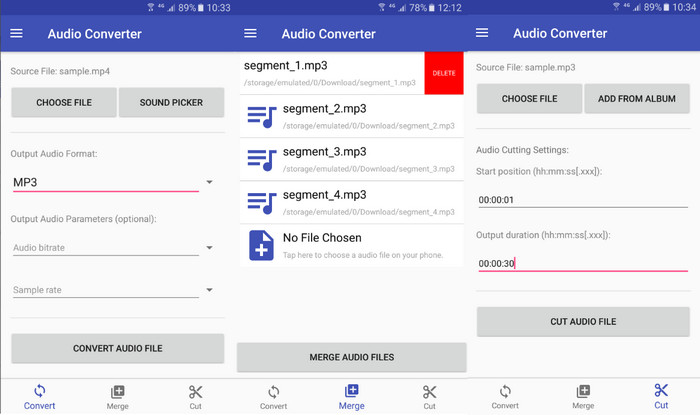
عندما يتعلق الأمر بتحويل الملفات الصوتية ، من الصعب التغلب على محول الصوت المجاني والمباشر لبرنامج Android من Online-Convert.com. يمكن للمستخدمين ببساطة سحب ملفات MP3 الخاصة بهم وإفلاتها في واجهة البرنامج لبدء عملية التحويل إلى M4A. يمكن ضبط جودة إخراج ملف صوتي عن طريق تغيير الإعدادات مثل معدل البت ومعدل أخذ العينات في محول الصوت. فيما يلي خطوات تغيير MP3 إلى M4A على Android:
الخطوة 1. قم بتنزيل وتثبيت تطبيق Audio Converter من موقع Online-Convert.com عبر متجر Google Play على جهاز Android. شغّل التطبيق واضغط على زر تحويل الصوت (Convert Audio).
الخطوة 2. بعد ذلك، اختر MP3 كصيغة إدخال وM4A كصيغة إخراج.
الخطوة 3. الآن، اضغط على زر اختيار الملفات (Select Files) لإضافة ملف (أو ملفات) MP3 إلى التطبيق. وأخيرًا، اضغط على زر بدء التحويل (Start Conversion) لبدء عملية التحويل. الأمر بهذه السهولة! لقد تعلّمت الآن كيفية التحويل من MP3 إلى M4A على Android.
الجزء 5. تحويل MP3 إلى M4A على iOS
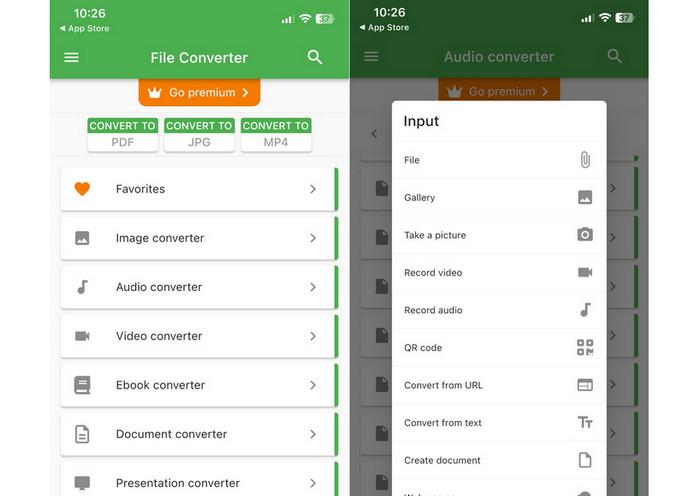
يمكن تحويل ملفات الصوت ، مثل MP3 ، إلى تنسيق M4A أكثر قابلية للنقل وخسارة بمساعدة File Converter Free ، وهو برنامج iOS مجاني ومباشر. يجعل تصميمه المباشر من السهل على أي شخص تحميل ملفات MP3 وتحويلها إلى M4A دون الحاجة إلى العبث بأي إعدادات أو إعدادات.
الخطوة 1. يمكنك العثور على تطبيق File Converter Free في متجر App Store، وهو متاح للتنزيل والاستخدام مجانًا. شغّل البرنامج واضغط على تبويب الصوت.
الخطوة 2. اختر MP3 كصيغة إدخال وصيغة إخراج، وM4A لصيغة AAC الخاصة بشركة Apple. اختر جودة ملف الإخراج المطلوبة باستخدام القائمة المنسدلة. لاستيراد ملف MP3 إلى البرنامج، اختر زر إضافة ملف (Add File).
الخطوة 3. لبدء عملية التحويل، انقر على زر تحويل (Convert).
الجزء 6. أسئلة وأجوبة حول تحويل MP3 إلى M4A
هل يمكنني تحويل MP3 إلى M4A باستخدام Windows Media Player؟
نعم، يمكنك تحويل MP3 إلى M4A باستخدام Windows Media Player، ولكن ذلك يتطلب بعض الخطوات الإضافية لأن صيغة M4A ليست مدعومة أصلاً في Windows Media Player. أو يمكنك ببساطة استخدام بديل لبرنامج Windows Media Player.
هل سيؤدي تحويل MP3 إلى M4A إلى فقدان جودة الصوت؟
قد يؤدي تحويل MP3 إلى M4A إلى خسارة طفيفة في جودة الصوت بسبب الاختلافات في خوارزميات الضغط المستخدمة في التنسيقين.
هل يمكنني تحويل M4A إلى MP3؟
نعم، العديد من برامج وأدوات تحويل الصوت تتيح لك التحويل من M4A إلى MP3 عند الحاجة. ومع ذلك، كن على علم بأن التحويل بين الصيغ عدة مرات قد يؤدي إلى فقدان في الجودة.
خاتمة
إن التحويل من MP3 إلى M4A عملية مفيدة لكل من يرغب في تحسين جودة وملاءمة ملفات الصوت لديه. باتباع الخطوات والنصائح الموضَّحة في هذا النقاش، يمكنك بسهولة تحويل ملفات MP3 إلى M4A والاستمتاع بصوت عالي الجودة على أي جهاز.
-
 مجاني وعبر الإنترنت | كيفية تحويل MP4 إلى M4A على Windows / Mac
 كيف أقوم بتحويل MP4 إلى M4A عبر الإنترنت؟ هل يمكنني استخراج الصوت من ملفات MP4؟ اقرأ هذا المنشور ، وستحصل على جميع الإجابات حول التحويل من MP4 إلى M4A.
-
 أفضل الأدوات التي يمكنك استخدامها لتحويل ملفات MP3 إلى ملفات M4R
 هل تبحث عن محول يمكنه تحويل ملف MP3 الخاص بك إلى نغمة رنين M4R لجهاز iPhone أو iPad دفعة واحدة؟ اقرأ المقال لتكتشف بعضًا من أفضلها.
-
 5 قاطعات MP3 لقص أي صوت بسهولة [تم تحديث 2023]
 هل تحتاج إلى قاطع MP3 لقص الصوت؟ في هذه الحالة ، اقرأ هذه المقالة لأننا نقدم الأدوات التي يمكنك الاعتماد عليها والتي توفر قطعًا سهلاً للصوت.
