


 محول الفيديو النهائي
 مسجل الشاشة
 إصلاح الفيديو
 تنزيل آمن
تحويل MP3 عالي الجودة إلى MOV على سطح المكتب وعبر الإنترنت والجوال
هل تبحث عن تحويل ملفات الصوت MP3 إلى صيغة الفيديو MOV؟ هناك العديد من الأسباب التي قد تدفعك إلى ذلك، مثل إنشاء فيديو بخلفية موسيقية أو رفع ملف صوتي على شبكات التواصل الاجتماعي التي لا تقبل إلا صيغ الفيديو. لحسن الحظ، هناك العديد من برامج محوِّل MP3 إلى MOV المتاحة عبر الإنترنت، وعلى الحاسوب، وعلى الهاتف المحمول، مما يجعل هذه العملية سهلة وسلسة. في هذا الدليل، سنستعرض بعضًا من أكثر خيارات محوِّلات MP3 إلى MOV فعالية، مع تحليل مميزاتها وفوائدها لمساعدتك على اختيار الأنسب لاحتياجاتك.

الجزء 1. مقارنة بين تنسيقات MP3 و MOV
MP3 و MOV كلاهما من تنسيقات الملفات الشائعة لتخزين ملفات الصوت والفيديو. ومع ذلك ، لديهم نقاط قوة وضعف مختلفة. يعد MP3 خيارًا جيدًا لتشغيل الموسيقى والبودكاست والكتب الصوتية ، حيث إنه يوفر جودة صوت جيدة وأحجام ملفات صغيرة. يعد MOV خيارًا جيدًا لتشغيل الفيديو وتحرير الفيديو ، حيث إنه يوفر جودة فيديو ممتازة. في النهاية ، سيعتمد أفضل تنسيق ملف بالنسبة لك على احتياجاتك الخاصة لتحويل MP3 إلى MOV بكفاءة.
| ميزة | MP3 | موف |
| امتداد الملف | .mp3 | .mov |
| ترميز الصوت | طبقة صوت MPEG-1 3 | MPEG-4 الجزء 2 |
| ترميز الفيديو | لا شيء | H.264 |
| جودة الصوت | حسن | ممتاز |
| جودة الفيديو | عدل | ممتاز |
| حجم الملف | صغير | كبير |
| التوافق | متوافق على نطاق واسع | متوافق على نطاق واسع |
| استخدم حالات | تشغيل الموسيقى ، والبودكاست ، والكتب الصوتية | تشغيل الفيديو وتحرير الفيديو |
الجزء 2. كيفية تحويل MP3 إلى MOV على نظامي التشغيل Windows و Mac
1. محول الفيديو النهائي
يُعد Video Converter Ultimate برنامج تحويل فيديو معروفًا يمكنه تحويل الفيديوهات إلى مجموعة متنوعة من الصيغ مثل MP4 وMOV وMKV وAVI وFLV. كما يتيح التحويل الدفعي، مما يسمح لك بتحويل عدد كبير من مقاطع الفيديو في الوقت نفسه. ومن المزايا الأخرى لهذا البرنامج قدرته على تعديل الفيديوهات، وإضافة الترجمات، وإزالة العلامات المائية.
الميزات الرئيسية:
◆ سرعات تحويل سريعة: يستخدم FVC Video Converter Ultimate أحدث تقنيات تحويل الفيديو لتحويل مقاطع الفيديو بسرعة وكفاءة. هذا يعني أنه يمكنك تحويل مقاطع الفيديو الخاصة بك في غضون ثوانٍ.
◆ سهل الاستخدام: FVC Video Converter Ultimate سهل الاستخدام ، حتى للمبتدئين. واجهة المستخدم بسيطة ، ويقدم البرنامج دروسًا تعليمية مفيدة.
◆ ميزات التحرير القوية: يوفر FVC Video Converter Ultimate القدرة على قص مقاطع الفيديو واقتصاصها وتدويرها. يتيح لك ذلك تخصيص مقاطع الفيديو الخاصة بك قبل تحويلها.
الخطوة 1. تثبيت وتشغيل البرنامج
ابدأ بالضغط على زر Free Download لتنزيل مُثبِّت البرنامج. بعد ذلك، اتبع التعليمات الظاهرة على الشاشة لتثبيته وتشغيله على جهاز الكمبيوتر لديك.
تنزيل مجانيلنظام Windows 7 أو أحدثتنزيل آمن
تنزيل مجانيلنظام MacOS 10.7 أو أحدثتنزيل آمن
الخطوة 2. إضافة ملف (ملفات)
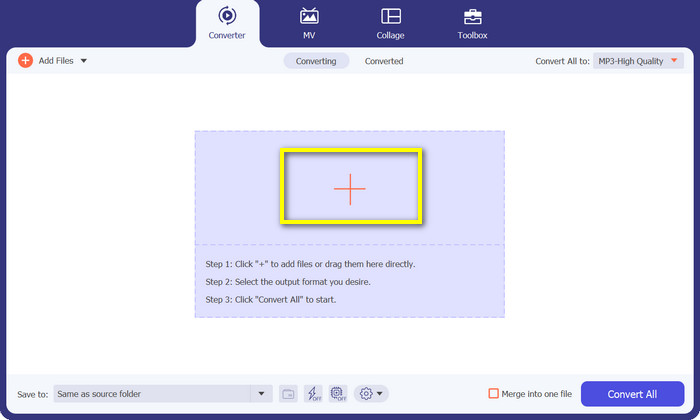
لإضافة الملفات، اضغط على زر علامة Plus من اللوحة الرئيسية للبرنامج أو انقر فوق Add Files في الزاوية العلوية اليسرى. بديلًا عن ذلك، يمكنك سحب الملفات إلى الواجهة في منتصف الشاشة. بعد تحميل الملفات، ستُعرَض في اللوحة لاحقًا.
الخطوة 3. اختيار صيغة الإخراج
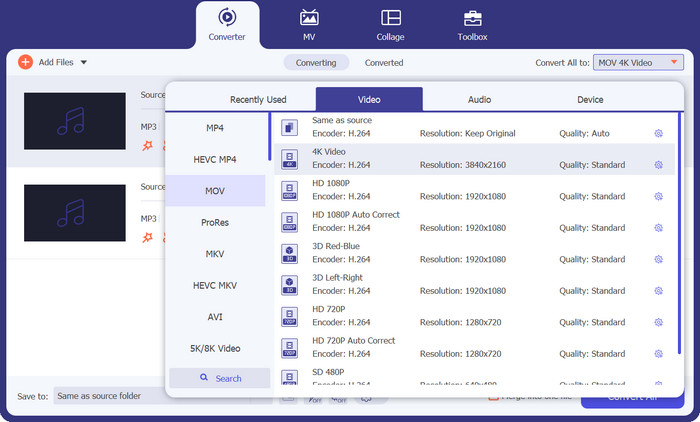
لتحويل MP3 إلى MOV، انقر على شريط Profile لإظهار قائمة الصيغ. هناك ثلاث فئات للاختيار منها. اختر علامة تبويب Video ثم اختر MOV كصيغة للإخراج.
الخطوة 4. بدء التحويل
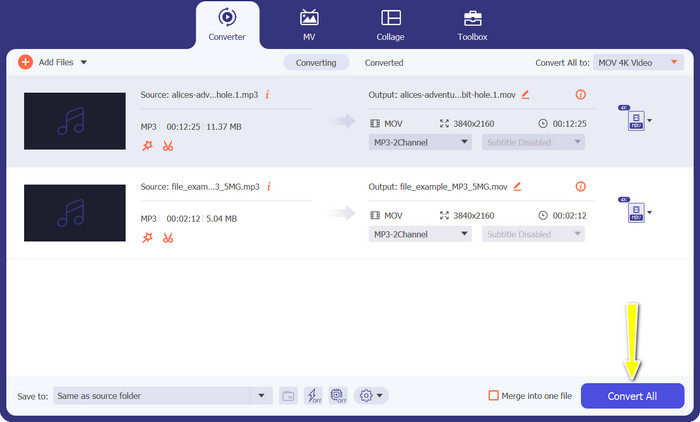
بعد ضبط كل الإعدادات، اضغط على زر Convert All لبدء عملية التحويل من MP3 إلى MOV.
2. مجاني محول MOV على الإنترنت
يُعد Free MOV Converter Online وسيلة مريحة لتحويل MP3 إلى MOV مجانًا عبر الإنترنت. يتيح لك هذا الأداة تحويل تقريبًا أي ملف إلى صيغة الإخراج التي تريدها دون التأثير في الجودة. بالإضافة إلى ذلك، صُمِّم بواجهة استخدام سهلة وبسيطة، مما يجعل التنقل فيه واضحًا وغير معقّد. وأخيرًا، وعلى خلاف البرامج التقليدية، لا تحتاج إلى الاعتماد على قدرة المعالجة وموارد الخادم لإنجاز عملية التحويل.
الميزات الرئيسية:
◆ تحويل الدُفعات: يمكن لـ FVC Free MOV Converter Online دفعة تحويل مقاطع فيديو متعددة في وقت واحد. يعد هذا توفيرًا رائعًا للوقت إذا كنت بحاجة إلى تحويل الكثير من مقاطع الفيديو.
◆ لا توجد علامات مائية: لا يضيف FVC Free MOV Converter Online أي علامات مائية إلى ملفات MP3 الخاصة بك. هذا يعني أن ملفات MP3 الخاصة بك ستكون خالية تمامًا من أي علامة تجارية.
◆ إعدادات الإخراج المخصصة: يمكّنك FVC Free MOV Converter Online من تخصيص إعدادات الإخراج لملفات MP3 الخاصة بك. يتضمن ذلك معدل البت ومعدل العينة والقنوات الصوتية.
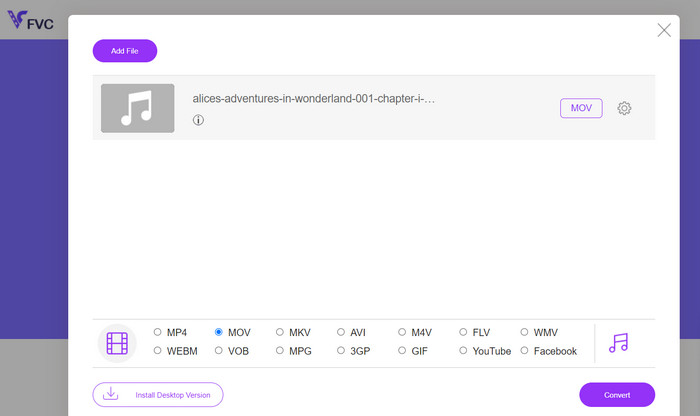
الخطوة 1. انتقل إلى موقع FVC Free MOV Converter Online. بعد ذلك، انقر على زر Add Files to Convert واختر ملف الفيديو الذي ترغب في تحويله.
الخطوة 2. في هذه الخطوة، اختر صيغة الإخراج. من بين الخيارات المتاحة، حدد MOV كصيغة للإخراج.
الخطوة 3. انقر على زر Convert. ستبدأ عملية التحويل. بعد الانتهاء من التحويل، يمكنك تنزيل ملف MP3.
الجزء 3. كيفية تحويل MP3 إلى MOV على iOS و Android
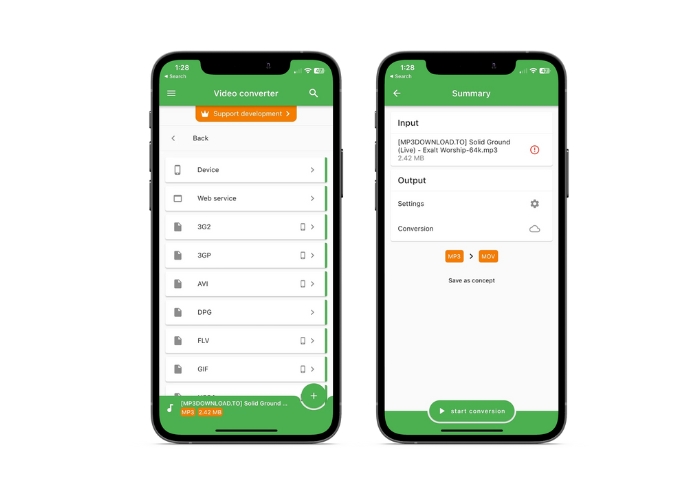
يسمح File Converter بتحويل العديد من تنسيقات الملفات الصوتية ، بما في ذلك AAC و MP3 ، وهو متاح على كل من أجهزة iOS و Android. لا تحتاج إلى مزيد من الاستكشاف إذا كنت تبحث عن محول MP3 إلى MOV Android أو iOS. من أجل السماح بتحويل الملفات بشكل سريع وفعال ، يوفر البرنامج تجربة سهلة الاستخدام ويقدم واجهة مبسطة.
الميزات الرئيسية:
◆ الإعدادات المسبقة وملفات التعريف: إعدادات أو ملفات تعريف محددة مسبقًا لمنصات أجهزة أو برامج معينة تضمن التوافق وأفضل إخراج في فئته.
◆ اختيار التخزين: يمكن للمستخدمين اختيار ما إذا كانوا يريدون حفظ ملف الإخراج في السحابة أو على أجهزتهم الذكية.
الخطوة 1. على هاتفك الذكي، قم بتثبيت تطبيق File Converter.
الخطوة 2. افتح التطبيق، واختر MOV كصيغة إخراج من بين الخيارات المتاحة.
الخطوة 3. يمكنك تغيير معدل البت أو غيره من إعدادات التحويل عن طريق النقر على خيار Settings.
الخطوة 4. اضغط على زر start conversion لبدء عملية التحويل بعد اختيار صيغة الإخراج والإعدادات.
قراءة إضافية:
حوِّل MOV إلى GIF واكتشف قوة المحتوى المتحرك
5 أدوات لقص ملفات MP3 لقص أي صوت بسهولة [تحديث 2023]
الجزء 4. أسئلة وأجوبة حول تحويل MP3 إلى MOV
ما هي أفضل إعدادات الإخراج لتحويل MP3 إلى MOV؟
تعتمد إعدادات إخراج MP3 إلى MOV على مطالبك. توفر معدلات البت والعينة العالية أفضل جودة. انخفاض معدلات البت وأخذ العينات يوفر مساحة.
كم من الوقت يستغرق تحويل MP3 إلى MOV؟
يعتمد وقت تحويل MP3 إلى MOV على حجم الملف وإعدادات الإخراج. يستغرق تحويل ملف صغير بمعلمات مخرجات منخفضة ثوانٍ. ومع ذلك ، قد يستغرق تحويل ملف كبير بمعلمات إخراج عالية عدة دقائق أو ساعات.
هل يمكنني تحويل MP3 إلى MOV دون فقدان الجودة؟
تحويل MP3 إلى MOV يحط من الجودة. MP3 ، تنسيق مع فقدان البيانات ، يفقد البيانات أثناء الضغط. يمكن أن تقلل إعدادات الإخراج فقدان الجودة.
خاتمة
بشكل عام، تُعد عملية تحويل MP3 إلى MOV عملية بسيطة نسبيًا. هناك العديد من الخيارات المتاحة، مما يتيح لك اختيار الطريقة الأنسب لاحتياجاتك.
-
 MOV VS MP4 - أيهما تختار؟
 MOV مقابل MP4 ، أيهما أفضل؟ يوضح هذا المنشور الفرق بين MP4 و MOV ، بحيث يمكنك الحصول على أفضل خيار لاستخدامه لملفات الفيديو الخاصة بك.
-
 FLAC مقابل MP3: أي تنسيق ملف صوتي يسيطر
 سيقارن هذا المنشور الاختلافات الرئيسية بين FLAC مقابل MP3. يتضمن ذلك جودة الصوت وحجم الملف والتوافق والمزيد.
-
 كيفية تحويل MP3 إلى M4A لتحسين جودة الصوت
 قم بتحسين جودة ملفات الموسيقى الخاصة بك عن طريق تحويل MP3 إلى M4A من خلال النصائح والحيل الخبيرة لدينا. يقدم دليلنا إرشادات خطوة بخطوة والبرامج الموصى بها.
