


 محول الفيديو النهائي
 مسجل الشاشة
 إصلاح الفيديو
 تنزيل آمن
مراجعة متعمقة لمحول WAV إلى MP3 لاكتشاف أفضل محول
في العصر الرقمي الحالي ، تلعب الملفات الصوتية دورًا مهمًا في مختلف جوانب حياتنا ، من الترفيه إلى التطبيقات الاحترافية. ومع ذلك ، توجد تنسيقات صوتية مختلفة ، لكل منها خصائصه وأغراضه الفريدة. أحد السيناريوهات الشائعة التي يواجهها العديد من المستخدمين هو الحاجة إلى تحويل ملفات الصوت من تنسيق WAV إلى تنسيق MP3. في منشور المراجعة هذا ، سوف نستكشف الأسباب الكامنة وراء متطلبات التحويل هذه ونتعمق في مراجعة أفضل محولات WAV إلى MP3 المتاحة.

الجزء 1. محولات WAV إلى MP3 لمستخدمي سطح المكتب وعبر الإنترنت
1. محول الفيديو النهائي
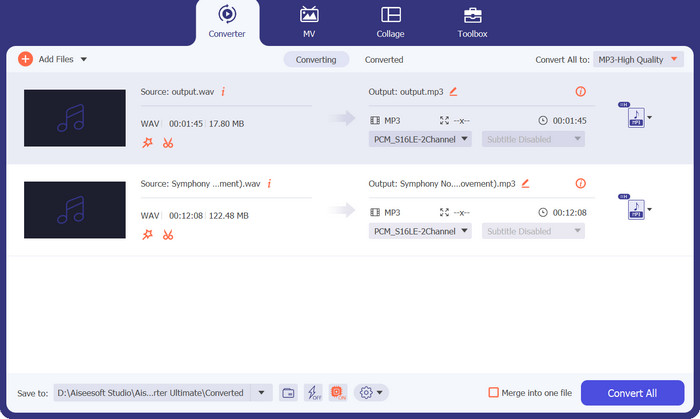
عندما يتعلق الأمر بتحويل ملفات WAV إلى تنسيق MP3، يبرز برنامج واحد يقدم أداءً استثنائيًا ومرونة عالية وهو Video Converter Ultimate. تم تطوير Video Converter Ultimate لتوفير تجربة تحويل سلسة وفعّالة، وهو يبرز كأداة متعددة الوسائط شاملة تتجاوز ما يوحي به اسمه.
تضمن جودة التحويل التي لا مثيل لها أن تظل جودة الصوت للملفات المحولة أصيلة. من خلال استخدام الخوارزميات وبرامج الترميز المتقدمة ، يقوم هذا البرنامج بإجراء تحويل صوتي عالي الجودة ، مع الحفاظ على السلامة الأصلية لملفات WAV الخاصة بك أثناء تسليم ملفات MP3 التي تبدو بنفس الجودة.
تنزيل مجانيلنظام Windows 7 أو أحدثتنزيل آمن
تنزيل مجانيلنظام MacOS 10.7 أو أحدثتنزيل آمن
الأنظمة المدعومة: يتوافق Video Converter Ultimate مع نظامي التشغيل Windows وmacOS. فهو يدعم أنظمة تشغيل Windows، بالإضافة إلى توافقه مع إصدارات macOS، بما في ذلك macOS Big Sur وCatalina وMojave وHigh Sierra والإصدارات الأقدم. يضمن هذا التوافق عبر الأنظمة أن يتمكن مستخدمو Windows وmacOS على حد سواء من الاستفادة من المزايا والخصائص التي يقدمها Video Converter Ultimate في تحويل ملفات WAV إلى MP3.
موصى به لـ: سواء كنت ترغب في تحسين كفاءة التخزين، أو تعزيز التوافق، أو تسهيل توزيع الملفات الصوتية، فإن Video Converter Ultimate يقدم جودة تحويل استثنائية، ودعمًا واسعًا للصيغ، وخصائص سهلة الاستخدام لتلبية احتياجاتك بفعالية. يُوصى به لمجموعة واسعة من المستخدمين، بما في ذلك عشّاق الوسائط، والمتخصصون في الموسيقى، وصنّاع المحتوى، الذين يحتاجون إلى حل برمجي موثوق ومرن لتحويل ملفات WAV إلى تنسيق MP3.
الايجابيات
- تحويل الدُفعات والمعالجة عالية السرعة.
- واجهة سهلة الاستخدام.
- دعم تنسيق واسع النطاق.
- جودة تحويل لا مثيل لها.
- يتضمن عددًا كبيرًا من الميزات المفيدة.
سلبيات
- قد يتطلب بعض الحد الأدنى من مواصفات الأجهزة.
- إنه مدفوع للبرامج.
2. Freemake محول الصوت
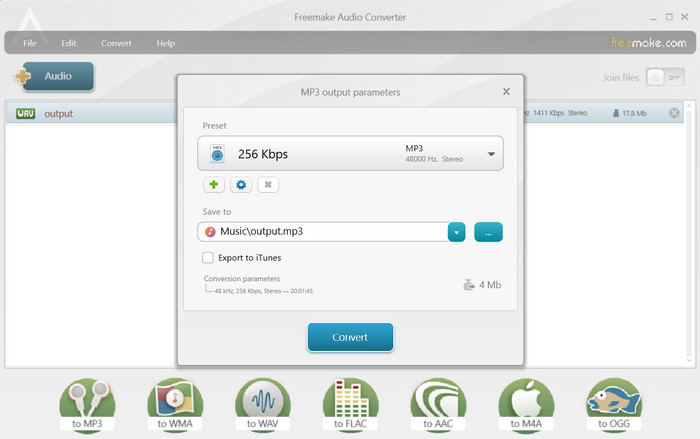
Freemake Audio Converter هو برنامج سطح مكتب مجاني ومتعدد الاستخدامات يحول WAV إلى MP3 وتنسيقات الصوت الأخرى. يأتي بواجهة سهلة الاستخدام ويسمح للمستخدمين بتحويل عدة ملفات في نفس الوقت. يتيح لك هذا المحول أيضًا اختيار خيارات الإخراج مثل معدل البت ومعدل العينة وقنوات الصوت لضمان جودة صوت عالية. في النهاية ، يمكنك تنزيل WAV to MP3 Converter مجانًا.
الأنظمة المدعومة: يتوافق Freemake Audio Converter مع أنظمة تشغيل Windows. للأسف، لا يتوفر Freemake Audio Converter على أنظمة macOS أو Linux. لذلك، يمكن لمستخدمي Windows الاستفادة من خصائص Freemake Audio Converter لتلبية احتياجاتهم في تحويل الملفات الصوتية، بينما قد يحتاج مستخدمو الأنظمة الأخرى إلى البحث عن حلول برمجية بديلة.
موصى به لـ: يُوصى باستخدام Freemake Audio Converter للأشخاص الذين يبحثون عن حل برمجي مجاني وسهل الاستخدام لتحويل الملفات الصوتية، بما في ذلك التحويل من WAV إلى MP3. يُعد هذا المحوِّل خيارًا ممتازًا للمستخدمين العاديين والهواة ومن يقدّرون البساطة وسهولة الاستخدام.
الايجابيات
- خيارات التخصيص الأساسية.
- مجموعة واسعة من تنسيقات الإدخال.
- البرنامج متاح مجانًا.
سلبيات
- تنسيقات الإخراج محدودة.
- يفتقر إلى الميزات المتقدمة.
3. محول صوت مجاني على الإنترنت
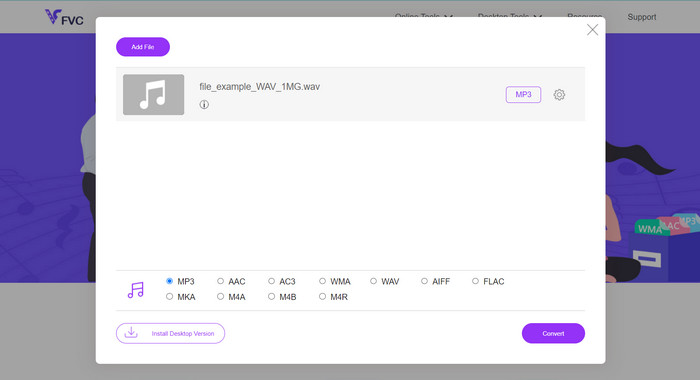
هل تبحث عن طريقة سلسة وفعّالة لتحويل ملفات WAV الخاصة بك إلى تنسيق MP3؟ لا داعي لمزيد من البحث! إن Free Audio Converter Online أداة ويب ديناميكية تُبسّط عملية التحويل بالكامل بفضل واجهتها سهلة الاستخدام ووظائفها الخالية من التعقيد. قل وداعًا لتثبيت البرامج المعقّدة ومرحبًا بالتحويل السهل من WAV إلى MP3.
لقد ولت أيام تنزيل البرامج وتثبيتها على جهاز الكمبيوتر الخاص بك. باستخدام Free Audio Converter Online ، يمكنك بسهولة تحويل ملفات WAV إلى تنسيق MP3 مباشرة من متصفح الويب الخاص بك. تتيح لك هذه الأداة المريحة عبر الإنترنت تحويل ملفاتك الصوتية أثناء التنقل ، في أي وقت وفي أي مكان ، دون أي برامج إضافية أو متطلبات تخزين.
الأنظمة المدعومة: بفضل استقلاليته عن المنصات، يضمن Free Audio Converter Online أن يتمكن المستخدمون على مختلف أنظمة التشغيل والأجهزة من الاستفادة من إمكاناته في تحويل WAV إلى MP3 دون أي قيود. يمكن الوصول إليه على أنظمة Windows وmacOS وLinux بمختلف الإصدارات، مما يضمن التوافق والراحة أثناء التنقل.
موصى به لـ: يُوصى باستخدام Free Audio Converter Online للأشخاص الذين يبحثون عن حل سريع ومريح لتحويل ملفات WAV الخاصة بهم إلى تنسيق MP3 دون الحاجة إلى تثبيت برامج إضافية. إنه مثالي للمستخدمين الذين يقدّرون البساطة وسهولة الاستخدام، وكذلك لمن قد يستخدمون أنظمة تشغيل أو أجهزة مختلفة.
الايجابيات
- تحويل سهل في متناول يدك.
- يقدم مجموعة واسعة من تنسيقات الصوت المدعومة.
- إعادة تعريف السرعة والموثوقية.
سلبيات
- الاعتماد على توفر الخادم.
4. زمزم
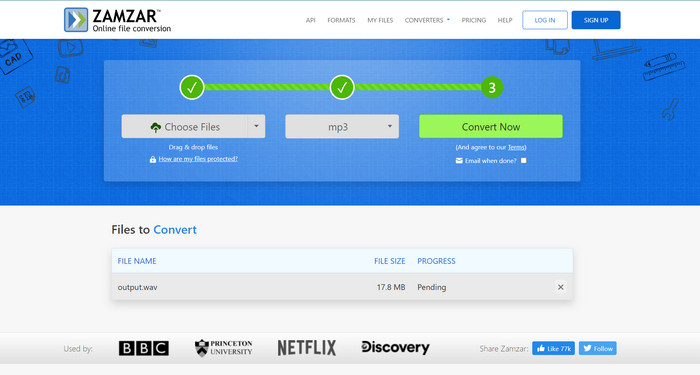
Zamzar هي منصة تحويل شهيرة أخرى عبر الإنترنت تقدم مجموعة واسعة من تحويلات تنسيق الملفات ، بما في ذلك WAV إلى MP3. يدعم تحميل الملفات من جهاز الكمبيوتر الخاص بك أو إدخال روابط URL للملفات عبر الإنترنت. يضمن Zamzar معالجة آمنة للملفات ويسلم الملفات المحولة مباشرة إلى عنوان بريدك الإلكتروني. إنه محول WAV إلى MP3 موثوق به عبر الإنترنت للتحويلات العرضية أثناء التنقل.
الأنظمة المدعومة: يتوافق Zamzar مع أنظمة Windows وmacOS وLinux، بالإضافة إلى المنصات المحمولة، مما يتيح للمستخدمين على أنظمة تشغيل مختلفة الوصول إلى خدماته في تحويل الملفات والاستفادة منها.
موصى به لـ: يُوصى باستخدام Zamzar على وجه الخصوص للمستخدمين الذين يعطون الأولوية لراحة الحلول المعتمدة على الويب لتحويل الملفات، ويحتاجون إلى المرونة في تحويل الملفات عبر منصات وأنظمة تشغيل متعددة دون الحاجة إلى تثبيت برامج.
الايجابيات
- يعمل بسلاسة على أنظمة تشغيل Windows و macOS و Linux والمنصات المحمولة.
- مجموعة واسعة من التنسيقات المدعومة.
- يرسل إخطارات البريد الإلكتروني بمجرد اكتمال تحويل الملف.
سلبيات
- يعتمد على اتصال إنترنت مستقر.
- ضع في اعتبارك تداعيات الخصوصية والأمان.
الجزء 2. WAV لتحويل MP3 لمستخدمي الهاتف المحمول
1. محول الوسائط
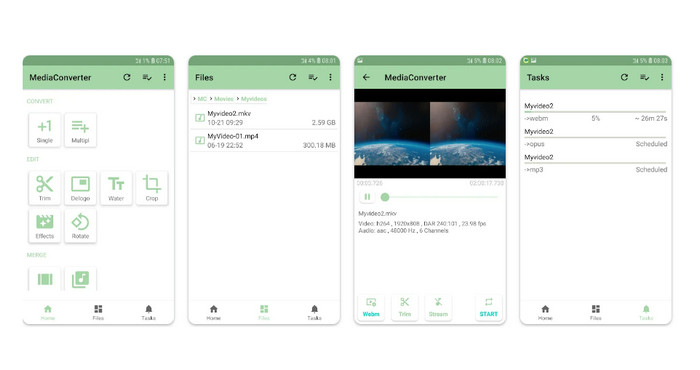
Media Converter هو تطبيق Android غني بالميزات يدعم تحويلات الصوت والفيديو المختلفة ، بما في ذلك WAV إلى MP3. من خلال واجهة بسيطة وبديهية ، يسمح لك بتخصيص إعدادات الإخراج ويوفر إمكانات تحويل الدُفعات. يوفر Media Converter أيضًا خيارات لقص الملفات الصوتية ويدعم تحويل الملفات المخزنة في الخدمات السحابية.
الأنظمة المدعومة: Media Converter هو تطبيق محمول مخصص لأجهزة Android، مما يجعله متوافقًا مع الهواتف الذكية والأجهزة اللوحية التي تعمل بنظام Android. يوفّر للمستخدمين إمكانية تحويل ملفات الصوت والفيديو مباشرة على أجهزتهم التي تعمل بنظام Android دون الحاجة إلى استخدام جهاز كمبيوتر منفصل أو خدمة عبر الإنترنت.
موصى به لـ: يُوصى باستخدام Media Converter لمستخدمي Android الذين يحتاجون إلى تطبيق محمول موثوق ومرن لتحويل ملفات الصوت والفيديو. وهو مناسب للأشخاص الذين غالبًا ما يحتاجون إلى تحويل ملفات الوسائط أثناء التنقل، مثل صنّاع المحتوى، والموسيقيين، والمستخدمين الذين يتعاملون كثيرًا مع صيغ صوت وفيديو مختلفة.
الايجابيات
- وهو يدعم مجموعة متنوعة من تنسيقات الصوت والفيديو.
- يوفر واجهة سهلة الاستخدام.
- يوفر خيارات تخصيص متنوعة.
سلبيات
- دعم محدود للمنصة.
- قيود حجم الملف.
2. محول الملفات
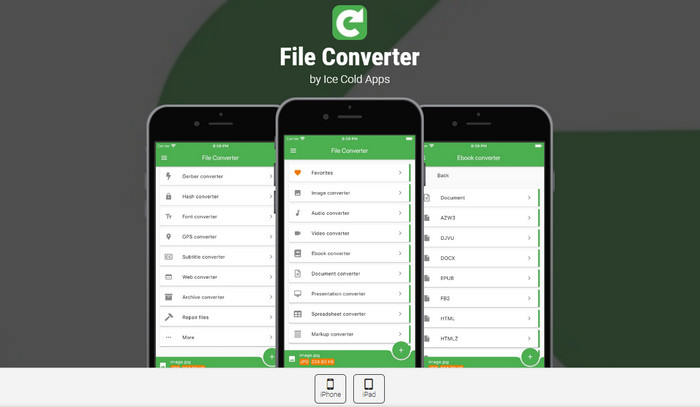
يعد File Converter أيضًا تطبيق iOS رائعًا لتحويل WAV إلى MP3. يتيح التحويل السهل لملفات الصوت ، بما في ذلك WAV إلى MP3. وهو يدعم مجموعة كبيرة من التنسيقات ويوفر خيارات لضبط جودة الإخراج ومعدل البت والبيانات الوصفية. يتكامل هذا التطبيق أيضًا مع أنظمة التخزين السحابية ، مما يسمح لك بتحويل الملفات مباشرة من خدمات مثل iCloud و Dropbox و Google Drive.
الأنظمة المدعومة: تطبيق File Converter المحمول متوافق مع أجهزة iOS، بما في ذلك أجهزة iPhone وiPad. وقد تم تصميمه خصيصًا لمنصة iOS ويمكن تنزيله وتثبيته من App Store. يتيح هذا التوافق لمستخدمي iOS تحويل ملفاتهم الصوتية والمرئية بسهولة مباشرة على أجهزتهم المحمولة باستخدام تطبيق File Converter.
موصى به لـ: يُوصى باستخدام File Converter لمستخدمي iOS الذين يحتاجون إلى تطبيق محمول متنوع الوظائف وسهل الاستخدام لتحويل ملفات الصوت والفيديو. وهو مناسب للأفراد الذين يعملون كثيرًا مع ملفات الوسائط على أجهزة iPhone أو iPad ويحتاجون إلى المرونة في تحويل الملفات أثناء التنقل.
الايجابيات
- قم بتحويل الملفات مباشرة على أجهزة iOS.
- اضبط إعدادات الفيديو والصوت.
- أداء محسن على أجهزة iPhone و iPad.
سلبيات
- يستثني أنظمة التشغيل الأخرى ، مثل Android.
- عمليات الشراء داخل التطبيق.
قراءة إضافية:
FLAC مقابل MP3: أي صيغة ملف صوتي هي الأفضل؟
أفضل محوّلات WAV إلى MP4 للتحويل من الصوت إلى الفيديو
الجزء 3. مقارنة البرامج المذكورة أعلاه
فيما يلي مخطط مقارنة يسلط الضوء على جوانب مختلفة من Video Converter Ultimate و Freemake Audio Converter و Free Audio Converter Online و Zamzar و Media Converter و File Converter كمحولات WAV إلى MP3:
| محول الفيديو النهائي | محول الصوت Freemake | محول صوت مجاني على الإنترنت | زمزم | تحويل وسائل الاعلام | تحويل الملف | |
| دعم التنسيق | مدى واسع | محدود | محدود | مدى واسع | مدى واسع | مدى واسع |
| تحويل دفعة | نعم | نعم | نعم | نعم | نعم | نعم |
| خيارات التخصيص | شاسِع | أساسي | أساسي | أساسي | محدود | محدود |
| سرعة التحويل | بسرعة | متوسط | متوسط | متوسط | بسرعة | متوسط |
| قيود حجم الملف | لا شيء | لا شيء | لا شيء | يختلف | لا شيء | لا شيء |
الجزء 4. أسئلة وأجوبة حول WAV إلى محولات MP3
هل من القانوني تحويل WAV إلى MP3؟
يعد تحويل WAV إلى MP3 للاستخدام الشخصي أمرًا قانونيًا بشكل عام. ومع ذلك ، فإن مشاركة المواد المحمية بحقوق الطبع والنشر دون إذن مناسب يعد أمرًا غير قانوني.
هل يمكنني تخصيص إعدادات الصوت أثناء عملية التحويل؟
نعم ، تسمح لك العديد من المحولات بتخصيص إعدادات مثل معدل البت ومعدل العينة وقنوات الصوت لضبط جودة ملف MP3 المحول.
هل يمكنني تحويل WAV إلى MP3 على جهازي المحمول؟
نعم ، هناك تطبيقات محمولة مثل Media Converter و File Converter تتيح لك تحويل WAV إلى MP3 مباشرة على جهاز Android أو iOS.
هل يمكنني تحويل ملفات WAV إلى MP3 بمعدلات بت متغيرة؟
نعم ، تسمح لك بعض المحولات بتحديد معدلات بت متغيرة (VBR) أثناء عملية التحويل ، والتي تعدل معدل البت ديناميكيًا بناءً على مدى تعقيد الصوت.
هل يمكنني تحويل ملفات WAV إلى MP3 باستخدام أدوات سطر الأوامر؟
نعم ، تتوفر أدوات سطر أوامر ، مثل FFmpeg و LAME ، والتي تتيح لك تحويل ملفات WAV إلى MP3 باستخدام أوامر ومعلمات محددة.
خاتمة
يُعد تحويل WAV إلى MP3 عملية شائعة وأساسية لأسباب متعددة، من بينها تقليل حجم الملفات، وتعزيز التوافق، وتمكين توزيع الصوت بكفاءة. عند البحث عن برنامج محوِّل WAV إلى MP3، ينبغي مراعاة عوامل مثل توافق المنصة، ودعم الصيغ، وخيارات التخصيص، وتجربة المستخدم عند اختيار المحوِّل الأنسب لمتطلباتك. مع توفر هذه الأدوات لديك، يمكنك بسهولة تحويل ملفات WAV إلى تنسيق MP3 والاستفادة من المرونة والراحة التي يوفرها هذا التنسيق الصوتي واسع الانتشار.
-
 تنزيل مشغل MP3 - أفضل 10 مشغلات موسيقى MP3 مجانية لعام 2025
 ما هو أفضل مشغل موسيقى MP3؟ كيف أضع الموسيقى على مشغل MP3؟ كيف يمكن تنزيل مشغل موسيقى MP3؟ يمنحك هذا المنشور مراجعة تفصيلية لأفضل 10 مشغلات MP3 مجانية لأجهزة الكمبيوتر التي تعمل بنظام Windows و Mac.
-
 برنامج تعليمي عملي حول كيفية تحويل مقاطع الفيديو إلى تنسيق MP3
 هل تواجه مشكلة في تحويل مقاطع الفيديو إلى MP3؟ بعد ذلك ، يجب أن تعتمد على هذه الكتابة بينما نبحث عن المحول الذي يوفر أفضل تحويل.
-
 3 من أفضل محرر بيانات تعريف WAV على نظام التشغيل Windows / Mac / عبر الإنترنت
 هل تريد أن يكون لديك محرر بيانات تعريف WAV على نظام Windows؟ ماك؟ متصل؟ إذا كان الأمر كذلك ، فاستمر في قراءة هذه المقالة حيث قمنا بمراجعة أفضل محرر تعريف لـ WAV.
