


 محول الفيديو النهائي
 مسجل الشاشة
 إصلاح الفيديو
 تنزيل آمن
تحويل WMV إلى MP3: أسهل طريقة لاستخراج ملفات الصوت من WMV
هناك مسارات موسيقية في صيغة WMV لا يُمكنك التوقف عن الاستماع إليها. كما تُوفر ملفات WMV جودة صوت ممتازة، وهي مناسبة أيضًا لتشغيل المسارات الصوتية. مع ذلك، يتطلب الاستماع إلى المسارات الصوتية بهذا التنسيق تشغيل الفيديو كاملًا، مما قد يُسبب بعض الإزعاج. لتسهيل الأمر، يُمكنك استخراج الصوت وتحويله إلى صيغة MP3.
استخراج ملف MP3 من ملف WMV مهمة سهلة، خاصة إذا استخدمت الأداة المناسبة. إذا كنت تبحث عن حل لمعالجة هذه المشكلة، فلا داعي للقلق! في هذه المقالة، ستتعرّف على أربع طرق يمكنك من خلالها بسهولة تحويل WMV إلى MP3 والاستمتاع بالاستماع إلى المسار الصوتي دون أي إزعاج. لنبدأ!

الجزء الأول: تحويل WMV إلى MP3 دون فقدان الجودة
أفضل وأسهل طريقة لتحويل WMV إلى MP3 هي استخدام أداة Video Converter Ultimate التي يوصي بها FVC. تتيح لك أداة تحويل الفيديو والصوت الكاملة هذه تحويل أي وسائط فيديو وصوت، بما في ذلك تحويل ملفات WMV إلى MP3. وباستخدام أداة التحويل هذه، يضمن أن المسار الصوتي المستخرج من ملف WMV سيبقى محفوظًا بفضل تقنية المعالجة الصوتية المتقدمة. فهي تضمن أن ملف MP3 المستخرج يحافظ على جودة الصوت الأصلية دون أي فقدان ناتج عن الضغط. بالإضافة إلى ذلك، يدعم FVC Video Converter Ultimate التحويل الدفعي، كما يسمح للمستخدمين بتخصيص إعدادات الصوت المتعددة، بما في ذلك معدل البت، ومعدل العيّنة، والقنوات الصوتية.
الخطوة 1. أولًا، قم بتنزيل وتثبيت أداة Video Converter Ultimate المختارة من FVC على جهاز الكمبيوتر لديك.
تنزيل مجانيلنظام Windows 7 أو أحدثتنزيل آمن
تنزيل مجانيلنظام MacOS 10.7 أو أحدثتنزيل آمن
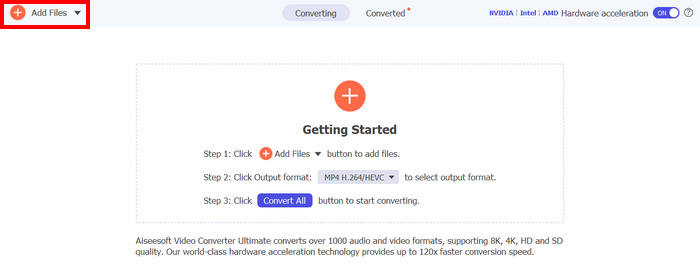
الخطوة 2. الآن، لاستيراد ملفات AVI التي تريد ضغطها وتحويلها إلى MP4، انقر بعد ذلك على زر إضافة ملفات (Add Files).
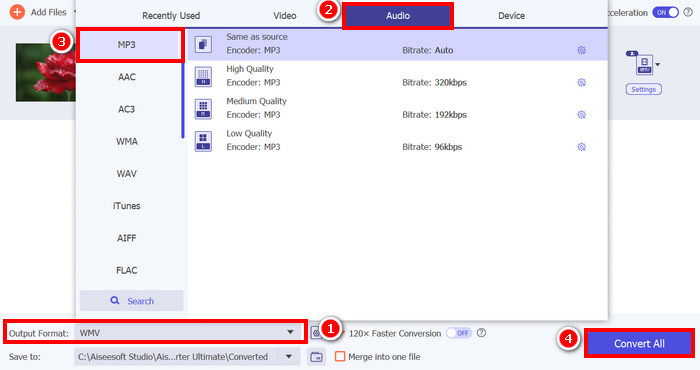
الخطوة 3. أخيرًا، في قسم تنسيق الإخراج (Output Format) في الأسفل، انقر عليه وانتقل إلى علامة تبويب الصوت (Audio). من هناك، اختر MP3 من القائمة. بعد التحديد، انقر على زر Convert All لبدء استخراج المسار الصوتي من ملف WMV.
يتميز برنامج FVC Video Converter Ultimate بقدرة فائقة على تحويل ملفات WMV إلى MP3. ما عليك سوى تحميل ملفات WMV، ثم اختيار صيغة الصوت المفضلة لديك، لاستخراج المقطع الصوتي منها. لذا، سواء كنت محترفًا أو مبتدئًا، فهذه الأداة مثالية لكل من يبحث عن طريقة سريعة وسهلة لتحويل ملفات الفيديو إلى صوت.
انقر هنا لمعرفة المزيد عن بعض مشغلات MP3 إذا احتجت إلى ذلك.
الجزء الثاني: تحويل WMV إلى MP3 مجانًا باستخدام VLC Media Player
يُعد VLC Media Player مشغل وسائط شائعًا نستخدمه عادةً لمشاهدة وتشغيل ملفات الوسائط المختلفة. ولكن بالإضافة إلى ذلك، لا تقتصر وظيفة VLC على تشغيل الوسائط فحسب، بل يمكن استخدامه أيضًا كمحوّل من صيغة WMV إلى MP3. نعم، لقد قرأتَ ذلك جيدًا! تحتوي الأداة على ميزة خاصة تتيح تصدير ملفات الفيديو المحددة وتحويلها إلى صيغة صوتية. للقيام بذلك، اتبع الخطوات التالية:
الخطوة 1. أولًا، قم بتنزيل وتثبيت أداة Video Converter Ultimate المختارة من FVC على جهاز الكمبيوتر لديك.
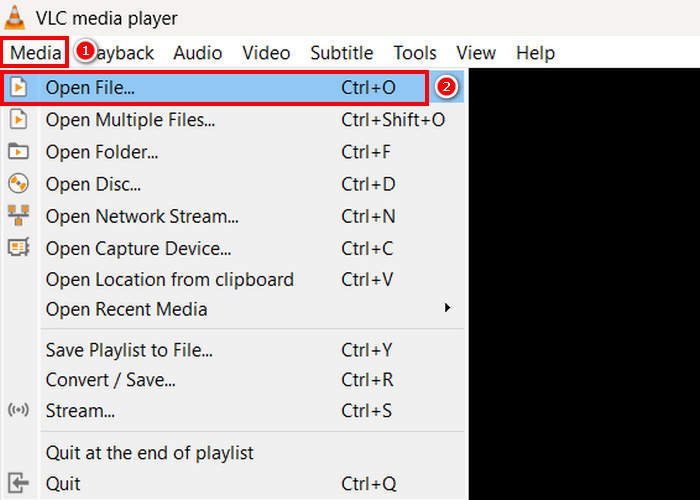
الخطوة 2. بعد ذلك، انتقل إلى علامة تبويب Media، ثم انقر أسفلها على Open File. من هناك، استورد ملف WMV الذي تريد تحويله إلى MP3.
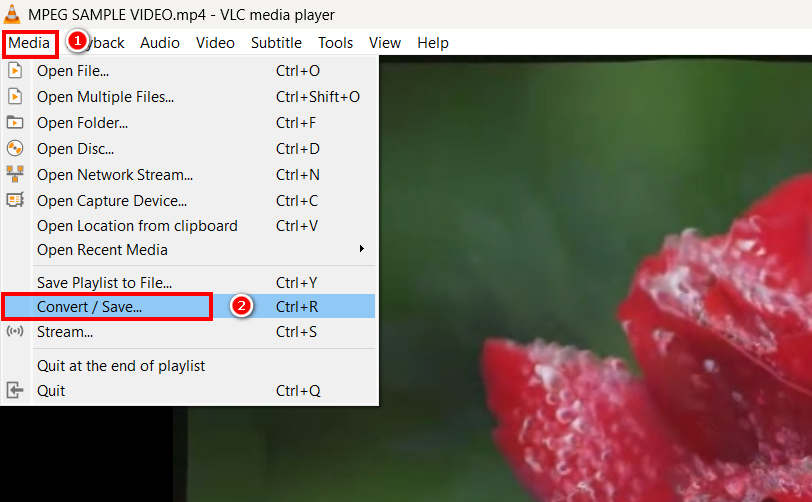
الخطوة 3. بعد ذلك، عُد مرة أخرى إلى علامة تبويب Media، وهذه المرة اختر Convert/ Save في الأسفل.
الخطوة 4. الآن، انقر على Profile وحدد MP3 كتنسيق الإخراج. بعد التحديد، انقر على زر Start في الأسفل لبدء استخراج المحتوى الصوتي من ملف WMV.
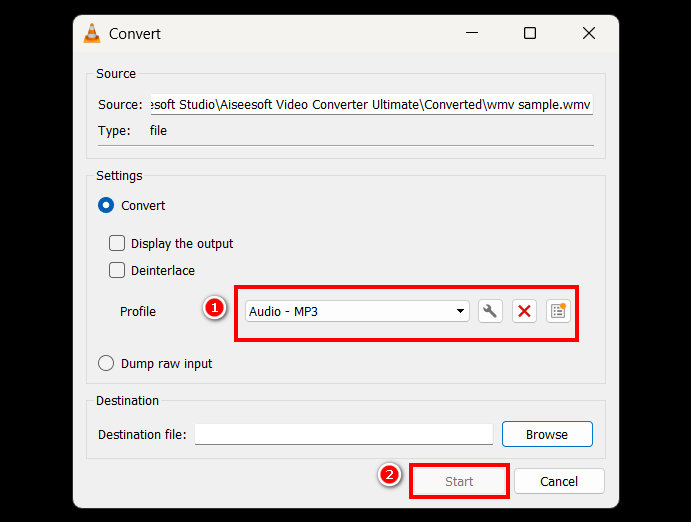
الميزة الوحيدة التي يتميز بها VLC مقارنةً بأدوات التحويل المخصصة الأخرى هي افتقاره لخيارات معالجة صوتية متقدمة وميزات تخصيص. صحيح أن VLC قادر على استخراج ملفات MP3 من ملفات WMV، إلا أنه لا يسمح للمستخدمين بضبط جودة الإخراج بدقة، مثل ضبط معدل البت، أو معدل أخذ العينات، أو قنوات الصوت.
الجزء 3. تحويل WMV إلى MP3 باستخدام Windows Media Player
لا يستطيع Windows Media Player تحويل ملفات WMV إلى MP3 مباشرةً إلا إذا تم نسخ ملف WMV على قرص. لذلك، إذا كان لديك ملف WMV على قرصك، يمكنك استخراجه إلى صيغة MP3. للقيام بذلك، اتبع الخطوات التالية:
الخطوة 1. افتح برنامج Windows Media Player على جهاز الكمبيوتر لديك.
الخطوة 2. انقر على علامة تبويب Organize واختر Option في الأسفل.
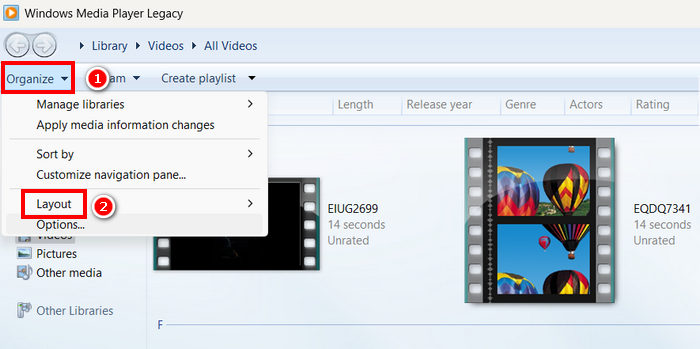
الخطوة 3. من هناك، انقر على Rip Music. بعد ذلك، اختر MP3 كتنسيق الإخراج، وفعِّل خيار Rip CD Automatically.
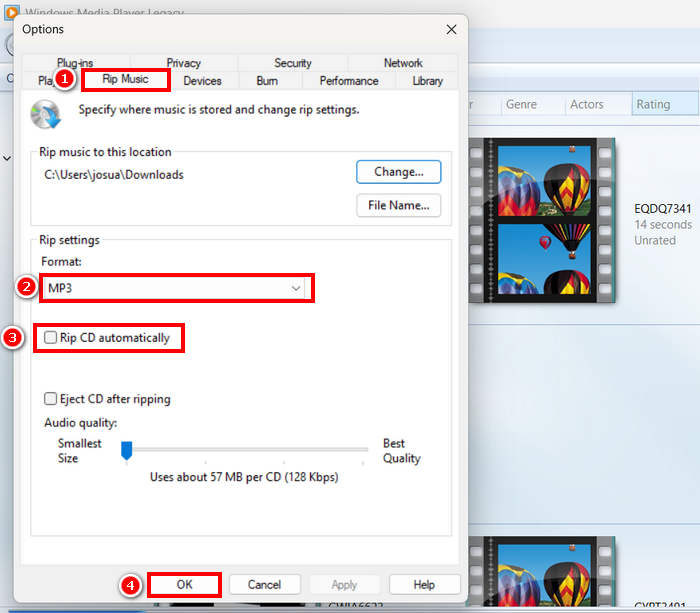
الخطوة 4. بعد الانتهاء، انقر على OK لبدء تحويل ملف WMV إلى MP3.
انقر هنا لمعرفة المزيد إذا كان Windows Media Player لا يعمل.
الجزء 4. تحويل WMV إلى MP3 عبر الإنترنت
الطريقة الأخيرة لتحويل ملفات WMV إلى MP3 هي عبر الإنترنت، والأداة المُستخدمة لذلك هي FreeConvert. تتيح لك هذه الأداة تحويل ملفات WMV إلى MP3 بسرعة ودون الحاجة إلى تثبيت أي برنامج. FreeConvert أداة ويب تدعم صيغ فيديو وصوت مُختلفة، مما يجعلها خيارًا مُناسبًا للمستخدمين الذين يُفضلون الحلول عبر الإنترنت.
الخطوة 1. أولًا، تحتاج إلى الدخول إلى موقعهم الرسمي؛ فقط ابحث عن FreeConvert في متصفح الإنترنت لديك.
الخطوة 2. بعد ذلك، انقر على زر Choose Files لاستيراد ملف WMV الذي تريد تحويله إلى MP3.
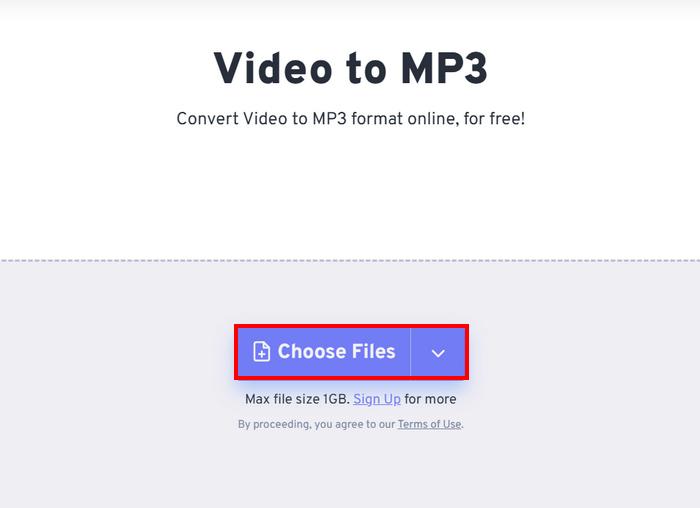
الخطوة 3. بعد ذلك، انقر على Output واختر MP3 كتنسيق الإخراج. الآن، لبدء تحويل ملف WMV إلى MP3، ما عليك سوى النقر على زر Convert.
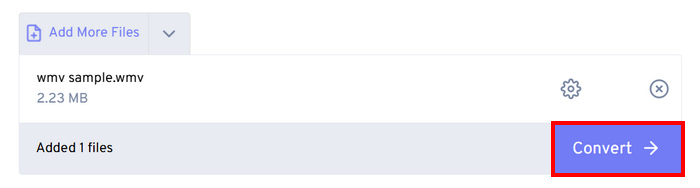
الميزة الوحيدة في FreeConvert هي وجود حد أقصى لحجم الملف الذي يمكنك تحويله. يمكنك فقط تحويل الملفات التي يقل حجمها عن 1 جيجابايت؛ وإلا، فعليك الاستفادة من اشتراكهم.
الجزء 5. الأسئلة الشائعة حول تحويل WMV إلى MP3
هل تحويل WMV إلى MP3 يؤثر على جودة الصوت؟
تعتمد جودة الصوت على الأداة المستخدمة. تضمن المحولات عالية الجودة، مثل FVC Video Converter Ultimate، تحويل ملفات WVA إلى MP3 دون فقدان. بالإضافة إلى ذلك، يمكن للمستخدمين تحسين وتخصيص مخرجات الصوت من خلال ضبط معدل البت ومعدل أخذ العينات وقنوات الصوت للحفاظ على جودة صوت مثالية داخل الأداة.
هل يؤدي تحويل WMV إلى MP3 إلى تقليل حجم الملف؟
نعم. ملفات MP3 هي تنسيقات صوتية مضغوطة؛ وبالتالي، تصبح أصغر حجمًا مقارنةً بمقاطع فيديو WMV.
هل يمكنني تحويل ملفات WMV متعددة إلى MP3 دفعة واحدة؟
نعم. تدعم أدوات مثل FVC Video Converter Ultimate التحويل الدفعي، مما يسمح لك بتحويل عدة ملفات WMV إلى MP3 دفعةً واحدةً بكفاءة.
خاتمة
يُعَدّ تنسيق MP3 بالفعل خيارًا رائعًا عندما ترغب في الاستماع إلى مسارك الصوتي المفضل بسلاسة. ورغم أن WMV تنسيق جيد لهذا الغرض أيضًا، فإنه يتطلّب تشغيل الفيديو كاملًا، مما قد يكون غير مريح إذا كنت تريد الصوت فقط. والآن بعد أن أصبحت لديك عدة خيارات للطرق التي يمكنك استخدامها لتحويل WVA إلى MP3، يعود إليك اختيار الأداة المناسبة. فقط تأكد من أنها تلبي احتياجاتك وتفضيلاتك لتجنّب أي إزعاج في المستقبل! حضِّر ملفات WMV لديك، ولنبدأ بتحويلها إلى ملفات MP3 اليوم!
-
 كيفية تحويل TS إلى AVI / MKV / MOV / WMV عبر الإنترنت ومجانيًا على Win / Mac
 هل تريد تحويل TS إلى AVI/MKV/MOV/WMV بسرعة؟ تعرض هذه المقالة أفضل محولات الفيديو عبر الإنترنت وغير المتصلة. اقرأها واختر ما تريد.
-
 مراجعة لأفضل 10 مشغلات فيديو WMV لعام 2025 (للكمبيوتر والهاتف)
 كيف يمكنني تشغيل دبليو إم في؟ هل يقوم VLC بتشغيل WMV؟ ما هو التطبيق الذي يلعب ملفات WMV؟ يعرض هذا المنشور أفضل 10 مشغلات فيديو WMV لك على أجهزة Mac وWindows PC وAndroid وiPhone.
-
 أفضل 3 طرق لدمج ملفات WMV عبر الإنترنت مجانًا (تحديث 2025)
 كيفية دمج مقاطع فيديو WMV عبر الإنترنت مجانًا؟ FVC Free Online Video Merger و Clideo WMV Joiner هما أداتان قويتان للانضمام إلى ملفات WMV عبر الإنترنت. ستقدم هذه المقالة كيفية استخدامها.
