


 محول الفيديو النهائي
 مسجل الشاشة
 إصلاح الفيديو
 تنزيل آمن
كيفية تحويل WebP إلى MP4 على جهاز الكمبيوتر للحصول على فيديو متحرك
هناك أسباب مختلفة تجعلنا نحوّل ملفات WebP إلى MP4. من أهم هذه الأسباب أنه عندما يكون لديك مجموعة من الصور المتحركة بصيغة WebP، قد لا تدعمها أجهزتك. من المزعج أن تكتشف أنك لا تستطيع الاستمتاع بملفاتك على جهازك نفسه. ولهذا السبب يختار معظم المستخدمين في الموقف نفسه تحويل ملفات WebP لديهم إلى صيغة مثل MP4 لجعل ملفاتهم الرقمية أكثر توافقًا وأصغر حجمًا. لكن كيف ستقوم بذلك لأول مرة؟ لحسن الحظ، جمع لك هذا المقال مجموعة من المحوّلات الجيدة التي ستساعدك كثيرًا في هذا الأمر. كما أضفنا طريقة احترافية لمساعدتك في هذا المجال أيضًا.

الجزء 1. كيفية تحويل WebP إلى MP4 عبر الإنترنت
سيقدم هذا القسم أفضل 3 حلول لدينا لتحويل WebP إلى MP4 عبر الإنترنت.
1. EZGIF
أول الحلول المتاحة عبر الإنترنت هو EZGIF. إنها أداة سهلة الاستخدام ومجانية يمكنك الوصول إليها عبر الويب. تساعدك هذه الأداة على إنشاء صور GIF وتغييرها وتعديلها. لكنها لا تقتصر على صور GIF لأنها تتعامل أيضًا مع تنسيقات WebP وAVIF وAPNG. علاوة على ذلك، يتيح لك EzGIF تبديل هذه التنسيقات باستخدام GIF وJPG وPNG وبالطبع MP4. وكما يوحي اسمه، فإن EZGIF يهدف إلى تبسيط الأمور. سواء كنت تريد إنشاء صور متحركة أو تحويل الرسوم المتحركة إلى مقاطع فيديو، فهذه الأداة ستلبي احتياجاتك. وبالتالي، يمكنك أيضًا استخدامها لتحويل ملفات WebP، سواء الثابتة أو المتحركة، إلى MP4. وبالتالي، إليك الخطوات البسيطة التي يجب اتباعها مع EZGIF.
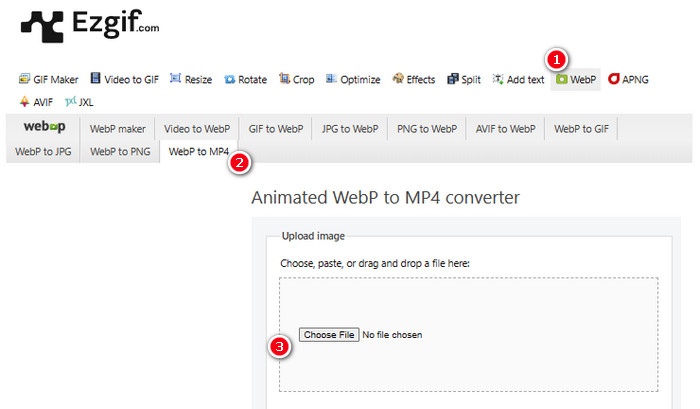
الخطوة 1. على موقع EZGIF، انتقل إلى أداة WebP > WebP to MP4 للوصول إلى محوّل WebP إلى MP4. بمجرد الدخول، انقر فوق زر Choose File لتحميل ملف WebP الخاص بك.
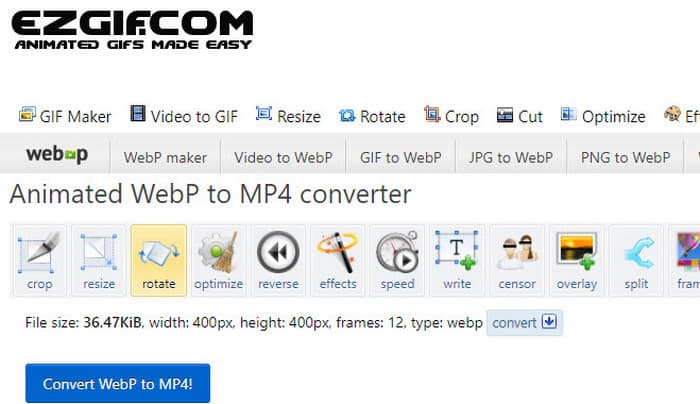
الخطوة 2. بعد تحميل ملف WebP، يمكنك الآن المتابعة إلى عملية التحويل. انقر فوق زر Convert للبدء.
الخطوة 3. عند الانتهاء، قم بتنزيل ملفك المحوّل حديثًا.
2. MConverter
الأداة التالية هي MConverter. هذا المحول هو أداة مفيدة حقًا على الويب تساعدك على تغيير الملفات من نوع إلى آخر. ومن المثير للدهشة أنه إذا كان لديك مجموعة من صور WebP التي تريد تحويلها إلى مقاطع فيديو MP4، فإن MConverter يتيح لك القيام بذلك جميعًا مرة واحدة. ألا يوفر الكثير من الوقت؟ علاوة على ذلك، يحتوي على مجموعة من التنسيقات التي يمكنه التعامل معها - مثل مقاطع الفيديو والأغاني والصور والترجمات وما إلى ذلك. ولكن هناك مشكلة في الإصدار المجاني - فهو يسمح لك فقط بتحويل ملفات يصل حجمها إلى 200 ميجا بايت. في غضون ذلك، دعنا نرى كيف يعمل MConvert عند تحويل WebP إلى MP4 باستخدامها.
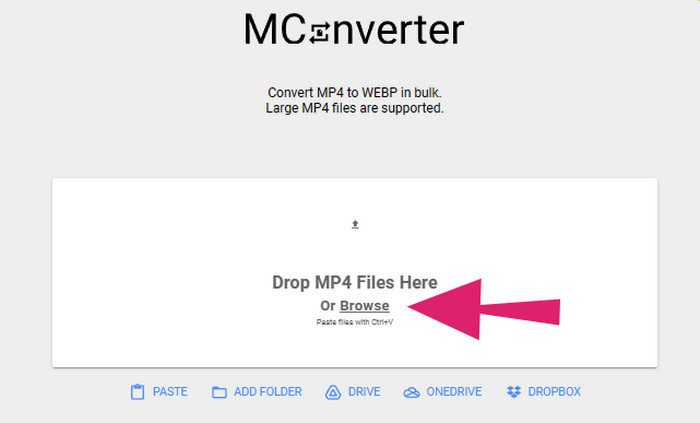
الخطوة 1. في الأداة المتاحة عبر الإنترنت، انقر فوق زر Browse لتحميل ملفات WebP التي تحتاج إلى تحويلها.
الخطوة 2. عند تحميل الملف بنجاح، انقر على صيغة MP4 من بين الخيارات المتاحة.
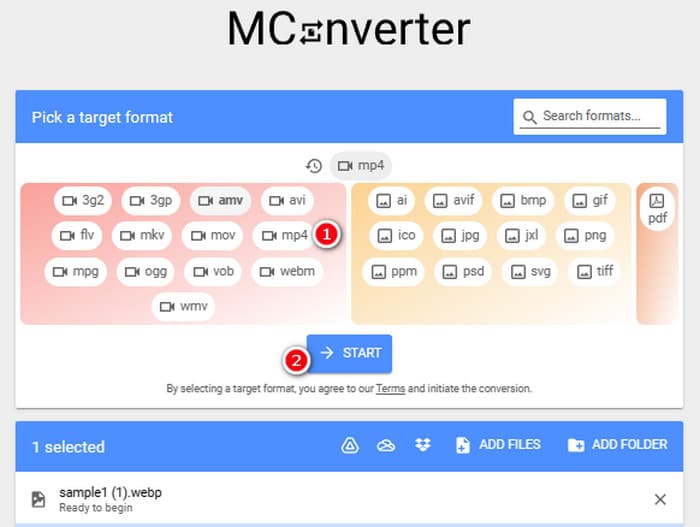
الخطوة 3. بعد ذلك، انقر فوق زر START لتنفيذ عملية التحويل.
3. التحويل عبر الإنترنت
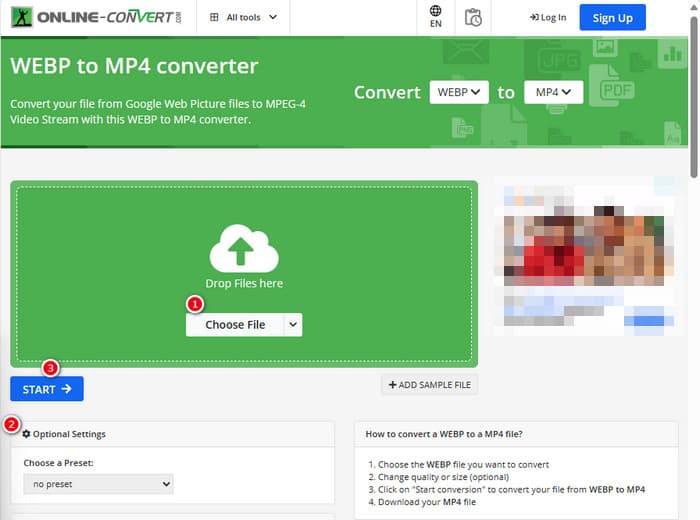
أخيرًا، اسمح لبرنامج Online Convert بملء آخر موضع على الإنترنت. يُعد برنامج Online Convert هذا محولًا رائعًا يمكنه تغيير أي نوع من ملفات الوسائط تقريبًا نيابةً عنك. وعلى الرغم من ذلك، فلن يكلفك سنتًا واحدًا مقابل أي تحويل تريد إجراؤه طالما أنه يدعمه. علاوة على ذلك، فهو يعمل بسرعة كبيرة، إلا عندما تكون شبكة الإنترنت لديك بها مشكلات. الآن، إذا كنت تريد تحويل ملف WebP إلى MP4، فيمكنك القيام بذلك على موقع الويب الخاص بهم. ليس هذا فحسب، بل يمكنك أيضًا تعديل معلمات الفيديو مثل حجمه ومعدل الإطارات والجودة وحتى قلبه أو قصه أو قطع الأجزاء التي لا تحتاج إليها. لذا، إذا كان ملف WebP جاهزًا للتحويل، فاتبع الخطوات أدناه على الفور.
الخطوة 1. تأكّد من استخدام أداة تحويل WebP إلى MP4 بمجرد وصولك إلى الموقع الرسمي.
الخطوة 2. انقر فوق زر Choose File وأدخل ملف WebP. بعد ذلك، يمكنك اختيار ضبطه باستخدام الإعدادات المتاحة في الواجهة.
الخطوة 3. وإلا، فانقر فوق زر START لبدء عملية التحويل.
الجزء 2. النهج الاحترافي لتحويل ملف WebP إلى MP4: FFmpeg
للحصول على طريقة احترافية لتحويل ملف صورة إلى فيديو، يمكنك استخدام FFmpeg. فهو أداة برمجية قوية تُستخدم لمعالجة ملفات الوسائط المتعددة. يتيح لك هذا البرنامج تحويل صيغ الصوت والفيديو والصور بين مجموعة واسعة من برامج ترميز مختلفة. ومع ذلك، فهو يعمل عن طريق سطر الأوامر، مما يجعله صعبًا على المبتدئين. لذلك، إليك الخطوات المبسطة التي يمكنك اتباعها. وللعلم، يمكن لبرنامج FFmpeg، بوصفه محوّل فيديو احترافيًا، أن يصلح مقاطع الفيديو التالفة أيضًا.
الخطوة 1. افتح FFmpeg بعد تثبيته على جهاز الكمبيوتر. ثم ابدأ بالضغط على أمر CD لفتح موجّه الأوامر.
الخطوة 2. يمكنك الآن الانتقال إلى المجلد الذي يحتوي على ملف WebP. ثم استخدم الأمر ffmpeg -i input.webp output.mp4.
الخطوة 3. ابدأ عملية التحويل بالضغط على مفتاح ENTER من لوحة المفاتيح.

الجزء 3. نصيحة إضافية: أفضل طريقة لتحويل ملفات MP4 إلى أي نوع فيديو/صوت عبر الإنترنت
ماذا عن تحويل ملفات MP4 الخاصة بك إلى صيغ الفيديو والصوت التي تريدها عبر الإنترنت؟ سيكون ذلك بسيطًا وسريعًا وفعّالًا إذا استخدمت FVC Free Video Converter Online. فهو حل مجاني يتيح لك تغيير مقاطع الفيديو بصيغة MP4 إلى صيغ فيديو وصوت مختلفة مثل WMV وMOV وFLV وAVI وMKV وAAC وMP3 وWAV وغيرها. كما يمكنك بسهولة تحويل مقاطع الفيديو عالية الدقة إلى ملفات MP4 أصغر حجمًا دون فقدان الجودة. والأفضل من ذلك، يمكنك تحويل عدة ملفات في آن واحد مع الاستمتاع بسهولة وسرعة العملية بالكامل. إضافة إلى ذلك، لا داعي للقلق بشأن العلامات المائية على مقاطع الفيديو أو فقدان أي بيانات أثناء التحويل، لأن هذا المحوّل عبر الإنترنت يلتزم بتقديم مخرجات نظيفة وآمنة لك! إليك ثلاث خطوات سهلة لتحويل ملفات MP4 الخاصة بك إلى مختلف أنواع الصيغ.
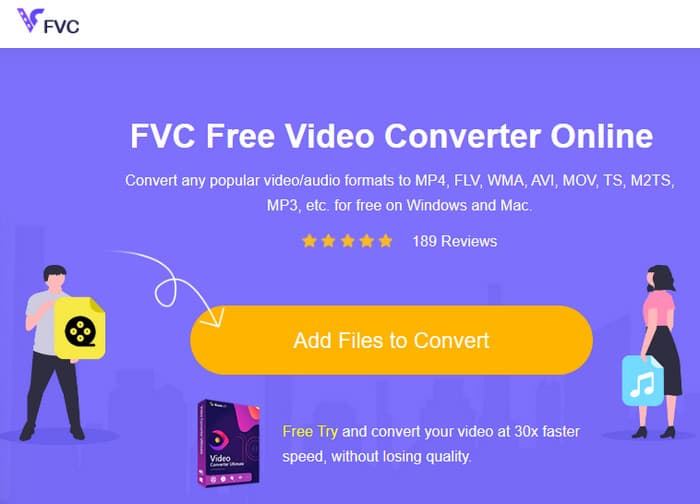
الخطوة 1. انقر فوق تبويب Add Files to Convert عند الوصول إلى الموقع. سيتيح لك ذلك تحميل ملفات MP4.
الخطوة 2. بعد عملية استيراد الملفات، اضبط الملفات على صيغة الإخراج التي ترغب بها.
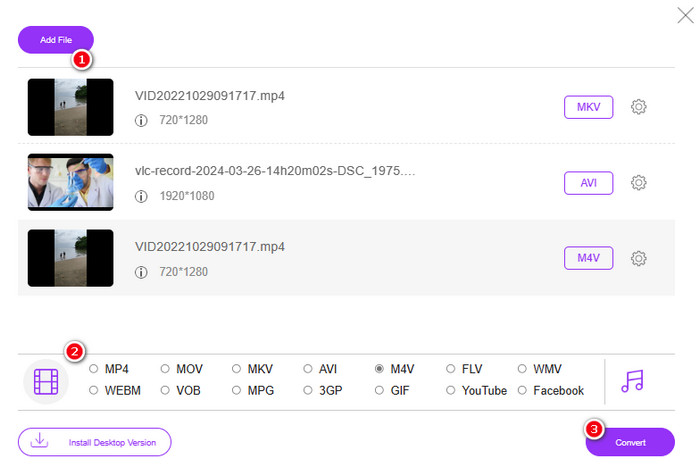
الخطوة 3. بمجرد ضبطها، انقر فوق زر Convert لبدء التحويل.
فيما يلي المزيد من النصائح لتحويل الصورة إلى MP4.
قراءة موسّعة
كيفية تحويل VLC إلى MP4: أسرع الإجراءات التي يمكنك إتقانها
حوّل مقاطع فيديو iPhone إلى MP4 على الكمبيوتر بسهولة وبدون فقدان الجودة
الجزء 4. الأسئلة الشائعة حول تحويل Webp وMP4
لماذا أقوم بتحويل ملف صورة مثل WebP إلى فيديو مثل MP4؟
-يجب تحويل الصورة إلى فيديو لتحقيق توافق أوسع وأغراض الحفظ.
هل يمكن عرض الصور بتنسيق WebP على جميع متصفحات الويب؟
-لا. بعض المتصفحات القديمة، وخاصة Internet Explorer، لا تدعم WebP بشكل أصلي. ومع ذلك، تدعم المتصفحات الحديثة عرضها.
كيف يمكنني تحويل صورة إلى WebP؟
- يجب عليك استخدام برنامج مخصص لإنشاء صور WebP. كما تتوفر العديد من الأدوات والمكتبات لتحويل الصور إلى تنسيق WebP.
خاتمة
مع محوّلات WebP إلى MP4 المعروضة أعلاه، ستصبح تجربة التحويل لديك الآن سلسة وواضحة. وبالتالي، فإن الطرق الثلاث الشائعة الاستخدام تُعتمد لتحقيق التحويل المطلوب. إذا واجهت صعوبات في إدارة العملية بإحدى هذه الطرق، يمكنك بكل بساطة إجراء التحويل باستخدام الطرق الأخرى.
-
 تعلم أسهل الطرق لتحويل WebP إلى JPG بسرعة
 دعنا نتعلم جميعًا طرقًا فعالة لتحويل صور الويب إلى JPG بسهولة. ستمنحك هذه المقالة محولات صور ممتازة يمكنك استخدامها لتحويل ملفات الصور.
-
 طرق مثالية لتحويل WebP إلى PNG دون عناء
 كن على دراية بالطرق الرائعة لتحويل WebP إلى PNG. ستوفر لك هذه الإرشادات أكثر محولات الصور فائدة التي يمكنك تجربتها.
-
 الطرق النهائية حول كيفية تحويل WebP إلى GIF بشكل مثالي
 هل تريد تحويل WebP إلى GIF ولكن ليس لديك فكرة عما يجب القيام به؟ لحسن الحظ ، سيقدم هذا المنشور طرقًا متعددة حول كيفية تحويل WebP إلى GIF على الفور.
