


 محول الفيديو النهائي
 مسجل الشاشة
 إصلاح الفيديو
 تنزيل آمن
كيفية ضغط ملفات PDF للبريد الإلكتروني: 3 طرق فعالة للاختيار
Indeed, sending large files via email can be a hassle. In fact, it may cause you some problems, or it may not be delivered at all. Also, many email providers restrict attachments to specific file sizes, which is easy to exceed with a complex PDF. This can be especially true for PDFs with lots of images or lengthy documents. To address this, most people in this situation resort to file-sharing services like Dropbox or Google Drive. However, they almost forget a handy trick, and that is via file compression. Many free online tools can do this, and some are quite popular. But how to compress a PDF for email effectively? That is what you are about to learn as you continue reading the entire content below.

الجزء 1. ما هو أفضل حجم لملف PDF للبريد الإلكتروني؟
إليك حقيقة: لا يوجد رقم سحري لحجم ملف PDF المثالي للرسائل الإلكترونية. الشيء الذي يجب الانتباه إليه هو حد المرفقات في منصة البريد الإلكتروني الخاصة بك. تحدد الخدمات الشائعة المرفقات بحجم 20 ميجا بايت تقريبًا، وهو ما يمكن الوصول إليه بسهولة بشكل مدهش، خاصة مع ملفات PDF التي تحتوي على الكثير من الصور أو المستندات الطويلة جدًا. وبالتالي، إذا كان ملف PDF الخاص بك أكبر من الحد الأقصى 20 ميجا بايت المذكور، فمن المحتمل ألا يتم إرسال بريدك الإلكتروني، وستتلقى رسالة خطأ. ومع ذلك، بدلاً من استهداف حجم معين أو أفضل حجم لملف PDF للبريد الإلكتروني، فمن الأفضل اللعب بأمان والحفاظ عليه أقل من 20 ميجا بايت. بهذه الطريقة، يمكنك أن تكون واثقًا من أنه سيتم إرفاقه وإرساله بنجاح.
الجزء 2. نقرة واحدة لضغط ملفات PDF لإرسالها عبر البريد الإلكتروني
Here’s a great and quick way to compress email files. Get ready to experience this free tool called FVC Free PDF Compressor, which can shrink your hefty PDF files without messing them up. Now, since most email services only allow attachments of around 20MB, PDFs with pictures or lots of text can easily reach that limit. This compressor can get your PDF way smaller, even under 100 kilobytes! You don’t need to worry about how it shrinks PDFs for email dramatically because it still maintains the quality of the files. In fact, you probably won't even notice a difference between the original and the shrunk version.
علاوة على ذلك، فإن هذه الأداة المذهلة سهلة الاستخدام للغاية، ويمكن لأي شخص لديه أي مستوى من الخبرة استخدامها. كل ما عليك فعله هو سحب ملف PDF وإفلاته في البرنامج، وسوف يقوم البرنامج تلقائيًا بتقليص حجمه. ثم، بنقرة واحدة فقط، يمكنك حفظ ملف PDF الأصغر على جهاز الكمبيوتر الخاص بك. بهذه الطريقة، يمكنك ضغط ملف PDF بسرعة إلى حجم البريد الإلكتروني عبر الإنترنت إلى الحجم المثالي لإرساله عبر البريد الإلكتروني أو تحميله بالكامل دون أي علامات مائية على المستند النهائي. لفهم عملية ذلك بشكل أفضل، راجع الإرشادات التفصيلية أدناه.
Step 1. On its main interface, click the Add PDF File tab and choose the PDF file that you need to compress.
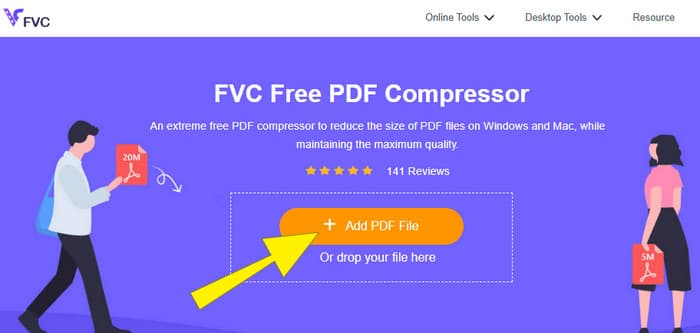
Step 2. While the PDF file is uploading, the tool is also working for its compression.
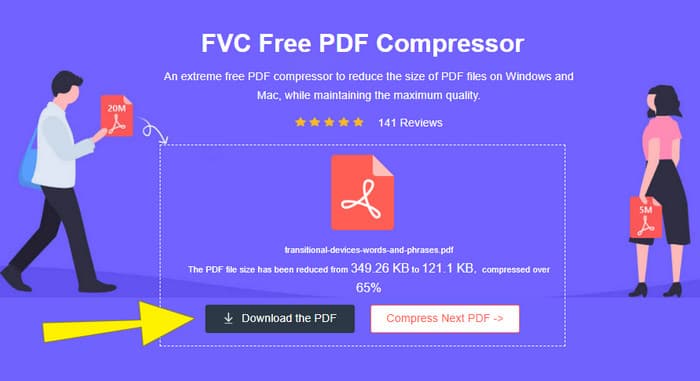
Step 3. Once done, click the Download the PDF button.
الجزء 3. ضغط ملفات PDF لإرسالها عبر البريد الإلكتروني باستخدام ميزات التحرير
If you prefer a tool that comes with editing features, then Adobe Acrobat is what you need for this task. Adobe Acrobat is a program known for creating, editing, and managing PDF files. It's like a powerful toolkit specifically designed for working with PDFs. One of its handy features is PDF compression, which you can use when you have a bulky PDF that won't fit into your email because of size limits. Adobe Acrobat, which comes with an online and desktop version, can help you compress large PDF files for email without messing with the quality too much. Well, it does this in a few ways, like reducing the size of images within the PDF or getting rid of unnecessary fonts. However, knowing Adobe and its suits, you must not be surprised if you find its learning curve steep. Hence, here are the steps to help you ease the process.
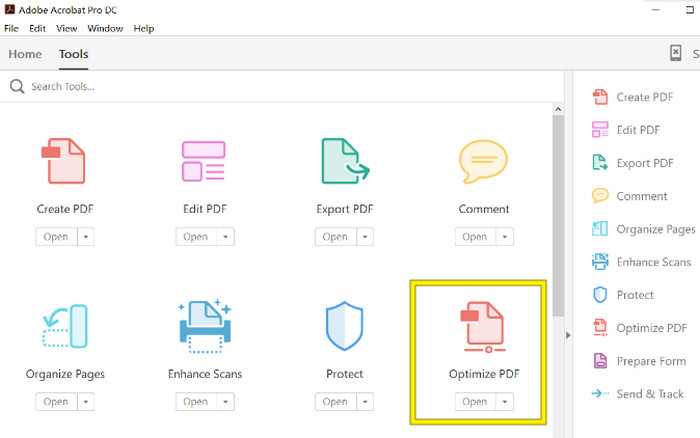
Step 1. Launch the Acrobat and open the PDF file that you need to work on. To do so, go to Tools-Optimize PDF-Open.
Step 2. Once you open the PDF file, click the Reduce File Size option from the new navigation shown. Then, set or use the editing options given to achieve your desired compression and optimization.
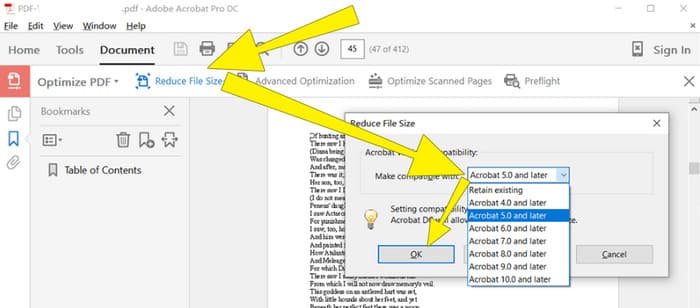
Step 3. After that, save the compressed PDF file.
الجزء 4. ضغط ملفات PDF لإرسالها عبر البريد الإلكتروني عن طريق التحويل
Want to learn a new trick on how to compress a PDF to send via email? Let’s convert the file to JPG. This conversion trick can be done perfectly using PowerPoint. PowerPoint is a program you likely use to create presentations. Imagine a slideshow with text, pictures, and maybe even videos. PowerPoint lets you build these presentations with individual slides that you click through to show your audience. It's a popular tool for teachers, students, business people, and anyone who wants to share information visually.
الآن، قد يكون إدراج ملف PDF في عرض PowerPoint مفيدًا، ولكن قد لا تكون هذه العملية هي الأكثر سهولة. ولكن بمجرد القيام بذلك، سيكون إنتاج ملف JPG أمرًا سهلاً. ولكن لا تقلق! يمكننا أن نرشدك خطوة بخطوة، والتي تحتاج إلى اتباعها لتضمين ملف PDF الخاص بك في وقت قصير.
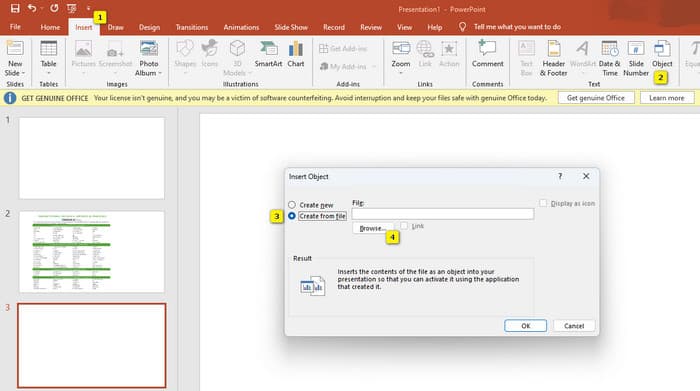
Step 1. Launch the PowerPoint on your PC and select the correct slide where you can open the PDF file.
Step 2. Now, navigate to the Insert tab menu and look for the Object option from the Text selection. Click the option, and a new window will pop up. From that window, toggle the Create from the File option, which is located on the left side of that interface. Then, click the Browse button, which will enable you to import the PDF file onto the slide.
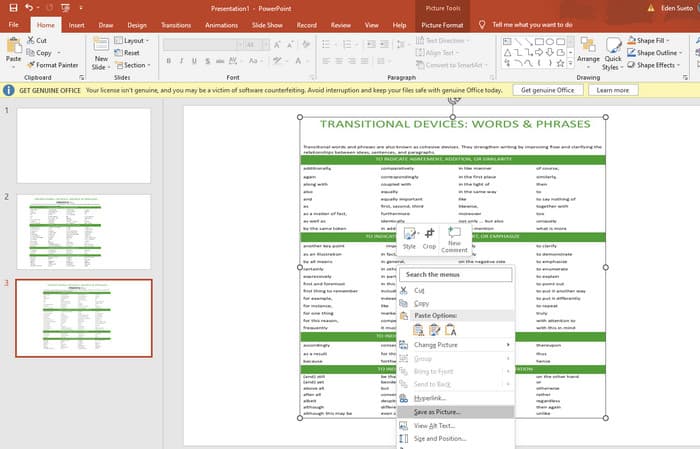
Step 3. Once the PDF file is uploaded, you can convert it to JPG. To do so, right-click the PDF on the slide, select Save As Picture, and save it as a JPEG.
الجزء 5. الأسئلة الشائعة حول PDF والضغط
ما هو حجم ملف PDF الذي يمكنك إرساله بالبريد الإلكتروني؟
يعتمد ذلك على موفر البريد الإلكتروني الخاص بك، ولكن معظمهم يحدون المرفقات إلى حوالي 20 ميغابايت.
ما هو أفضل ضاغط PDF مجاني؟
تتوفر أدوات ضغط PDF مجانية، ولكن الأفضل منها يعتمد دائمًا على تفضيلات المستخدمين. حتى الآن، يعد برنامج FVC Free PDF Compressor الأداة المجانية الأكثر موصى بها عبر الإنترنت.
كيفية ضغط ملفات PDF لإرسالها بالبريد الإلكتروني؟
في الواقع، يعمل الضغط على ملفات PDF لأنها عبارة عن ملفات مضغوطة بالفعل.
خاتمة
This article talks about how to compress PDF files for email in the best ways. You can now ensure a smoother and better way to send your PDFs via email as long as you reduce them properly to achieve the file limitation.
-
 3 أفضل الحلول حول كيفية إزالة العلامة المائية من مقاطع الفيديو بسهولة
 هل تريد إزالة العلامة المائية المزعجة على الفيديو؟ باستخدام هذه المدونة ، يمكنك التعرف على الأفكار المختلفة حول إزالة العلامة المائية من مقطع فيديو.
-
 4 أفضل الطرق حول كيفية إضافة علامة مائية على أي مقاطع فيديو بسرعة
 دعنا نتعلم كيفية إضافة علامة مائية إلى أي مقاطع فيديو على Windows و Mac و Online و iOS و Android بخطوات مفصلة إذا قرأت هذه المقالة.
-
 3 أسهل طرق لإضافة علامة مائية إلى GIF عبر الإنترنت وغير متصل
 يمكن أن تكون إضافة علامة مائية إلى GIF سهلة مثل 1-2-3 إذا كنت تستخدم الأداة الصحيحة بشكل صحيح. الأدوات الموجودة في السوق واسعة جدًا ، لكننا سنقدم الأدوات الثلاث التي يمكنك الاعتماد عليها.
