


 محول الفيديو النهائي
 مسجل الشاشة
 إصلاح الفيديو
 تنزيل آمن
3 نصائح لإصلاح VLC لا يقوم بتشغيل DVD
VLC Media Player is one of the most popular video and audio playing software. Besides various digital media formats, VLC is also capable of playing DVDs, Audio CDs, and VCDs. However, many users have encountered the VLC not playing DVD problem. Are you facing the same situation?

In fact, many reasons may cause the VLC Media Player does not play DVD. This post will discuss how to solve it in 3 different ways, whether VLC can’t read DVD disc, video and audio files of DVD are choppy, or VLC does not play the whole DVD.
الجزء 1. قم بتحديث أو إعادة تثبيت VLC لإصلاح عدم تشغيل VLC على قرص DVD
When the VLC Media Player does not play DVD, you should first restart computer and VLC to check if the problem is still there. If the VLC not playing DVD issue is still existing, you can choose to upgrade VLC to its latest version.
Open VLC Media Player on your Windows 10/8/7 PC or Mac. Click Help tab on the top menu bar. From the drop-down list, choose the Check for Updates option. If there is an available one, you can follow the on-screen instructions to upgrade your VLC to the latest version.
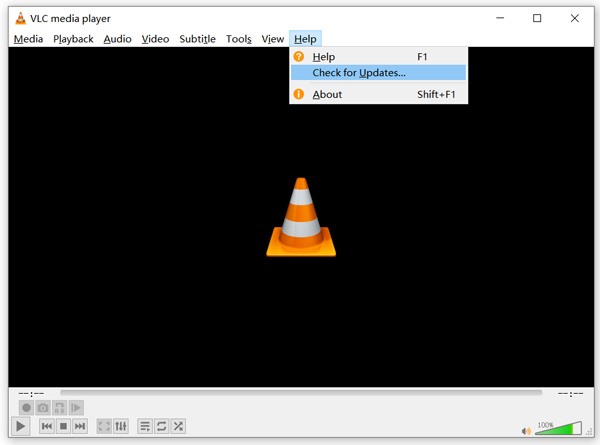
Here you can also uninstall VLC and then re-install it on your computer. You can go to the VideoLAN site to free install a suitable version.
عند تثبيت إصدار جديد من VLC ، يمكنك تشغيل قرص DVD الخاص بك والتحقق مما إذا كان بإمكانه فتح قرص DVD كالمعتاد.
الجزء 2. إعادة تعيين التفضيلات لإصلاح عدم تشغيل VLC لمشكلة DVD
في بعض الحالات ، يمكنك تخصيص تفضيلات VLC أو إعادة تعيينها لحل مشكلة عدم تشغيل قرص DVD في VLC. سيوضح لك الدليل التالي كيفية تعيين تفضيلات VLC.
Step 1. Open VLC and choose the Tools menu. Select the Preferences option from the drop-down list.
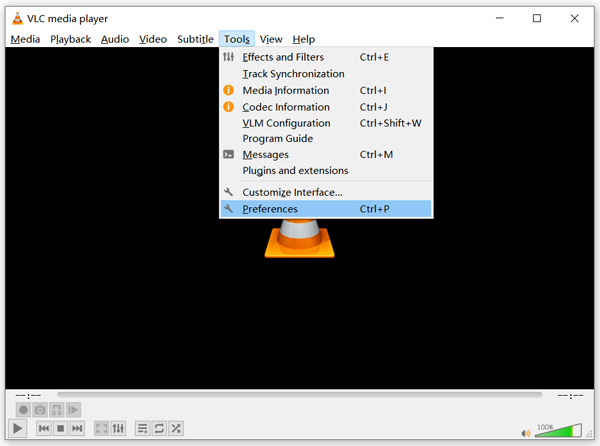
Step 2. Now you will be guided to the Simple Preferences window. Tick All under the Show Settings at the bottom left corner to enter the Advanced Preferences window.
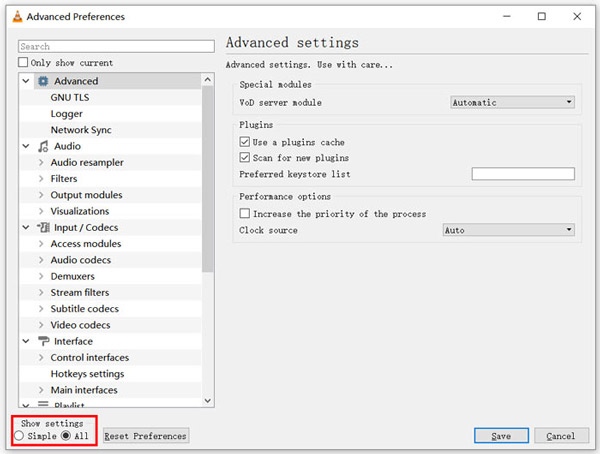
Step 3. Here you can click on the Reset Preferences button to try fix VLC not playing DVD issue. Also, you can go to the Video section on the left, click Filters and then choose Deinterlacing video filter option on the right. Click Save button to confirm your operation.
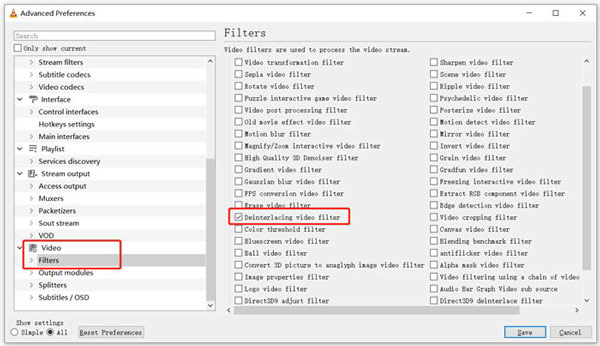
Whether you choose to reset or custom VLC preferences, after all your operations, you should restart VLC and then use it play DVDs.
الجزء 3. احصل على أداة بديلة لبرنامج VLC لتشغيل أقراص DVD
If VLC is still not playing DVD on Windows 10/8/7 PC or Mac, you should find a VLC alternative player to help you watch DVD movies on computer. Here we strongly recommend the Free Online DVD Player for you to watch any DVDs with high quality.
إنه مشغل DVD مجاني تمامًا يسمح لك بتشغيل أقراص DVD ومجلدات DVD وملفات صور ISO على كل من Windows 10/8/7 PC و Mac. يمكن لمشغل DVD المجاني هذا تشغيل قرص DVD الخاص بك مباشرة على أي متصفح ويب مثل Chrome و IE و Firefox و Safari. وهي مجهزة بجميع ميزات تشغيل DVD التي تحتاجها. علاوة على ذلك ، فإنه يمكّنك من التقاط لقطات وإضافة وتعديل واختيار العناوين الفرعية والمسارات الصوتية.
Step 1. When you want to play DVD, you can go to this Free Online DVD Player page and click on the Play Now button to install a Launcher for the DVD playback. Once the installation is finished, the DVD player will be initiated automatically.

Step 2. When you enter this DVD player, you can choose Open Disc or Open File according to your need. To play a DVD disc, you should insert your DVD disc and select the Open Disc option. To open DVD folder or DVD ISO file, you can use the Open File.
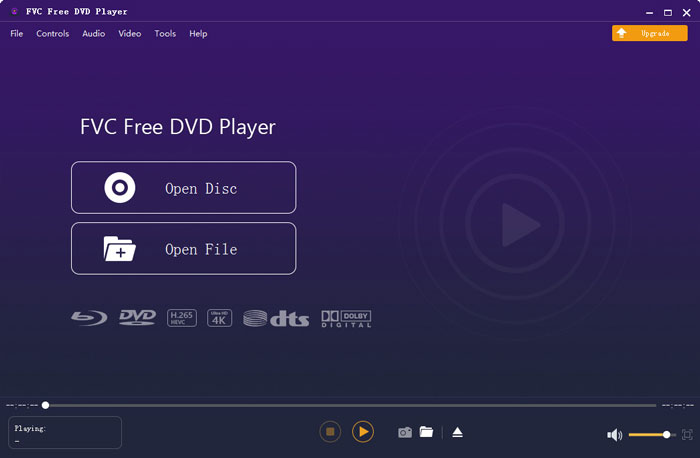
Step 3. You are given the full control of the DVD playing. You can forward, backward, pause, and stop it anytime you like. You are also able to take screenshots of your favorite scenes. Also, you can change the audio track, video track, and subtitle track based on your need.
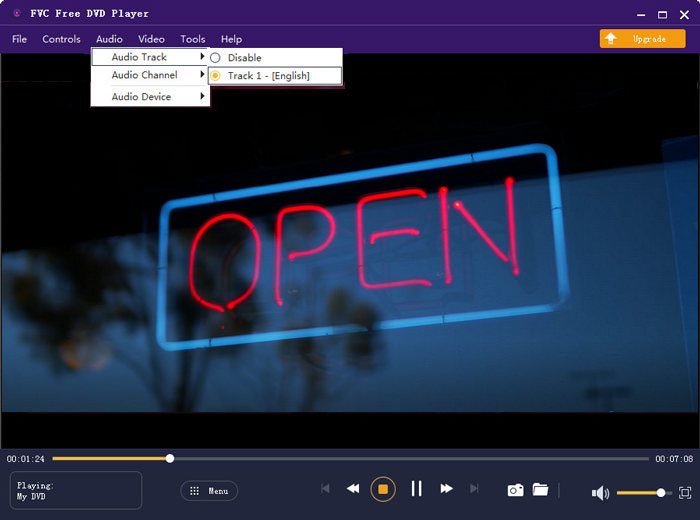
يتمتع بديل VLC Media Player هذا بالقدرة على تشغيل أي أفلام DVD بجودة صوت وصورة عالية. إنه مصمم بتقنية تشفير الفيديو المتقدمة ويدعم كلاً من DTS-HD و Dolby TrueHD. لذلك عندما تواجه VLC لا تقوم بتشغيل مشكلة DVD ، يمكنك الاعتماد على مشغل DVD هذا لمشاهدة أقراص DVD الخاصة بك.
More VLC alternatives are here.
الجزء 4. الأسئلة الشائعة حول برنامج VLC Media Player لا يقوم بتشغيل DVD
السؤال 1. كيف تلعب DVD مع VLC؟
لتشغيل فيلم DVD على VLC Media Player ، يمكنك إدخال قرص DVD في محرك أقراص الكمبيوتر ، وفتح VLC Media Player ثم النقر فوق قائمة الوسائط. اختر Open Disc و DVD ، ثم انقر فوق الزر Browse لتحميل ملف DVD الخاص بك. بعد ذلك ، سيبدأ VLC في تشغيل قرص DVD الخاص بك.
السؤال 2. لماذا لا يمكنني تشغيل أقراص DVD في نظام التشغيل Windows 10؟
لم يعد دعم تشغيل أقراص DVD المضمنة من Microsoft متوفرًا في Windows 10. ولهذا السبب لا يمكنك تشغيل أقراص DVD على جهاز كمبيوتر يعمل بنظام Windows 10. بدلاً من ذلك ، تقدم Microsoft برنامج Windows DVD Player الذي يكلفك $14.99 لمشاهدة أقراص DVD.
السؤال 3. كيفية نسخ قرص DVD إلى MP4؟
When you want to watch DVD on computer, you can also choose to convert DVD to a digital video file like MP4. You can rely on the powerful DVD to MP4 converter to rip your DVD to MP4 without quality loss.
خاتمة
VLC can work as a free DVD player to help you play DVDs on Windows 10/8/7, Mac and Linux computer. It can easily access DVD menu, chapters, and other related contents. However, many users complained about the VLC not playing DVD problem.
Here in this post, you can get 3 effective solutions to fix the VLC Media Player does not play DVD issue. Hope you can better watch your DVD movies after reading this page.
-
 كيفية نسخ ملف _TS للفيديو على قرص DVD على نظام التشغيل Mac / Windows 10
 كيف يمكنني تحويل ملفات TS إلى قرص DVD ونسخها؟ سيوضح لك هذا الدليل المفصل خطوة بخطوة كيفية نسخ ملفات ومجلدات TS إلى قرص DVD على نظام Windows / Mac حتى تتمكن من مشاهدة ملفات TS على مشغل DVD أو التلفزيون.
-
 كيفية تسجيل فيديو الشاشة بالصوت باستخدام VLC Media Player
 إنه دليل خطوة بخطوة حول الاستخدام الشامل لميزة تسجيل شاشة VLC. يمكنك العثور على العملية التفصيلية واستكشاف الأخطاء وإصلاحها وأفضل بديل من المقالة.
-
 أفضل 5 مشغلات فيديو لـ iPhone يجب ألا تفوتك في عام 2021
 لتشغيل مقاطع الفيديو بجميع التنسيقات والحصول على تجربة مشاهدة أفضل على جهاز iPhone الخاص بك ، يجب عليك قراءة هذه المقالة والتعرف على أفضل 5 مشغلات فيديو لأجهزة iPhone 12/11 / X / 8/7/6.
