


 محول الفيديو النهائي
 مسجل الشاشة
 إصلاح الفيديو
 تنزيل آمن
مراجعة أفضل 5 مشغلات ISO مجانية لنظام التشغيل Mac
هل تبحث عن طريقة سهلة لتشغيل ملفات ISO على جهاز كمبيوتر يعمل بنظام Windows 7 أو Windows 10؟ ما هو أفضل مشغّل ISO لنظامي Windows وMac؟
قد لا تعرف الكثير عن ملفات ISO وكيفية تشغيل ملفات ISO. في الحقيقة، ملفات ISO هي ملفات مضغوطة صُمِّمت أساسًا للاستخدام مع أقراص DVD وCD وBlu-ray. وتُستَخدَم عادةً لإنشاء نسخ احتياطية من أقراص DVD وCD. ومع ذلك، لا يمكن فتح هذه الملفات مباشرة بواسطة Windows Media Player أو QuickTime Player. لذلك، من الضروري العثور على حل أو مشغّل ISO لفتحها.

يقدّم لك هذا المقال 5 من أفضل مشغّلات الوسائط التي تدعم ISO لمساعدتك على مشاهدة أفلام ISO على جهاز الكمبيوتر. يمكنك الاطلاع على المزايا الأساسية لكل مشغّل ISO ثم استخدام المشغّل الذي تفضّله لتشغيل ملفات ISO.
الجزء 1. مشغل ISO مجاني لأجهزة الكمبيوتر التي تعمل بنظام Windows و Mac - VLC Media Player
يُعَدّ مشغّل الوسائط VLC من أشهر أدوات التشغيل التابعة لجهة خارجية، والتي تدعم تقريبًا جميع تنسيقات الفيديو والصوت. علاوة على ذلك، يمكنه العمل كمشغّل ISO لأجهزة كمبيوتر Windows 10/8/7 وMac وLinux. لديه القدرة على تشغيل ملفات صور ISO، وأقراص DVD وBlu-ray وVCD وأقراص الصوت CD.
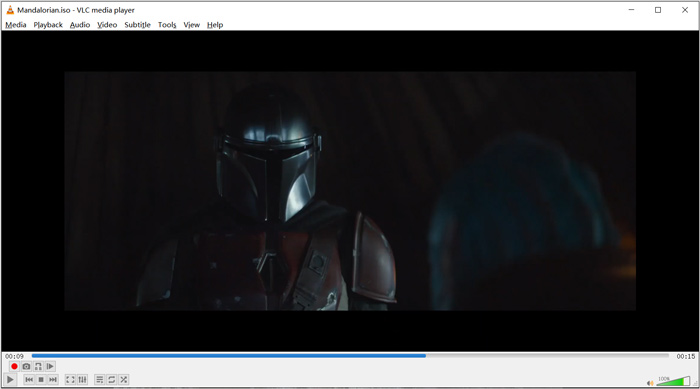
كمشغل وسائط مفتوح المصدر ، يتيح لك VLC تنزيل برامج ترميز إضافية لتحسين تشغيل الفيديو والصوت. يمكنك النقر بزر الماوس الأيمن على ملف ISO واختيار VLC كمشغل. أيضًا ، يمكنك السحب والإفلات مباشرة لتشغيل فيديو ISO.
الجزء 2. مشغل Blu-ray ISO لنظامي التشغيل Windows و Mac - Aiseesoft Blu-ray Player
يُعَدّ Aiseesoft Blu-ray Player أداة متكاملة لتشغيل ملفات ISO الخاصة بأقراص Blu-ray وDVD. فهو يدعم بشكل كبير أي أقراص Blu-ray، ومجلدات Blu-ray، وأقراص DVD وCD وملفات صور ISO. هذا المشغّل يدعم كلًا من أجهزة كمبيوتر Windows 10/8/7/XP/Vista وMac. يمكنه تشغيل ملف ISO وأقراص Blu-ray وDVD مع تأثير بصري عالي الدقة فعليًا. إضافة إلى ذلك، يمكنه تشغيل فيديوهات 4K المشفَّرة بترميز H.265/HEVC بسلاسة ومن دون فقدان للجودة.
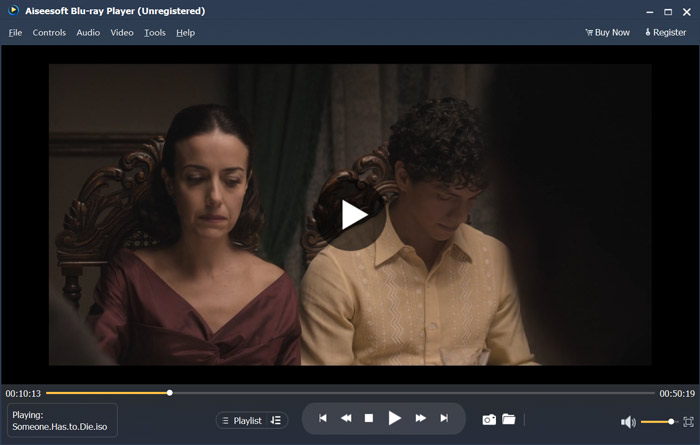
يوفر برنامج مشغل ISO هذا إصدارًا تجريبيًا مجانيًا لتشغيل ملفات ISO بجودة عالية. تحتاج إلى الترقية إلى إصدار مدفوع إذا كنت تحتاج فقط إلى تشغيل ISO. وهو يدعم كلاً من DTS-HD و Dolby TrueHD. لذلك ، يمكنك الحصول على تجربة صوت رائعة أثناء تشغيل فيديو ISO. بصفتك مشغل ملفات صورة ISO ، فإنه يمنحك التحكم الكامل في تشغيل ISO. إلى جانب أقراص Blu-ray وأقراص DVD وملفات ISO ، فإنه يدعم أيضًا أي تنسيقات فيديو وصوت مستخدمة بشكل متكرر.
إلى جانب تشغيل ملفات ISO، يمكنه أيضًا العمل كـمشغّل 4K UHD لفتح أفلام بدقة 4K.
الجزء 3. مشغل ISO للتلفزيون والكمبيوتر الشخصي - مشغل DVDFab 6
يُعَدّ DVDFab Player 6 برنامج تشغيل 4K مميزًا يوفّر ميزة تشغيل ملفات ISO. يتيح لك تشغيل ملفات ISO على الكمبيوتر بجودة عالية. وأكثر من مجرد مشغّل ISO، فهو يدعم أقراص DVD وBlu-ray وفيديوهات 4K. كما يأتي DVDFab Player 6 مزوّدًا بميزة Poster Walls لإدارة مكتبة الوسائط بالكامل بكفاءة.
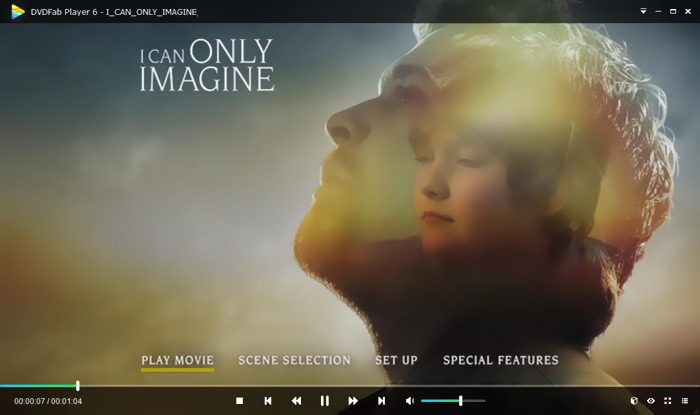
يوفر DVDFab Player 6 وضعين لتشغيل ISO ، وضع الكمبيوتر ووضع التلفزيون. يمكنك فتح مشغل ISO هذا واستخدام مستكشف الملفات لتحديد موقع ملفات ISO بسرعة. إلى جانب تشغيل الفيديو عالي الدقة ، فإنه يدعم إخراج الصوت HDR10 و Hi-Res. هناك العديد من الوظائف الأخرى المصممة في هذا المشغل. لكن يجب أن تعلم أن DVDFab Player 6 ليس مجانيًا تمامًا. تحتاج إلى الترقية إلى الإصدار القياسي أو الإصدار Ultra للحصول على هذه الميزات.
الجزء 4. برنامج ISO Player - باور دي في دي
يُعَدّ PowerDVD مشغّل وسائط متعددة قويًا يملك القدرة على تشغيل أقراص DVD وأفلام Blu-ray وملفات صور ISO ومختلف ملفات الفيديو والصوت. يمكنه العمل كمشغّل وسائط ISO لمساعدتك على مشاهدة أفلام ISO على جهاز كمبيوتر يعمل بنظام Windows أو على جهاز Mac. وقد تم تزويده بتقنية TrueTheater المتقدمة ليقدّم لك تفاصيل أكثر حدة وتجربة تشغيل فيديو سلسة.
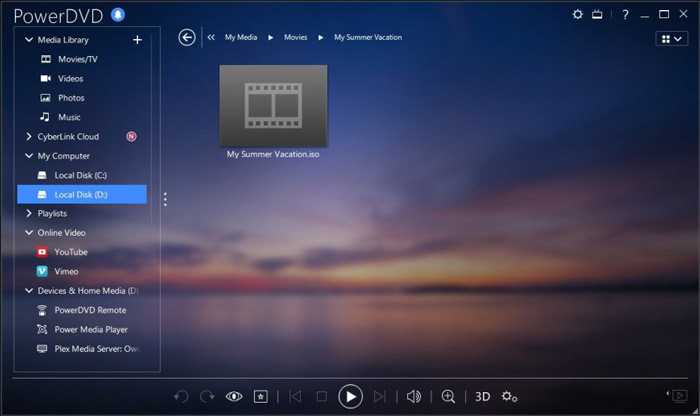
يقدم PowerDVD إصدارًا مجانيًا لك لتشغيل ملفات ISO. لكنه يحمل أيضًا العديد من الوظائف الأخرى. قد يكون لديك بعض القيود على تشغيل أفلام Blu-ray و 4K. يجب عليك الترقية إلى الإصدار المدفوع لإزالة هذه الحدود.
الجزء 5. مشغل ISO مجاني لنظام التشغيل Windows 10/8/7 PC و Mac - برنامج KMPlayer
يُعَدّ KMPlayer مشغّل وسائط شائعًا ومفتوح المصدر يمكنه تشغيل ملفات صور ISO بجودة عالية. هذا المشغّل المجاني لملفات ISO يدعم تقنية فك التشفير متعدّد النوى، والتي تتيح له تشغيل أي أقراص DVD وأفلام ISO بجودة صورة وصوت مرتفعة مع استهلاك منخفض لموارد المعالج. كما يوفّر أيضًا ميزة تشغيل الفيديو ثلاثي الأبعاد (3D).
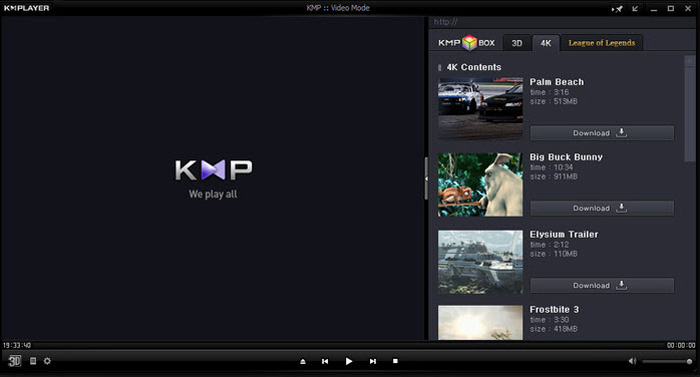
برنامج KMPlayer هو نوع واحد من مشغلات DVD الخالية من المنطقة. يمكنه إدارة مجموعة أقراص DVD بسهولة. يوفر لك طريقة بسيطة لتخصيص قائمة DVD والترجمة والمسارات الصوتية وتأثيرات التشغيل. وبالمثل ، فإنه يدعم ملفات ISO بشكل جيد.
الجزء 6. أسئلة وأجوبة لمشغل ISO
السؤال 1. ما هو ملف صورة ISO؟
ملف صورة ISO هو في الواقع نسخة من قرص مضغوط أو قرص DVD أو قرص Blu-ray بأكمله. وهي تتألف من محتويات بيانات من كل قطاع مكتوب على قرص ضوئي. يمكن إنشاء ISO بواسطة برنامج تصوير القرص من الأقراص الضوئية. يمكن نسخ محتويات القرص بالكامل بدقة في ملف ISO واحد. الاستخدام الأكثر شيوعًا لملف الصورة هو إعادة كتابته على قرص DVD أو قرص Blu-ray. تحتاج إلى الاعتماد على أداة خارجية لنسخ ملف صورة ISO على قرص DVD.
السؤال 2. كيف يمكن تركيب صورة ISO في نظام التشغيل Windows 10؟
يحتوي Windows 10 على طريقة مضمنة لتحميل ملفات صور ISO. يمكنك النقر بزر الماوس الأيمن فوقه ثم اختيار خيار التثبيت. بعد ذلك ، سيظهر ملف ISO كمحرك أقراص جديد ضمن هذا الكمبيوتر.
السؤال 3. كيفية إنشاء ملف ISO لنظام التشغيل Windows 10؟
عندما تريد إنشاء ملف ISO لنظام التشغيل Windows 10 ، يمكنك الانتقال إلى صفحة تنزيل Windows 10 وتثبيت أداة إنشاء الوسائط. عندما تصل إلى الصفحة ، يمكنك النقر فوق زر أداة التنزيل الآن. افتح برنامج الإنشاء وانقر فوق وسائط التثبيت مثل ملف ISO لجهاز كمبيوتر آخر. يمكنك اختيار اللغة والهندسة المعمارية وإصدار Windows. بعد ذلك ، اختر ملف ISO ثم التالي لبدء إنشاء ملف ISO لنظام التشغيل Windows 10.
السؤال الرابع: كيفية نسخ ملف ISO إلى فيديو MP4 رقمي؟
إذا كنت تريد نسخ محتوى ISO إلى فيديو رقمي بصيغة MP4 أو MOV، يمكنك تنزيل محوّل ISO لتحويل ملف صورة ISO إلى فيديو عالي الجودة.
السؤال 5. هل يمكن لـ Kodi تشغيل ملفات ISO؟
نعم ، يدعم Kodi أصلاً أفلام DVD-Video المخزنة في صور ISO و IMG DVD أو صور DVD-Video. يمكنك تنزيل Kodi مجانًا وإضافة ملف ISO إليه ثم بدء التشغيل بسهولة.
خاتمة
تحدّثنا في هذا المقال أساسًا عن ملفات ISO وكيفية تشغيلها. يمكنك الحصول من هذه الصفحة على 5 توصيات رائعة لأفضل مشغّلات ISO. عندما ترغب في تشغيل ملفات ISO أو أفلام DVD، يمكنك الاعتماد على أيٍّ منها.
-
 برنامج تعليمي لفتح ملفات ARF وتحويلها باستخدام WebEx ARF Player
 فيما يلي الخطوات التفصيلية لاستخدام WebEx ARF Player. يمكنك تشغيل ملفات WebEx ARF وتحويلها على جهاز كمبيوتر يعمل بنظام Windows و Mac بسهولة. علاوة على ذلك ، يمكنك تحسين تجربة التشغيل مع مشغل ARF ثلاثي الأبعاد أيضًا.
-
 GIF Player - أفضل 5 مشغلات GIF لأجهزة الكمبيوتر التي تعمل بنظام Windows و Mac و Android و iPhone
 ما هو البرنامج الذي يفتح ملفات GIF؟ كيف يمكنني عرض صور GIF على Android؟ هل يوجد في iPhone مشغل GIF لفتح صور GIF؟ يشارك هذا المنشور أفضل 5 مشغلات GIF لك.
-
 أفضل 8 مشغلات MKV لتشغيل ملفات MKV مع الترجمة المرغوبة
 عندما تريد تشغيل فيديو MKV بالترجمة المرغوبة ، يمكنك معرفة المزيد حول أفضل 8 مشغلات ملفات MKV للكمبيوتر الشخصي / Mac واختيار الملف المطلوب وفقًا لمتطلباتك.
