


 محول الفيديو النهائي
 مسجل الشاشة
 إصلاح الفيديو
اكتشف طرقًا لكيفية تشغيل ملفات MKV على PS4
لا يقتصر تشغيل الأفلام على جهاز Xbox One S فقط، فالآن تحاول PS4 مجاراة هذا التوجه. باستخدام كابل USB وعن طريق DLNA بات بإمكان PS4 الآن تشغيل ملفات MKV وMP4 وAVI وغير ذلك الكثير. هذا يعني أن ملفات MKV ضمن الصيغ التي يمكنك تشغيلها. للاطلاع على قائمة كاملة بجميع الصيغ المدعومة، قم بزيارة الموقع الرسمي لـ PS4. وبالإضافة إلى ذلك، فأنت ما كنت لتستمر في قراءة هذه المقالة لو لم تكن مهتماً بتشغيل ملف MKV على PS4. واصل القراءة، فمع تقدمك ستكتشف الطرق التي يمكنك من خلالها تشغيل ملفات MKV على PS4.

الجزء 1. هل يمكن تشغيل جميع ملفات MKV على PS4؟
هل يمكنني تشغيل ملفات MKV على PS4؟ بالتأكيد يمكنك ذلك. يدعم PS4 تنسيق ملف MKV. ولكن لا يمكن تشغيل جميع ملفات MKV بشكل صحيح. قد تواجه الفشل في اللعب. هذا لأنك تحتاج إلى تلبية المعايير التي حددها PS4. في الغالب ، يتم دعم H.264 / MPEG-4 AVC. تنطبق نفس القواعد إذا كنت ستقوم بتشغيل ملفات MKV من محرك أقراص USB. وفي الوقت نفسه ، يتم دعم ملفات الصوت MP3 و AAC LC و AC-3. معظم هذه التنسيقات هي تنسيقات Dolby Digital. إذا كنت تعتقد أنك قد استوفيت المعيار ، فيمكنك متابعة الخطوات الخاصة بكيفية لعب MKV على PS4 مباشرة.
الخطوة 1. قم بتنزيل وتثبيت DivX Media Server ثم شغّل المشغّل. بعد ذلك فعّل خيار المشاركة على جهاز الكمبيوتر لديك.
الخطوة 2. قم برفع أو استيراد ملف الـMKV إلى الخادم.
الخطوة 3. قبل الانتقال إلى الخطوة التالية، تأكد من أن كلاً من جهاز الكمبيوتر وPS4 متصلان بنفس شبكة الـWi‑Fi. بعد ذلك قم بتنزيل وتثبيت مشغل DivX Media Player على جهاز PS4. ثم افتح تطبيق مشغل الوسائط على PS4 واختر DivX Media Server من قائمة الأجهزة التي ستظهر.
الخطوة 4. أخيراً، ابحث عن قسم الفيديو ثم حدد الفيديو الذي تريد تشغيله وابدأ البث.
الجزء 2. دليل خطوة بخطوة حول كيفية تشغيل MKV على PS4 من USB
في هذه الأثناء ، إذا كنت تستخدم وحدة تخزين USB ، فتأكد من أنها إما بتنسيق FAT أو exFAT ، وإلا فلن يتم اكتشافها. إذا كنت تعتقد أنك جاهز وكان محرك الأقراص المحمول متوافقًا ، فراجع الدليل أدناه خطوة بخطوة.
الخطوة 1. شغّل جهاز PS4 وأدخل وحدة USB. انتقل إلى القائمة الرئيسية. ثم اختر Video واستمر في البحث حتى تجد اسم وحدة التخزين USB الخاصة بك.
الخطوة 2. عندما ترى قائمة أسماء الملفات، انقر على Display All لعرض جميع الملفات التي حفظتها على وحدة الـUSB. بعد ذلك انسخ الملف وانقله إلى جهاز PS4.
الخطوة 3. في النهاية، تأكد من توفر مساحة تخزين كافية لإكمال عملية النقل.
الجزء 3. طريقة بديلة للعب MKV على PS4 عبر Plex Server
إلى جانب DivX، هناك أيضاً مشغل بديل يمكنك استخدامه لتشغيل ملفات MKV على PS4، وهو خادم بث الوسائط المسمّى Plex. يتيح لك خادم الوسائط هذا بث مقاطع الفيديو عالية الجودة والموسيقى والبرامج التلفزيونية والبودكاست من جهاز الكمبيوتر. رغم أن بعض المستخدمين يواجهون مشكلات في تشغيل بعض ملفات MKV، إلا أنه لا يزال بالإمكان استخدامه كخيار بديل. وفي المقابل، إذا كنت مصرّاً على استخدام Plex وتشغيل ملف غير متوافق، فيُنصح بتحويل الفيديو. فبعض برامج التحويل قادرة على تحويل ملفات MKV إلى صيغة مدعومة من Plex. ومن خلال ضبط برنامج ترميز الفيديو، ومعدل الإطارات، ومعدل البت وغيرها من الإعدادات، يصبح ذلك ممكناً. هل يوجد أداة قادرة على فعل ذلك؟ نعم، يمكنك تجربة Video Converter Ultimate. نعم، هذه الأداة قادرة على ذلك. جرّب استخدامها لحل هذه المشكلة.
الخطوة 1. قم بتنزيل وتثبيت برنامج Video Converter Ultimate على جهاز الكمبيوتر.
تحميل مجانيلنظام Windows 7 أو أحدثتنزيل آمن
تحميل مجانيلنظام MacOS 10.7 أو أحدثتنزيل آمن
الخطوة 2. أضف الملفات التي تريد تحويلها بالنقر على Add files أو ببساطة سحب وإفلات الملف داخل واجهة البرنامج.
الخطوة 3. بعد ذلك، اختر الصيغة المدعومة من Plex عن طريق النقر على قائمة Convert to All المنسدلة.
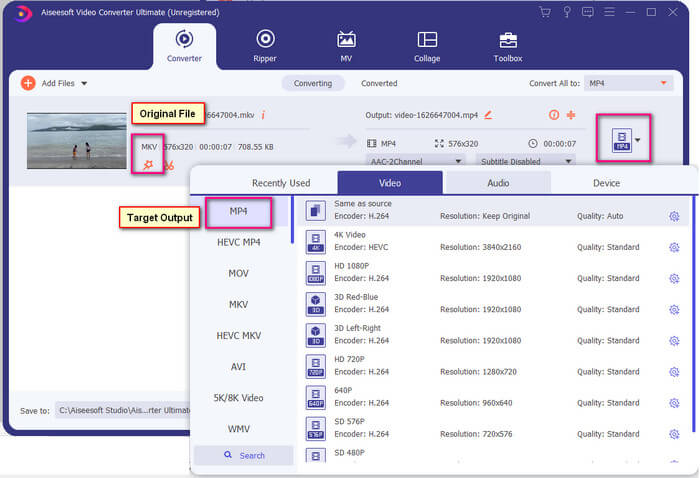
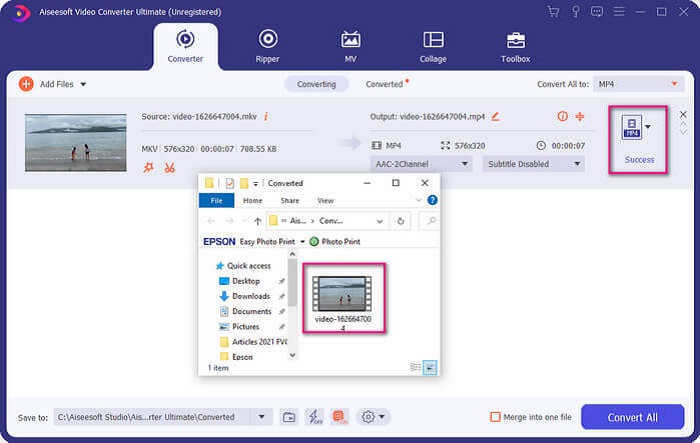
الخطوة 4. بعد تحديد الصيغة، انقر على زر Convert All لبدء عملية التحويل. عند انتهاء التحويل ستظهر نافذة المجلد الذي حُفظ فيه الملف تلقائياً.
هناك المزيد مع محول الفيديو النهائي. يمكنك التحقق من قائمة المزايا والعيوب أدناه للتعرف على الميزات الجيدة الأخرى التي تقدمها.
● يتم تحويل هذه الأداة بسرعة تصل إلى ثلاث ثوان.
● لديها تقنية تسريع يمكنها تحسين الملف المحول.
● يدعم جودة HD.
● يحتوي على ميزات تحرير مثل إضافة عوامل تصفية وتأثيرات أساسية.
● يمكنك ضبط الترجمة والمسار الصوتي.
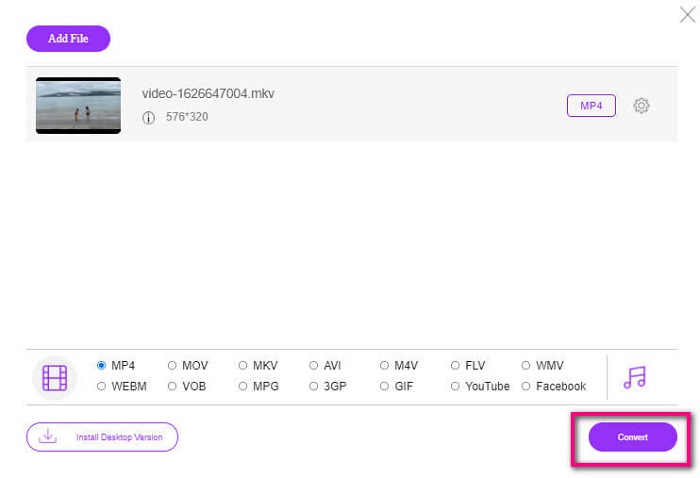
في حال كنت تبحث عن محوّل مجاني، يمكنك أيضاً تجربة أداة FVC Free Online Video Converter. قد لا تكون بمستوى برنامج Ultimate Video Converter، لكنها تظل قادرة على مجاراة احتياجاتك. من المؤكد أنها تستطيع تحويل الملف وجعله متوافقاً مع Plex أو DivX. وكل ما عليك فعله هو…
الخطوة 1. شغّل الأداة عن طريق زيارة الصفحة الرسمية المذكورة في الوصف.
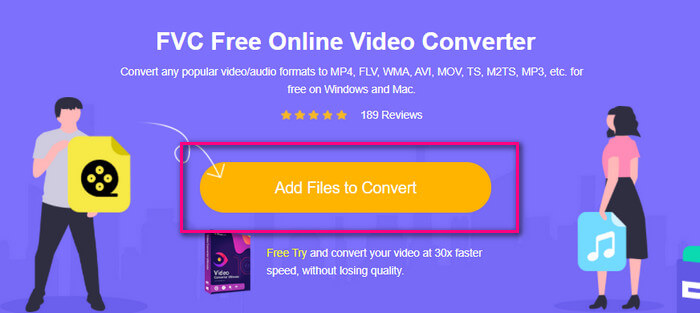
الخطوة 2. قم برفع الفيديو بالنقر على Add Files to Convert.
الخطوة 3. غيّر الصيغة عن طريق تحديد الدائرة الموجودة في الأسفل.
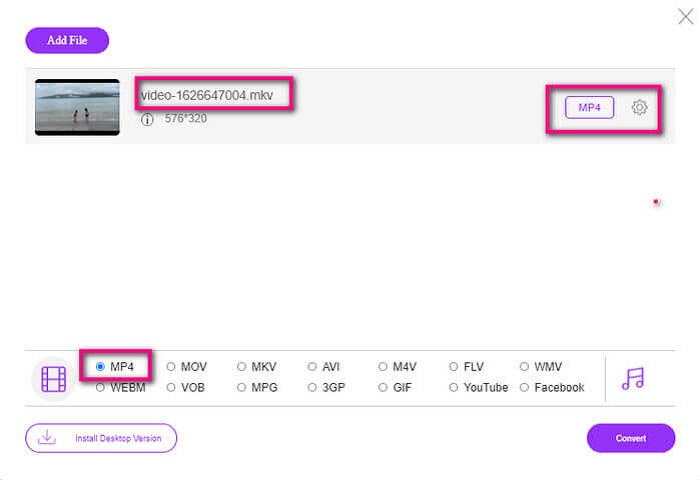
الخطوة 4. أخيراً، انقر على زر Convert ثم حدد موقع الحفظ الذي تريد تخزين الملف فيه، ومن هناك انقر على Okay. يمكنك النقر على أيقونة Folder لمشاهدة الملف المُحوَّل.
قراءة إضافية
تشغيل ملفات MKV في Windows Media Player
الجزء 4. مزيد من المعلومات حول تشغيل ملفات MKV على PS4
كم تكلفة جهاز PS4؟
يبلغ سعر التجزئة في السوق 399.99 دولارًا أمريكيًا في الولايات المتحدة وفي كندا 399.99 دولارًا كنديًا. قد تختلف الأسعار حسب سعر التجزئة في بلدك.
هل هناك إمكانية لتشغيل CC أو Close Caption MKV على PS4؟
نعم، يوجد. ستجده في إعدادات سهولة الوصول. المسار هو: انتقل إلى Settings في جهاز PS4، ثم Accessibility وبعدها اختر Display Closed Captions. من هناك انقر على Options لتفعيل الترجمة المغلقة.
إذا كان PS4 يدعم MKV ، فلماذا لا يتم تشغيل ملفاتي؟
كما هو مذكور أعلاه ، تحتاج إلى التأكد من أن ملف MKV يلبي معيار المشغل الذي تستخدمه. عليك فقط التحقق من متطلبات PS4 أو خادم دفق الوسائط الآخر. تحتوي معظم خوادم الوسائط أيضًا على تصنيف لتشغيل ملفات MKV.
ما هي التنسيقات التي يدعمها PS4؟
هناك العديد من تنسيقات الملفات التي يدعمها PS4. لكن ستلاحظ أن معظم التنسيقات غير مضغوطة وتحتوي على ملف كبير. على الرغم من أنه يدعم أيضًا الملفات غير المضغوطة مثل Mp4. وفي الوقت نفسه ، إليك قائمة التنسيقات التي نتحدث عنها: MKV و AVI و MPEG-2 PS و MPEG-2 TS و AVCHD و XAVC و MP4.
خاتمة
في الختام ، هناك العديد من الطرق التي يمكنك من خلالها تشغيل ملفات MKV بشكل مباشر أو غير مباشر على PS4. ما تم إدراجه هو أكثر الوسائط شيوعًا. DivX Stream Server و Plex ليست سوى بعض البدائل التي يمكنك استخدامها. يُنصح بشدة بتحويل الملف بدلاً من ذلك لتجنب المتاعب والكثير من العمليات.
-
 [محلول] لن يقوم مشغل VLC بتشغيل MKV ، وكيفية إصلاحه
 هل يدعم مشغل VLC ملفات MKV؟ لماذا لا يقوم VLC بتشغيل MKV؟ يشارك هذا المنشور 4 نصائح مفيدة لإصلاح مشغل VLC لن يقوم بتشغيل ملفات MKV.
-
 كيفية تشغيل ملفات MKV على iPad 2025
 كيف تلعب ملفات MKV على iPad 2؟ هل يمكنني تحويل MKV إلى MP4 للعب على iPad Pro / Air / 2؟ يشارك هذا المنشور طريقتين سهلتين للعب MKV على iPad.
-
 كيفية تنزيل MKV Codec في Windows Media Player للتشغيل السلس
 لا يمكن تشغيل فيديو MKV في Windows Media Player؟ يمكنك تنزيل برنامج ترميز MKV لبرنامج Windows Media Player مجانًا. على العكس ، قم بتحويل MKV لجعله قابلاً للتشغيل في Windows Media Player.
