


 محول الفيديو النهائي
 مسجل الشاشة
 إصلاح الفيديو
 تنزيل آمن
إصلاح رمز الخطأ 224003: كل ما تحتاج إلى معرفته
أقل ما يرغب الشخص في تجربته هو أن يرى ظهور Error Code 224003 على شاشته. يعد فهم الأسباب الشائعة لرمز الخطأ 224003، مثل مشكلات الشبكة وتوافق المتصفح والبرامج القديمة، أمرًا بالغ الأهمية لاستكشاف الأخطاء وإصلاحها بشكل فعال. معرفة الأدوات الصحيحة أمر ضروري عند التعامل مع مثل هذا الأمر، الأمر الذي يتطلب اتخاذ القرار لضمان عدم إتلاف ملف الفيديو بالكامل.
ستتعمق هذه المقالة في حلول مفصّلة خطوة بخطوة، تعالج كل سبب محتمل وتقدّم نصائح عملية لحل الخطأ. بنهاية هذا الدليل، ستكون مزوّدًا بالمعرفة اللازمة للتعامل مع تعقيدات رمز الخطأ 224003 وضمان تجربة رقمية سلسة. سواء كنت تواجه هذا الخطأ للمرة الأولى أو تعرّضت له مرارًا، يهدف دليلنا إلى تمكينك بالأدوات اللازمة لاستكشاف خطأ رمز الخطأ 224003 وإصلاحه ومنعه في المستقبل. احرص على قراءة المقالة كاملة اليوم حتى تعرف كيف تتعامل معه في حال تكرره مستقبلًا.

الجزء 1. فهم رمز خطأ الفيديو 224003
يمكن أن يظهر رمز الخطأ 224003 في أشكال مختلفة، وغالبًا ما يشير إلى وجود خلل أو مشكلة داخل النظام. قد يواجه المستخدمون هذا الخطأ أثناء استخدام تطبيقات أو خدمات بث أو متصفحات معينة، مما يؤدي إلى إزعاج كبير. لمعالجة هذا الخطأ وحله بشكل فعال، من الضروري فهم أسبابه المحتملة، المدرجة أدناه.
الأسباب الشائعة لرمز الخطأ 224003
◆ مشكلات الشبكة: قد يتسبّب الاتصال الضعيف أو غير المستقر بالإنترنت في ظهور رمز الخطأ 224003، خصوصًا عند بث المحتوى عبر الإنترنت. وهذا أيضًا سبب ظهور رمز الخطأ 232404.
◆ توافق المتصفح: قد لا تكون بعض المتصفحات متوافقة تمامًا مع التطبيق أو الخدمة، مما يؤدي إلى ظهور هذا الخطأ.
◆ البرامج القديمة: يمكن أن تكون البرامج القديمة، بما في ذلك المتصفحات والتطبيقات، عاملًا في حدوث هذا الخطأ.
◆ ملفات التخزين المؤقت أو ملفات تعريف الارتباط التالفة: قد تؤدي ملفات التخزين المؤقت المتراكمة أو ملفات تعريف الارتباط (الكوكيز) التالفة في متصفحك إلى إعاقة عمل التطبيق بشكل صحيح، مما ينتج عنه رمز الخطأ 224003.
في أي الحالات يحدث رمز الخطأ
◆ مشكلات في منصة البث: قد تؤدي المشكلات الموجودة على جهة خادم منصة البث، مثل الصيانة أو المشكلات التقنية أو الضغط العالي على الخوادم، إلى ظهور رمز الخطأ 224003. في مثل هذه الحالات، يكون تحكّم المستخدم في حل المشكلة محدودًا، وقد يحتاج إلى الانتظار حتى تقوم المنصة بمعالجتها.
◆ تسريع الأجهزة (Hardware Acceleration): قد يؤدي تفعيل تسريع الأجهزة في إعدادات متصفحك أحيانًا إلى مشكلات في التوافق مع بعض محتوى الفيديو، مما يتسبّب في ظهور رمز الخطأ 224003. قد يكون تعطيل تسريع الأجهزة حلًا محتملًا في مثل هذه الحالات، وكذلك لحل مشكلات تشغيل فيديو أخرى مثل ظهور الفيديو بشاشة خضراء، أو تجمّد الفيديو، وغير ذلك.
◆ عدم التوافق مع الجهاز: قد لا تكون بعض الأجهزة أو أنظمة التشغيل متوافقة بالكامل مع محتوى الفيديو، مما يؤدي إلى ظهور أخطاء أثناء التشغيل.
◆ جدار الحماية أو برامج الحماية على الشبكة: قد تقوم بعض برامج الأمان أو جدران الحماية بحظر بث محتوى فيديو معيّن، مما يؤدي إلى ظهور رمز الخطأ 224003.
◆ تعارض إضافات المتصفح: قد تتداخل بعض إضافات المتصفح أو الملحقات مع عمل مشغلات الفيديو عبر الإنترنت بشكل صحيح، مما يتسبّب في ظهور رمز الخطأ 224003.
من المهم أن نفهم أن الظروف المحددة التي أدت إلى ظهور رمز الخطأ 224003 قد تختلف؛ وبالتالي، قد تختلف أيضًا إجراءات استكشاف الأخطاء وإصلاحها. يعتمد تحديد السبب الأساسي على السياق الذي يحدث فيه الخطأ لمعالجة المشكلة بشكل صحيح.
الجزء 2. دليل خطوة بخطوة لحل الخطأ 224003
برنامج Aiseesoft لإصلاح الفيديو
يمكن أن يحدث الخطأ 224003 لأي شخص، في أي وقت، ومع أي ملف فيديو، وعندما يحدث هذا الخطأ قد ترى رسالة مثل: Error 224003: The video file cannot be played. يُعد Aiseesoft Video Repair أداة موثوقة لإصلاح المشكلات مثل ملفات الفيديو التالفة أو المعطوبة، بما في ذلك الخطأ 224003. يمكنه إصلاح مقاطع الفيديو بمختلف الصيغ، بما في ذلك MP4 وMOV وAVI وWMV وMKV وFLV. كما يدعم إصلاح مقاطع الفيديو التالفة بسبب الفيروسات أو البرمجيات الخبيثة أو غيرها من العوامل. اتبع هذا الدليل خطوة بخطوة لحل مشكلتك باستخدام Aiseesoft Video Repair واستعادة مقاطع الفيديو الخاصة بك بحالة ممتازة.
خطوات حل الخطأ 224003 باستخدام Aiseesoft Video Repair:
الخطوة 1. قم بزيارة موقع Aiseesoft الإلكتروني، ثم حمّل برنامج Video Repair واتبع تعليمات التثبيت.
تنزيل مجانيلنظام Windows 7 أو الأحدثتنزيل آمن
الخطوة 2. افتح Aiseesoft Video Repair ثم أضف الفيديو الذي يواجه رمز الخطأ 224003 عبر الرمز الأحمر +. انقر على الرمز الأرجواني + في الجهة اليمنى لإضافة فيديو عيّنة.
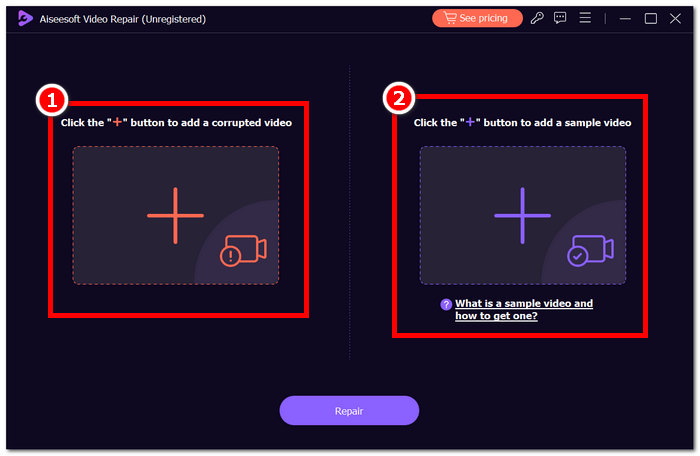
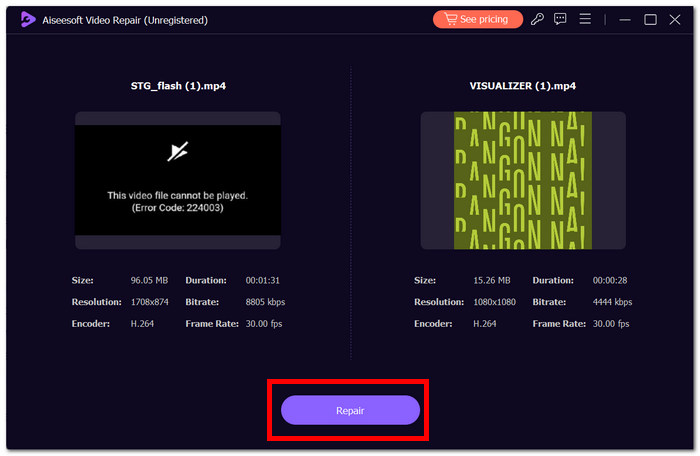
الخطوة 3. انقر على Repair، وسيقوم البرنامج بتحليل الفيديو وإصلاحه.
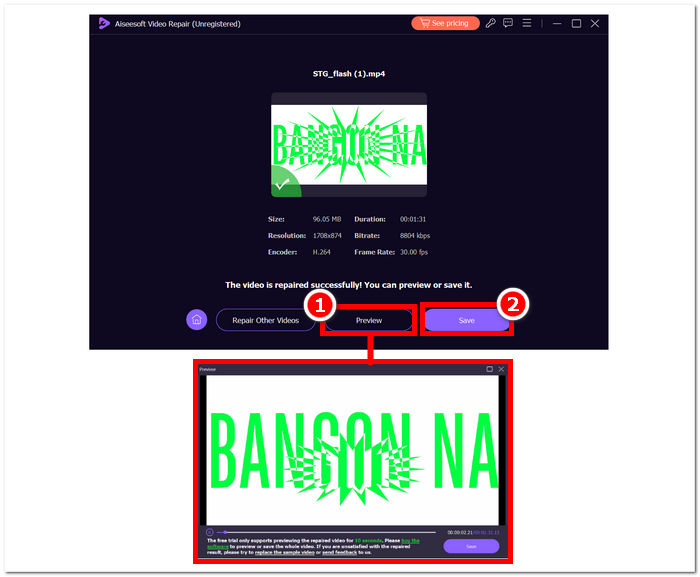
الخطوة 4. بعد الإصلاح، انقر على Preview للتحقق من النتيجة. انقر على Save ليتم تنزيل الفيديو الذي تم إصلاحه، ثم افتحه بواسطة مشغّل الوسائط لديك للتأكد من أن الخطأ 224003 قد تم إصلاحه.
نصائح إضافية:
◆ احتفظ بنسخة احتياطية من ملف الفيديو الأصلي قبل محاولة إجراء أي إصلاحات.
◆ تأكد من استخدام أحدث إصدار من Aiseesoft Video Repair للحصول على الأداء الأمثل.
من خلال اتباع هذه التعليمات خطوة بخطوة، يمكنك استخدام Aiseesoft Video Repair بكفاءة لمعالجة الخطأ 224003 والقضاء عليه، مما يعيد ملفات الفيديو الخاصة بك إلى حالة وظيفية وممتعة. تذكر حفظ الفيديو الذي تم إصلاحه في موقعك المفضل والاستمتاع بالمشاهدة دون انقطاع دون الإحباط الناتج عن الخطأ 224003. إذا واجهت أي تحديات أثناء العملية، فارجع إلى وثائق Aiseesoft Video Repair أو اطلب المساعدة من موارد الدعم الخاصة بهم للحصول على مزيد من التوجيه.
الجزء 3. الأسئلة الشائعة حول رمز الخطأ 224003
لماذا يستمر Firefox في قول رمز خطأ الفيديو 224003؟
قد ينشأ خطأ فيديو Firefox 224003 بسبب مشكلات الاتصال بالشبكة، أو تناقضات في إعدادات المتصفح، أو عدم التوافق مع محتوى الفيديو. لمعالجة هذا الخطأ، ابدأ بالتحقق من استقرار اتصالك بالإنترنت، والتأكد من تحديث متصفحك، ومسح ذاكرة التخزين المؤقت وملفات تعريف الارتباط في متصفحك. بالإضافة إلى ذلك، يمكن أن تساعد إزالة الملحقات مؤقتًا من متصفحك في تحديد تعارضات التوافق وحلها، مما قد يؤدي إلى القضاء على حدوث الخطأ 224003 أثناء تشغيل الفيديو.
هل إصلاح ملف الفيديو يقلل من جودة الفيديو؟
يمكن إصلاح ملف الفيديو دون المساس بالجودة إذا تم تنفيذه بشكل صحيح. تتناول هذه العملية في المقام الأول مشكلات مثل الفساد أو أخطاء التنسيق داخل الملف. من الضروري الاعتماد على أدوات إصلاح الفيديو الموثوقة، وكإجراء وقائي، قم بإنشاء نسخة احتياطية من ملف الفيديو الأصلي قبل البدء في أي إجراءات إصلاح.
هل يمكنك إصلاح رمز خطأ الفيديو عبر الإنترنت؟
لمعالجة رمز خطأ فيديو عبر الإنترنت مثل 224003، قم بتحديث الصفحة، وتحقق من اتصالك بالإنترنت، وقم بتحديث المتصفح الخاص بك. إذا استمرت المشكلة، فكر في تجربة متصفح مختلف للتوافق. إذا فشلت كل الخطوات الأخرى، فاتصل بدعم النظام الأساسي أو منتديات المجتمع للحصول على المساعدة في حل الخطأ واستعادة التشغيل السلس للفيديو.
خاتمة
قد يكون رمز الخطأ 224003 مزعجًا، لكن يمكنك التغلب عليه بالمعلومات الصحيحة وإجراءات استكشاف الأخطاء وإصلاحها المناسبة. من خلال تحديد الأسباب المحتملة مثل مشكلات الشبكة، وتوافق المتصفح، والبرامج القديمة، وتصحيحها، يمكنك إصلاح هذا الخطأ بسهولة واستعادة تجربة رقمية خالية من المشكلات. إذا واجهت رمز الخطأ 224003 مرة أخرى، فيُرجى الرجوع إلى دليلنا للحصول على حل تفصيلي خطوة بخطوة. ومع هذه الرؤى، ستصبح إحباطاتك التقنية شيئًا من الماضي، مما يتيح لك الاستمتاع بأنشطتك الرقمية دون انقطاع وبكل سهولة.
-
 ما هو الخطأ 0xc10100bf في الفيديو وكيفية إصلاحه
 هل لا يتم تشغيل الفيديو الخاص بك بسبب الخطأ 0xc10100bf، وتبحث عن طرق لإصلاحه؟ في هذه المقالة، ستتعرف على ماهيته وكيفية إصلاحه.
-
 حلول سريعة لإصلاح خطأ تعذر تشغيل الفيديو 150
 هل واجهت عدم القدرة المحبطة على تشغيل الفيديو الخطأ 150 أثناء تجربة مشاهدة الفيديو؟ لا تقلق لأننا حصلنا على معلومات حول كيفية إصلاحها.
-
 [دليل مفصل] كيفية إصلاح عدم تشغيل فيديو Google Drive على الكمبيوتر
 لا يتم تشغيل مقاطع الفيديو على Google Drive مع ظهور الخطأ "حدثت مشكلة أثناء تشغيل هذا الفيديو". يمكن أن يكون بسبب Google Drive نفسه أو مشاكل الكروم. ستقدم هذه المقالة 6 حلول بالتفصيل.
