


 محول الفيديو النهائي
 مسجل الشاشة
 إصلاح الفيديو
 تنزيل آمن
كيفية إصلاح مشكلة عدم عمل الصوت على iPhone [3 طرق سهلة]
هل جرّبت عددًا لا يحصى من الطرق لاستعادة الصوت في مقاطع فيديو الآيفون لديك، ومع ذلك ما زال الصوت لا يعمل؟ ليس الأمر أنه لا توجد طريقة لحل مشكلة صوت الفيديو على الآيفون، بل إنك كنت تحاول حلها بطريقة غير صحيحة. لذلك، في هذه المقالة سنستعرض 3 من أسهل الطرق لإصلاح مشكلة لا يوجد صوت في فيديو الآيفون الخاص بي. نحن ندرك أن هذه المشكلة مزعجة ومحبِطة للغاية. لذا، إذا كنت تعاني من هذه المشكلة ولا يمكنك الانتظار لحلها في مقاطع فيديو الآيفون لديك، فاقرأ هذه المقالة، وافهم سبب عدم تشغيل الصوت في مقاطعك، ثم أصلح المشكلة وفقًا لذلك.

الجزء 1. لماذا لا يوجد صوت في مقاطع الفيديو على جهاز iPhone الخاص بي
لماذا لا يصدر جهاز iPhone الخاص بي صوتًا أثناء تشغيل مقاطع الفيديو هو في الحقيقة سؤال ومشكلة يواجهها الكثيرون. حسنًا، هناك أسباب مختلفة لحدوث ذلك، ولكن هل تفهم حقًا لماذا يحدث هذا عادةً؟ فيما يلي الأسباب التي تجعل جهاز iPhone لا يصدر صوتًا أثناء تشغيل مقاطع الفيديو:
فيديو iPhone لا يحتوي على صوت في الصور
تطبيق Photos هو تطبيق معروف على نطاق واسع لإدارة الصور وتحريرها من إنتاج شركة Apple. وهو المكان الذي يمكن للمستخدمين من خلاله تخزين صورهم ومقاطع الفيديو الخاصة بهم وعرضها وتحريرها والمزيد! ورغم أن Photos عبارة عن منصة مرموقة لعرض مقاطع الفيديو وتشغيلها، إلا أنه في بعض الحالات لا يصدر تشغيل مقاطع الفيديو على هذا التطبيق أي صوت. وفيما يلي بعض الأسباب التي تجعل مقاطع الفيديو على iPhone لا تصدر أي صوت في Photos:
• قد يكون مستوى الصوت مكتومًا أو منخفضًا جدًا. تأكد من رفع مستوى صوت الآيفون وأن مفتاح الرنين غير مضبوط على الوضع الصامت.
• قد يكون ملف الفيديو تالفًا، مما يؤدي إلى تعطل مسار الصوت أو عدم تشغيله إطلاقًا.
• قد توجد مشكلة برمجية أو خطأ (Bug) في تطبيق الصور (Photos) يمنع تشغيل الصوت.
• قد يواجه تطبيق الصور صعوبة في قراءة ترميز الصوت (Audio Codec) للفيديو، خاصة إذا كان التنسيق غير مدعوم بالكامل.
• قد يكون الآيفون متصلًا بجهاز بلوتوث، مثل سماعة رأس أو مكبر صوت غير قيد الاستخدام حاليًا، مما يؤدي إلى إعادة توجيه الصوت بعيدًا عن الهاتف.
لا يوجد صوت في ألبوم الكاميرا لفيديو iPhone
عند التصوير مباشرة على جهاز iPhone، يمكنك معاينة الفيديو من خلال تشغيله من ألبوم الكاميرا. ومع ذلك، لا يواجه بعض مستخدمي iPhone أي صوت عند تشغيل مقاطع الفيديو من ألبوم الكاميرا، مما يجعلهم يشعرون بالانزعاج والحيرة بشأن سبب عدم وجود صوت في مقاطع الفيديو الخاصة بهم. فيما يلي بعض الأسباب التي تجعل الصوت لا يعمل على iPhone عند تشغيله في ألبوم الكاميرا:
• قد يكون الميكروفون محجوبًا أو معطّلًا أثناء التسجيل، مما ينتج عنه عدم التقاط أي صوت.
• إذا كان الآيفون في وضع عدم الإزعاج (Do Not Disturb)، فقد يمنع تشغيل الأصوات عند معاينة الفيديوهات في ألبوم الكاميرا (Camera Roll).
• قد يكون الآيفون في الوضع الصامت، مما قد يؤدي إلى تشغيل الفيديو بدون صوت.
لا يوجد صوت في iPhone عند تشغيل مقاطع الفيديو في IG
قد يشكل تشغيل مقاطع الفيديو على Instagram مشكلة في بعض الأحيان. يواجه البعض عدم القدرة على تشغيل الفيديو؛ وهناك بعض الحالات التي لا يتم فيها تشغيل الصوت فقط عند تشغيل مقاطع الفيديو على IG. الآن، لفهم سبب حدوث ذلك بشكل أفضل، فيما يلي الأسباب التي تجعل iPhone لا يعمل بصوت عند تشغيل مقاطع الفيديو على IG:
• قد يكون إنستغرام قد كتم الفيديو بشكل افتراضي، ما يتطلب من المستخدمين الضغط على أيقونة مكبر الصوت لتفعيل الصوت.
• قد يكون مستوى الصوت داخل تطبيق إنستغرام منخفضًا أو مكتومًا، بشكل منفصل عن مستوى صوت نظام الآيفون.
• قد تكون هناك مشكلة مؤقتة أو خطأ (Bug) في تطبيق إنستغرام، يتطلب إعادة تشغيله أو تحديثه.
• قد يؤدي ضعف أو عدم استقرار اتصال الشبكة إلى تحميل الفيديو بشكل غير صحيح، ما ينتج عنه غياب الصوت.
• قد يكون الآيفون مضبوطًا على الوضع الصامت أو الاهتزاز، مما قد يؤثر في مخرجات الصوت داخل تطبيق إنستغرام.
الجزء 2. حلول لإصلاح مشكلة عدم وجود صوت على iPhone
الآن بعد أن فهمت بعض الأسباب التي تجعل جهاز iPhone الخاص بك لا يصدر صوتًا أثناء تشغيل مقاطع الفيديو، فقد حان الوقت لمعرفة كيفية إصلاح هذه المشكلة.
الطريقة الأولى: استخدام إصلاح فيديو FVC
عندما لا يصدر الآيفون أي صوت في مقاطع الفيديو بسبب تشغيل فيديو تالف، فإن الحل الأمثل لذلك هو استخدام أداة FVC Video Repair. نعلم جميعًا أنه عندما يتلف ملف الفيديو، فإن ذلك لا يؤثر فقط في إمكانية تشغيل الصورة، بل ينعكس أيضًا على الصوت، مما يؤدي إلى مشاكل مثل اختفاء الصوت. يمكن أن يتسبب تلف ملف الفيديو في تعطيل التزامن بين مساري الصورة والصوت أو حتى إزالة مسار الصوت بالكامل أو إتلافه، مما ينتج عنه تشغيل صامت. بناءً على ذلك، صُممت أداة FVC Video Repair لمعالجة هذه المشكلات، واستعادة السلامة البصرية للفيديو مع الصوت المصاحب له، لضمان تجربة تشغيل سلسة ومليئة بالصوت.
الخطوة 1. أولًا، تفضّل بزيارة موقعهم الرسمي. ثم قم بتنزيل الأداة وتثبيتها على جهازك.
تنزيل مجانيلأنظمة Windows 7 أو الأحدثتنزيل آمن
تنزيل مجانيلـ MacOS 10.7 أو الأحدثتنزيل آمن
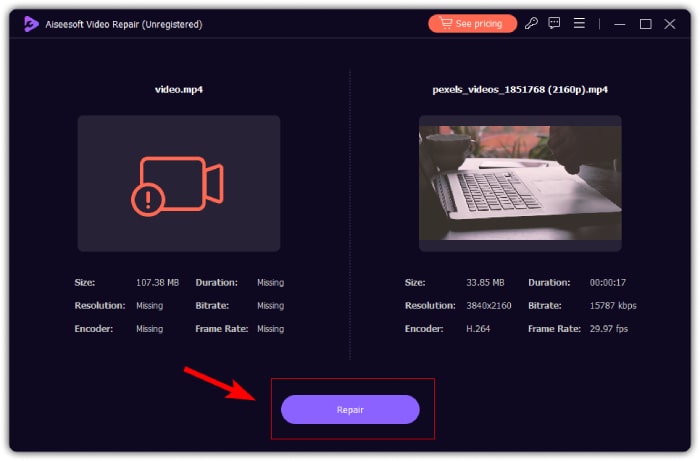
الخطوة 2. بعد ذلك، أضف الفيديو التالف عن طريق النقر على زر العلامة الحمراء +، بنفس الطريقة التي نقرت بها على زر العلامة الزرقاء + لإضافة الفيديو النموذجي. بعد ذلك، انقر على زر Repair لبدء إصلاح مشكلة الصوت.
الخطوة 3. أخيرًا، انقر على زر Preview لمعاينة الفيديو الذي تم إصلاحه والتأكد من أن الصوت قد تم استعادته الآن. عند نجاح عملية الإصلاح، يمكنك حفظه بالضغط على زر Save.
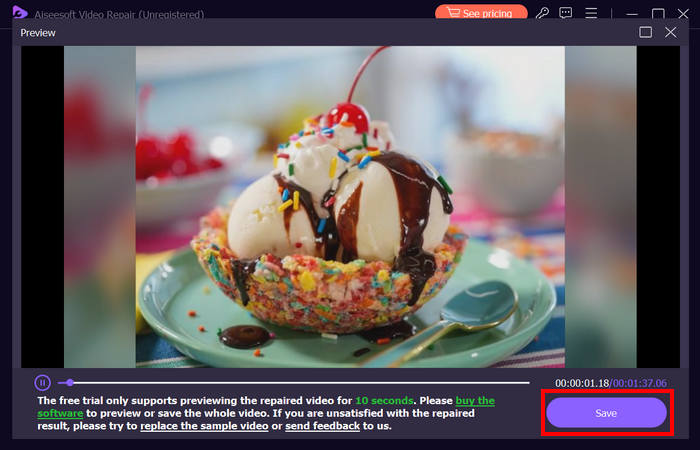
يمكن لبرنامج FVC Video Repair إصلاح مشكلة عدم وجود صوت في مقاطع الفيديو على iPhone بسهولة. بفضل خوارزمية الذكاء الاصطناعي الأحدث والكشف التلقائي عن المعلومات الحيوية وإصلاحها مباشرة، يمكنه استعادة صوت الفيديو على iPhone بفعالية.
الطريقة 2: استخدام FVC Picked Video Converter Ultimate
في المقابل، إذا كانت مشكلتك ناتجة عن مسار صوت مفقود، أي أن الجزء الصوتي من الفيديو مفقود أو تالف أو غير مُرمَّز بشكل صحيح، يمكنك استخدام الأداة المختارة من FVC وهي Video Converter Ultimate. يمكن لهذه الأداة مساعدتك في إصلاح مسار الصوت المفقود عن طريق تحويل الفيديو إلى تنسيق متوافق. لإصلاح مشكلة عدم تشغيل الصوت في الآيفون بسبب مسار صوت مفقود، اتبع الخطوات أدناه:
الخطوة 1. إذا لم تكن الأداة مثبتة على جهاز الكمبيوتر لديك، فقم أولًا بتنزيلها وتثبيتها على حاسوبك.
تنزيل مجانيلنظام Windows 7 أو أحدثتنزيل آمن
تنزيل مجانيلنظام MacOS 10.7 أو أحدثتنزيل آمن
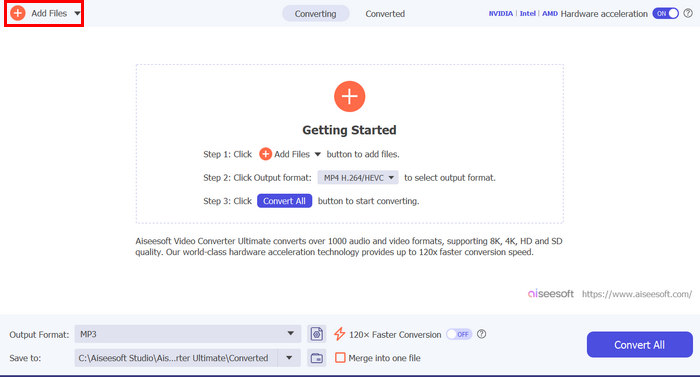
الخطوة 2. بعد ذلك، أضف الفيديو الذي لا يعمل فيه الصوت على الآيفون عن طريق النقر على زر Add Files.
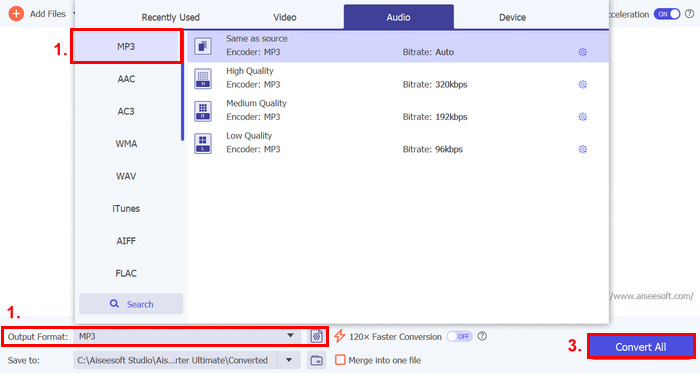
الخطوة 3. الآن، انقر على Output Format، واختر MP3، ثم حدد من القائمة تنسيق الصوت الذي تريده لفيديوك. وأخيرًا، انقر على زر Convert All لحفظ ملفك.
تُعد أداة Video Converter Ultimate كاملة الميزات هذه التي تم اختيارها من قبل FVC أداة مثالية لأي مشكلة تتعلق بالفيديو والصوت. وبصرف النظر عن المشكلة، سواء كانت ملفًا تالفًا أو برنامج ترميز غير صحيح أو تنسيقًا غير مدعوم، فإن هذه الأداة قادرة على تقديم المساعدة حقًا.
الطريقة 3: إعادة تشغيل iPhone
إذا كان جهاز iPhone الخاص بك يعاني من بعض مشكلات النظام التي تؤثر على الصوت عند تشغيل مقاطع الفيديو، فيمكنك ببساطة إعادة تشغيل جهاز iPhone الخاص بك. وبهذه الطريقة، يمكنك تحديث نظام تشغيل الجهاز، مما قد يؤدي إلى إزالة الخلل المؤقت أو الأخطاء التي قد تتسبب في مشكلة الصوت. إليك كيفية إعادة تشغيل جهاز iPhone الخاص بك ببساطة لإصلاح مشكلة عدم وجود صوت في الفيديو على جهاز iPhone:
لأجهزة iPhone X وما بعدها
الخطوة 1. لإعادة تشغيل الآيفون، اضغط مطولًا على الزر الجانبي وأحد زري رفع أو خفض الصوت حتى يظهر شريط تمرير إيقاف التشغيل على الشاشة.
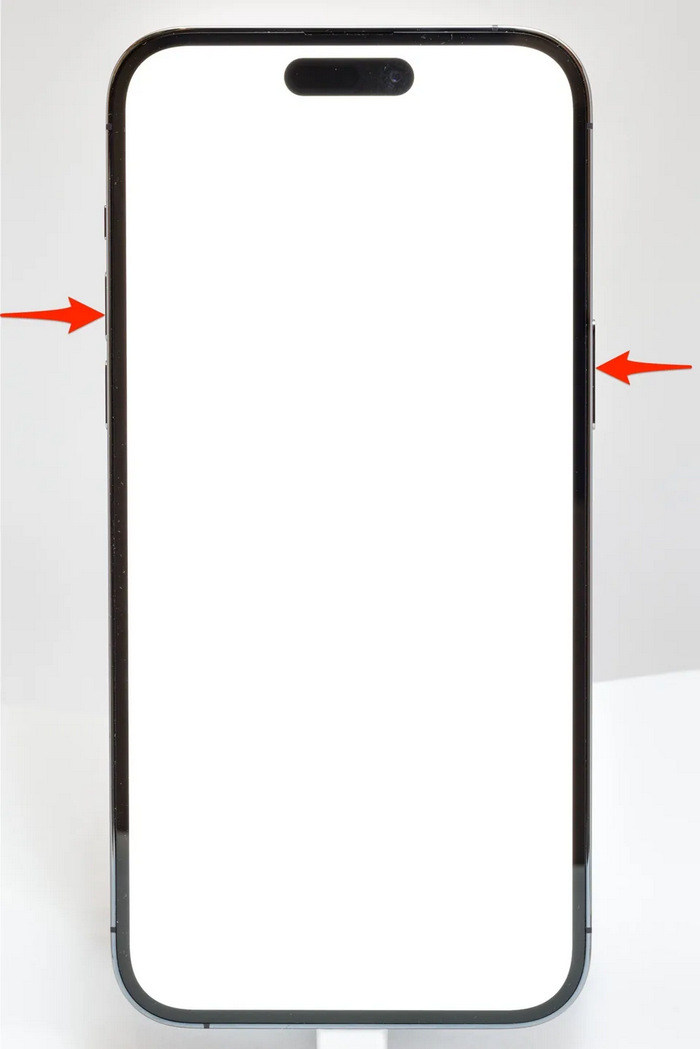
الخطوة 2. اسحب شريط التمرير حتى يتم إيقاف تشغيل الآيفون.
الخطوة 3. الآن، لإعادة تشغيله اضغط على الزر الجانبي.
لأجهزة iPhone 6 و7 و8 وSE
الخطوة 1. أولًا، تحتاج إلى الضغط مع الاستمرار على الزر الجانبي.
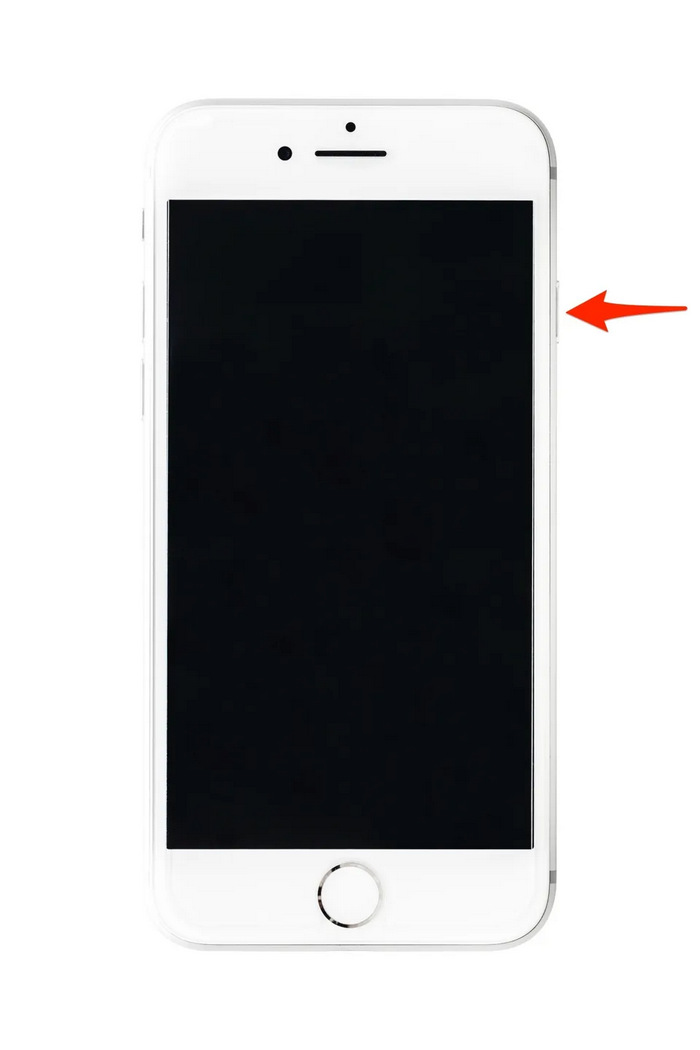
الخطوة 2. انتظر حتى يظهر شريط تمرير إيقاف التشغيل، ثم اسحب الشريط لإيقاف تشغيل الجهاز.
الخطوة 3. الآن، لإعادة تشغيله اضغط على الزر الجانبي.
هذه الطرق سهلة التنفيذ ولن تتطلب منك استخدام أي أداة خارجية. ومع ذلك، فهي حل أساسي وشائع للغاية، ولا تضمن إصلاحًا كاملاً لمشكلة عدم وجود صوت في الفيديو على جهاز iPhone.
الجزء 3. الأسئلة الشائعة حول Stellar Repair for Video
ما هي أجهزة iPhone التي تدعم Dolby Vision أو الصوت DTS؟
تدعم هواتف iPhone من سلسلة iPhone 12 والإصدارات الأحدث تقنية Dolby Vision، التي تعمل على تحسين جودة الفيديو من خلال تحسين الألوان والتباين. ومع ذلك، لا تدعم هواتف iPhone تقنية الصوت DTS بشكل مباشر، حيث تستخدم تقنيات صوتية أخرى مثل Dolby Atmos.
هل يمكن تشغيل FLAC auan dio على iPhone؟
نعم، يمكنك تشغيل الصوت بتنسيق FLAC على جهاز iPhone الخاص بك، ولكنك ستحتاج إلى تطبيق تابع لجهة خارجية مثل VLC أو مشغل صوت متخصص، لأن تطبيق الموسيقى المدمج في جهاز iPhone لا يدعم تنسيق FLAC بشكل أصلي.
هل سيتم تشغيل الصوت في وضع صامت على iPhone؟
لا، لن يتم تشغيل الصوت في مقاطع الفيديو إذا كان جهاز iPhone الخاص بك في وضع صامت. لسماع الصوت، ستحتاج إلى إيقاف تشغيل وضع الصامت عن طريق قلب المفتاح الموجود على جانب جهاز iPhone الخاص بك.
خاتمة
تختلف أسباب مشكلة عدم وجود صوت في فيديو الآيفون وكذلك تختلف طرق حلها. والآن بعد أن عرفت كيفية إصلاح هذه المشكلة، نأمل ألّا تشعر بالإحباط إذا واجهتها مرة أخرى في أي وقت. ولكن في الوقت الحالي، إذا كانت لديك المشكلة نفسها، فيمكنك تجربة أي من الطرق الموضحة في هذه المقالة.
-
 أفضل طريقتين لتحويل فيديو FLV إلى iPhone مجانًا
 يشارك هذا الدليل الملموس طريقتين سهلتين لمساعدتك على تعلم كيفية تحويل ملفات FLV إلى فيديو iPhone أو العديد من التنسيقات الأخرى دون دفع فلس واحد.
-
 [محلول] كيفية إصلاح مقاطع الفيديو التي لا يتم تشغيلها على iPhone بخطوات مفصلة
 لا يمكن تشغيل مقاطع الفيديو المحلية في المعرض على جهاز iPhone الخاص بك من خلال مشغل الفيديو الافتراضي؟ هل تحدث مقاطع فيديو YouTube عبر الإنترنت التي لا يتم تشغيلها على iPhone دائمًا؟ فيما يلي 5 حلول لمساعدتك في هذه المقالة.
-
 دليل ملموس لتحميل مقاطع الفيديو بتنسيق FLV على موقع YouTube
 تحميل FLV على يوتيوب ولكن فشل؟ يمكنك حل هذه المشكلة بنفسك وتحويل FLV إلى برامج الترميز المدعومة على YouTube باتباع دليلنا المفصل خطوة بخطوة.
