


 محول الفيديو النهائي
 مسجل الشاشة
 إصلاح الفيديو
 تنزيل آمن
الإجراءات التفصيلية لتحويل ملفات AVI إلى تنسيق M4V
تنسيق حاوية الوسائط المتعددة AVI، وهو اختصار لـ Audio Video Interleaved، هو أحد خصائص برنامج الفيديو في نظام ويندوز. فهو يتيح تشغيل الصوت والفيديو في الوقت نفسه مدمجين في ملف واحد. وبفضل إمكاناته الفريدة، بما في ذلك التحكم المتزامن والعرض في الوقت الفعلي، أصبح AVI سريعًا من أكثر صيغ الفيديو استخدامًا. ولكن إذا أردت تشغيل الفيديو على جهاز Mac، فيجب عليك تحويل AVI إلى M4V لأن M4V هو تنسيق تابع لشركة Apple يمكن تشغيله على iTunes وApple QuickTime Player وأجهزة iOS. وقد ترغب أحيانًا في تحويل ملفات .avi على جهاز Mac إلى تنسيق عالمي مثل M4V. في هذه الحالة، يُنصح بتحويل AVI إلى M4V ليعمل بشكل صحيح على نظام Mac OS. سنعرض لك أفضل الطرق لـتحويل AVI إلى M4V باستخدام تطبيقات عبر الإنترنت وأخرى بدون اتصال بالإنترنت.

الجزء 1: مقدمة إلى AVI و M4V
| AVI | M4V | |
| اسم الملف | تداخل الصوت والفيديو | فيديو MPEG-4 |
| امتداد الملف | .avi | .m4v |
| وصف | يعد تنسيق ملف AVI أحد أشهر حاويات الوسائط المتعددة التي تم إنشاؤها على الإطلاق. تم إتاحة الاختصار AVI ، الذي يشير إلى الصوت والفيديو المتداخل ، في البداية للجمهور من قبل Microsoft في عام 1992 كمكون من إطار عمل الوسائط المتعددة الخاص بهم ، "فيديو لنظام التشغيل Windows". يمكن أن يحتوي ملف AVI بملحق اسم الملف .avi على محتوى متزامن من الفيديو والصوت لأنه تنسيق حاوية. وبالتالي ، يمكن للمؤلفين تحرير وتشفير تسلسلات الصوت والفيديو أو تسلسلات الفيديو باستخدام المعيار. | أنشأت Apple امتداد الملف M4V ، والذي يشبه بشكل ملحوظ امتداد ملف MP4 ، لمحتوى متجر iTunes. أجهزة Apple هي الوحيدة التي يمكنها تشغيل ملفات M4V. للتشغيل على أجهزة Apple ، يمكن تحويل تنسيقات الفيديو الأخرى مثل MP4 و MOV إلى M4V. يتمثل الاختلاف الأساسي بين تنسيقات ملفات M4V و MP4 في أن الأول يدعم حماية حقوق النشر الخاصة بـ DRM ، والذي يحظر انتهاك حقوق الطبع والنشر لمحتوى الوسائط. يجب أن يمنح الكمبيوتر الإذن بتسجيل الدخول إلى حساب iTunes لشراء ملف الوسائط لتشغيل ملف M4V محمي بواسطة DRM. ومع ذلك ، إذا لم تكن الملفات محمية بنظام DRM ، فيمكن للمستخدم ببساطة إعادة تسمية امتداد الملف M4V إلى MP4 لجعله متوافقًا مع الأجهزة غير التابعة لـ Apple. |
| طورت بواسطة | مايكروسوفت | شركة آبل |
| البرامج المرتبطة | مشغل الميديا VLC مشغل آبل كويك تايم برنامج Adobe Premiere Pro 2020 ويندوز ميديا بلاير | برنامج KMPlayer ميديا بلاير كلاسيك زووم بلاير \ مشغل الميديا VLC |
| فئة الملف | فيديو | فيديو |
| نوع التمثيل الصامت | فيديو / x- فيديو | فيديو / x-m4v |
الجزء 2: أفضل طريقة لتحويل AVI إلى M4V
هل تريد تحويل AVI إلى M4V مجانًا؟ يمكنك استخدام أداة FVC Free Video Converter Online. يمكن لهذه الأداة بسهولة تحويل تنسيق ملف AVI إلى M4V. كما أنها تدعم المزيد من صيغ الفيديو مثل FLV وMP4 وMOV وWMA وغيرها. وإذا كنت تخطط لتحويل عدة ملفات AVI إلى صيغ ملفات مختلفة، يمكنك استخدام هذا التطبيق لأنه يقدّم عملية تحويل دفعي. يمكنك أيضًا تعديل الفيديوهات قبل التحويل، مثل تغيير معدل الإطار والدقة ومعدل البت. بالإضافة إلى ذلك، يمكن لـ FVC Free Video Converter Online تحويل ملفات الصوت مثل MP3 وAAC وAC3 وFLAC وغيرها.
ميزات
◆ تحويل العديد من تنسيقات ملفات الفيديو ، مثل M4V و AVI و MP4 و MOV و VOB و FLV و WMV وما إلى ذلك.
◆ يمكن تغيير دقة الفيديو ومعدل البت ومعدل الإطارات.
◆ تحويل ملفات الصوت مثل MP3 ، AAC ، AC3 ، FLAC ، إلخ.
اتبع الإرشادات البسيطة أدناه لتحويل AVI إلى M4V بسهولة.
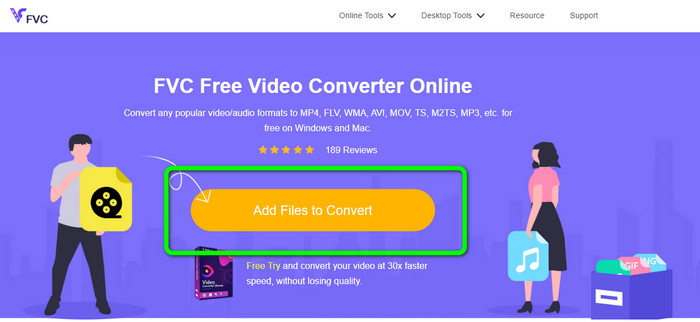
الخطوة 1: أولًا، افتح المتصفح وانتقل إلى موقع FVC Free Video Converter Online. اضغط زر Add Files to Convert لتحميل ملف AVI.
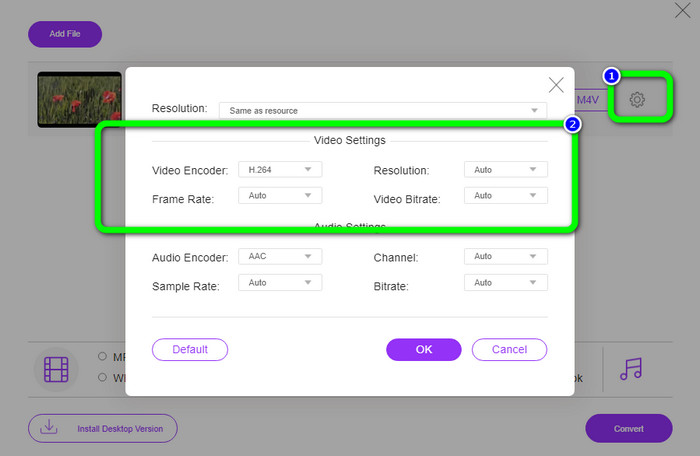
الخطوة 2: إذا رغبت في تغيير دقة الفيديو أو معدل الإطار أو معدل البت، انقر على أيقونة الإعدادات في الجهة اليسرى من الواجهة. بعد الانتهاء من التعديلات، اضغط OK.
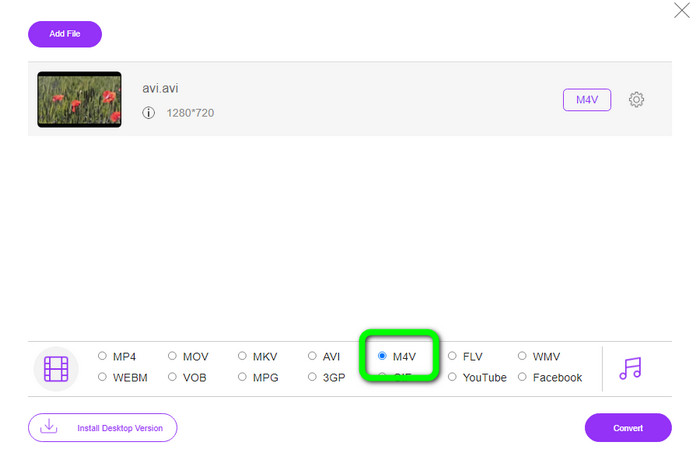
الخطوة 3: بعد ذلك، في الجزء السفلي من الواجهة، اختر ملف M4V كصيغة الإخراج.
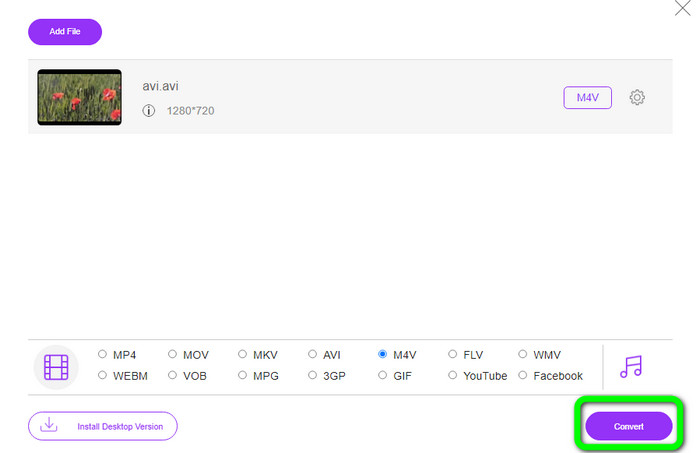
الخطوة 4: وأخيرًا، لحفظ ملف الفيديو، انقر زر Convert. انتظر عملية التحويل ثم قم بتنزيل الناتج النهائي.
الجزء 3: طريقة سهلة لتحويل AVI إلى M4V على نظامي التشغيل Windows و Mac
محول ممتاز آخر يمكنك استخدامه هو FVC Video Converter Ultimate. يمكن لهذه الأداة تحويل AVI إلى M4V على نظام ويندوز. يستطيع البرنامج تحويل ملفاتك على الفور لأنه يوفر عملية تحويل عالية السرعة، أسرع بـ 30 مرة. كما يمكنك تحويل ملفات متعددة في الوقت نفسه لأنه يتيح التحويل الدفعي. بالإضافة إلى ذلك، يمتاز بأسلوب استخدام بسيط وواجهة بديهية مثالية للمبتدئين. علاوة على ذلك، لا يقتصر هذا البرنامج دون اتصال على نظام ويندوز فقط، بل هو متوفر أيضًا على نظام Mac. وبالإضافة إلى ذلك، يمكنك إجراء بعض التعديلات على الفيديوهات أثناء التحويل، مثل تحسينها وقصها وإضافة المرشحات وغير ذلك.
الميزات
◆ يحول أكثر من 100 ملف فيديو ، بما في ذلك M4V و MP4 و AVI و FLV و MKV و MOV و VOB و WMV والمزيد.
يتوفر إنشاء مجمعة باستخدام قوالب وفلاتر مجانية.
◆ يقدم صانع الموسيقى والفيديو.
◆ تعديل الفيديوهات باستخدام أداة تحسين الفيديو، وقص الفيديو، وإزالة العلامة المائية، وضاغط الفيديو، وغيرها.
◆ تحويل تنسيقات ملفات الصور ، مثل BMP و JPG و PNG وما إلى ذلك.
تسريع الفيديو وإبطائه.
استخدم الأدلة التفصيلية أدناه لمعرفة كيفية تحويل AVI إلى M4V على نظامي التشغيل Windows و Mac باستخدام FVC Video Converter Ultimate. سوف نستخدم نسخة ويندوز.
الخطوة 1: قم بتنزيل FVC Video Converter Ultimate على نظام ويندوز أو Mac بالضغط على زر التنزيل.
تحميل مجانيلنظام Windows 7 أو أحدثتنزيل آمن
تحميل مجانيلنظام MacOS 10.7 أو أحدثتنزيل آمن
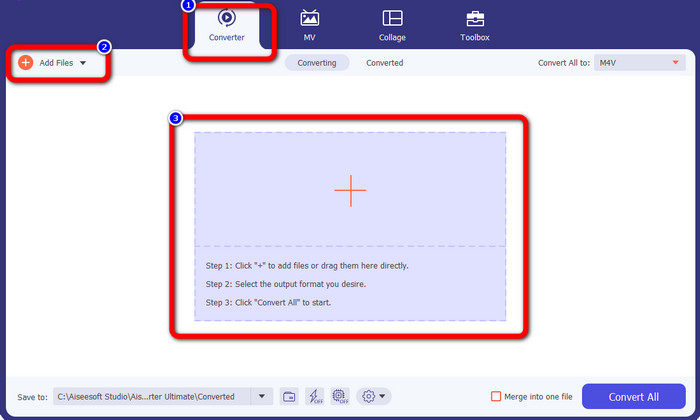
الخطوة 2: بعد فتح البرنامج، انتقل إلى لوحة Converter. لديك ثلاث طرق لإدراج ملف AVI. أولًا، يمكنك النقر على زر Add File في المربع الثاني. الخيار الثاني هو النقر على علامة Plus في المربع الثالث. وأخيرًا، يمكنك إسقاط الملف مباشرة في المنتصف.
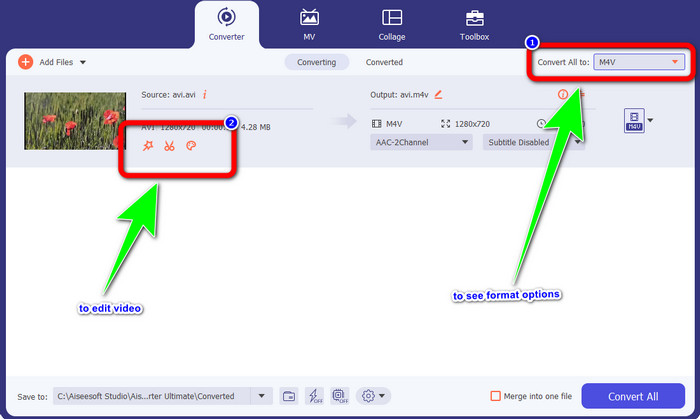
الخطوة 3: بعد إضافة ملف AVI، انقر زر Convert All to لعرض خيارات الصيغ، ثم اختر صيغة ملف M4V. بعد ذلك، إذا أردت تعديل الفيديو، يمكنك الانتقال إلى المربع الثاني. يمكنك استخدام الأدوات لتعديل الفيديو مثل إضافة المرشحات، وتدوير الفيديو وقصه، والقص الزمني، وغير ذلك.
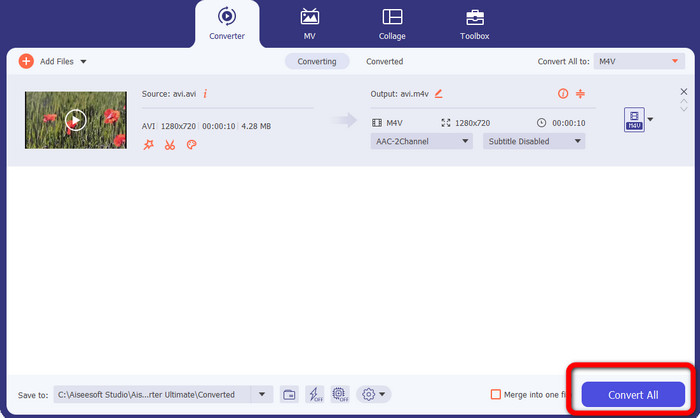
الخطوة 4: في الخطوة الأخيرة، انقر زر Convert. انتظر عملية التحويل السريعة ثم احفظ الفيديو المحوّل.
الجزء 4: كيفية تحويل AVI إلى M4V باستخدام فرملة اليد
يُعَدّ Handbrake محولًا آخر يمكنه تحويل AVI إلى M4V مجانًا. فهو قادر على تحويل عدة ملفات مثل WEBM وM4V وMP4 وMKV وغيرها. بمساعدة هذه الأداة، يمكنك بسهولة تحويل العديد من الملفات. ومع ذلك، يعد Handbrake معقد الاستخدام؛ إذ تحتاج إلى امتلاك معرفة كافية بهذا المحول. كما أن عملية تثبيته مربكة؛ إذ يجب عليك تنفيذ العديد من الإجراءات قبل استخدامه، وهو ما يستغرق وقتًا طويلًا للمستخدمين.
الخطوة 1: قم بتنزيل برنامج Handbrake على جهاز الكمبيوتر.
الخطوة 2: اختر ملف AVI الذي تريد تحويله.
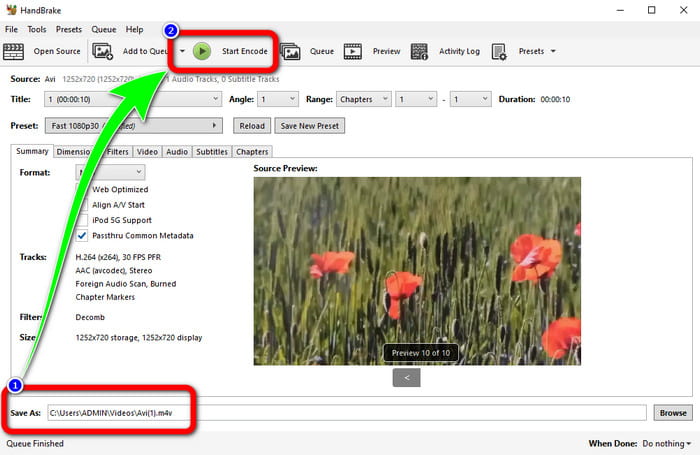
الخطوة 3: انتقل إلى خيار الصيغة واختر M4V. ثم ابدأ عملية التحويل بالنقر على زر Start.
الجزء 5: أسئلة وأجوبة حول تحويل AVI إلى M4V
1. كيفية تحويل AVI إلى M4V على نظام Mac؟
يمكنك استخدام FVC Video Converter Ultimate. يمكن لهذا المحول بسهولة تحويل AVI الخاص بك إلى M4V باستخدام جهاز Mac الخاص بك.
2. ما هو حجم ملف AVI؟
نظرًا لأن مقاطع فيديو AVI غير مضغوطة ، فإنها تشغل مساحة أكبر على القرص الثابت. على سبيل المثال ، يمكن أن تستخدم ساعة واحدة من لقطات فيديو 352x288 AVI ما يصل إلى 33 جيجابايت (3300 ميجابايت) من مساحة القرص الثابت.
3. هل ملف AVI عالمي؟
نعم. على الرغم من أن صيغًا أحدث مثل MP4 أو MOV أو WMV قد حلت محل صيغة AVI إلى حد كبير، فإن الأفراد ما زالوا يستخدمون AVI بسبب سهولة نقله. فبإمكان أي تقريبًا أي حاسوب أو جهاز أن يشغّل ملفات AVI.
خاتمة
يوضح لك هذا الدليل أفضل الطرق لـتحويل ملفات AVI إلى M4V باستخدام ثلاثة محوّلات. ولكن إذا كنت تريد عملية تحويل فائقة السرعة، فاستخدم FVC Video Converter Ultimate. وإذا أردت طريقة أكثر بساطة، فاستخدم FVC Free Video Converter Online.
-
 يجب أن تعرف أفضل 5 مشغلات M4V لنظام التشغيل Windows / Mac / Android / iOS
 عندما لا تتمكن من تشغيل مقاطع الفيديو M4V الخاصة بك على مشغل QuickTime ، يجب أن تتعلم المزيد من مشغلات M4V الخمسة الممتازة لنظام التشغيل Windows و Mac و Android و iOS من هذه المقالة
-
 AVI VS MP4 - الاختلافات والتشابهات بين تنسيقات AVI و MP4
 ما هو تنسيق الفيديو الأفضل ، AVI أم MP4؟ إذا كنت ترغب في الحصول على مقارنة مفصلة ، يمكنك التحقق من هذه المقالة AVI VS MP4. يمكنك معرفة الاختلافات والتشابهات بين AVI و MP4 في العديد من الجوانب
-
 3 برنامج محول الفيديو المستخدم لتحويل iTunes M4V إلى AVI على نظام Mac
 ليس لديك أي فكرة عن كيفية تحويل MKV إلى تنسيق AVI؟ بينما نواصل قراءة هذه المقالة ، سنعرف الأدوات الثلاثة التي يمكن أن تساعدك في تحويل تنسيق الملف هذا
