


 محول الفيديو النهائي
 مسجل الشاشة
 إصلاح الفيديو
قم بتحويل AVI إلى MKV دون عناء باستخدام أفضل 3 أدوات تحويل.
قد يبدو تحويل ملف AVI إلى MKV معقدًا، خاصة إذا كنت جديدًا في مجال تحويل صيغ الملفات. كما أنه من الصعب العثور على أدوات تساعدك على تحويل ملفاتك. لكن لا داعي للقلق بعد الآن! توفر لك هذه المقالة طرقًا سهلة لتحويل ملف AVI الخاص بك إلى ملف MKV باستخدام ثلاثة أدوات مختلفة.

الجزء 1. ملفات AVI VS. ملفات MKV
AVI أو Audio Video Interleave هو تنسيق حاوية ملف تقوم Microsoft بتطويره. تحتوي ملفات AVI على بيانات الصوت والفيديو التي تسمح بتشغيل الصوت مع الفيديو. هذا النوع من الملفات هو تنسيق الفيديو القياسي لنظام التشغيل Windows ، فلا عجب أنه أحد أكثر تنسيقات الملفات شيوعًا. في المقابل ، MKV أو Matroska هو تنسيق حاوية وسائط متعددة. يخزن هذا النوع من الملفات مسارات الصوت والفيديو والترجمة في ملف واحد. بالإضافة إلى ذلك ، فهو مقاوم للمستقبل ، لذلك لا داعي للقلق من أن هذا الملف قديم. ولكن لماذا نقوم بتحويل ملفات AVI إلى تنسيقات MKV؟ ببساطة لأن تنسيقات MKV يمكنها التعامل مع تدفقات ترجمات متعددة ومسارات صوتية بلغات مختلفة.
الجزء 2. أفضل محول AVI إلى MKV يجب أن تجربه
إذا كنت تبحث عن محوّل AVI إلى MKV يعمل بدون اتصال بالإنترنت ويحتوي على مزايا مميزة، فإن FVC Video Converter Ultimate هو الأداة المناسبة لك. يمتلك هذا المحوّل خصائص خاصة لا تتوفر في غيره؛ إذ يمكنك مثلاً تحرير ملف الفيديو، وضغط الملفات، وحتى إجراء تحويل دفعي لعدة ملفات في ملف واحد. كما يمكنه إجراء تحويل فائق السرعة بسرعة البرق. بالإضافة إلى ذلك، فهو يدعم عددًا كبيرًا من صيغ الملفات للتحويل، بما في ذلك AVI إلى MKV وWMV وMOV وMP4 وWebM وغيرها الكثير.

FVC Video Converter Ultimate:
5،689،200+ التنزيلات- يمكنك إضافة أو إزالة علامة مائية على أشرطة الفيديو الخاصة بك.
- لديها عملية تحويل مدمجة فائقة السرعة وتسريع الأجهزة.
- يحتوي على واجهة مستخدم رسومية سهلة الاستخدام.
- يمكنك إجراء تحويل دفعة لتحويل عدة ملفات إلى ملف واحد.
- متوفر على جميع المنصات مثل Windows و Mac.
تحميل مجانيلنظام Windows 7 أو أحدثتنزيل آمن
تحميل مجانيلنظام MacOS 10.7 أو أحدثتنزيل آمن
لذلك إذا كنت مهتمًا باستخدام هذا المحول ، فاتبع الخطوات البسيطة أدناه.
الخطوة 1. أولاً، قم بتنزيل برنامج التطبيق من خلال النقر على زر Download أدناه لنظامي Windows/Mac. بعد ذلك، تابع عملية التثبيت، ثم شغّل التطبيق.
تحميل مجانيلنظام Windows 7 أو أحدثتنزيل آمن
تحميل مجانيلنظام MacOS 10.7 أو أحدثتنزيل آمن
الخطوة 2. بعد فتح التطبيق، ستظهر لك الواجهة الأولى للمحوّل. هذه هي الواجهة الأولى للأداة.
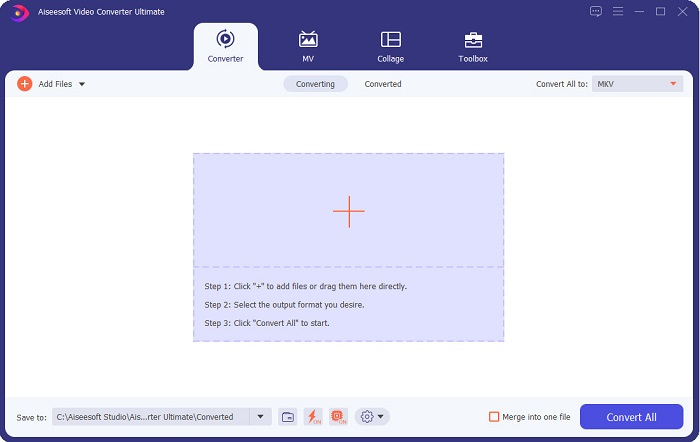
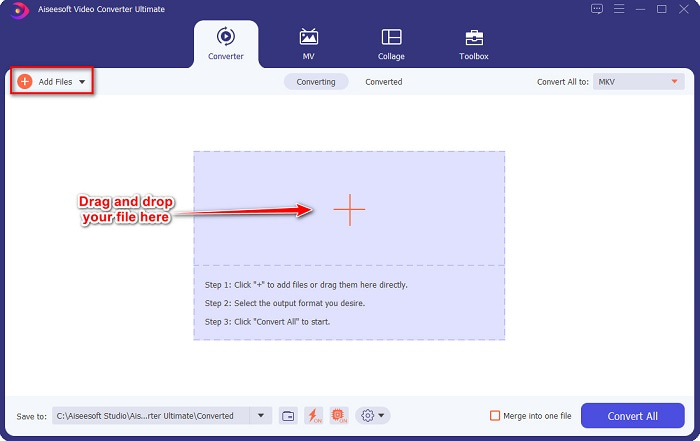
الخطوة 3. انقر فوق زر Add Files أو اسحب الملفات وأفلتها على زر علامة + لتحميل ملف AVI الخاص بك.
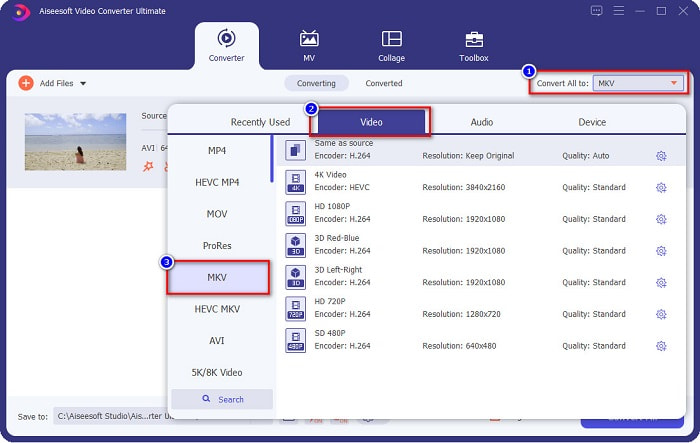
الخطوة 4. بعد تحميل ملف AVI، انقر فوق زر Convert All to لاختيار MKV كصيغة الإخراج.
الخطوة 5. أخيرًا، انقر فوق زر Convert All لتحويل ملف AVI الخاص بك إلى تنسيق MKV. ثم انتظر لبضع ثوانٍ، وها هو ذا! لقد تم تحويل ملف AVI إلى MKV.
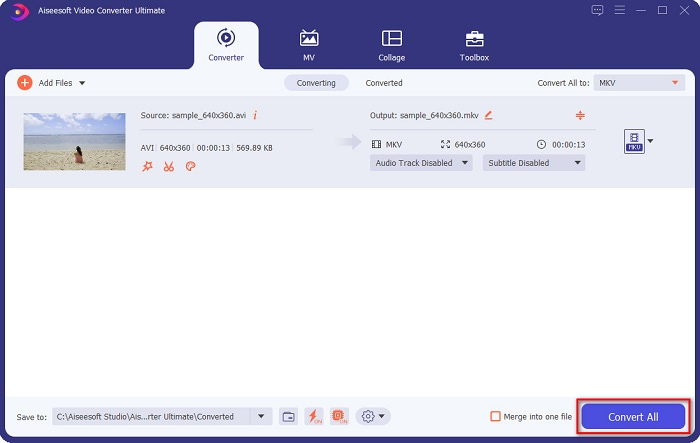
باتباع الخطوات البسيطة أعلاه ، يمكنك تحويل AVI إلى MKV بسهولة.
الجزء 3. أفضل طريقة لتحويل ملفات AVI إلى ملفات MKV عبر الإنترنت
يُعد FVC Free Online Video Converter واحدًا من أفضل المحوّلات المتاحة على الويب. يتيح لك هذا المحوّل تحويل العديد من صيغ الملفات مثل AVI إلى MKV وWMA وMOV وTS وMP4 وغيرها. كما أن استخدام هذا المحوّل سهل للغاية، مما يجعله مناسبًا للمبتدئين. بالإضافة إلى ذلك، يمكنك تعديل دقة الملف، ومعدل بت الفيديو، ومعدل الإطارات. ومع ذلك، يعتمد هذا المحوّل على الاتصال بالإنترنت، ولذلك قد تواجه بطئًا في عملية التحويل.
فيما يلي الخطوات الخاصة بكيفية تحويل AVI إلى MKV مجانًا عبر الإنترنت:
الخطوة 1. انقر على هذا الرابط للانتقال إلى صفحة الويب الخاصة بـFVC Free Online Video Converter.
الخطوة 2. بعد ذلك، انقر على زر Add Files to Convert، ثم شغّل التطبيق.
قم بتنزيل إصدار سطح المكتب لتحويل الملفات دفعة واحدة.
الخطوة 3. بعد تشغيل التطبيق، سيتم نقلك إلى ملفات جهاز الكمبيوتر. اختر عندها ملف AVI، ثم انقر على Open.
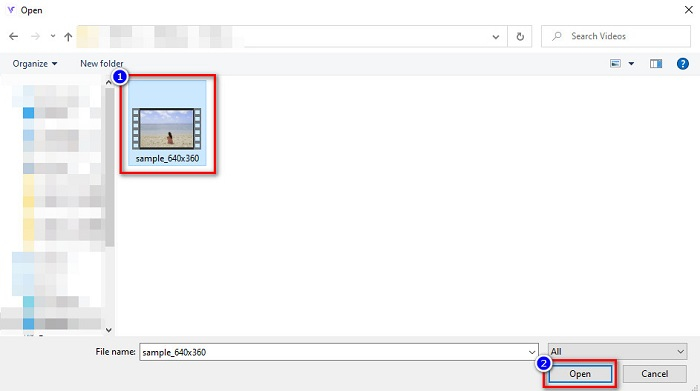
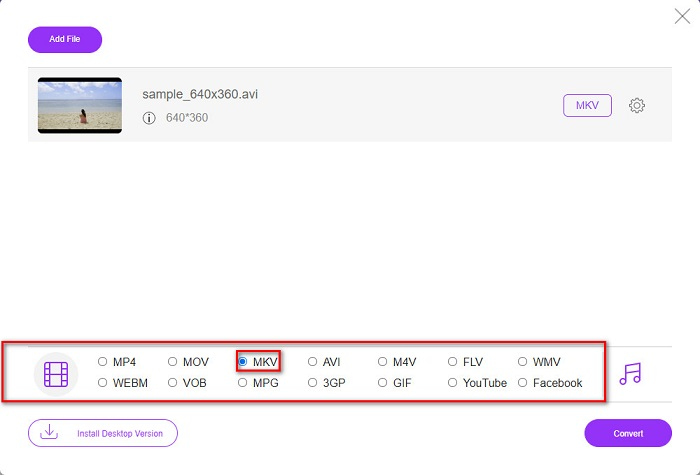
الخطوة 4. في أسفل واجهة البرنامج، سترى قائمة صيغ الملفات. اختر MKV كصيغة الإخراج، ثم انتقل إلى الخطوة الأخيرة.
الخطوة 5. انقر على زر Convert لبدء تحويل ملف AVI الخاص بك إلى MKV في الخطوة الأخيرة.
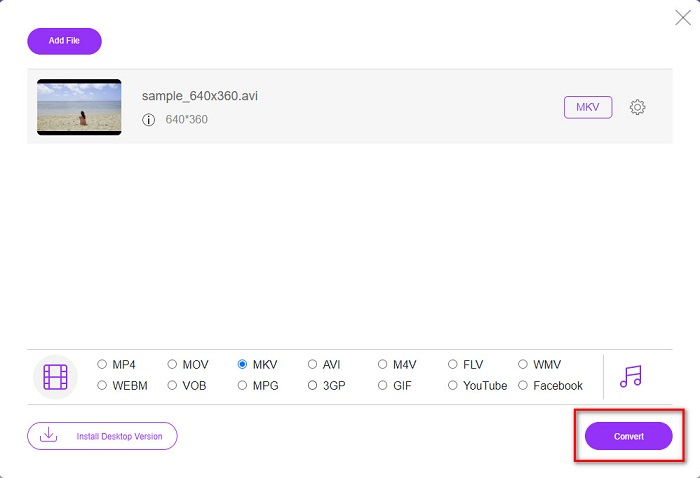
هذا هو مدى سهولة تحويل ملفات AVI الخاصة بك إلى MKV باستخدام محول عبر الإنترنت.
الجزء 4. تحويل AVI إلى MKV باستخدام محول مجاني
ما يميز استخدام البرامج المجانية كمحوّل هو إمكانية تنزيلها دون أي رسوم. ومن أفضل أدوات البرامج المجانية المتاحة برنامج VSDC Free Video Converter. هذا المحوّل سريع وقوي ويمتلك واجهة سهلة الاستخدام. كما يدعم صيغ الملفات القياسية مثل تحويل AVI إلى MKV وMPEG وWMV وFLV وMP4 وغيرها. ومع ذلك، فإن مزاياه محدودة نوعًا ما عندما يتعلق الأمر بخصائص التحويل.
دليل سريع حول كيفية استخدام محول الفيديو المجاني VSDC
الخطوة 1. قم بتنزيل برنامج التحويل المجاني عن طريق البحث عن VSDC Free Video Converter في متصفحك. اتبع خطوات التثبيت، ثم افتح التطبيق. بعد تشغيل البرنامج، انقر على زر علامة + لتحميل ملف AVI إلى واجهة البرنامج.
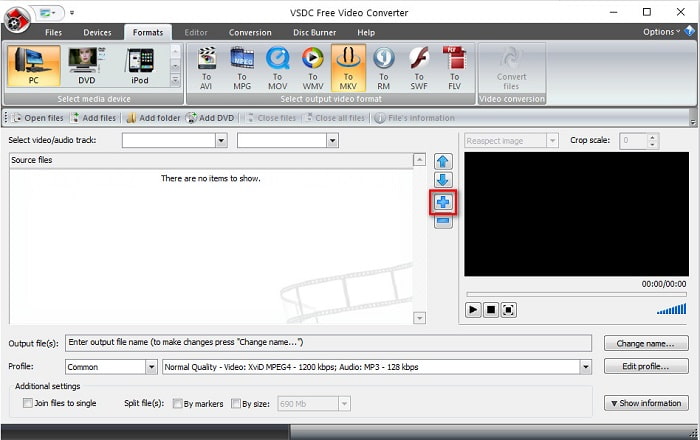
الخطوة 2. بعد ذلك، اختر صيغة الإخراج التي تريدها من صيغ الملفات الموجودة أعلى واجهة البرنامج. في حالتك، انقر على MKV.
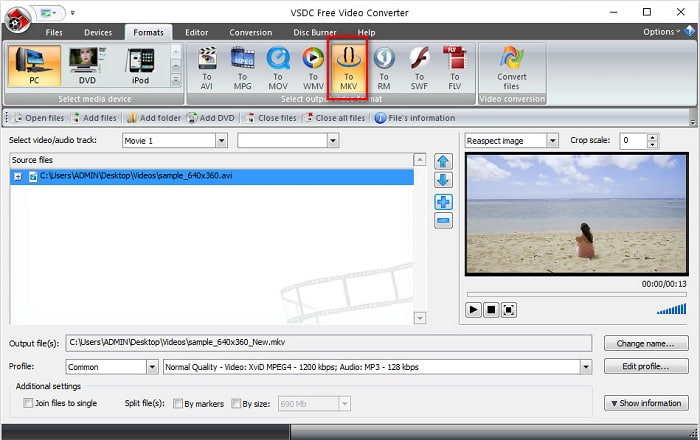
الخطوة 3. في الخطوة الأخيرة، انقر على زر Convert Files. عندها سيبدأ تحويل ملف AVI الخاص بك إلى ملف MKV.
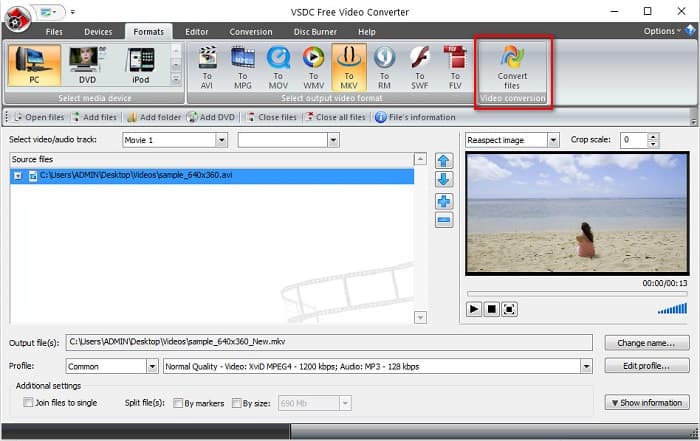
باتباع هذا الدليل السريع ، يمكنك بسهولة تحويل ملف AVI إلى ملف MKV باستخدام محول مجاني.
AVI مقابل MKV
استنادًا إلى تنسيق ملف تبادل الموارد (RIFF) ، تم تقديم تنسيق AVI بواسطة Microsoft في عام 1992. يمكنه حفظ الفيديو / الصوت عالي الجودة لأنه يستخدم ضغطًا أقل. ولكن هذا يتسبب أيضًا في الحجم الكبير لملف AVI ، والذي قد يكون مشكلة عندما تكون المساحة محدودة.
تنسيق حاوية الوسائط المتعددة Matroska ، الذي تم إصداره في عام 2002 ، هو تنسيق مفتوح المصدر يمكن أن يتضمن عددًا من مسارات الفيديو والصوت والصورة والترجمة. لذلك ، يمكنك استخدامه لتخزين مقاطع الفيديو القصيرة والبرامج التلفزيونية والأفلام بسهولة. أنها تحظى بشعبية كبيرة بالنسبة للمروحة الفرعية.
الجزء 5. أسئلة وأجوبة حول تحويل AVI إلى MKV
ما هي عيوب تحويل AVI إلى MKV؟
نظرًا لأن AVI هو تنسيق أكثر شيوعًا من MKV ، إذا قمت بتحويل ملف AVI الخاص بك إلى MKV ، فلا يمكنك تشغيل ملفك في مشغلات الفيديو الأخرى التي لا تدعم ملفات MKV.
أيهما أفضل حجم ملف ، AVI أم MKV؟
يحتوي MKV على حجم ملف كبير مقارنةً بـ AVI لأن MKV يحتوي على العديد من مقاطع الفيديو والصوت ومسارات الترجمة. يقوم أيضًا بتخزين فيلم كامل مع ترجمة.
كيف يمكنني تشغيل ملفات AVI على جهاز Mac؟
لا تستطيع أجهزة ماك تشغيل فيديوهات AVI بشكل افتراضي. ومع ذلك، هناك طرق معينة لتشغيل هذا النوع من الملفات على ماك. إحدى هذه الطرق هي تحويل ملف AVI إلى ملف يمكن لنظام ماك تشغيله، مثل MP4. لمعرفة المزيد عن تحويل AVI إلى MP4، انقر على هذا الرابط.
خاتمة
الكل في الكل ، يمكن للمحولات المذكورة أعلاه تحويل ملفات AVI إلى MKV دون عناء. لديهم جميعًا واجهة مستخدم رسومية سهلة الفهم ، والتي لن تعطيك صعوبة في استخدامها. لديهم أيضًا ميزات فريدة لا تمتلكها المحولات الأخرى. ولكن إذا كنت تريد محولًا يبرز أفضل ما في ملفك ، حيث يحتوي على ميزات يمكنها التحرير والتحويل بسرعة فائقة ، فقد ترغب في استخدام FVC Video Converter Ultimate كخيار أول. قم بتنزيله الآن ، واختبر ميزاته الفريدة لتستخدمها.
-
 حدد ما هو برنامج محول AVI إلى MP3 المثالي [PC و Mac]
 هل تريد معرفة كيفية تحويل AVI إلى تنسيق صوت MP3؟ ستجد في القائمة أدناه أدوات وخطوات مختلفة تناسب احتياجاتك.
-
 كيفية تحويل AVI إلى MOV بخطوات وأدوات سهلة
 هل تريد معرفة كيفية تحويل AVI إلى MOV قابل للتشغيل؟ يجب عليك اتباع هذه المقالة لمعرفة كيفية القيام بذلك والنصائح للحصول على تحويل ناجح.
-
 استيراد وتحويل AVI إلى التنسيق المدعوم لـ iMovie [2021]
 هل تواجه مشكلة لأنه لا يمكنك استيراد ملف AVI الخاص بك على iMovie؟ إذا قرأت هذا المقال ، فقد اخترت بالفعل العلاج الصحيح لهذه المشكلة.

