


 محول الفيديو النهائي
 مسجل الشاشة
 إصلاح الفيديو
كيفية تحويل AVI إلى WMV باستخدام محولات مجانية [خطوات سريعة]
تُعَد ملفات AVI أو Audio Video Interleave، التي طوّرتها شركة مايكروسوفت في البداية، من صيغ الفيديو عالية الجودة. تتميّز هذه الصيغة بدقّة عالية، لكن حجم الملف يكون كبيرًا جدًا. وأحد الطرق الشائعة لتشغيل الفيديو أو استخدامه على أي منصة هو تحويل ملف AVI إلى ملف WMV. لذلك، إذا كنت تريد معرفة المزيد عن كيفية تحويل AVI إلى WMV، فتابع القراءة بينما نستعرض عدّة برامج للتحويل مع شرح الخطوات بالتفصيل.

الجزء 1. قم بتحويل ملف AVI الخاص بك إلى WMV على نظام التشغيل Windows 10/11
يدعم نظام التشغيل ويندوز 10 العديد من صيغ الملفات التي يمكنك العثور عليها عبر الإنترنت، ومن ضمنها صيغا AVI وWMV، وكلاهما مدعوم في ويندوز 10. لذلك، سيكون من السهل تحويل ملف AVI إلى ملف WMV، خاصة إذا استخدمت برنامج التحويل فائق السرعة FVC Video Converter Ultimate. يُعَد هذا البرنامج من أشهر برامج التحويل الموثوقة حاليًا. بالإضافة إلى ذلك، يتيح لك البرنامج تعديل ملفاتك وتحسينها وضغطها. كما أنه سهل الاستخدام ويمكنه تحويل ملفات AVI إلى WMV بسرعة على ويندوز 10.

FVC Video Converter Ultimate
5،689،200+ التنزيلات- يسمح لك بتحويل تنسيقات ملفات مختلفة بما في ذلك AVI إلى WMV و MP4 و MOV و VOB وما إلى ذلك.
- يحتوي على ميزات تسمح لك بدمج ملفات متعددة في ملف واحد.
- يمكنك تحرير وتحسين وضغط ملفك.
تحميل مجانيلنظام Windows 7 أو أحدثتنزيل آمن
تحميل مجانيلنظام MacOS 10.7 أو أحدثتنزيل آمن
فيما يلي خطوات كيفية تحويل ملف AVI إلى تنسيق ملف WMV:
الخطوة 1. لتثبيت FVC Video Converter Ultimate على نظام ويندوز 10، انقر على زر التحميل أدناه، ثم اتبع خطوات التثبيت وقُم بتشغيل البرنامج.
تحميل مجانيلنظام Windows 7 أو أحدثتنزيل آمن
تحميل مجانيلنظام MacOS 10.7 أو أحدثتنزيل آمن
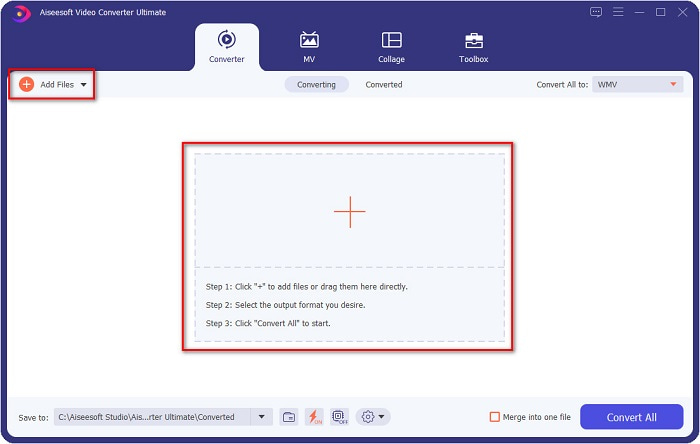
الخطوة 2. بعد فتح البرنامج، انقر على زر Add files الموجود في أعلى يسار الشاشة، أو على زر + لإضافة ملفات AVI إلى الواجهة الرئيسية للبرنامج. ستظهر لك ملفات الكمبيوتر، ثم اختر ملف AVI الذي تريد تحويله إلى WMV، وانقر على زر Open لرفع الملف.
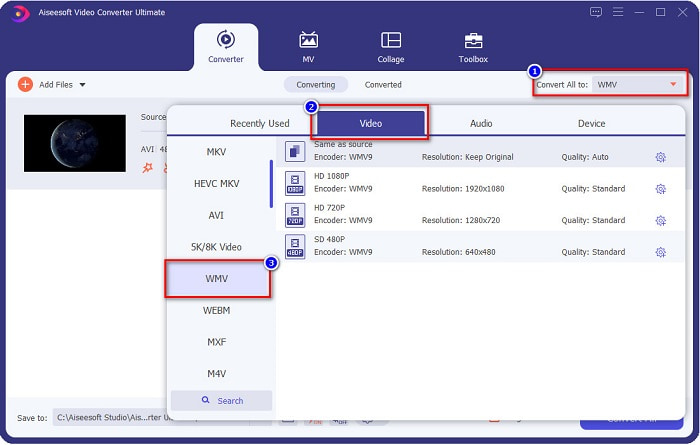
الخطوة 3. لتغيير صيغة الملف، انقر على زر Convert All to في أعلى يمين واجهة البرنامج. ستظهر قائمة بصيغ الملفات، ثم اختر WMV من قسم Video.
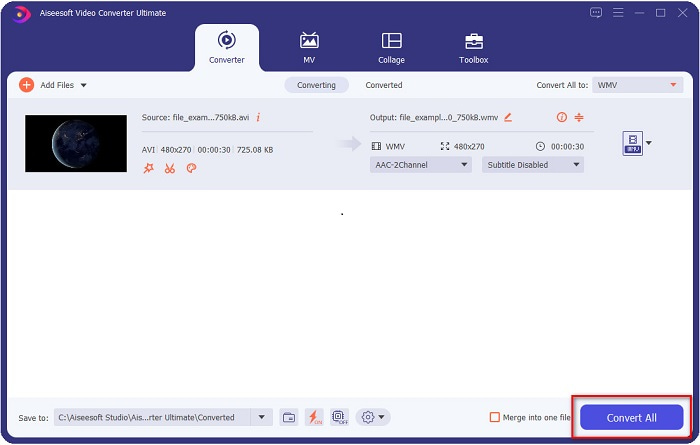
الخطوة 4. بعد اختيار صيغة WMV، انقر على زر Convert All لتحويل ملف AVI إلى ملف WMV. انتظر بضع ثوانٍ فقط، وستنتهي العملية! بهذه البساطة يمكنك تحويل ملف AVI إلى WMV بسهولة.
الجزء 2. كيفية تحويل AVI إلى WMV مجانًا
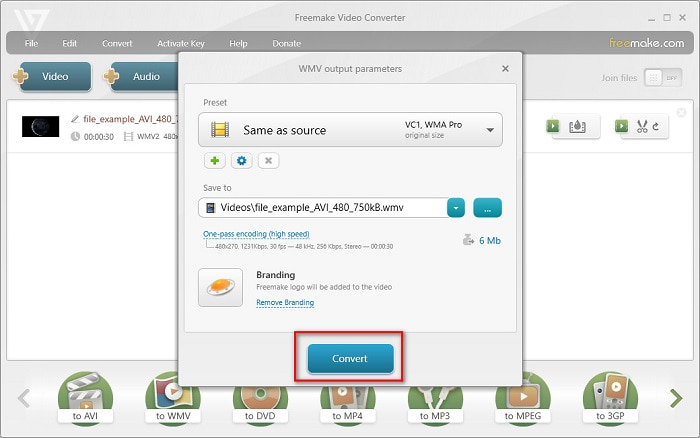
عند تحويل ملفات AVI إلى WMV، يمكنك أيضًا استخدام أدوات مجانية قابلة للتحميل. من أشهر هذه الأدوات برنامج Freemake Video Converter. يتيح لك هذا البرنامج غير المتصل بالإنترنت التحويل بين أكثر من 500 صيغة، مثل AVI إلى WMV وMP3 وMP4 وDVD وغيرها. إلا أن واجهة المستخدم الرسومية (GUI) ليست جيدة بما يكفي، كما أن التعامل مع الواجهة ليس سهلًا للغاية. ومع ذلك، لا يزال الكثير من المستخدمين يعتمدون عليه في عمليات تحويل الملفات.
دليل سريع حول كيفية تحويل ملف AVI الخاص بك إلى ملف WMV باستخدام Freemake Video Converter:
الخطوة 1. قم بتحميل البرنامج من خلال البحث عن Freemake Video Converter في المتصفح. بعد الانتهاء من التحميل، افتح البرنامج.
الخطوة 2. بعد فتح البرنامج، انقر على زر Video، ثم اختر ملف AVI عندما تظهر لك ملفات الكمبيوتر. اضغط على Open لإضافة ملف AVI إلى قائمة الانتظار.

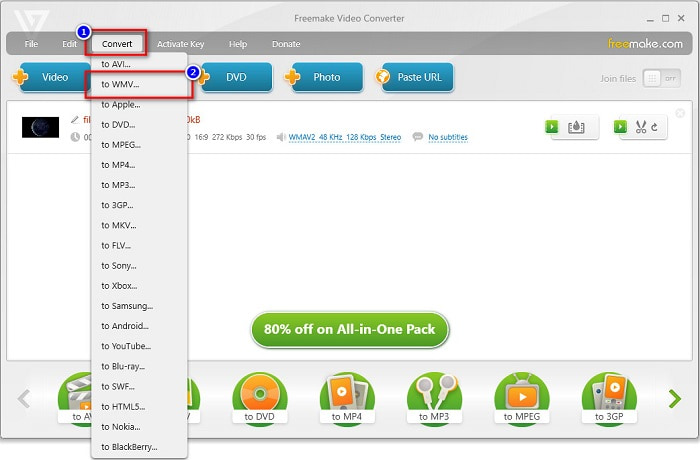
الخطوة 3. بعد اختيار ملف AVI، انقر على خيار Convert الموجود في أعلى واجهة البرنامج. ستظهر قائمة بصيغ الملفات، ثم اختر WMV.
الخطوة 4. ستظهر لك واجهة جديدة يتم فيها تنفيذ عملية التحويل. انقر على زر Convert لبدء تحويل ملف AVI إلى WMV.
الجزء 3. تحويل ملفات AVI إلى ملفات WMV عبر الإنترنت
لا يمكن إنكار أن تحويل الملفات عبر الإنترنت أكثر سهولة ومرونة. لذلك جرّبنا بعض محوّلات الفيديو أونلاين لتحويل AVI إلى WMV عبر الإنترنت، واخترنا FVC Free Video Converter Online كأفضل خيار نوصي به. يتيح لك هذا المحوّل تحويل ملفات كبيرة دون قيود تقريبًا. ومع ذلك، قد تواجه بطئًا في عملية التحويل لأن هذا المحوّل يعتمد على الاتصال بالإنترنت؛ أي إن سرعة التحويل مرتبطة بسرعة اتصالك. ومع ذلك، فقد استخدم العديد من المستخدمين FVC Free Video Converter Online وأثبت كونه واحدًا من أفضل المحوّلات عبر الإنترنت.
الخطوات الخاصة بكيفية تحويل ملف AVI إلى WMV باستخدام FVC Free Video Converter
الخطوة 1. من خلال المتصفح، ابحث عن FVC Free Video Converter Online.
الخطوة 2. عندما تنتقل إلى صفحة الويب، انقر على زر Add Files to Convert. بعد ذلك قم بتحميل المشغّل (Launcher) الذي سيظهر عند الضغط على زر Add Files to Convert، ثم اختر ملف AVI الخاص بك.
قم بتنزيل إصدار سطح المكتب لتحويل الملفات دفعة واحدة.
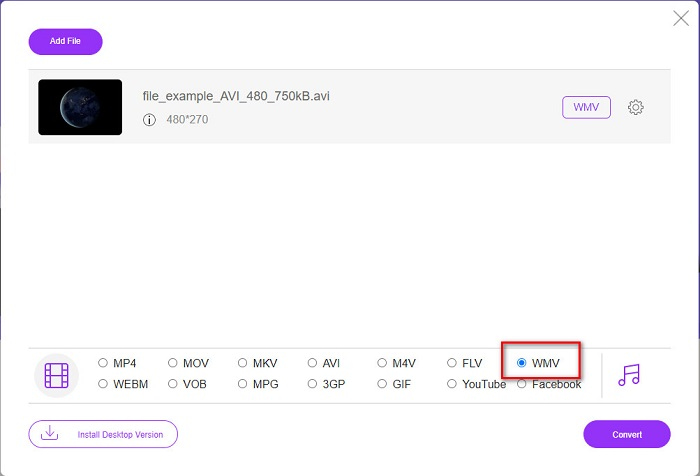
الخطوة 3. بعد اختيار الملف، ستظهر في الواجهة الثانية للبرنامج قائمة بصيغ الملفات، ثم انقر على WMV.
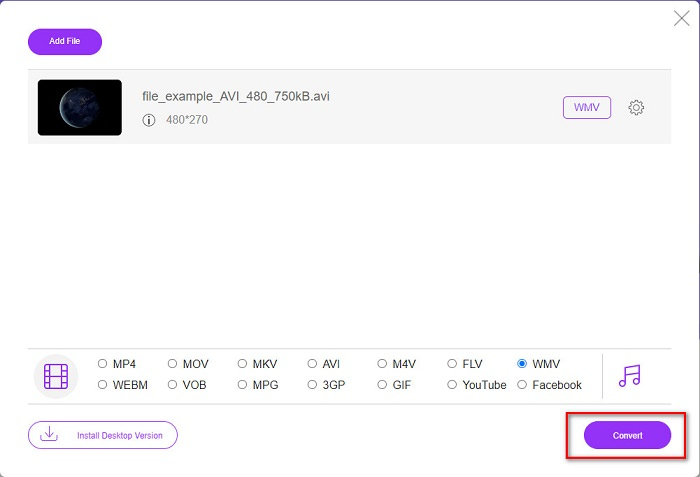
الخطوة 4. أخيرًا، انقر على زر Convert في أسفل يمين واجهة البرنامج. ستظهر لك ملفات الكمبيوتر لتحديد مكان حفظ الملف المحوّل، وبعدها سيبدأ تحويل ملف AVI إلى WMV.
الجزء 4. المزيد حول AVI و WMV
تُعَد ملفات AVI أو Audio Video Interleave من صيغ الفيديو القياسية لأجهزة ويندوز. تحتوي هذه الملفات على صوت وصورة وتستخدم العديد من برامج الترميز (Codecs) مثل DivX وXviD. إلا أن هذه الصيغة مضغوطة بدرجة قليلة، لذا يكون حجم الملف كبيرًا نسبيًا. في المقابل، تدعم صيغة WMV أو Windows Media Video العديد من البرامج والأجهزة، كما يتم ضغط هذه الملفات باستخدام مشغّل Windows Media Player. إضافة إلى ذلك، فإن نظام ويندوز عادةً ما يشغّل هذا النوع من الملفات بسهولة. للاطلاع على المزيد، اقرأ أفضل مشغلات WMV إذا كنت تريد تشغيل ملفات WMV بسلاسة.
AVI مقابل WMV
استنادًا إلى تنسيق ملف تبادل الموارد (RIFF) ، تم تقديم تنسيق AVI بواسطة Microsoft في عام 1992. يمكنه حفظ الفيديو / الصوت عالي الجودة لأنه يستخدم ضغطًا أقل. ولكن هذا يتسبب أيضًا في الحجم الكبير لملف AVI ، والذي قد يكون مشكلة عندما تكون المساحة محدودة.
من إنتاج Microsoft ، كان WMV أحد أكثر تنسيقات الفيديو شيوعًا في العقد الأول من القرن الحادي والعشرين. يمكن رؤيتها عبر الويب وتشغيلها بواسطة مشغلات وسائط مختلفة على Windows. وهو أيضًا تنسيق ملف الفيديو الافتراضي لبرنامج Windows Media Player. ولكن تم الاستيلاء عليها من قبل تنسيقات أخرى مؤخرًا.
الجزء 5. أسئلة وأجوبة حول تحويل AVI إلى تنسيق ملف WMV
هل يؤدي تغيير AVI إلى WMV إلى إتلاف جودة الملف؟
عندما تقوم بتحويل AVI إلى WMV ، يجب ألا تتأثر جودة ملفاتك. ومع ذلك ، فإن بعض المحولات لا تدعم مقاطع فيديو البكسل عالية الجودة ، مما يتسبب في انخفاض الجودة.
هل يمكنك ضغط ملفات AVI؟
نعم. يمكنك استخدام برامج ضغط الفيديو المتاحة عبر الإنترنت. كما يمكنك أيضًا تحويل ملف AVI إلى صيغة WMV لتقليل حجم الملف. بالإضافة إلى ذلك، يمكنك استخدام FVC Video Converter Ultimate من أجل ضغط ملفات AVI الخاصة بك.
هل سيتغير حجم ملف ملف AVI الخاص بي بعد التحويل؟
هناك بعض الحالات في حجم ملف AVI الخاص بك والتي قد تكون مختلفة عن الأصل. لأنه عندما يتم تحويل الملفات ، سيتم إلغاء ضغط الملفات المضغوطة ، مما يؤدي إلى تغيير حجم الملف قليلاً.
خاتمة
لتلخيص كل ذلك ، تُظهر الأدوات عبر الإنترنت وغير المتصلة المعروضة أعلاه ميزات تحويل واعدة يمكن أن تلبي احتياجاتك عندما يتعلق الأمر بتحويل ملفات AVI إلى ملفات WMV. ولكن إذا كنت تبحث عن محول يحتوي على العديد من الميزات التي ستساعدك على تلبية احتياجاتك ، فنحن نوصي باستخدام FVC Video Converter Ultimate - هل ما زلت لديك شكوك حول ذلك؟ جربه الآن وحقق أقصى استفادة من ملفاتك!
-
 دليل ملموس لمساعدتك في تحويل AVI إلى FLV مجانًا
 لتحويل AVI إلى FLV ، تحتاج إلى محول فيديو قوي. لحسن الحظ ، يمكنك تعلم اثنين ودليلهم خطوة بخطوة من هذه المقالة الفردية.
-
 كيفية تحويل مقاطع فيديو AVI إلى ملفات GIF متحركة على Windows / Mac
 هل تريد تحديد مقاطع AVI المثيرة للاهتمام لإنشاء صور GIF؟ ستخبرك هذه المقالة بأفضل طريقتين لقص مقاطع فيديو AVI وتحويل ملفات AVI إلى ملفات GIF متحركة مجانًا.
-
 حدد ما هو برنامج محول AVI إلى MP3 المثالي [PC و Mac]
 هل تريد معرفة كيفية تحويل AVI إلى تنسيق صوت MP3؟ ستجد في القائمة أدناه أدوات وخطوات مختلفة تناسب احتياجاتك.

