


 محول الفيديو النهائي
 مسجل الشاشة
 إصلاح الفيديو
 تنزيل آمن
أسرع الطرق لتحويل FLAC و WAV (غير متصل / متصل)
برنامج الترميز الصوتي اللا ضياعي المجاني، المعروف اختصارًا باسم FLAC، هو تنسيق ملف صوتي يشبه إلى حد كبير MP3. فهو يوفّر للمستخدمين جودة صوت ممتازة مع شَغل مساحة صغيرة نسبيًا على القرص. إضافة إلى ذلك، يُعد هذا النوع من الصيغ «لا ضياعيًا»، أي إن جزءًا كبيرًا من بياناتك الصوتية يبقى محفوظًا بالرغم من عملية الضغط. من ناحية أخرى، توجد حالات تحتاج فيها إلى تحويل ملفات FLAC إلى تنسيق آخر مثل WAV إذا كنت ترغب في الوصول بتجربة الاستماع لديك إلى أقصى درجات الجودة والتميّز. فهل ينبغي عليك الاختيار بين الاثنين؟ اكتشف أدناه كيف يمكنك الاستفادة من كليهما باستخدام أفضل أدوات تحويل FLAC إلى WAV المتاحة.

الجزء 1. تحويل FLAC و WAV دون اتصال
يُعد Video Converter Ultimate أداة احترافية رفيعة المستوى لتحويل الملفات إلى أي تنسيق صوتي، بما في ذلك WAV وFLAC. يقدّم هذا البرنامج ميزة التحويل الدفعي التي تتيح لك تحويل مجموعة من الملفات الصوتية دفعة واحدة. علاوة على ذلك، يمكنك تعظيم جودة كل مقطع صوتي تعمل عليه، إذ يتيح لك البرنامج ضبط التفاصيل التقنية للإخراج مثل معدل العيّنة ومعدل البِت. إذا كنت ترغب في تحويل WAV إلى FLAC أو العكس بشكل دفعي، فاقرأ الدليل السريع الذي أعددناه لك أدناه.
الخطوة 1. شغِّل البرنامج على جهازك من خلال اختيار زر التنزيل المجاني المناسب أدناه. في الخطوة التالية، اتبع التعليمات الظاهرة على الشاشة لتشغيل البرنامج. يمكنك التعرّف إلى واجهته بمجرد تثبيته.
تحميل مجانيلنظام Windows 7 أو أحدثتنزيل آمن
تحميل مجانيلنظام MacOS 10.7 أو أحدثتنزيل آمن
الخطوة 2. انقر على أيقونة إضافة في الشاشة الرئيسية واستورد الملف الصوتي الذي تريد العمل عليه. بعد ذلك، سيتم نقلك إلى معاينة الملف الذي تم استيراده. يمكنك أيضًا رفع مجلد كامل إذا رغبت في التحويل بالجملة؛ اختر من جهازك المجلد الذي يحتوي على جميع الملفات الصوتية المطلوبة.
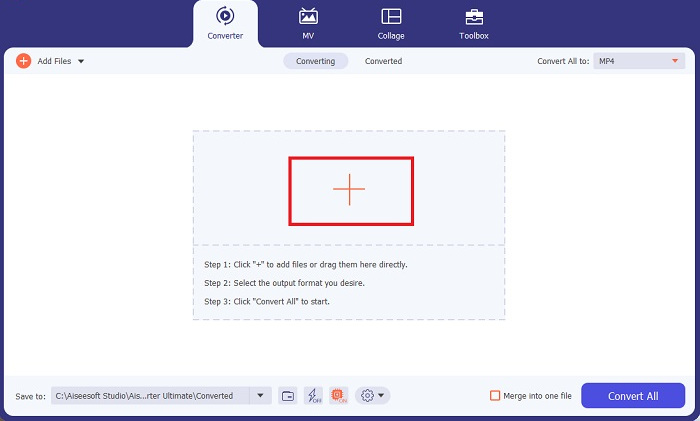
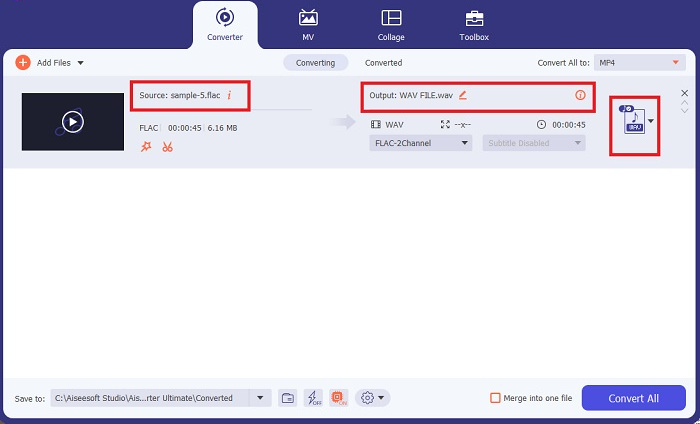
الخطوة 3. يمكنك الآن تغيير تنسيق الإخراج بالنقر على زر المحوِّل أعلى شاشة البرنامج. من هناك، اختر WAV من تبويب مخرج الصوت. وفي الوقت نفسه، يمكنك ضبط معدل العيّنة ومعدل البِت لملف الإخراج ليتوافق مع الجودة التي تفضّلها.
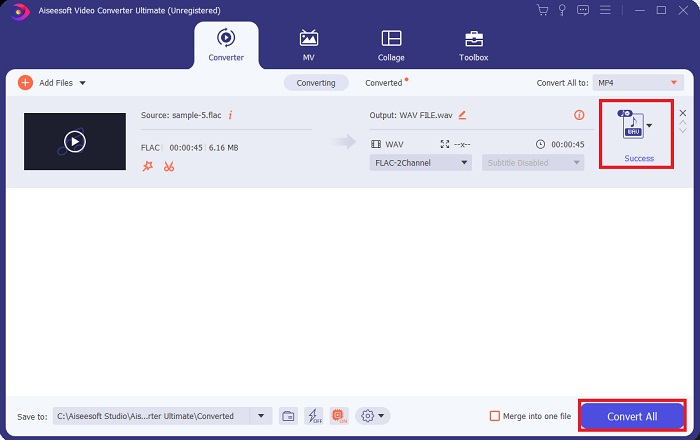
الخطوة 4. في الخطوة الأخيرة، ابدأ عملية التحويل بالنقر على زر تحويل الكل في الأسفل. بعد ذلك، سيفتح البرنامج تلقائيًا مجلد الإخراج لتتمكن من التحقق من الصيغة الجديدة لملفك.
الايجابيات
- فإنه يمكن دفعة تحويل FLAC إلى تنسيق ملف صوتي WAV.
- يعمل البرنامج بشكل جيد مع نظامي التشغيل Windows و Mac OS.
- لديها سرعة تحويل سريعة.
سلبيات
- يتطلب رسوم اشتراك مدفوعة بعد الإصدار التجريبي المجاني.
- البرنامج لا يعمل على أجهزة Linux OS.
الجزء 2. تحويل FLAC إلى WAV أو WAV إلى FLAC عبر الإنترنت
رغم أن محرك البحث لديك قد يعرض لك عددًا كبيرًا من محوّلات FLAC إلى WAV أو WAV إلى FLAC عبر الإنترنت، فإننا نقدّم لك ما يسهّل عليك الأمر. يُعد Free Audio Converter Online خيارًا ممتازًا لتجنّب تثبيت برنامج على سطح المكتب. يعمل هذا المحوّل عبر الإنترنت بسلاسة، مع توفير الأمان والحماية لبياناتك الشخصية أثناء إنجاز عملية التحويل. إضافة إلى ذلك، يمكنك الاستفادة من ميزة التحويل الدفعي في هذا البرنامج عبر الإنترنت كما لو كنت تستخدم برنامجًا على سطح المكتب.
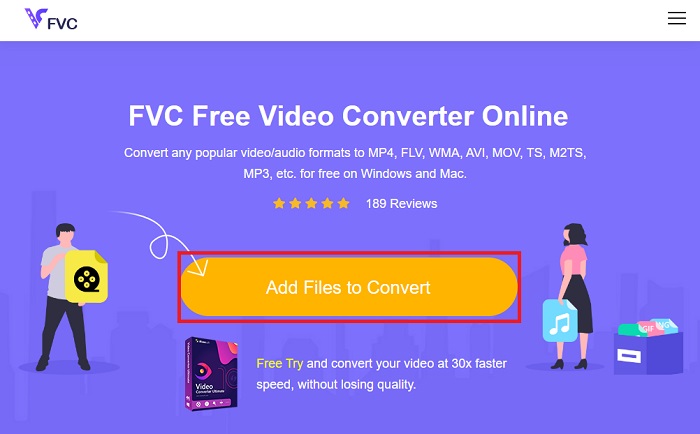
الخطوة 1. انقر على الرابط أعلاه للانتقال إلى الموقع الرئيسي لأداة Free Online Video Converter. اختر إضافة ملفات للتحويل من الشاشة الرئيسية وقم برفع ملفك الصوتي.
الخطوة 2. ستظهر معاينة لملفك الأصلي على الشاشة. ومن اللوحة نفسها، توجّه إلى الأسفل واختر تنسيق الإخراج الذي تريده.
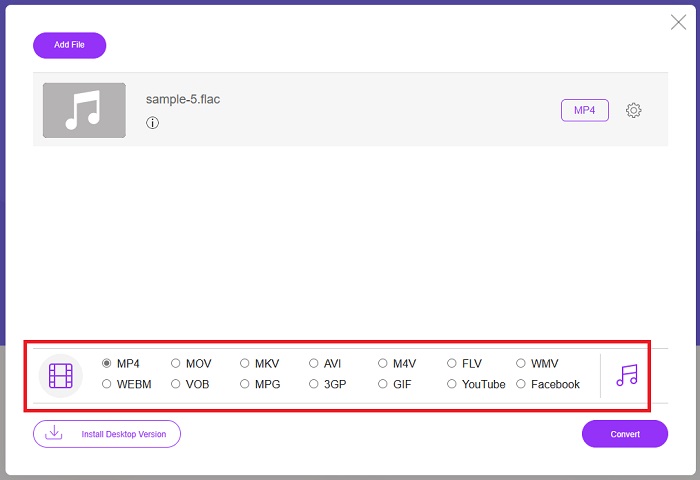
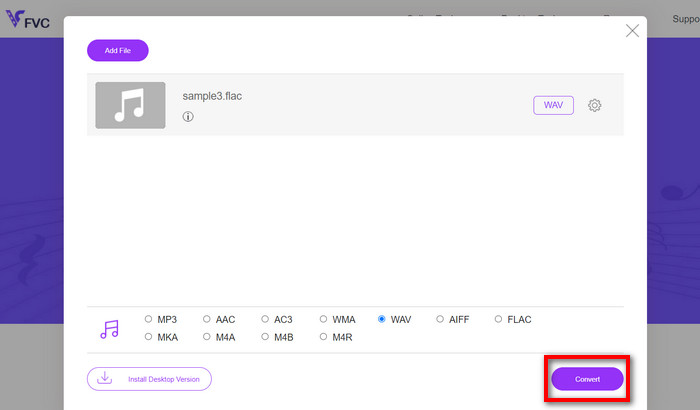
الخطوة 3. انقر على زر تحويل لتغيير صيغة FLAC إلى WAV. إذا رغبت في تحويل ملف آخر، أعد تنفيذ هذا الدليل من البداية.
الايجابيات
- إنه يعمل على أي محرك بحث مثل Google Chrome و Safari و Firefox والمزيد.
- يقدم العديد من تنسيقات الملفات الصوتية الشائعة مثل MP3 و AAC و WMA.
- يمكن للمستخدمين الاستمتاع بتحويلات غير محدودة يوميًا.
سلبيات
- سرعة التحويل تعتمد على قوة الاتصال بالإنترنت.
قراءة إضافية:
تحويل FLAC إلى MP3 مع الحفاظ على جودة الصوت
خطوات سهلة لتحويل WAV إلى OGG للحصول على حجم صوتي مثالي
الجزء 3. أسئلة وأجوبة حول تحويل FLAC و WAV
هل سيؤدي تحويل ملف من FLAC إلى WAV إلى انخفاض في الجودة؟
لن يؤدي تحويل ملفات الصوت الخاصة بك من FLAC إلى WAV إلى تدهور الجودة نظرًا لأن دقتها غير مضغوطة. ومع ذلك ، افترض أنك قمت بتحويل ملف من WAV إلى FLAC. في هذه الحالة ، قد تلاحظ تغييرات طفيفة ، خاصة بالنسبة لأولئك الذين تكون آذانهم في التفاصيل. إذا كنت بحاجة إلى مساعدة في تحديد الشخص الذي تريد الاحتفاظ به ، فإليك جزء من المنظور يمكنك إلقاء نظرة عليه ؛ تعد تنسيقات الصوت FLAC خيارًا جيدًا لتخزين مجموعة كبيرة من الأغاني ، بينما يكون حجم ملفات WAV أكبر ولكنه مناسب لتحرير الصوت.
هل WAV هو تنسيق الصوت الأعلى دقة؟
WAV هو اختصار Waveform Audio File Format تم تطويره بواسطة IBM و Microsoft. يعتبر هذا التنسيق هو التنسيق الأعلى دقة في صناعة الموسيقى الرقمية لأنه يحتوي على ترددات صوتية خام وغير منقوصة.
ما هو أفضل محول FLAC إلى WAV على الإنترنت؟
بدون شك ، FVC Free Online Video Converter هو أفضل محول مجاني من FLAC إلى WAV على الإنترنت. لا تحتاج إلى اكتساب البراعة التقنية لتحويل أي ملفات فيديو وصوت باستخدام البرنامج. يمكنه القيام بعملك بكفاءة لأنه سهل الاستخدام ولديه سرعة تحويل لا مثيل لها. علاوة على ذلك ، يوفر هذا البرنامج عبر الإنترنت ، إن لم يكن كل ، ولكن معظم تنسيقات الصوت الشائعة التي نعرفها.
خاتمة
يمكن أن تتم عملية التحويل في كلا الاتجاهين من FLAC إلى WAV ومن WAV إلى FLAC. وبما أن كلا التنسيقين من أكثر صيغ الملفات شيوعًا في عالم الموسيقى الرقمية اليوم، فإن اختيار الأنسب منهما يعتمد غالبًا على الغرض الذي ستستخدمه من أجله. باستخدام الأدوات المذكورة أعلاه، يمكنك التبديل بين الصيغتين في أي وقت. اتبع الخطوات السابقة لتحويل FLAC إلى WAV أو WAV إلى FLAC، ولن تواجه أي صعوبات بإذن الله.
-
 تعرف على كيفية تحويل MP3 إلى تنسيق WAV
 هل تريد معرفة كيفية تحويل MP3 إلى WAV؟ حدد الأدوات التي تنتج أفضل جودة تحويل يمكنك الحصول عليها.
-
 WAV Player - أفضل 5 تطبيقات WAV Player لأجهزة Android و iPhone و PC و Mac
 كيف تلعب ملفات WAV على هاتف Android؟ أي لاعب يمكنه لعب WAV؟ يشارك هذا المنشور أفضل 5 مشغلات WAV مجانية لأجهزة Android و iPhone و Mac والكمبيوتر الشخصي.
-
 أفضل 3 برامج تحرير للبيانات الوصفية لـ FLAC على نظامي التشغيل Mac و Windows [محدّث في 2023]
 هل تريد تغيير بيانات FLAC الوصفية؟ في هذه الحالة ، يجب عليك قراءة هذه المقالة لأننا نقدم معرفة كافية حول أحدث محرر بيانات تعريف FLAC يمكنك استخدامه.
