


 محول الفيديو النهائي
 مسجل الشاشة
 إصلاح الفيديو
 تنزيل آمن
أسهل الطرق حول كيفية تحويل M2TS إلى تنسيق ملف M4V
العديد من الصيغ، مثل M2TS، تحصل على دعم غير كافٍ كلما تقدّمنا في الزمن. حاوية Blu-ray الأصلية للصوت والفيديو، التي تنقل البيانات باستخدام تدفق MPEG-2، ما زالت تُستخدم في هذه الصيغة. بعض الأجهزة، بما في ذلك أجهزة iPhone وiPod وهواتف Android، لا يمكنها قراءة بنية هذه الصيغة، ولذلك لا يمكنك تشغيل هذا النوع من الملفات عليها. ولكن إذا كان لديك ملفات بهذه الصيغة، يمكنك تحويلها إلى صيغ أخرى مثل M4V. وإذا كنت ترغب في تحويلها، فاقرأ هذه المقالة، إذ سنقدّم لك أفضل الطرق التي يمكنك من خلالها تحويل ملفات M2TS إلى M4V.

الجزء 1: طريقة مجانية لتحويل M2TS إلى M4V
لن تقلق بعد الآن بشأن كيفية تحويل ملفات M2TS إذا استخدمت أداة FVC Free M2TS Converter. يمكنك من خلال هذه الأداة المجانية تحويل ملفات M2TS إلى مجموعة واسعة من صيغ الفيديو الشائعة، بما في ذلك M4V وMP4 (فيديو HD H.264/MPEG-4 AVC) وMOV وAVI وTS وVOB وMKV وFLV وSWF وASF وWMV وMP3 وM4A وOGG وWAV وWMA وFLAC وغيرها. كما أن هذه الأداة تدعم التحويل بالدفعة، ما يعني أنه يمكنك تحويل ملفات متعددة دفعة واحدة فورًا. بالإضافة إلى ذلك، تتمتع بسرعة تحويل فائقة، إذ يمكنها تحويل الملفات بسرعة تصل إلى 50 ضعف سرعة المحوّلات العادية.
علاوة على ذلك ، فإن FVC Free M2TS Converter لا يمكن الاعتماد عليه فقط في تحويل ملفات متعددة. كما يوفر محرر فيديو مدمجًا. يجعل من السهل تحميل العديد من ملفات M2TS في وقت واحد ودمجها في ملف واحد. بالإضافة إلى ذلك ، يمكنك اختيار سمة معينة لكل ملف فيديو ، مثل عيد ميلاد أو عائلة أو طعام أو مكان أو رياضة أو مهرجان مثل الهالوين. بهذه الطريقة ، يمكنك التأكد من حصولك على فيديو جذاب ورائع. أخيرًا ، هذه الأداة آمنة للاستخدام. سيضمن تجنب فقد الصوت والصورة أثناء عملية التحويل.
الميزات
◆ قم بتحويل ملفات الفيديو المختلفة ، مثل M2TS و M4V و MP4 و MOV و AVI و FLV و WMV والمزيد.
◆ يوفر عملية تحويل عالية السرعة تصل إلى 50 مرة أسرع من متوسط سرعة التحويل.
◆ تحويل ملفات متعددة في وقت واحد.
◆ يقدم وظيفة مُحسِّن للفيديو لتحسين مقاطع الفيديو.
◆ دمج مقاطع فيديو متعددة لعمل قطعة واحدة.
اتبع الإجراء البسيط أدناه لمعرفة كيفية تحويل ملفات M2TS المتعددة إلى M4V واحد باستخدام محول FVC Free M2TS.
الخطوة 1: حمِّل برنامج FVC Free M2TS Converter على جهاز الكمبيوتر من خلال النقر على زر Download أدناه، ثم تابع عملية التثبيت وشغِّل التطبيق.
تحميل مجانيلنظام Windows 7 أو أحدثتنزيل آمن
تحميل مجانيلنظام MacOS 10.7 أو أحدثتنزيل آمن
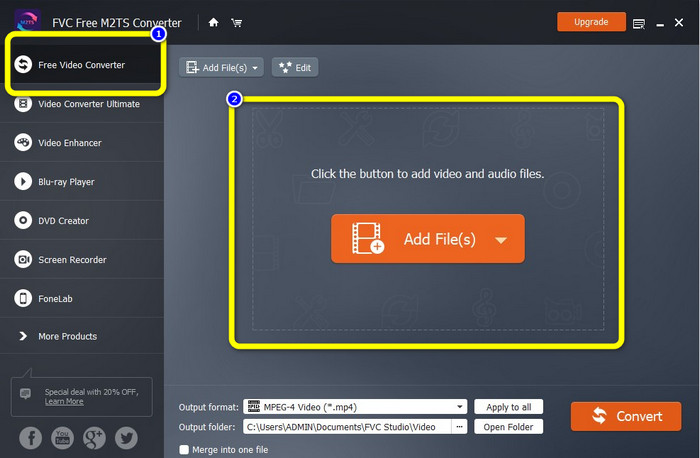
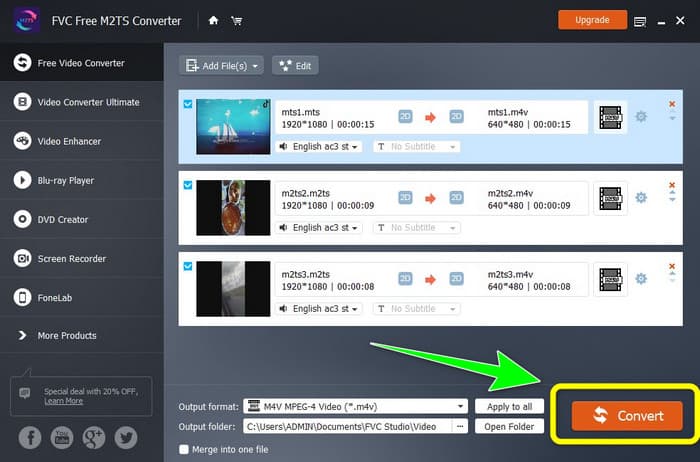
الخطوة 2: اختر خيار Free Video Converter في الجهة اليسرى من الواجهة، ثم انقر زر Add File لإضافة ملف فيديو M2TS الذي تريد تحويله.
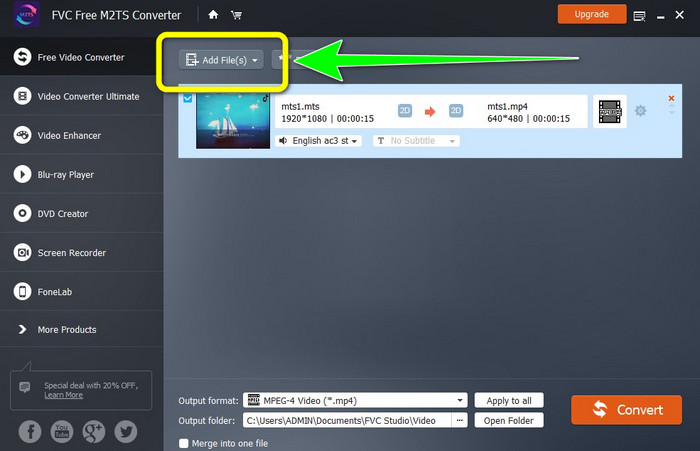
الخطوة 3: إذا كنت تريد إدراج عدة ملفات فيديو M2TS، فانقر زر Add Files.
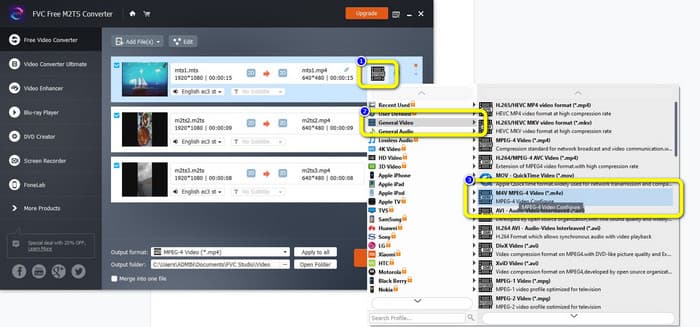
الخطوة 3: انتقل إلى رمز Video في الجهة اليمنى من الواجهة، ثم اختر خيار General Video وحدِّد تنسيق الملف المطلوب، وهو M4V.
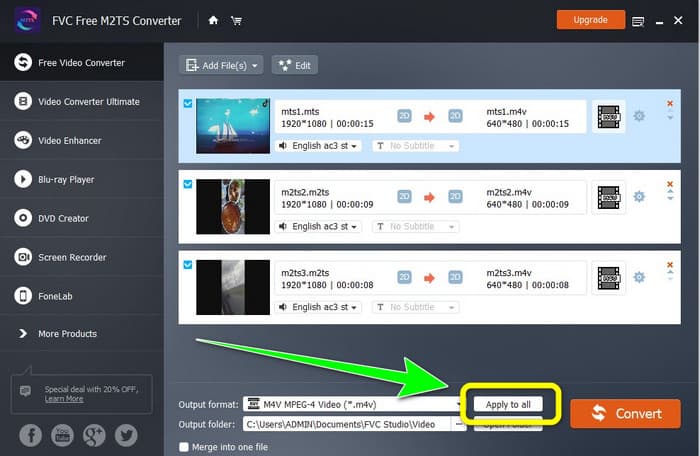
الخطوة 4: يمكنك اتباع الإجراء نفسه لتغيير صيغة الإخراج لملفات M2TS الأخرى، كما يمكنك النقر على زر Apply to all لتغيير صيغة الإخراج لجميعها فورًا إلى M4V.
الخطوة 5: بعد تغيير جميع ملفات M2TS إلى صيغة M4V، انقر زر Convert. انتظر حتى تنتهي عملية التحويل ثم احفظ الفيديوهات في الموقع الذي تريده.
الجزء 2: أفضل طريقة لتحويل M2TS إلى M4V دون خسارة
إذا كنت تريد طريقة ممتازة أخرى لدمج عدة ملفات M2TS في ملف M4V واحد، يمكنك تجربة برنامج Video Converter Ultimate. من خلال هذا التطبيق القابل للتنزيل، يمكنك بسهولة تحويل ملفات M2TS إلى M4V بدون فقدان جودة، لأنه يدعم التحويل بالدفعة. بالإضافة إلى ذلك، يتميز بسرعة تحويل تصل إلى 30 ضعف سرعة المحوّلات الأخرى، وبذلك يمكنك تحويل المزيد من الملفات دون إضاعة الوقت. علاوة على ذلك، يمتلك Video Converter Ultimate واجهة بديهية ويوفّر خطوات بسيطة لتحويل الملفات، مما يجعله مناسبًا لجميع المستخدمين.
علاوة على ذلك ، يوفر هذا المحول أيضًا المزيد من الميزات الرائعة. إذا كنت ترغب في دمج مقاطع فيديو M2TS متعددة وتحويلها إلى قطعة واحدة ، فيمكنك استخدام هذا التطبيق لأنه يحتوي على أداة Video Merger. بهذه الطريقة ، يمكنك دمج مقاطع فيديو M2TS بسهولة. تتيح لك هذه الأداة أيضًا إنشاء صورة مجمعة ، حيث يمكنك دمج الصور ومقاطع الفيديو. يمكنك أيضًا استخدام العديد من القوالب والمرشحات المجانية. حتى تتمكن من صنع ملصقة جميلة. هناك المزيد من الميزات التي يمكنك الاستمتاع بها باستخدام Video Converter Ultimate.
الميزات
◆ تحويل أكثر من 100 تنسيق لملفات الفيديو ، بما في ذلك M4V ، M2TS ، MP4 ، AVI ، FLV ، MKV ، WMV ، VOB ، MOV ، SWF ، إلخ.
◆ قم بإنشاء ملصقة رائعة باستخدام فلاتر وقوالب مجانية.
◆ عرض صانع الموسيقى والفيديو.
◆ يوفر Toolbox لتحرير الفيديو.
◆ يقدم عملية تحويل الدُفعات بسرعة تحويل أسرع 30 مرة.
استخدم الخطوات التفصيلية أدناه لتحويل ملفات M2TS متعددة في وقت واحد باستخدام FVC Video Converter Ultimate.
الخطوة 1: قم بتنزيل برنامج Video Converter Ultimate على جهاز الكمبيوتر. لتنزيله، يمكنك النقر على زر Download أدناه، ثم افتح التطبيق بعد الانتهاء من التنزيل والتثبيت.
تحميل مجانيلنظام Windows 7 أو أحدثتنزيل آمن
تحميل مجانيلنظام MacOS 10.7 أو أحدثتنزيل آمن
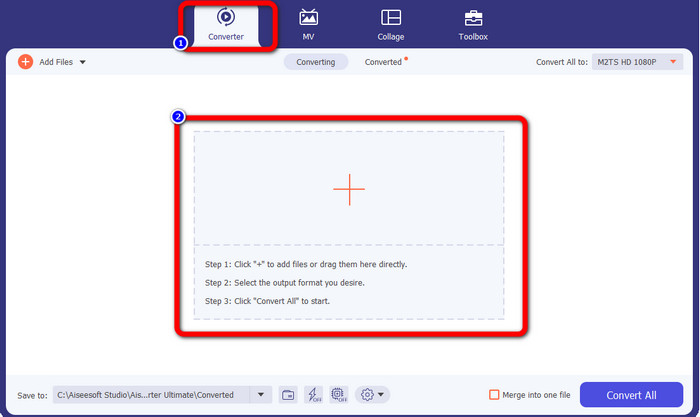
الخطوة 2: اختر لوحة Converter ثم انقر زر علامة Plus لإضافة ملفات M2TS الخاصة بك.
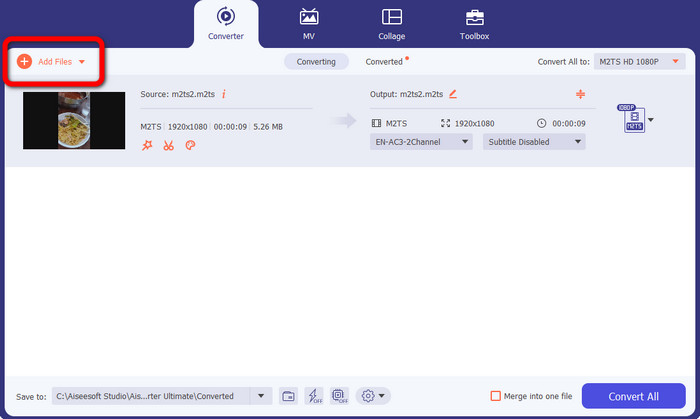
الخطوة 3: انقر زر Add File في الجهة اليسرى من الواجهة لإضافة المزيد من ملفات M2TS.
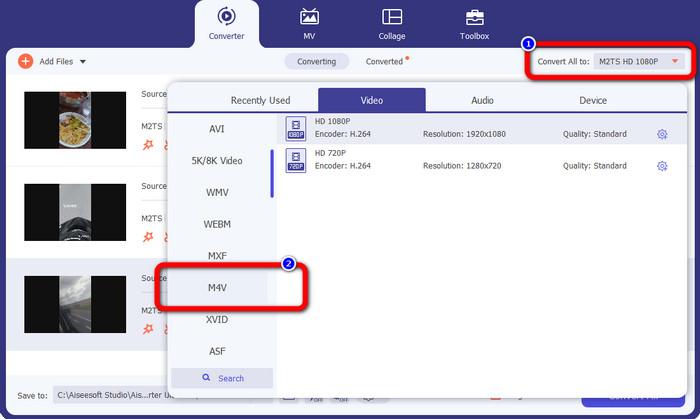
الخطوة 4: لتحويلها إلى ملف M4V، انقر زر Convert All to للاطلاع على خيارات الصيغ، ثم اختر صيغة الملف M4V.
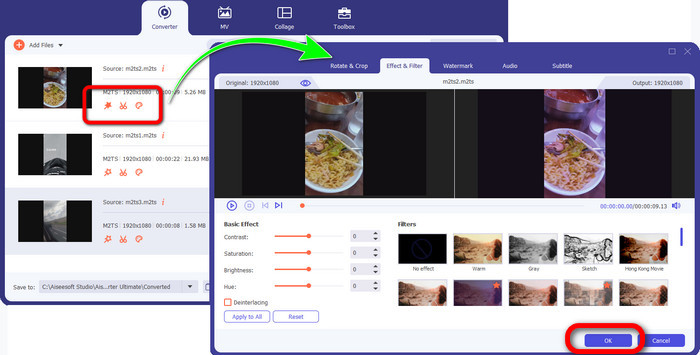
الخطوة 4: لتحرير الفيديوهات، انقر أدوات التحرير المتاحة. يمكنك تحسين الفيديوهات وتعديلها وإضافة الفلاتر والتأثيرات وقص المقاطع. بعد الانتهاء من التحرير، انقر OK.
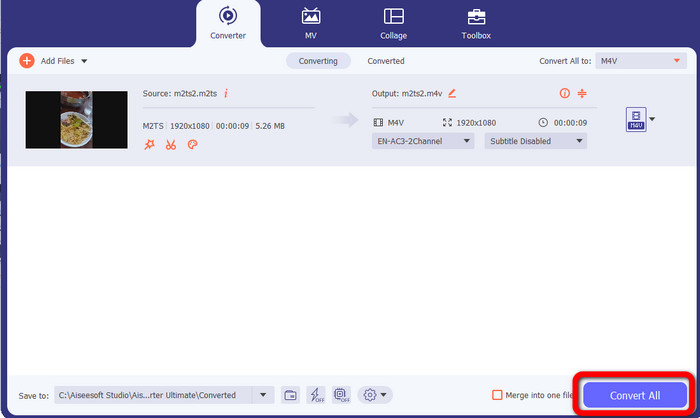
الخطوة 5: بعد تحرير الفيديو، يمكنك تحويله بالنقر على زر Convert All. احفظ الفيديو بعد انتهاء عملية التحويل.
الجزء 3: ما هو M2TS؟
امتداد الملف: .m2ts
يستخدم تنسيق ملف حاوية Blu-ray Disc Audio-Video (BDAV) MPEG-2 Transport Stream (M2TS) ملحق اسم الملف M2TS. يتم استخدامه لعدة تدفقات صوتية ، وفيديو ، وغيرها من التدفقات. تعمل حاوية تدفق النقل MPEG-2 كأساس لها. على قرص Blu-ray Disc و AVCHD ، يتم استخدام هذا النوع من الحاوية بشكل متكرر للحصول على فيديو عالي الجودة. قامت جمعية Blu-ray Disc بتطوير M2TS. جميع البرامج المرتبطة هي All Player و VLC Media Player و Pot Player و MPlayer.
الجزء 4: ما هو M4V؟
امتداد الملف: .m4v
أنشأت Apple تنسيق ملف M4V ، وهو تنسيق حاوية فيديو مشابه لمعيار MP4. الاختلاف الأساسي هو أن ملفات M4V يمكن أن تتمتع بحماية ضد النسخ. في متجر iTunes الخاص بها ، تقوم Apple بترميز ملفات الفيديو باستخدام تنسيق M4V. البرامج المرتبطة بهذا التنسيق هي Apple QuickTime Player و Apple iTunes و Media Player Classic و KMPlayer و Real Player و Zoom Player و VLC Media Player.
قراءة إضافية:
كيفية تحويل ملفات M2TS إلى AVI باستخدام أفضل المحوّلات على الويب وسطح المكتب
طريقة مميزة لتحويل ملفات M2TS إلى FLV أونلاين وأوفلاين
الجزء 5: أسئلة وأجوبة حول تحويل M2TS إلى M4V
هل M2TS أفضل من MP4؟
نظرًا لأن M2TS يوفر المزيد من الذاكرة وهو عالي الدقة ، فإنه يتطلب مساحة أكبر. MP4 أفضل من M2TS لتوفير مساحة التخزين.
كيفية استخدام Handbrake لتحويل M2TS إلى M4V؟
تنزيل Handbrake. ثم انتقل إلى فتح المصدر وأضف ملف M2TS. ثم انتقل إلى خيار التنسيق وحدد M4V. بعد ذلك ، انقر فوق الزر بدء الترميز.
هل MTS هو نفسه M2TS؟
من حيث الوظيفة ، ملفات MTS و M2TS متطابقة. كل من هذه الملفات عالية الدقة متصلة بتنسيق الفيديو AVCHD. من الممكن تغيير امتداد ملف M2TS إلى امتداد ملف MTS والعكس صحيح.
خاتمة
تساعدك المناقشة أعلاه على التعرّف أكثر على كيفية تحويل ملفات M2TS إلى M4V. يعد التطبيقان القابلان للتنزيل من أفضل المحوّلات التي يمكنك استخدامها لتحويل الملفات، حيث يمكنهما التحويل بسرعة وبدون فقدان للجودة.
-
 طرق مختلفة حول كيفية تغيير MOV إلى تنسيق ملف M4V
 هل ترغب في طريقة فعالة لتحويل ملف MOV إلى تنسيق M4V؟ بعد ذلك ، ستمنح هذه المقالة رغبتك. فيما يلي أفضل المحولات التي يمكنك استخدامها.
-
 تقنيات ممتازة لتحويل GIF على الفور إلى M4V
 توفر لك هذه الإرشادات أكثر الاستراتيجيات فعالية لتحويل GIF إلى M4V. بالإضافة إلى ذلك ، سوف نقدم لك أفضل محولين يمكنك تجربتهما.
-
 عملية مباشرة لتحويل SWF إلى M4V بكفاءة
 لا تفوت هذه الفرصة لتعلم الطرق غير المعقدة لتحويل SWF إلى M4V عبر الإنترنت واستخدام تطبيق قابل للتنزيل. اقرأ هذا المنشور لتكتشف!
