


 محول الفيديو النهائي
 مسجل الشاشة
 إصلاح الفيديو
أفضل محولات مجانية من MKV إلى WMV يمكنها تحويل ملفاتك بسرعة
ملف MKV (ماتروسكا) هو حاوية قياسية يمكنها تضمين عدد كبير من ملفات الصوت والفيديو. ورغم كونه تنسيقًا شائعًا، ما زلت بحاجة إلى تحويله إلى تنسيق فيديو يحظى بدعم واسع مثل WMV. لذلك إذا كنت تبحث عن محول مجاني من MKV إلى WMV، فهذه هي المقالة المناسبة لك.

الجزء 1. لماذا تحتاج إلى تحويل MKV إلى WMV
نظرًا لأن MKV (Matroska) هو حاوية قياسية مجانية، فإنه يمكنه الاحتفاظ بكمية كبيرة من ملفات الصوتيات والمرئيات وملفات الوسائط المتعددة. وعلى الرغم من كونه تنسيق ملف شائعًا، إلا أنه ليس معيارًا صناعيًا، لذلك قد لا تدعم بعض مشغلات الوسائط هذا النوع من الملفات. في المقابل، فإن WMV أو Windows Media Video هو تنسيق ملف يحظى بدعم واسع من قِبل العديد من مشغلات الوسائط المتاحة على مختلف الأجهزة. إضافة إلى ذلك، فهو برنامج ترميز يقوم بضغط حجم الملف، مما يجعله واحدًا من أكثر تنسيقات الملفات شيوعًا وملاءمة في كثير من مشغلات الوسائط.
الجزء 2. تحويل MKV إلى WMV باستخدام محول Lightning-Speed
ليس هناك شك في أن FVC Video Converter Ultimate هو أفضل أداة بالنسبة لك عندما يتعلق الأمر بتحويل ملفات MKV إلى WMV. يتيح لك هذا المحول المجاني وفائق السرعة تحويل MKV إلى WMV دون فقدان الجودة. يحتوي هذا المحول أيضًا على ميزات رائعة تتيح لك تحرير ملفات متعددة وتحسينها ودمجها في ملف واحد. علاوة على ذلك ، يسمح لك بتحويل تنسيقات ملفات مختلفة مثل MKV إلى WMV و MP4 و M4V و AVI و MOV والمزيد.

FVC Video Converter Ultimate
5،689،200+ التنزيلات- يدعم تحويل الدُفعات لتحويل ملفات متعددة في نفس الوقت.
- يحتوي على ميزة تسمح لك بتحويل ملفات MKV الخاصة بك بسرعة فائقة.
- يدعم 200+ بما في ذلك MKV و WMV و MP4 و AVI و MPG و MOV و VOB والمزيد.
- متوفر في أنظمة أساسية مختلفة ، مثل Windows و Mac.
تحميل مجانيلنظام Windows 7 أو أحدثتنزيل آمن
تحميل مجانيلنظام MacOS 10.7 أو أحدثتنزيل آمن
كيفية تحويل ملفاتك باستخدام FVC Video Converter Ultimate
الخطوة 1. لتثبيت FVC Video Converter Ultimate، انقر زر Download أدناه، ثم اتبع خطوات التثبيت وافتح التطبيق.
تحميل مجانيلنظام Windows 7 أو أحدثتنزيل آمن
تحميل مجانيلنظام MacOS 10.7 أو أحدثتنزيل آمن
الخطوة 2. بعد فتح التطبيق، انقر Add Files أو زر + لتحميل الملفات إلى قائمة الانتظار حتى تتمكن من بدء عملية التحويل.
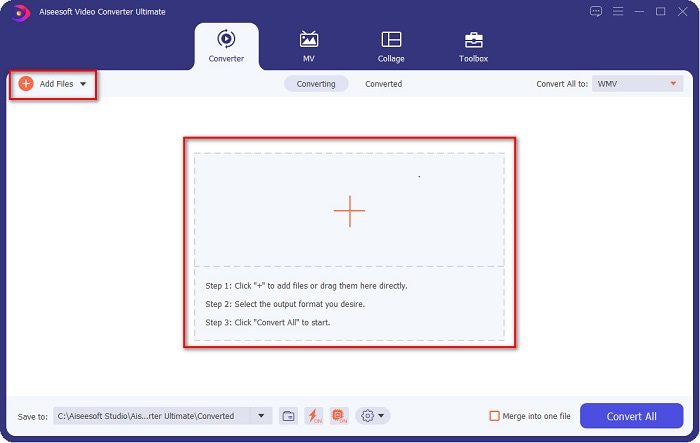
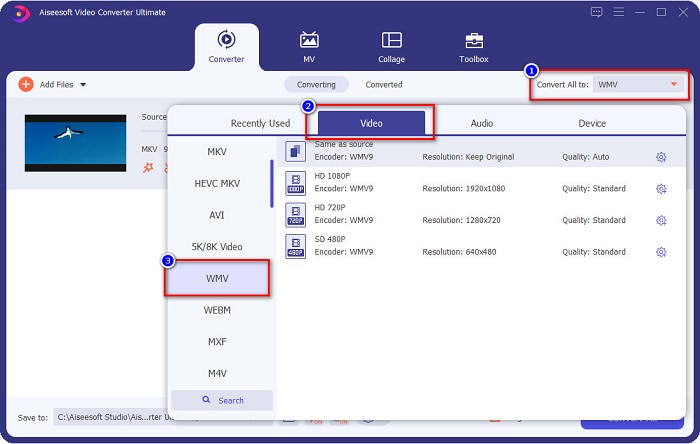
الخطوة 3. بعد ذلك، انقر زر Convert All to الموجود في الزاوية اليمنى العليا من واجهة البرنامج. ستظهر قائمة بتنسيقات الملفات، ثم اختر ملف WMV.
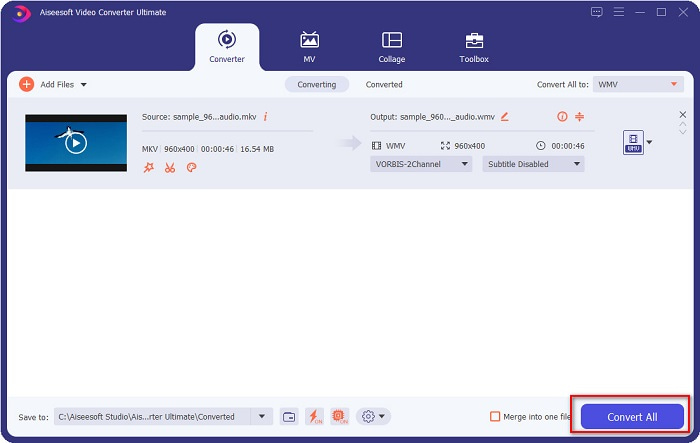
الخطوة 4. بعد اختيار تنسيق الملف الذي تريده، انقر زر Convert All لتحويل ملف MKV الخاص بك إلى تنسيق WMV. ثم انتظر بضع ثوانٍ، وسيكون ملف WMV جاهزًا!
باتباع هذه الخطوات السهلة في استخدام FVC Video Converter Ultimate ، يمكنك بسرعة تحويل MKV إلى WMV.
الجزء 3. تحويل MKV إلى WMV باستخدام برنامج VLC Media Player Converter
هناك طريقة أخرى يمكنك من خلالها تحويل ملف MKV إلى ملف WMV وهي استخدام محول مجاني. VLC Media Player ليس مجرد مشغل فيديو ؛ يمكنه أيضًا تحويل ملفات مثل MKV إلى WMV و WebM و MP4 وما إلى ذلك. ومع ذلك ، يصعب فهم واجهته قليلاً. ومع ذلك ، يتم استخدام هذا المحول من قبل العديد من المستخدمين.
دليل سريع حول كيفية استخدام برنامج VLC Media Player Converter:
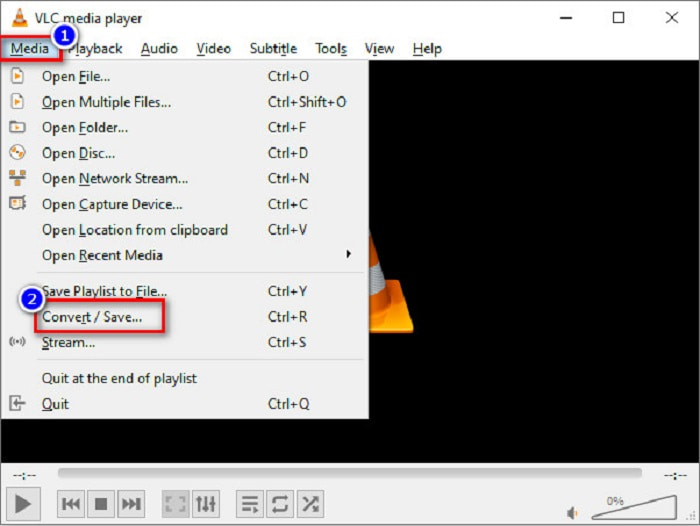
الخطوة 1. افتح برنامج VLC Media Player، أو إذا لم يتم تنزيله بعد على جهاز الكمبيوتر لديك، فابحث عن VLC Media Player ثم اتبع خطوات التثبيت. بعد ذلك، من الزاوية اليسرى العليا من الشاشة، انقر خيارات Media ثم اضغط زر Convert/Save.
الخطوة 2. بعد النقر زر Convert/Save ستظهر واجهة جديدة يمكنك فيها رؤية قائمة الملفات المحلية التي قمت برفعها. لتحميل ملف، انقر زر + Add لتحميل ملف MKV الخاص بك. اضغط زر Convert/Save في الأسفل للانتقال إلى الخطوة التالية.
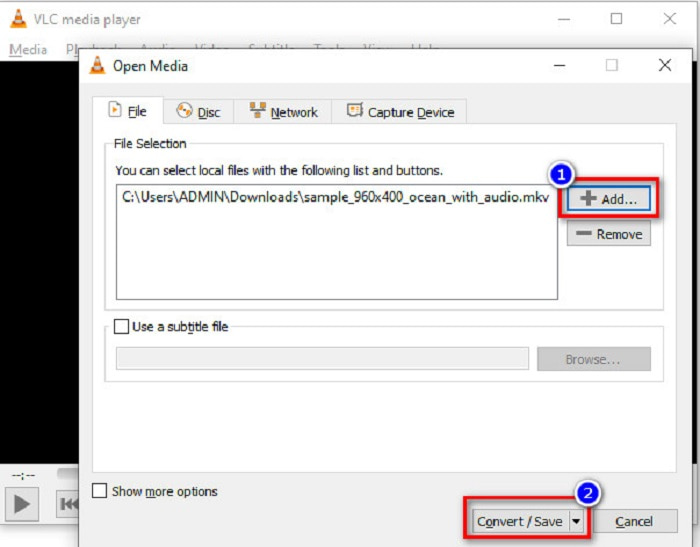
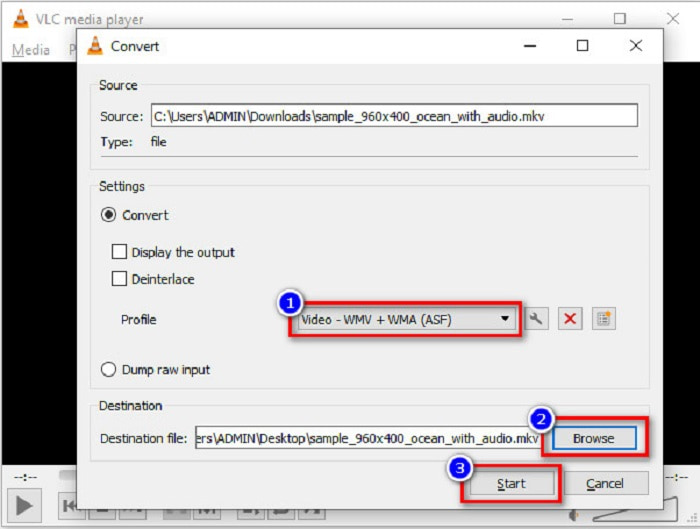
الخطوة 3. أخيرًا، اختر ملف WMV كتنسيق للملف. انقر زر Browse لاختيار مكان حفظ الملف بعد انتهاء التحويل. وفي النهاية، انقر زر Start لبدء تحويل ملف MKV الخاص بك إلى ملف بصيغة WMV.
الجزء 4. تحويل MKV إلى WMV باستخدام Free Online Converter
يُعد FVC Free Video Converter Online محولًا مجانيًا عبر الإنترنت من MKV إلى WMV يتيح لك تحويل العديد من تنسيقات ملفات الصوت والفيديو، بما في ذلك MKV إلى WMV وAVI وMPG وMOV وMP4 وMP3 وغيرها. يوفّر هذا المحوّل أيضًا ميزة تُمكِّنك من تعديل معدل البت للفيديو، ومعدل الإطارات، وحتى دقة ملفك. وعلى الرغم من أنه محول إلكتروني رائع، فقد تواجه بطئًا في التحويل بسبب اتصال الإنترنت لأنه يعتمد كليًا على الويب. ومع ذلك، فإنه ما يزال يقدم أداءً ممتازًا ويُعد من الأفضل لدى كثيرين.
فيما يلي الخطوات لتحويل ملف MKV إلى WMV باستخدام FVC Free Video Converter Online
الخطوة 1. من خلال المتصفح، ابحث عن FVC Free Video Converter Online للوصول إلى موقعهم.
الخطوة 2. بعد الدخول إلى موقعهم، انقر زر Add Files to Convert وقم بتشغيله. ستظهر لك ملفات جهاز الكمبيوتر حيث ستختار ملف MKV الخاص بك.
قم بتنزيل إصدار سطح المكتب لتحويل الملفات دفعة واحدة.
الخطوة 3. سترى قائمة تنسيقات الملفات في الواجهة الثانية للأداة في الأسفل. ضع علامة في الدائرة بجانب ملف WMV.
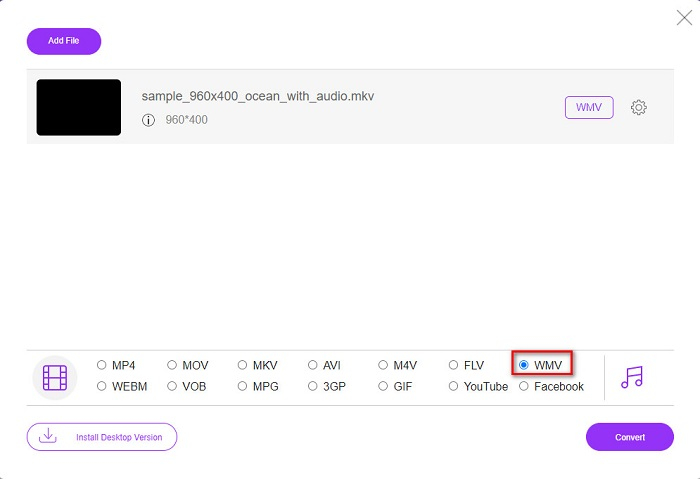
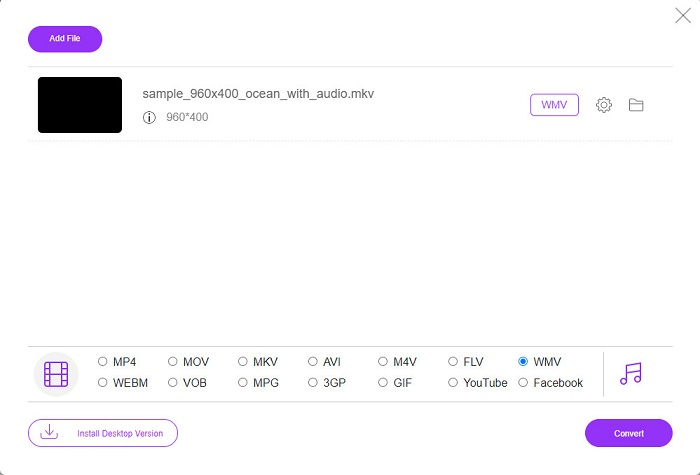
الخطوة 4. في الخطوة الأخيرة، انقر زر Convert الموجود في الزاوية اليمنى السفلية من واجهة الأداة. بعدها سيبدأ تحويل ملف MKV الخاص بك.
MKV مقابل WMV
تنسيق حاوية الوسائط المتعددة Matroska ، الذي تم إصداره في عام 2002 ، هو تنسيق مفتوح المصدر يمكن أن يتضمن عددًا من مسارات الفيديو والصوت والصورة والترجمة. لذلك ، يمكنك استخدامه لتخزين مقاطع الفيديو القصيرة والبرامج التلفزيونية والأفلام بسهولة. أنها تحظى بشعبية كبيرة بالنسبة للمروحة الفرعية.
من إنتاج Microsoft ، كان WMV أحد أكثر تنسيقات الفيديو شيوعًا في العقد الأول من القرن الحادي والعشرين. يمكن رؤيتها عبر الويب وتشغيلها بواسطة مشغلات وسائط مختلفة على Windows. وهو أيضًا تنسيق ملف الفيديو الافتراضي لبرنامج Windows Media Player. ولكن تم الاستيلاء عليها من قبل تنسيقات أخرى مؤخرًا.
الجزء 5. أسئلة وأجوبة حول تحويل MKV إلى WMV
هل يمكنك تغيير MKV إلى WMV دون فقدان جودة ملفك؟
بالتااكيد. باستخدام FVC Video Converter Ultimate ، يمكنك تحويل ملف MKV إلى WMV دون فقدان جودة الملف.
ما هو أفضل تنسيق ملف لتحويل ملف MKV الخاص بك؟
كما ذُكر أعلاه، لا تدعم بعض مشغلات الوسائط هذا التنسيق. لذلك يجب عليك تحويله إلى تنسيق ملف تدعمه معظم مشغلات الوسائط على نطاق واسع، ومن بينها تنسيق MP4. لمعرفة المزيد عن هذا الموضوع، اقرأ هذه المقالة: [مجاني وعلى الإنترنت] كيف يمكنني تحويل MKV إلى MP4 على ويندوز/ماك.
هل يستطيع Windows Media Player تشغيل ملفات MKV؟
مشغل Windows Media لا يدعم تنسيق ملفات MKV، لذلك عند محاولة تشغيل ملف MKV في Windows Media Player سيتم تشغيل الصوت فقط. تابع القراءة في أفضل مشغل لملفات MKV للعثور على المشغل الذي تريده.
خاتمة
هناك العديد من الطرق حول كيفية تحويل ملف MKV إلى WMV. تتميز المحولات المذكورة أعلاه بميزات مميزة تميزها عن بعضها البعض.
ومن بين أفضل محولات MKV إلى WMV المذكورة، نوصي باستخدام FVC Video Converter Ultimate لأن هذا المحول أكثر كفاءة وسهولة في الاستخدام. بالإضافة إلى ذلك، فإنه يضم ميزات فريدة يمكن أن تساعدك على تحسين ملفك. ما زلت غير متأكد؟ قم بتنزيله الآن لتجربة هذا المحول فائق السرعة.
-
 MKV to MOV - كيفية تحويل MKV إلى MOV
 كيف أقوم بتحويل MKV إلى MOV على نظام Mac؟ هل يستطيع موفي قراءة MKV؟ ماذا يعني تنسيق MOV؟ يوضح هذا المنشور طريقتين بسيطتين لمساعدتك في تحويل MKV إلى MOV باستخدام محولات الفيديو الاحترافية عبر الإنترنت مجانًا.
-
 كيفية تحويل مقاطع فيديو MKV إلى صور GIF متحركة بدون Photoshop / FFmpeg
 بعد تنزيل أفلام MKV ومشاهدتها على جهاز الكمبيوتر الخاص بك ، قد ترغب في مشاركة بعض اللحظات الرائعة مع الأصدقاء أو على الإنترنت كملفات GIF. في هذه المقالة ، يمكنك التعرف على أسهل طريقتين لتحويل MKV إلى GIF.
-
 نصائح وحيل حول كيفية تحويل ملفات MKV إلى MP3 [2021]
 هل تواجه مشكلة في اختيار المحول المناسب من MKV إلى MP3؟ ثم تابع قراءة هذا المنشور حيث قدمنا حلولًا مختلفة لمشكلة واحدة.

