


 محول الفيديو النهائي
 مسجل الشاشة
 إصلاح الفيديو
في مراجعة مفصلة حول أفضل 5 محولات لتحويل OGV إلى WMV
ألا تعرف كيف تحوّل ملف OGV إلى WMV وتقوم بتشغيله على Windows Media Player؟ أنت محظوظ، لأننا اليوم سنعرّفك بالأدوات المختلفة التي يمكنك استخدامها لتحويل ملف OGV الخاص بك. هل تريد معرفة ما هي هذه الأدوات الخمس؟ في الجزء اللاحق، ستتعلّم أيضًا كيفية تحويل ملف OGV إلى WMV. لذا من الأفضل أن تستعد، لأننا لا نريد أن نُطيل عليك، فلنبدأ رحلتنا فورًا.

الجزء 1. أعلى 5 محول OGV إلى WMV عبر الإنترنت وغير متصل
أعلى الصفحة 1. FVC Video Converter Ultimate
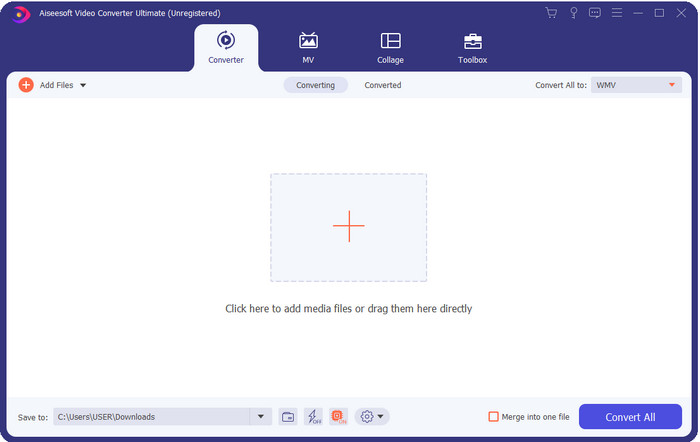
يُعد FVC Video Converter Ultimate واحدًا من أفضل محوّلات OGV إلى WMV التي يمكنك تنزيلها على جهاز الكمبيوتر. يوفّر هذا البرنامج سرعة تحويل مذهلة أبهرت بالفعل العديد من المستخدمين. علاوة على ذلك، ليست عملية التحويل وحدها هي نقطة قوة هذا البرنامج، بل يمكنك استخدام ميزات التحرير المتقدمة لجعل الفيديو مميزًا، أو تصغير حجمه، أو دمج المقاطع. وبشكل عام، إذا كنت جديدًا في مجال تحويل الصيغ، فهذا هو الخيار الأفضل، لأنك ستتمكن من إجراء التحويل بسهولة شديدة وبدون أي عناء، ومع ذلك تحصل في النهاية على نتيجة احترافية.
تحميل مجانيلنظام Windows 7 أو أحدثتنزيل آمن
تحميل مجانيلنظام MacOS 10.7 أو أحدثتنزيل آمن
الايجابيات
- قم بتحويل OGV إلى تنسيقات WMV و AVI و MOV و MP4 و 200+ المتوفرة في أقل من دقيقة.
- يتم تحويل بدلاتها القوية وميزات التحرير المتقدمة التي ستحتاج إليها.
- محول لا يصدق يمكن لأي شخص استخدامه حتى بدون خبرة هو مضمون وخفيف الوزن.
- متوفر في جميع أنظمة التشغيل ليتم تنزيله على نظامي التشغيل Windows و Mac.
سلبيات
- للحصول على هذا البرنامج ، ستحتاج إلى شرائه أولاً.
- قم بتنزيله على محرك الكمبيوتر الخاص بك.
أعلى 2. VLC Media Player
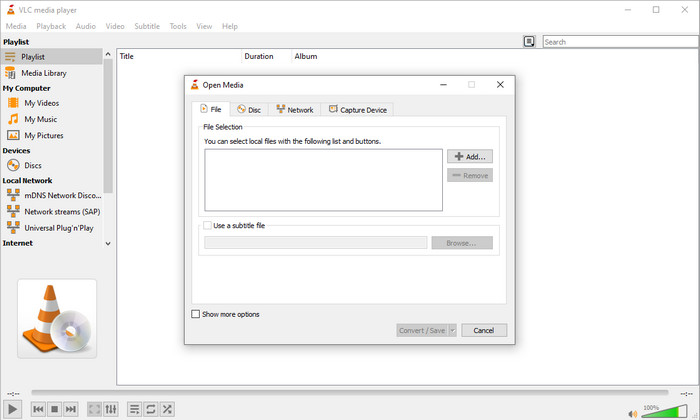
يُعد VLC Media Player من أكثر المشغلات تحميلًا وأسهلها استخدامًا على مختلف الأجهزة. هذا المشغّل يمكنه أيضًا تحويل ملف OGV إلى WMV أو إلى إصدار/صيغة أخرى تريدها. ورغم أن المشغّل يدعم التحويل، فإنه ما يزال يفتقر إلى بعض الصيغ المدعومة، خصوصًا عند تحويل الملف إلى صيغة محددة بعينها. ولكن إن كان VLC مثبتًا بالفعل على جهازك، فلماذا لا تجربه كمحوّل فيديو على جهازك لتغيير صيغة الملف؟.
الايجابيات
- مجاني للتنزيل ، وهو يدعم تنسيقات مختلفة للتشغيل والتحويل.
- متوفر في جميع الأجهزة المراد استخدامها.
- عملية تحويل سريعة.
سلبيات
- يدعم تنسيقًا محدودًا يمكنك الاختيار من بينها.
- ليس المحول النموذجي الخاص بك.
- مطلوب الكثير من الخطوات قبل أن تتمكن من التحويل.
أعلى 3. Aconvert
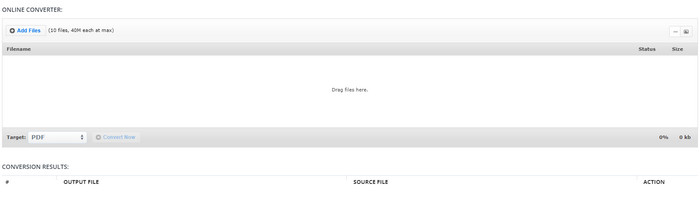
سيساعدك Aconvert في مهمة تحويل ملفات OGV. يعمل هذا المحوّل الإلكتروني من OGV إلى WMV على إتاحة عملية تحويل فعّالة لتقليل الإزعاج قدر الإمكان. ومع ذلك، يحتوي هذا المحوّل على الكثير من الإعلانات في واجهة الموقع، وقد تكون مزعجة جدًّا من عدة نواحٍ. إضافة إلى ذلك، يقيّد هذا الموقع تجربة التحويل بعشر مرات فقط، وبحجم ملف لا يتجاوز 40 ميجابايت لكل ملف. لكن لا داعي للقلق، فهذا الموقع مجاني لجميع مستخدمي الإنترنت الذين يرغبون في تحويل الملفات عبر الإنترنت.
الايجابيات
- متاح على شبكة الإنترنت للاستخدام.
- يدعم تنسيقًا معروفًا يمكنك إدراجه.
- سهل الاستخدام.
سلبيات
- كان تنسيق الخيارات للإخراج النهائي الكثير من أوجه القصور.
- هناك الكثير من الإعلانات المزعجة على الموقع.
أعلى 4. Video2Edit.com
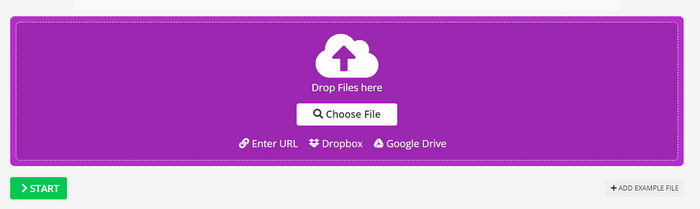
موقع Video2Edit.com يشبه Aconvert، لكنه أفضل قليلًا لأنه يتيح لك تعديل الفيديو قبل تحويل OGV إلى WMV. كما يمكنك تغيير ترميز الصوت (الكودك) بين ثلاثة خيارات. علاوة على ذلك، هناك العديد من الأمور الأخرى التي يمكنك فعلها باستخدام هذا المحوّل. غير أن الجانب السلبي في هذه الأداة الإلكترونية هو أن الصيغ المتاحة عليها محدودة، كما أنها تحتوي على إعلانات، وعملية التحويل فيها بطيئة.
الايجابيات
- محول متعدد الوظائف.
- متاح على جميع مواقع الويب ليتمكن أي شخص من الوصول إليه.
- يمكنه تعديل برامج ترميز الفيديو والصوت.
سلبيات
- إعلانات على الواجهة.
- تستغرق عملية التحويل وقتًا طويلاً.
أعلى 5. FVC Free Video Converter Online
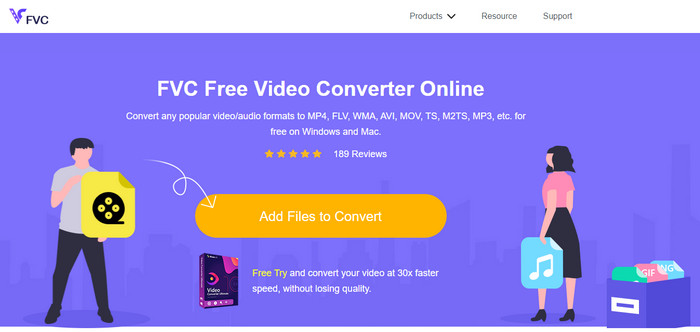
يقدّم FVC Free Video Converter Online عملية تحويل أفضل من OGV إلى WMV مقارنةً بـ VLC وAconvert وVideo2Edit.com. فالسبب هو أن هذه الأداة على الويب توفّر ناتجًا احترافيًّا يشبه ما يقدّمه FVC Video Converter Ultimate، إلا أن ليست كل الصيغ المدعومة في الأداة الكاملة متاحة هنا. بالإضافة إلى ذلك، يمكنك ضبط الجودة ورفعها إلى دقة أعلى للحصول على نتيجة أفضل. ومن المزايا الأخرى أنه لا توجد إعلانات مزعجة تعرقل عملية التحويل، وبالتالي يمكنك الاستمتاع بالتحويل دون ظهور إعلانات منبثقة، كما يمكنك التحويل دون حدود، حتى من حيث حجم الملفات.
الايجابيات
- وهو يدعم تنسيقات أكثر من VLC و Adconvert و Video2Edit.
- يمكنه تعديل مواصفات الفيديو والصوت.
- من السهل الوصول إلى محول الويب في أي وقت وفي أي مكان مع اتصال بالإنترنت.
- لا توجد إعلانات على الواجهة ، وتبدو أكثر احترافية.
سلبيات
- إذا لم يكن لديك إنترنت ، فلا يمكنك استخدام هذا المحول مثل المحولين الآخرين عبر الإنترنت.
- لا توجد ميزات التحرير.
الجزء 2. كيفية تحويل OGV إلى WMV باستخدام FVC Video Converter Ultimate
والآن، إن كنت قد أُعجبت بما يمكن القيام به باستخدام FVC Video Converter Ultimate، فعليك قراءة ما يلي. حتى تحصل على فكرة حول كيفية تحويل OGV إلى WMV باستخدام أداة Ultimate، يجب أن تتبع الخطوات التالية.
خطوات تحويل صيغة OGV إلى WMV باستخدام FVC Video Converter Ultimate:
الخطوة 1. قم بتنزيل برنامج التحويل على نظام Windows أو Mac، واتبع تعليمات التثبيت، ثم افتح برنامج التحويل.
تحميل مجانيلنظام Windows 7 أو أحدثتنزيل آمن
تحميل مجانيلنظام MacOS 10.7 أو أحدثتنزيل آمن
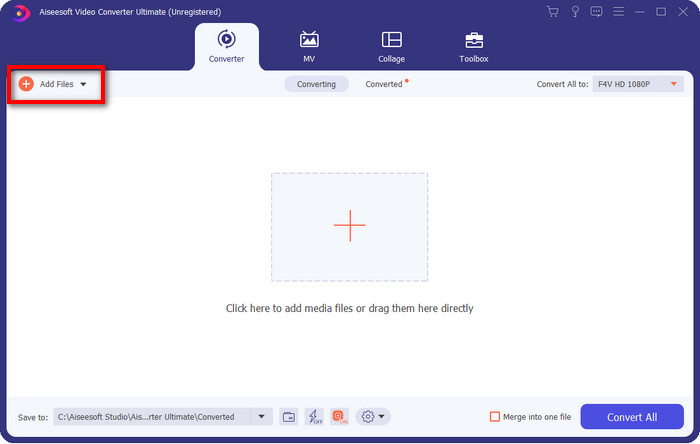
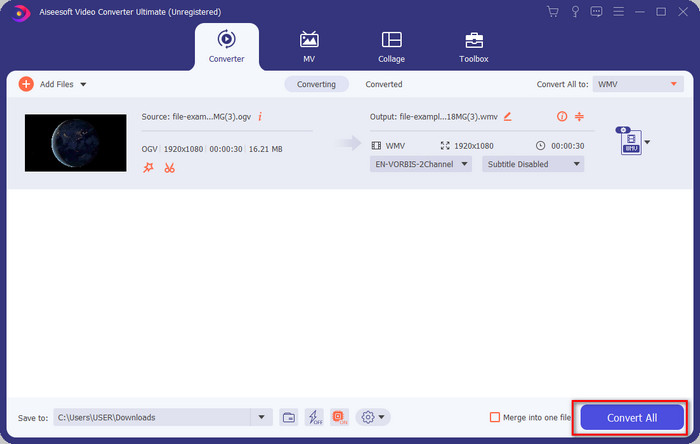
الخطوة 2. بعد فتح برنامج التحويل، يمكنك تحميل ملف OGV بالنقر على زر Add Files في أعلى يسار الواجهة، ثم الضغط على Open.
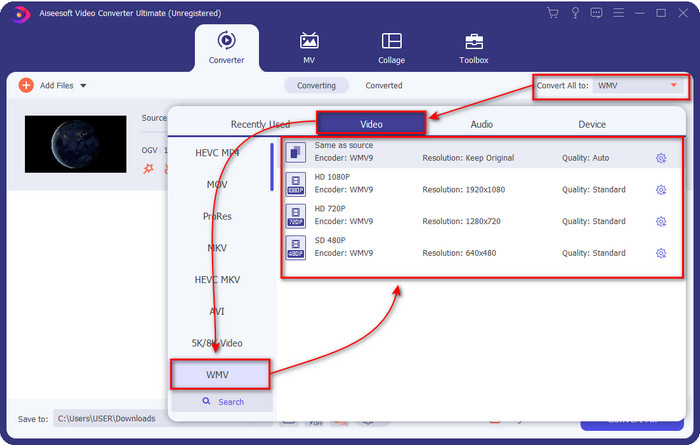
الخطوة 3. بعد تحميل ملف OGV، اختر صيغة WMV التي تريدها من خيار Convert All to.
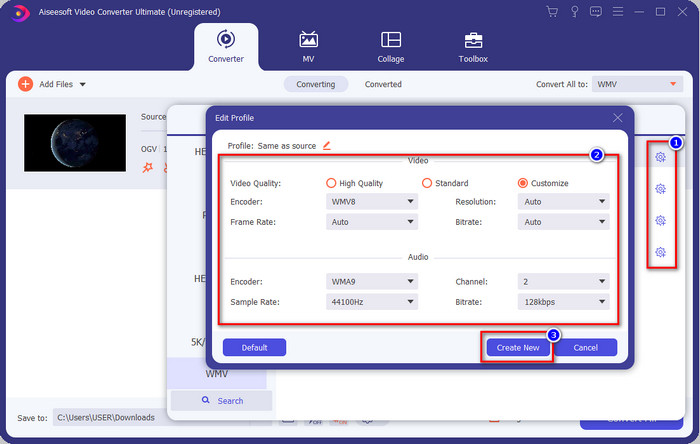
اختياري: هل تريد تعديل إعدادات ملف الفيديو نفسه؟ انقر إذن على أيقونة cog، ثم عدّل إعدادات الترميز (encoder) ومعدل الإطار (frame rate) أو معدل العيّنة (sample rate) للفيديو والصوت. لحفظ التغييرات، انقر على Create New. بعد التعديل، ستلاحظ ظهور أيقونة cog أعلى الصيغة التي اخترتها.
الخطوة 4. انقر على Convert All لبدء عملية التحويل. بعد الانتهاء، ستظهر نافذة لمجلد على جهازك تحتوي على ملف WMV الناتج.
الجزء 3. مخطط المقارنة
| ميزات المحولات | FVC Video Converter Ultimate | مشغل الميديا VLC | أكونفيرت | Video2Edit.com | FVC Free Video Converter Online |
| تحويل الصيغ |  | | | | |
| تحرير الميزات | |  | | | |
| تعديل إعدادات الفيديو والصوت | | | | | |
| المعتمد على الإنترنت | | | | | |
| إعلانات مجانية | | | | | |
الجزء 4. أسئلة وأجوبة حول تحويل OGV إلى WMV
هل يمكنني استخدام محول FFmpeg OGV إلى WMV؟
نعم، يمكنك استخدام FFmpeg لتحويل OGV إلى WMV، لكن هذا المحوّل ليس سهل الاستخدام للمبتدئين كما هو الحال مع البرامج الشائعة الأخرى. إذا أردت استخدام هذه الأداة، فاتبع الخطوات التالية: شغّل الأداة، ثم نفّذ مسار FFmpeg.exe على نظامك. بعد ذلك، افتح سطر الأوامر (Command Prompt) وانتقل إلى موقع ملف OGV الذي تريد تحويله على القرص. بعد ذلك أدخل الأمر التالي: ffmpeg -i input.ogv -vn -ar 44100 -ac 2 -b:a 192k output.wmv ثم اضغط Enter لبدء المعالجة.
هل يمكن تشغيل OGV على نظام Mac؟
لا يمكنك تشغيل ملفات OGV على برنامج QuickTime لأن ترميز هذه الصيغة غير مدعوم. لكن هناك طريقة لجعلها متوافقة على أجهزة Mac، وهي تحويلها إلى صيغة MOV. هل تريد معرفة كيفية تحويل ملفات OGV إلى MOV؟ إذن اضغط على هذا الرابط.
هل OGV و OGG بنفس التنسيق؟
OGV و OGG هي الحاويات الدقيقة ، لكن هناك اختلافات في ما تحتويه. على سبيل المثال ، يمكن لملفات OGG تخزين صوت عالي الجودة ولكن ليس مع مقاطع الفيديو. في المقابل ، يمكن لـ OGV الاحتفاظ بمحتوى صوت وفيديو عالي الجودة.
خاتمة
والآن بعد أن تعرّفنا إلى محوّلات OGV إلى WMV التي يمكنك استخدامها، حان وقت اختيار الأداة المناسبة لك. ورغم أن جميع الأدوات المعروضة هنا ستساعدك، فقد تبيّن لنا أن FVC Video Converter Ultimate يَعِد المستخدمين بأداء متميز. من الصعب تصديق ما يمكن أن يقدّمه هذا البرنامج من إمكانيات. والآن أصبح القرار بيدك لاختيار الأداة، ولكن إن لم تحسم أمرك بعد، فننصحك باستخدام FVC Video Converter Ultimate. هل تريد معرفة المزيد عن الأداة نفسها؟ إذن عليك تنزيلها أولاً واستخدامها دون أي قيود.
-
 أكثر 2 محولات يمكن الوصول إليها لتحويل ملف OGV إلى AVI [2021]
 هل تريد تحويل ملفات OGV إلى AVI؟ تقدم هذه المقالة اثنين من أفضل الحلول التي يمكنك استخدامها لجعل تحويلك آمنًا وسريعًا دون فقدان مصداقية الفيديو و #039.
-
 محول OGV إلى FLV رائع لا يجب أن تفوته [مثبت]
 إذا كنت & #039 ؛ تتساءل عن كيفية تحويل ملفات OGV إلى ملفات FLV بسرعة ، فستظهر لك هذه المقالة المحول الوحيد الذي ستحتاج إليه على الإطلاق & #039.
-
 3 طرق لتحويل ملفات M2TS إلى WMV مجانًا على Windows / Mac / Online
 فيما يلي 3 طرق سهلة لتحويل مقاطع فيديو M2TS إلى WMV. يمكنك تغيير تنسيق الفيديو من M2TS إلى WMV مجانًا على أنظمة التشغيل Windows و Mac وعلى الإنترنت بسرعة. يتم دعم تحويل الدُفعة.
