


 محول الفيديو النهائي
 مسجل الشاشة
 إصلاح الفيديو
 تنزيل آمن
كيفية تحويل SWF إلى 3GP بسهولة وعلى الفور
Small Web Format, or SWF, is an Adobe file format that contains vector-based animations and videos. However, this file format is not common and is supported by other browsers and programs. So it is hard to play this file. In this case, you must best convert your SWF file to other formats supported by browsers and programs like the 3GP format. Luckily, this article will provide an effective way to convert SWF to 3GP using various converters. Let’s find these helpful ways by reading this article without further ado.

الجزء 1: محول SWF إلى 3GP الأكثر موثوقية لتغيير SWF إلى 3GP
تحويل SWF إلى 3GP بواسطة Video Converter Ultimate
Video Converter Ultimate is the most reliable offline tool for your Windows and Mac. This application lets you convert SWF to 3GP instantly. Also, you can convert more files because it supports 100+ file formats, including MP4, MOV, MKV, FLV, DIVX, XVID, and more. In addition, this offline tool can convert files up to 30x faster than other converters. You can also use it for free. Moreover, you can convert multiple files in one go, so you don’t have to wait longer. The best part is that all users can utilize this tool because it has a simple interface with basic steps for converting different files.
علاوة على ذلك ، يحتوي Video Converter Ultimate أيضًا على ميزات رائعة أكثر مما تتخيل. يمكنك المتابعة إلى ميزة Toolbox إذا كنت تريد تحسين فيديو SWF الخاص بك. يمكنك استخدام محسنات الفيديو لتحسين دقة الفيديو وسطوعه وتباينه. يمكنك حتى إزالة الضوضاء في الفيديو الخاص بك. هذه ليست سوى واحدة من الميزات الرائعة التي يمكنك تجربتها عند استخدام هذا المحول. إذا كنت تريد اكتشاف المزيد من الميزات ، فاستخدم Video Converter Ultimate وشاهدها بنفسك.
الميزات
◆ قم بتحويل العديد من ملفات الفيديو ، مثل MP4 و AVI و FLV و SWF و M4V و MTS وما إلى ذلك.
◆ قم بإنشاء فيديو موسيقي بمواضيع رائعة مختلفة.
◆ اصنع ملصقة مع العديد من القوالب والمرشحات المجانية.
◆ يحتوي على Toolbox الذي يوفر أدوات متنوعة لتحسين الفيديو ، مثل مُحسِّن الفيديو وتصحيح الألوان وصانع ثلاثي الأبعاد وما إلى ذلك.
◆ اضبط سرعة الفيديو حتى 8x أسرع.
◆ إضافة وإزالة العلامات المائية من الفيديو.
◆ قادرة على تغيير حجم ملف الفيديو.
◆ قادر على تحويل الصور.
الايجابيات
- متاح لكل مستخدم.
- يدعم أكثر من 1000 تنسيق ملف.
- يمكن الوصول إليها على كل من Windows و Mac.
- يمكنه تحسين الفيديو بسهولة.
سلبيات
- لتجربة المزيد من الميزات الرائعة ، يوصى بشراء الإصدار المحترف.
لتحويل SWF إلى 3GP بسهولة ، اتبع الإرشادات الأساسية أدناه.
Step 1: You must download the Video Converter Ultimate application on your Windows or Mac by clicking the download button below. Then, proceed to the installation process and launch the application.
تحميل مجانيلنظام Windows 7 أو أحدثتنزيل آمن
تحميل مجانيلنظام MacOS 10.7 أو أحدثتنزيل آمن
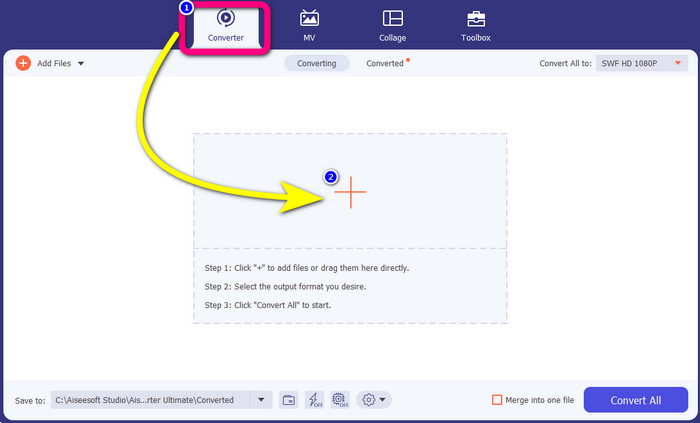
Step 2: On the four options at the upper part of the interface, select the Converter panel. Click the Plus icon and choose the video with an SWF file you want to convert.
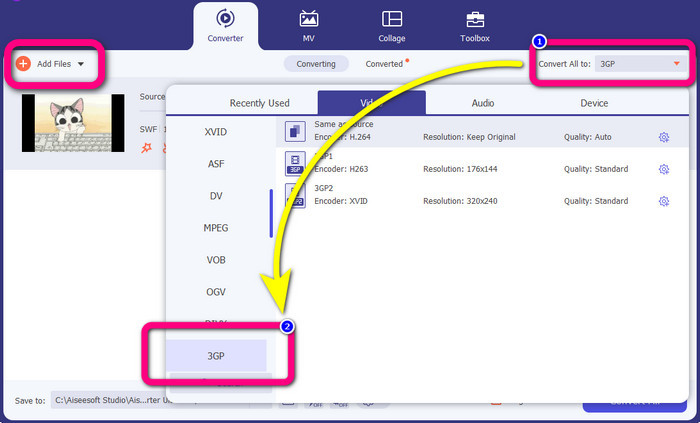
Step 3: Click the Convert all to button and pick the 3GP format from the format options. You are allowed for batch conversion, so if you want to convert more files or convert your SWF file to other formats like MP4, MKV, MOV, AVI, and more, click the Add Files button. You can convert them at once.
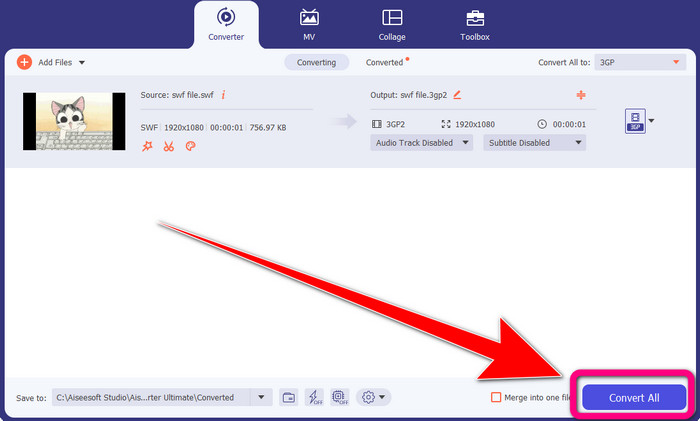
Step 4: Lastly, if you are done selecting the 3GP file format, click the Convert All button. Wait for the fast conversion process and save your final video output.
الجزء 2: أدوات ممتازة عبر الإنترنت لتحويل SWF إلى 3GP
FVC Free Video Converter Online
When converting SWF to 3GP online, you can use the FVC Free Video Converter Online. This online tool is reliable for converting video and audio file formats, such as FLV, MP4, MTS, MP3, AVI, WMA, etc. You can also use this for free for both Mac and Windows. Moreover, this is suitable for all users, especially beginners. It has an excellent and simple method, so you don’t have to trouble yourself. Lastly, follow the steps below if you are excited about using FVC Free Video Converter Online to convert SWF to 3GP.
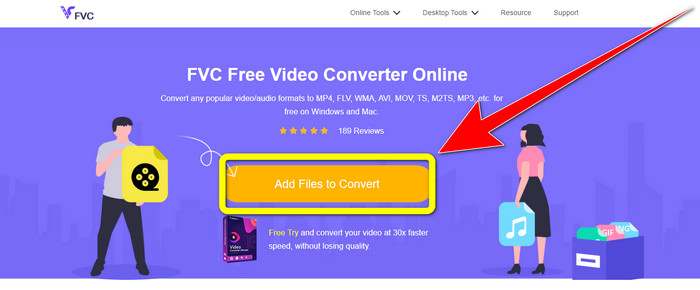
Step 1: Visit the FVC Free Video Converter Online website. Click the orange box to insert your video with the SWF file format.
Step 2: After you insert the video file, you can already choose the 3GP file format from the format options and click it.
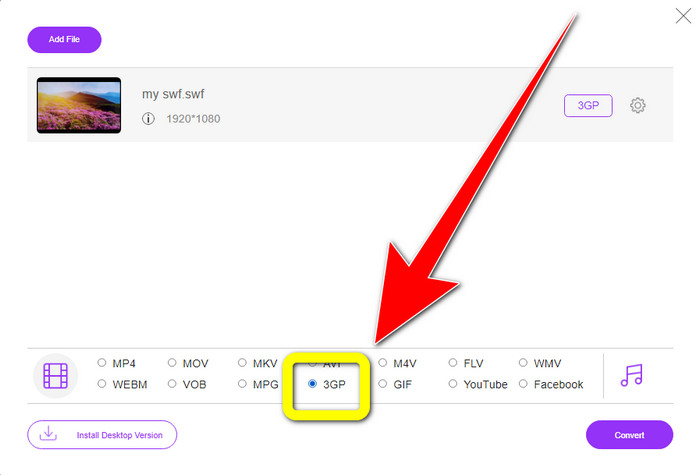
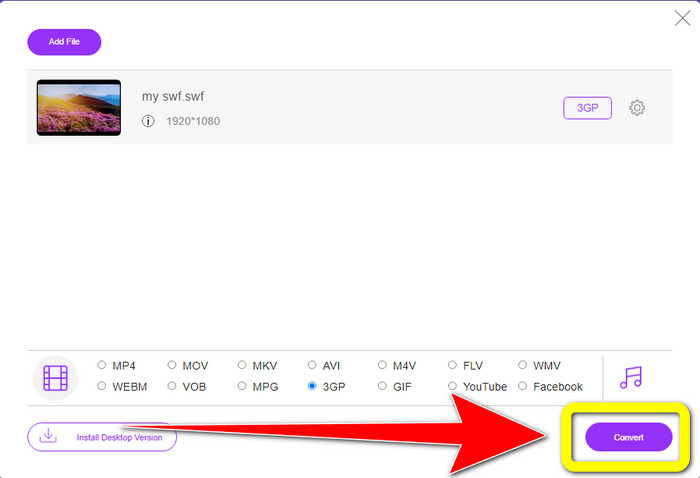
Step 3: Click the Convert button to convert your SWF file to 3GP format.
التحويل عبر الإنترنت مجانًا
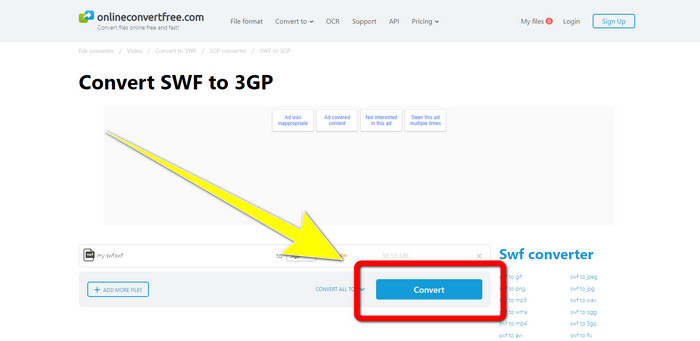
Another useful and helpful online tool to convert SWF to 3GP is Online Convert Free. With the assistance of this online software, you can convert different files, including M4V, MP4, AVI, WEBM, XVID, FLV, and more. So, you can convert MP4 to 3GP with this tool. You can also trust this tool to convert images, audio, documents, etc. The conversion process is fast. Also, it is easy to use, which gives an advantage to non-professional users. However, converting your file using this software only has a maximum of 100Mb when using the free version. To increase the maximum file size, you have to purchase a subscription. Follow the steps below to convert SWF to 3GP using this online tool.
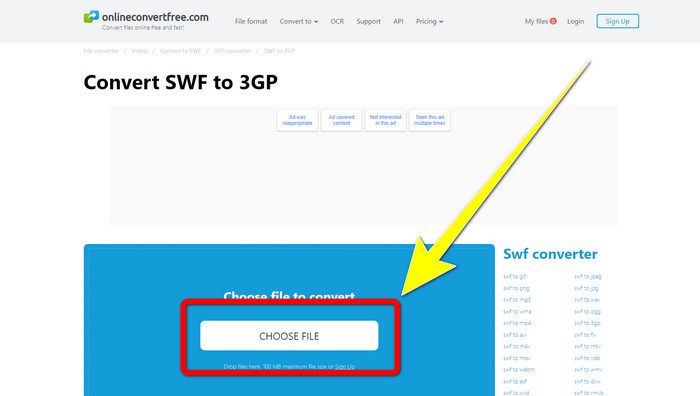
Step 1: Go to the Online Convert Free website. Click the Choose File button to import the video file.
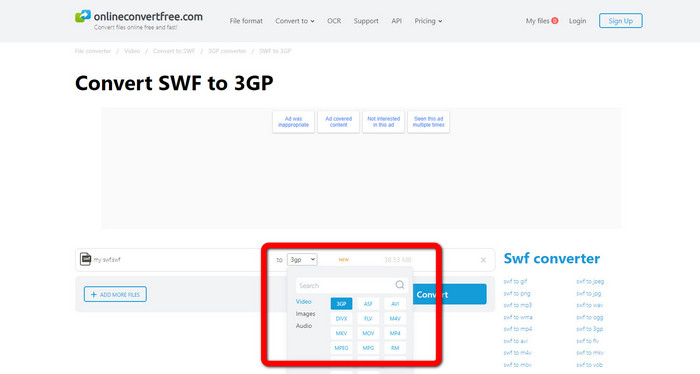
Step 2: Gelect the 3GP file format from the format options after importing the video file.
Step 3: To convert your file to 3GP, click the Convert button and save your output on your desktop
الجزء 3: SWF مقابل 3GP
| SWF | 3GP | |
| وصف | رسم متحرك يحتوي على متجه ورسومات نقطية ونص ومحتوى تفاعلي مكتوب في ActionScript. | حاوية الوسائط المتعددة المحددة بواسطة 3GPP لخدمات 3G UMTS. |
| طورت بواسطة | أدوبي | مشروع شراكة الجيل الثالث |
| نوع الملف | تنسيق ملف Adobe Flash | تنسيق الوسائط المتعددة 3GPP |
| الايجابيات | يمكن استخدامها بشكل عام للتوصيل الفعال لمحتوى الوسائط المتعددة. | متوفر في جميع البرامج / الأجهزة تقريبًا |
| سلبيات | غير مدعوم من قبل المتصفحات أو البرامج الأخرى. | يتم تخزين الفيديو بجودة منخفضة |
الجزء 4: الأسئلة الشائعة حول تحويل SWF إلى 3GP
1. هل تحتوي ملفات SWF على صوت؟
- تم إنشاء تنسيق SWF لاحتواء رسوم المتجهات والرسوم المتحركة ، ومع ذلك قد يحتوي أيضًا على أنواع أخرى من البيانات مثل النص والفيديو والصوت. تُستخدم هذه الملفات بشكل متكرر لإنتاج الرسوم المتحركة ولعب الألعاب والفيديو والصوت على مواقع الويب.
2. ما الذي يمكن فتح ملفات .SWF؟
- لفتح ملف SWF ، يمكنك استخدام VLC Player أو مشغل الفلاش المخفي من Adobe ، والذي يستخدمه المطورون كثيرًا.
3. هل يمكنني تحويل ملف SWF إلى تنسيقات أخرى؟
- Definitely, yes! The best solution is to download the Video Converter Ultimate on your Windows or Mac. This application lets you convert your SWF file to MKV and other file formats.
خاتمة
Here is the most detailed guide for converting SWF to 3GP format. People prefer simplicity over complicated ways. So, if you want to convert different files easily, use the FVC Free Video Converter Online.
-
 3 طرق لتحويل MPG إلى 3GP على نظامي التشغيل Windows و Mac [مجانًا]
 إذا كنت تبحث عن طرق لتحويل MPG إلى 3GP ، فاقرأ هذه المقالة لمعرفة أفضل الطرق لتحويل MPG إلى 3GP على نظامي التشغيل Windows و Mac.
-
 أفضل طريقة لتحرير وإزالة وعرض بيانات 3GP الوصفية على سطح المكتب
 ما هي البيانات الوصفية 3GP؟ كيف يمكنني عرض ، وتغيير ، وتحرير العلامات على 3GP الخاص بي؟ إذا كان لديك نفس السؤال ، فهذه المقالة لك.
-
 كيفية تحويل DIVX إلى 3GP على أنظمة Windows و Mac وعلى الإنترنت
 كيفية تحويل DIVX إلى 3GP؟ إذا كنت تبحث عن إجابة ، اقرأ هذا المقال. سنعرض لك إجراءات رائعة بمساعدة محولات مختلفة.
