


 محول الفيديو النهائي
 مسجل الشاشة
 إصلاح الفيديو
مراجعة كاملة حول كيفية تحويل ملف SWF إلى AVI باستخدام 5 محولات
التنسيق الذي أُنشئ بتعاون مشترك بين ShockWave Flash وAdobe هو SWF. صُمِّم هذا التنسيق لاحتواء وتشغيل الرسوم المتحركة الفيديو على مشغّل الفلاش أو على الويب عبر مكوّنات الفلاش الإضافية. ومع ذلك، من الصعب جدًا مشاهدة الفيديوهات المتحركة بتنسيق SWF، لأن جميع مشغلات الوسائط تقريبًا لا تدعم هذا التنسيق سوى Flash Player. وفي هذه الحالة، ستحتاج إلى العثور على محوِّل حتى تتمكّن من مشاهدة ملف .swf على جهازك المكتبي. لذلك، نعرض لك أدناه المحوّلات التي يمكنك استخدامها لـتحويل SWF إلى AVI عبر الإنترنت وغير المتصل بالإنترنت.

الجزء 1. SWF مقابل AVI: أيهما أفضل؟
في وقت سابق ، شرحنا بعض البيانات التي جمعناها أثناء بحثنا حول ملفات SWF. لكن هل تعلم أن هذا الملف يستخدم متجهًا وليس بكسل؟ لفهمها بشكل أفضل ، دعنا نتعمق فيها. البكسل هي مربعات صغيرة تظهر على شاشتك. في الأساس ، كل هذا المربع الصغير له ألوان مختلفة وكلها مشتركة معًا لإنشاء صورة بصرية. ومع ذلك ، تستخدم المتجهات المعادلات الرياضية لحساب الشكل الذي سيؤخذ جزءًا على شاشة العرض الخاصة بك. لذلك ، إذا حاولنا مشاهدة مقاطع فيديو SWF ، فتوقع جودة مرئية أفضل بكثير من أي تنسيق.
يعد AVI أحد تنسيقات الملفات الشهيرة التي تحتوي على حجم ملف ضخم مقارنة بالتنسيقات الأخرى. والسبب الرئيسي في أن حجم ملف AVI كبير هو فقط لأنه غير مضغوط. ولأنه غير مضغوط توقع أن يحتفظ الملف بالجودة ولكن بحجم أكبر بكثير.
السبب الوحيد الذي يجعلك تحتاج إلى معرفة كيفية تحويل ملف SWF إلى AVI هو مشاهدة الفيديو الذي لا يزال ضمن امتداد الملف .swf. علاوة على ذلك ، نجعل بحثك أسهل بكثير من أي وقت مضى حيث نقوم بتجميع الأدوات المختلفة التي يمكنك اختيارها. أيضًا ، توفر جميع الأدوات المذكورة أدناه تحويلًا رائعًا سيساعدك حرفياً في حل هذه المشكلة.
الجزء 2. 5 من أفضل محولات SWF إلى AVI المتوفرة على سطح المكتب والويب
1. FVC Video Converter Ultimate
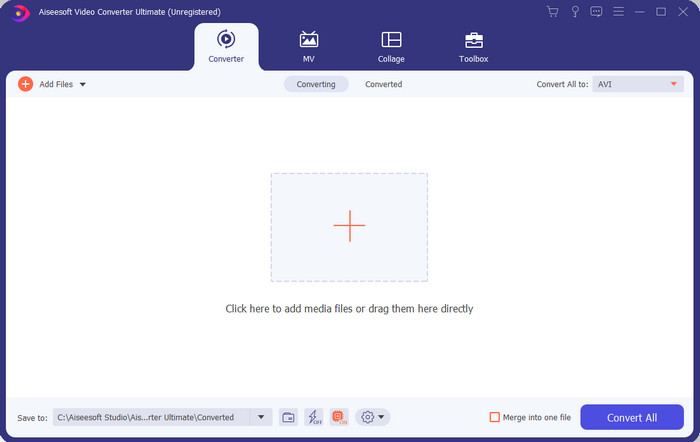
إذا كنت تبحث عن برنامج استثنائي نهائي لاستخدامه في تحويل ملفات .swf فإن FVC Video Converter Ultimate هو الأنسب لك. ولم يكن ليتصدر القائمة لو لم يقدّم أداء تحويل متميزًا. كما أنه يدعم أكثر من 200 تنسيق معروف لديك أو حتى غير المعروف. وعلى عكس المحوّلات المذكورة أدناه، فهو يختلف كثيرًا من حيث الواجهة، والوظائف، والميزات المتقدمة، وسهولة الوصول، وغير ذلك. إذا كنت تبحث عن محوّل رائع فقل لنفسك إن عملية البحث قد انتهت لأنك وجدت ما تريد. علاوة على ذلك، إن لم تكن مقتنعًا بالأداة بعد، فلنجرّبها عمليًا عبر تنزيل هذا الأفضل ضمن محوّلات SWF إلى AVI المجانية أولًا.
الايجابيات
- وهو يدعم تسريع الأجهزة والتحويل السريع للتحويل في غمضة عين.
- مجموعة واسعة من تنسيقات ملفات الوسائط المدعومة.
- تتوفر ميزات التحرير بعد تسوية الدفع.
- يمكن إجراء تحويل الدُفعات بسهولة.
سلبيات
- يجب أن تدفع أولاً قبل أن تتمكن من استخدامه ولكنها رخيصة جدًا.
- يجب تنزيله على محرك الأقراص الخاص بك أولاً.
2. مشغل الميديا VLC
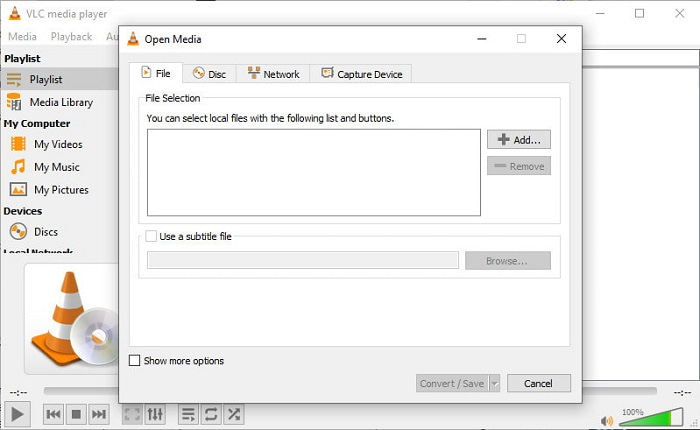
يحتوي مشغّل الوسائط هذا على ميزة خفية ستودّ استخدامها. فـVLC Media Player لا يُستخدم فقط كمشغّل وسائط، بل يوفّر أيضًا وظيفة محوِّل. ومع ذلك، فإن صيغ الإخراج التي يدعمها برنامج التحويل المدمج محدودة جدًا، ولا يمكنك ضبط الدقة. كما أن عملية تحويل الصيغ هنا ستكون بالتأكيد أكثر صعوبة مقارنة بالمحوّلات الأخرى. ولكن إذا رغبت في تجربة هذا المحوّل المجاني من SWF إلى AVI فقم بتنزيل مشغّل الوسائط.
الايجابيات
- يحتوي على محول مدمج جنبًا إلى جنب مع مشغل الوسائط.
- مجاني للتنزيل على أي منصة.
- إنه آمن للتنزيل وعملية التحويل محمية أيضًا.
سلبيات
- تنسيق أقل مدعومًا من المحولات الأخرى المتوفرة في هذه القائمة.
- هناك الكثير مما يتعين القيام به قبل أن تتمكن من إجراء التحويل.
3. تحويل
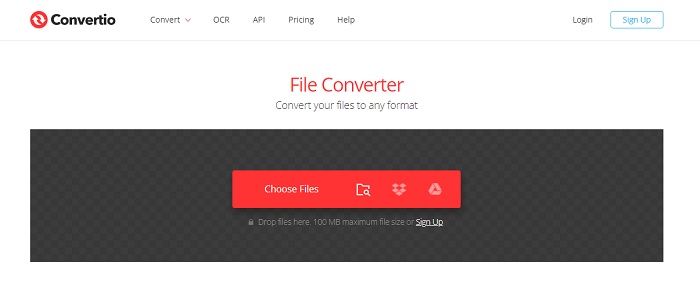
إذا كنت تريد تحويل SWF إلى AVI عبر الإنترنت فجرّب أداة Convertio لأنها توفّر تحويلًا بسيطًا وفعّالًا. كما أن هذه الأداة الإلكترونية آمنة للاستخدام، وجميع الملفات التي تم تحويلها عبرها تُحذَف من الموقع. وميزة أخرى مذهلة في هذه الأداة هي أنه يمكنك إجراء تحويلات دفعية إذا قمت بالتسجيل. لكن عملية رفع الملفات ثم تنزيلها ستستغرق بالتأكيد الكثير من وقتك، وهذا يُعدّ إزعاجًا بسيطًا للمستخدمين. وإذا كنت لا تريد إنفاق أي مبلغ على عملية التحويل فحاول استخدام هذه الأداة.
الايجابيات
- لا حاجة لتنزيل البرنامج على محرك الأقراص الخاص بك قبل أن تتمكن من استخدامه.
- وهو يدعم مستوى متوسط من التنسيقات التي يمكنك الاختيار من بينها.
- يمكن تحويل تنسيقين للملفات في وقت واحد في نفس الوقت.
سلبيات
- سيستغرق تحميل الملف وتنزيله بعد التحويل الكثير من وقتك.
- يعتمد على الإنترنت مما يعني أنه إذا كان الإنترنت بطيئًا ، فإنه يتوقع وقتًا طويلاً.
4. OnlineConvertFree.com
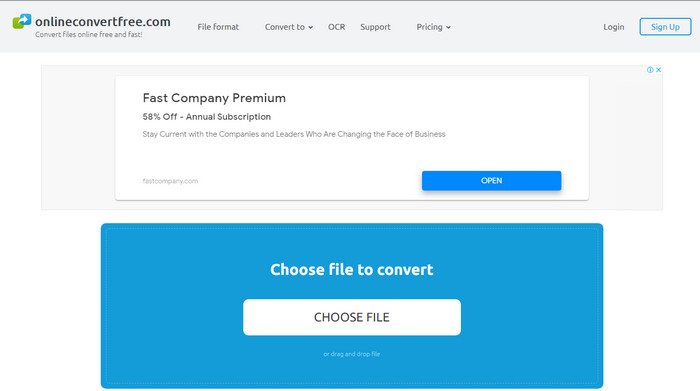
محوِّل فيديو آخر عبر الإنترنت لتحويل SWF إلى AVI يمكنك استخدامه هو OnlineConvertFree.com. إذا كانت البساطة هي الجمال، فهذا يجب أن يكون خيارك لأداء مهمة التحويل. وعلى عكس الأداة الإلكترونية المذكورة أولًا، فهذه أبسط بكثير لكنها تدعم عددًا أقل من الصيغ للاختيار. كما أن حجم الملف محدود في هذا البرنامج عبر الإنترنت. لذا، إذا كان حجم ملفك أكبر من 20 ميغابايت فتوقّع أنك لن تستطيع استخدامه عبر هذه الأداة. ومع ذلك، إذا أردت استخدامه لتحويل الملفات وأيضًا لتقليل التكاليف فاعتمد عليه.
الايجابيات
- إنه مجاني للوصول.
- يمكن استخدام هذا المحول إذا كان لديك اتصال بالإنترنت.
- الواجهة العامة تبدو أنيقة.
سلبيات
- لا يمكن الوصول إليها إذا لم يكن الإنترنت متاحًا.
- الإعلانات تقتل الموقع.
الجزء 3. 5 خطوات حول كيفية تحويل SWF إلى AVI على FVC Video Converter Ultimate
فيما يلي الخطوات التفصيلية حول كيفية استخدام FVC Video Converter Ultimate. ستضمن لك جميع الخطوات المقدمة هنا تجربة سهلة ورائعة.
الخطوة 1. أولًا، يجب تنزيل الأداة على قرص جهازك، واختر ما إذا كان جهازك PC أو Mac. ثم ثبّت البرنامج على القرص، واجرِ الإعداد بسهولة، ثم انقر على Start Now.
تحميل مجانيلنظام Windows 7 أو أحدثتنزيل آمن
تحميل مجانيلنظام MacOS 10.7 أو أحدثتنزيل آمن
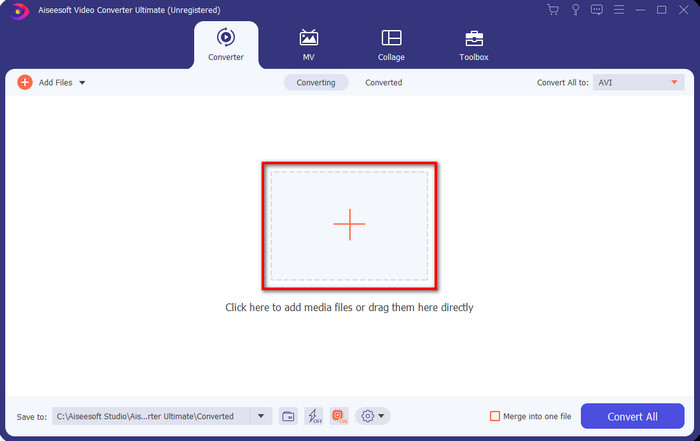
الخطوة 2. افتح البرنامج الذي ثبّتّه على القرص، ثم انقر على زر + ثم حدّد الملف من المجلد الذي سيظهر تاليًا. اضغط على Open للمتابعة.
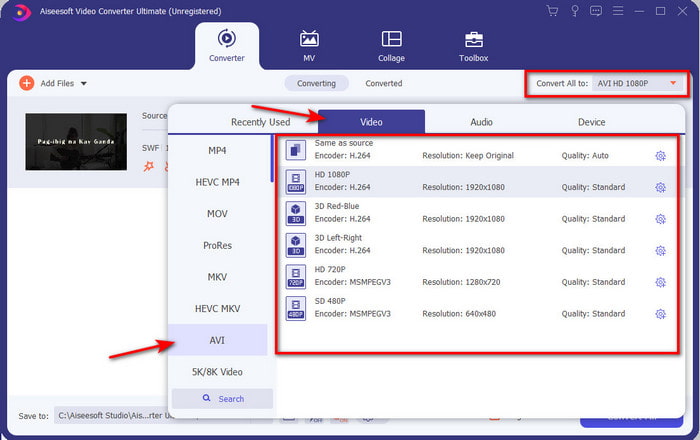
الخطوة 3. ولتغيير ملف SWF إلى تنسيق AVI انقر على زر القائمة المنسدلة واختر تنسيق AVI ثم حدّد الدقة.
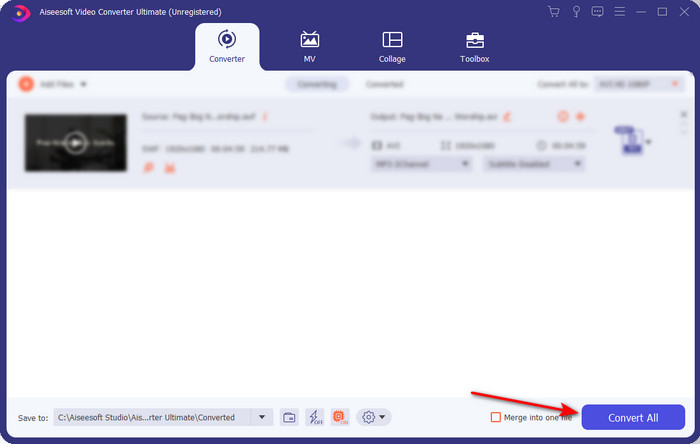
الخطوة 4. وبعد أن تنتهي من اختيار التنسيق، انقر على Convert All لبدء عملية التحويل.
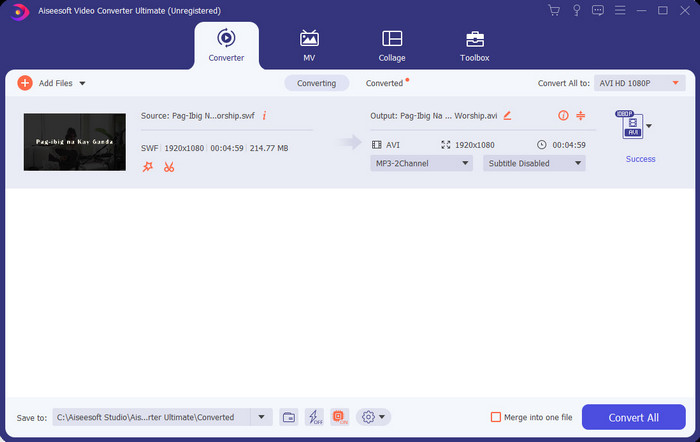
الخطوة 5. بعد انتهاء التحويل، سيظهر مجلد يحتوي على الملف المحوَّل. انقر على ملف AVI الجديد لمشاهدته ثم انقله لاحقًا إذا رغبت.
الجزء 4. أسئلة وأجوبة حول SWF و AVI
هل يمكنني تشغيل SWF على مشغلات الوسائط الأخرى؟
الإجابة بالتأكيد لا، لأن .swf غير مدعوم في مشغّل الوسائط لديك حتى لو استخدمت تطبيقًا تابعًا لجهة خارجية. وأفضل خيار لتشغيل ملف .swf هو تحويله إلى تنسيق جديد حتى تتمكّن من تشغيله. ولكن إن لم ترغب في تحويله فعليك استخدام Flash Player فقط من أجل تشغيل ملف SWF.
هل .swf أصغر حجمًا؟
الإجابة نعم بالتأكيد، فإلى جانب صغر حجمها يتم تحميلها أيضًا بشكل أسرع مقارنة بالتنسيقات الأخرى وكذلك بفضل البنية الكاملة للتنسيق نفسه. يمكنك تجربة ضغط ملفات SWF باستخدام ضاغط فيديو إذا كانت كبيرة جدًا.
هل يمكن لملف SWF الخاص بي ضبط الشفافية؟
حسنًا ، يمكنك ضبطه ليكون شفافًا إذا كنت تريد ذلك أم لا إذا كنت لا تريد ذلك. كذلك ، يمكنك إضافة قناة ألفا مع اللون على شاشتك أو تدرج الرمادي لتعيينها على أنها شفافة.
خاتمة
مع إنهاء هذا المقال ، اكتشفنا بالفعل ما هو SWF والغرض الآخر منه. أيضًا ، علمنا أنه لا يمكنك استخدام ملف .swf إذا كنت لا تستخدم Flash Player ولا يمكنك تشغيله بخلاف ذلك. الآن ، أفضل حل لتشغيل ملف SWF هو تحويله إلى تنسيق جديد مثل AVI. علاوة على ذلك ، تؤدي جميع الأدوات المذكورة أعلاه وظيفتها كمحول. ولكن لا توجد أداة توفر حلاً أسرع وأسهل بكثير من FVC Video Converter Ultimate.
-
 SWF إلى MP4: قم بتحويل SWF مجانًا إلى MP4 عبر الإنترنت والكمبيوتر الشخصي
 كيف تفتح ملف SWF بدون برنامج Adobe Flash Player؟ احصل على أفضل 3 محول مجاني من SWF إلى MP4 لتحويل SWF إلى MP4 عبر الإنترنت وعلى جهاز الكمبيوتر / Mac في 3 خطوات.
-
 [2 الحلول] كيفية تحويل SWF إلى ملفات GIF بسهولة مجانًا
 عندما تفشل في تصدير تنسيق GIF من خلال برنامج Flash ، يمكنك محاولة حفظ الملفات بتنسيق SWF في البداية. ثم يمكنك تعلم طريقتين سهلتين لتحويل ملفات SWF إلى GIF من هذه المقالة.
-
 اختيار ممتاز لتحويل MKV إلى تنسيق AVI
 إتقان كيفية تحويل مقاطع فيديو MKV بخطوات سهلة مقدمة لك حصريًا. هل تريد أن تعرف كيف؟ ثم انقر فوق هذا الارتباط لمعرفة المزيد.
