


 محول الفيديو النهائي
 مسجل الشاشة
 إصلاح الفيديو
 تنزيل آمن
4 طرق مباشرة لتحويل WEBM إلى DIVX
Converting video files is the best procedure to do when the video is not supported in a certain program. In this post, you will learn the easiest methods you can do to transform your WEMB file to DIVX format. You can find many WEBM to DIVX converters online and offline, but some of them are not effective and complicated to utilize. In that case, we tested numerous applications to show you the most useful and excellent converters with understandable methods you can download on your Mac, Windows, and online. Are you excited to know these outstanding methods? Then let’s go and read this informative article.

الجزء 1: تحويل WEBM إلى DIVX دون اتصال بأفضل جودة
Converting different files is difficult, especially when you don’t know the process and the application you must use. So, do you want to convert the WEBM file to DIVX with excellent quality? Then download the Video Converter Ultimate on your Windows and Mac. This application is easy to use when converting various files because it has basic methods and a friendly user interface, which is why it won’t complicate the procedures. In addition, it supports 1000+ formats, including WEBM, DIVX, ASF, OGV, MTV, GIF, MPEG, DPG, MOV, M4V, MP4, FLV, etc. Moreover, Video Converter Ultimate can enhance your videos because it has great video editing tools. We can do more things on your WEBM video. To compress your video, go to the Toolbox and select Video compressor. Also, to add watermarks to your WEBM video, select the Video Watermark Tool.
الميزات
◆ قم بتحويل العديد من مقاطع الفيديو حتى أكثر من 1000 تنسيق ملف.
◆ تحويل الملفات أسرع 30 مرة من المحولات الأخرى.
◆ يقدم صانعي الكولاج مع فلاتر وموضوعات مجانية.
◆ قادر على إنشاء فيديو موسيقي.
◆ يوفر Toolbox لتحسين الفيديو ، مثل ضاغط الفيديو ، وتصحيح الألوان ، ومزامنة الصوت ، والمحسن ، والمزيد.
الايجابيات
- يتميز بواجهة سهلة الاستخدام ومناسب للمبتدئين.
- إنه تطبيق مجاني للتنزيل.
- يسمح بتحويل الدُفعات.
- قادر على تحويل الملفات دون فقدان الجودة.
سلبيات
- لاستخدام الإصدار المحترف ، قم بشراء اشتراك.
قم بتحويل WEBM إلى DIVX باستخدام Video Converter Ultimate.
Step 1: Install the Video Converter Ultimate on your computer. Then, launch it.
تحميل مجانيلنظام Windows 7 أو أحدثتنزيل آمن
تحميل مجانيلنظام MacOS 10.7 أو أحدثتنزيل آمن
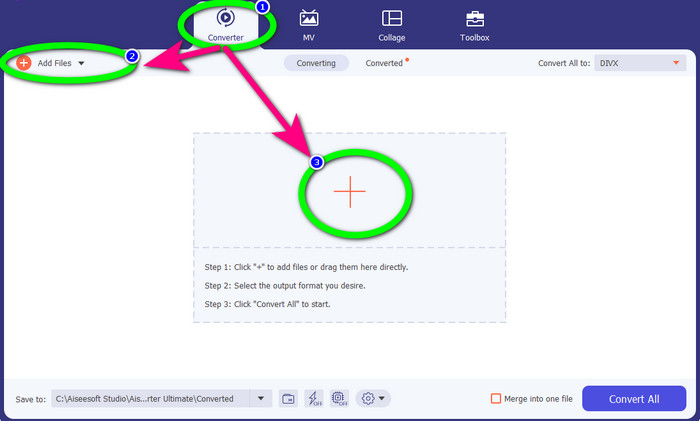
Step 2: When the interface shows up, select the Converter panel and click Add Files button or the Plus icon to add the WEBM file.
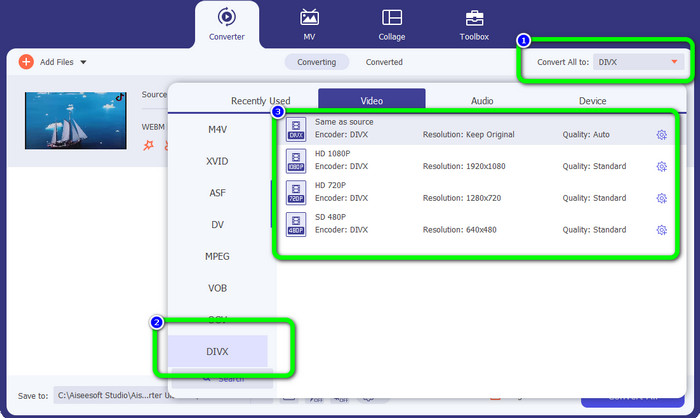
Step 3: After adding the WEBM file, click the Convert All to button. Select your desired format, which is the DIVX file format. You can also pick the quality of your video from 480p to 1080p.
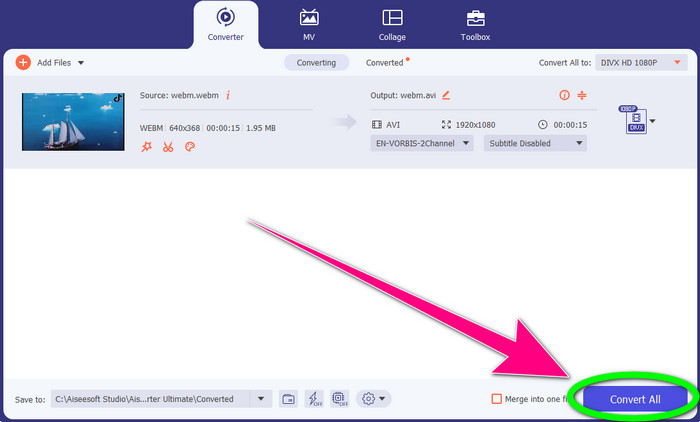
Step 4: You can finally click the Convert All button to convert the WEBM file to DIVX format.
الجزء 2: 3 طرق لتحويل WEBM إلى DIVX عبر الإنترنت
باستخدام WEBM.to
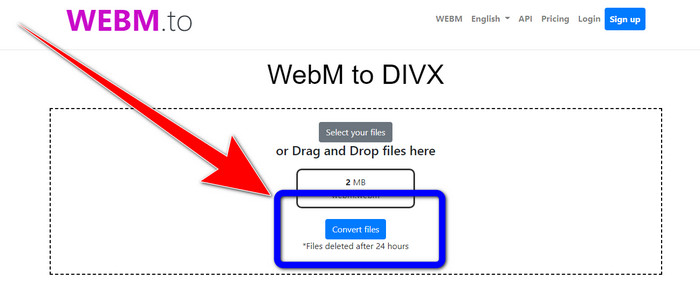
Are you searching for a WEBM to DIVX converter online? WEBM.to is the tool you don’t want to miss. It can convert different files using your browsers, like Google Chrome, Mozilla Firefox, Microsoft Edge, etc. It supports file formats such as MOV, FLV, M4V, TS, MT2S, and more. Like the converter above, WEB.to is easy to use because it only focuses on converting files. Lastly, your file is safe here because your file will be automatically deleted after 24 hours. However, the conversion process is slow. It also won’t perform well if you don’t have a stable internet connection. Let’s convert your WEBM file to DIVX using this online tool.
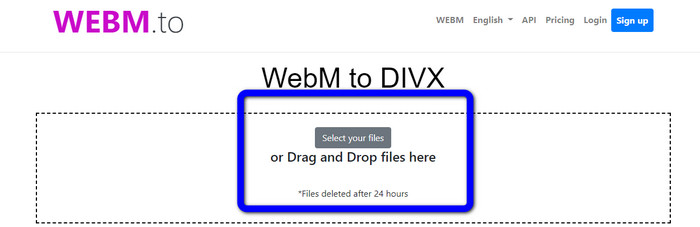
Step 1: Visit the WEBM.to website. Click the Select your files button to import your WEBM file. You can also drag your file in the box.
Step 2: Click the Convert Files button after adding the WEBM file. Wait for the process of converting the file and save your final video.
باستخدام إيفانو
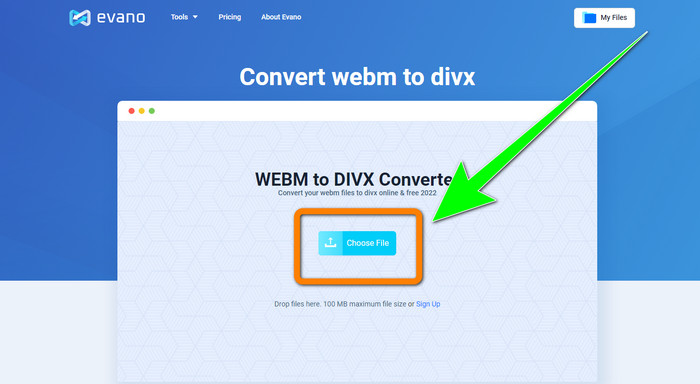
You can also use Evano to convert WEBM to DIVX. This online tool is also reliable. It can convert different file formats, like MP4, AVI, DIVX, XVID, 3GP, FLV, VOB, MOV, etc. So, you can convert WEBM to FLV using this tool. In addition, EVANO is not just a converter but also an audio editor and optimizer, so you can do more things with this tool. But this application has a limit when using the free version. You can only convert with a maximum file size of 100Mb. It means that you must buy a subscription to get unlimited file sizes. Also, you must have a fast internet connection. It is a web-based application, and an internet connection is highly recommended. Follow the steps below to convert WEBM to DIVX using Evano.
Step 1: Visit the website of Evano. Press the Choose File button to add the WEBM file.
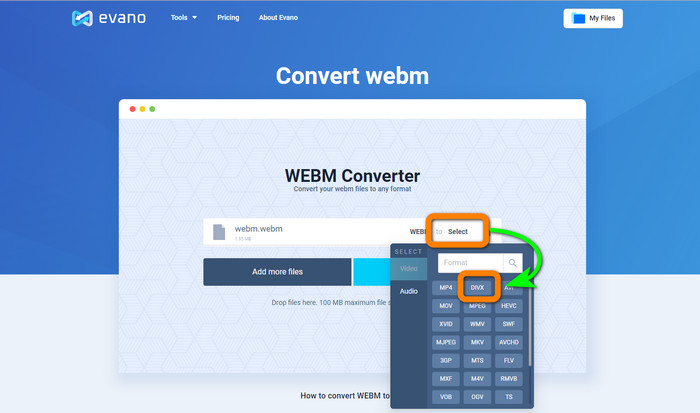
Step 2: Click the Select button to proceed to the format options. Then, select the DIVX file format.
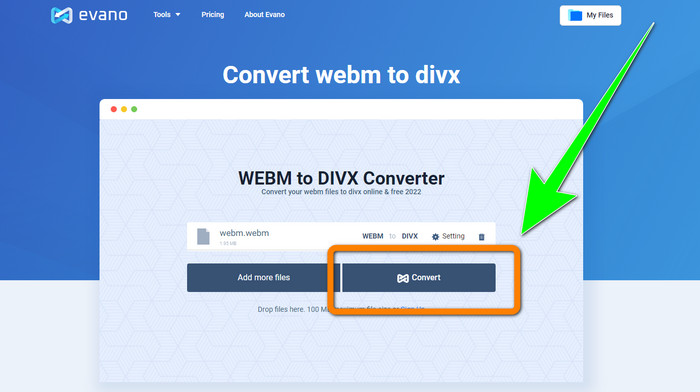
Step 3: For the final step, click the Convert button. Patiently wait for the conversion process and save the video with a DIVX file format.
باستخدام FileProInfo
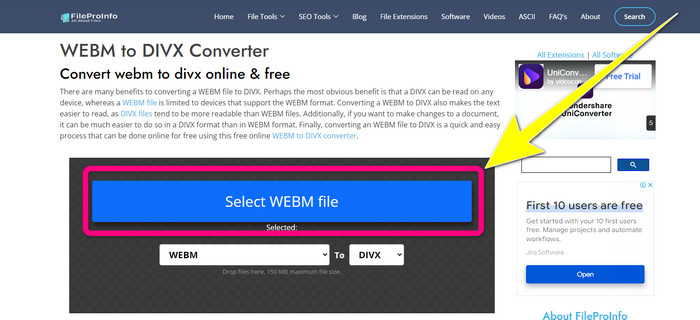
FileProInfo is one of the online converters you can easily use to convert WEBM to DIVX. With the help of this online tool, you don’t need to worry about how to convert your file to other formats. You also can use this tool to convert WEBM to MKV. Moreover, it has simple methods for converting files. In addition, aside from converting, you can use this tool for plagiarism checks, complete website reviews, ping website tools, and more. However, there are times when FileProInfo is not working. Also, when it comes to the process of converting files, it is too slow. Like the other online converters, it has a maximum file size of 150MB. So, let’s proceed with converting the WEBM file to DIVX using his online tool.
Step 1: Go to the website FileProInfo. Click the blue box to insert the WEBM file.
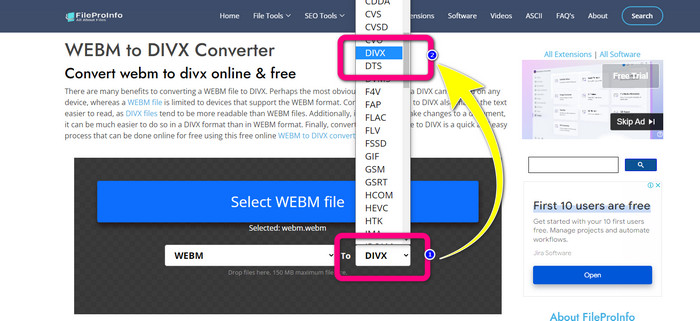
Step 2: After you insert the WEBM file, proceed to the format options and select the DIVX file format.
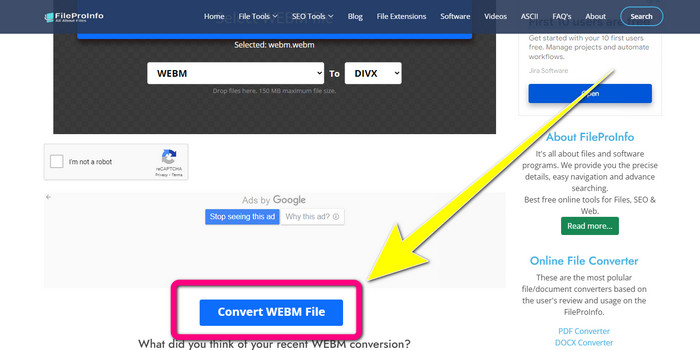
Step 3: Scroll down, and click the Convert WEBM file button.
الجزء 3: WEBM مقابل DIVX
| ويب | DIVX | |
| ملحق ملف الفيديو | يتم استخدام تنسيق وسائط متعددة مفتوح المصدر وخالٍ من حقوق الملكية يسمى WebM لدفق محتوى الإنترنت. يتضمن تدفقات صوتية مضغوطة باستخدام برامج الترميز Oupus أو Vorbis وتدفق الفيديو المضغوط باستخدام إما VP8 أو VP9. نظرًا لتصميمه خفيف الوزن وإمكانيات التوزيع في الوقت الفعلي ، فقد أصبح أحد أكثر تنسيقات الملفات شيوعًا لبث مقاطع الفيديو عبر الإنترنت. | برنامج ترميز فيديو عالي الجودة وعالي الضغط يدعم دقة تصل إلى 1080 HD ويضغط مقاطع الفيديو إلى جزء صغير من حجمها القياسي دون التضحية بالكثير من جودتها. |
| طورت بواسطة | شركة جوجل. | DIVX Network Inc. |
| الايجابيات | ولاء مجاني ومفتوح المصدر ، يدعم معظم برامج الترميز. | صغير الحجم ، مجاني للاستخدام |
| سلبيات | عدم وجود عناصر تفاعلية | |
| برامج المنتسبين | VLC Media Player و Mozilla Firefox و Google Chrome و Windows Media Player | XBox 360 ، ستيريو سيارة ، مشغلات DVD ، مشغلات Blu-ray |
الجزء 4: أسئلة وأجوبة حول تحويل WEBM إلى DIVX
1. ما هي مزايا تحويل WEBM إلى DIVX؟
تنسيق ملف DIVX أكثر قابلية للقراءة ومقبولًا على نطاق واسع من ملف WEBM. أيضًا ، يمكن أن يساعد التحويل إلى ملفات DIVX في الأمان.
2. أيهما أفضل ، WEBM أم MP4؟
فيما يتعلق بحجم ملف الفيديو ، فإن WEBM أصغر من MP4. ولكن من حيث الجودة والتوافق ، فإن MP4 أفضل.
3. هل WEBM لها صوت؟
نعم بالطبع. يروج مشروع WebM مفتوح المصدر WebM ، وهو تنسيق ملف حاوية رقمية متعددة الوسائط يمكنه استيعاب الصوت والفيديو معًا. WEBM هو مجرد تنسيق حاوية. يتم تضمين مجموعة فرعية من تنسيق حاوية الوسائط المتعددة Matroska فيه.
خاتمة
These are the most excellent applications you can use to convert WEBM to DIVX with effective methods. So, what are you waiting for? Download and use Video Converter Ultimate now. It can convert your files faster and easier.
-
 طرق سهلة التعلم حول كيفية تحويل Xvid إلى DivX
 هل تبحث عن أفضل حل لتحويل Xvid إلى DivX مجانًا؟ ستساعدك هذه المقالة في حل مشكلتك. لذا ، اقرأ المنشور باستمرار.
-
 كيفية تحويل MPG إلى DivX دون فقدان الجودة
 هل تبحث عن تطبيق خالٍ من المشاكل يمكنك استخدامه لتحويل MPG إلى DivX؟ ستوفر لك هذه المقالة طرقًا فعالة مختلفة يجب أن تجربها.
-
 كيفية تحويل DIVX إلى 3GP على أنظمة Windows و Mac وعلى الإنترنت
 كيفية تحويل DIVX إلى 3GP؟ إذا كنت تبحث عن إجابة ، اقرأ هذا المقال. سنعرض لك إجراءات رائعة بمساعدة محولات مختلفة.
