


 محول الفيديو النهائي
 مسجل الشاشة
 إصلاح الفيديو
 تنزيل آمن
ضغط ملفات AVI للحصول على أحجام ملفات أصغر دون فقدان الجودة
بغض النظر عن رغبتك في إرسال ملفات AVI إلى البريد الإلكتروني أو تحميل ملفات AVI إلى مواقع الويب ، فمن المهم حقًا ضغط AVI. هناك العديد من برامج تحرير وضواغط الفيديو التي يمكنها تقليص ملفات AVI. لكي تكون أكثر تحديدًا ، يمكنك تحويل تنسيق الفيديو أو قص مقاطع الفيديو غير المرغوب فيها أو إعادة تعيين المعلمات لجعل فيديو AVI الخاص بك أصغر. إذا كنت تريد الاحتفاظ بتنسيق ومحتوى فيديو AVI ، فيمكنك استخدام ضاغط فيديو لإعادة ضبط إعدادات الفيديو. فيما يلي 3 طرق مجانية لضغط ملفات AVI دون فقدان الجودة. فقط اقرأ واتبع.

الجزء 1: كيفية ضغط ملفات AVI عبر الإنترنت مجانًا
يوجد الكثير من ضواغط الفيديو عبر الإنترنت في السوق ، أي منها يمكن أن يكون أفضل ضاغط AVI على الإنترنت؟ بالنسبة لمعظم المستخدمين ، هناك بعض العوامل المهمة التي تحتاج إلى أخذها في الاعتبار.
تحميل مجانيلنظام Windows 7 أو أحدثتنزيل آمن
تحميل مجانيلنظام MacOS 10.7 أو أحدثتنزيل آمن
1. مجاني تماما وآمن للاستخدام.
2. لا يوجد حد أقصى لحجم الملف.
3. ضغط دفعة ملفات AVI.
4. ضغط فيديو AVI كبير الحجم فوق جيجابايت إلى حجم ملف صغير بالفعل.
5. قم بتغيير تنسيق فيديو AVI ودقة الوضوح ومعدل البت لتقليص حجم الفيديو.
لحسن الحظ، يمكنك الحصول على كل تلك الميزات في FVC Free Video Compressor. يمكنك ضغط ملفات AVI كبيرة عبر الإنترنت مجانًا على أجهزة كمبيوتر ويندوز وماك، بدون اشتراك أو تسجيل. تجعل سرعة المعالجة الأعلى حتى 30 مرة من المنافسين عملية ضغط ملفات AVI سريعة للغاية. والآن، لنرَ كيف نضغط حجم فيديو AVI عبر الإنترنت.
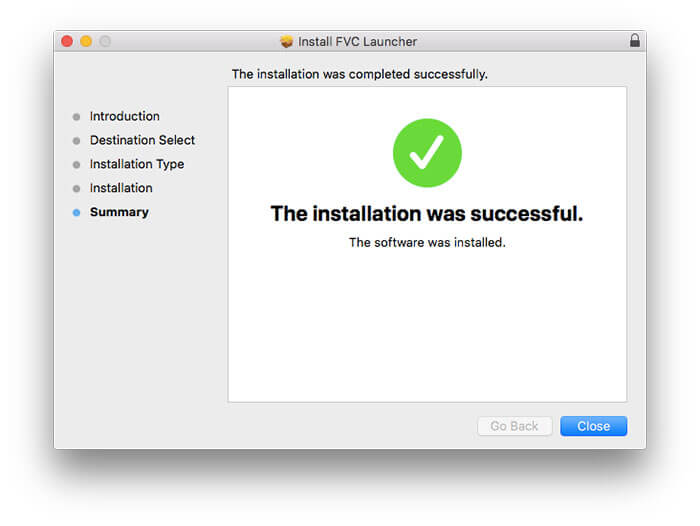
الخطوة 1: افتح أداة ضغط الفيديو المجانية هذه عبر الإنترنت. انقر على Add Files to Compress لتثبيت المشغّل.
الخطوة 2: استعرض وأضف فيديو AVI الخاص بك. ستحصل على واجهة بسيطة وبديهية لمتابعة ضغط ملف AVI.
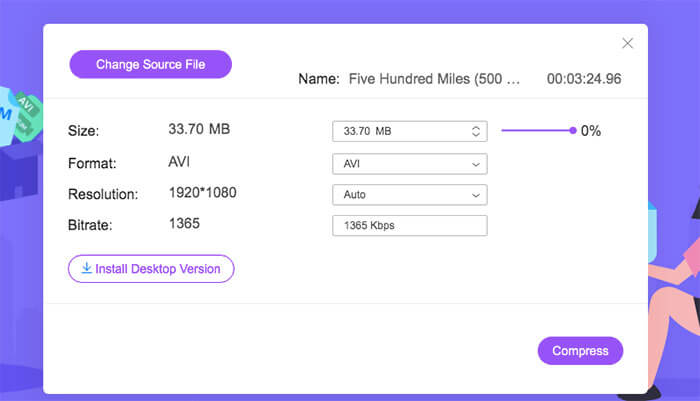
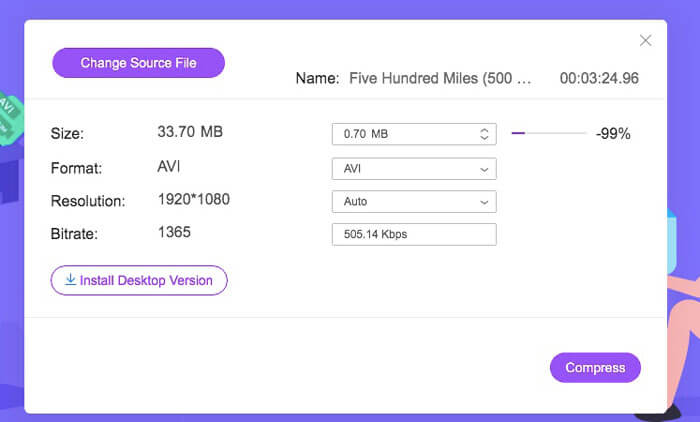
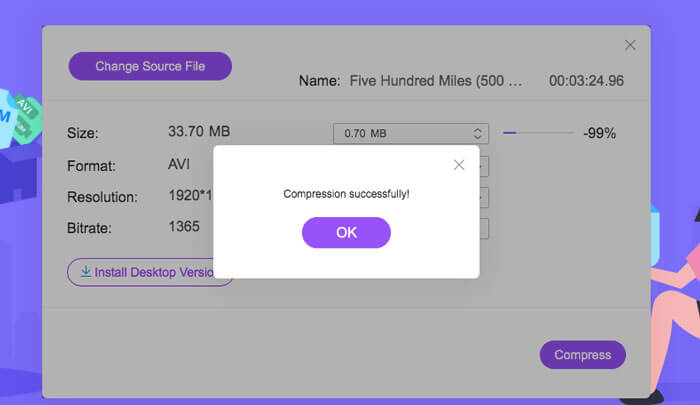
الخطوة 3: في قسم Size يمكنك تقليل حجم فيديو AVI بتحريك شريط التمرير المجاور. أو يمكنك تحديد حجم ملف AVI المضغوط باستخدام سهمي Upside وDownside.
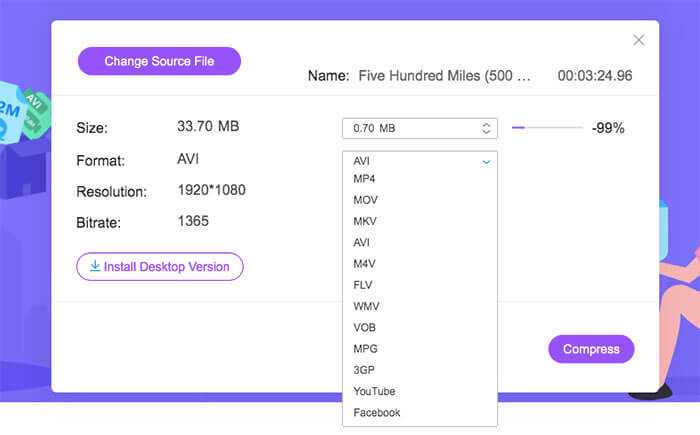
الخطوة 4: افتح قائمة Format. يمكنك ضغط AVI وتحويله إلى MP4 أو MOV أو حتى صيغ متوافقة مع YouTube وFacebook. بعد ذلك، اختر ملف تعريف Resolution مناسبًا لتقليل حجم ملف AVI.
الخطوة 5: انقر على Compress وحدد مجلد الحفظ. بعد ظهور إشعار Compression successfully يمكنك الحصول على فيديو AVI المضغوط.
الجزء 2: كيفية ضغط مقاطع فيديو AVI على Windows
لضغط فيديو AVI على Windows 10/8/7 مجانًا ، هناك خيار آخر يمكنك استخدامه. يمكن لـ Windows Movie Maker ضغط ملف AVI على نظام التشغيل Windows 10 والإصدارات السابقة. فقط افعل ما تظهره الفقرات التالية.
الخطوة 1: افتح Windows Movie Maker. انقر على Import Video تحت قسم Capture Video لإضافة فيديو AVI الخاص بك.
الخطوة 2: حدد فيديو AVI الذي قمت باستيراده، ثم اسحبه وأفلته في قسم Timeline في الأسفل.
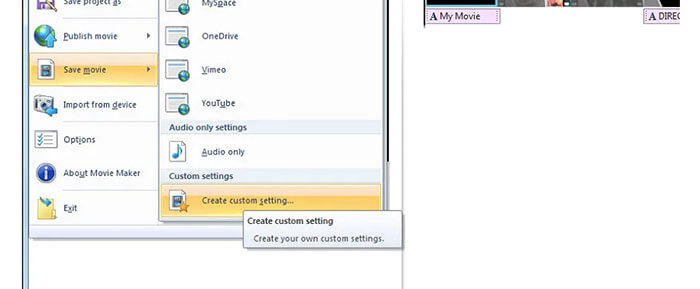
الخطوة 3: انقر على Save Movie File ثم على create custom settings من قائمة File.
الخطوة 4: ضمن Video settings يمكنك ضبط عرض وارتفاع الفيديو ومعدل البت (bitrate) ومعدل الإطارات لجعل ملف AVI أصغر.
الخطوة 5: انقر على Save لتصغير حجم فيديو AVI على ويندوز إلى ملف صغير.
الجزء 3: كيفية ضغط ملفات فيديو AVI على نظام Mac
يمكن أن يكون iMovie هو برنامج ضغط الفيديو المجاني AVI أيضًا. يمكنك استخدام iMovie لضغط مقاطع فيديو .avi على جهاز Mac مجانًا. علاوة على ذلك ، يمكنك اقتصاص الحواف السوداء والأجزاء غير المرغوب فيها لتقليل حجم الفيديو داخل iMovie أيضًا. هناك العديد من أدوات تحرير وضغط الفيديو المفيدة في iMovie.
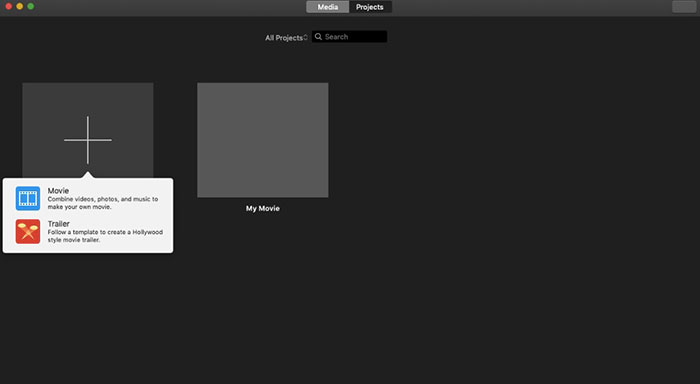
الخطوة 1: شغّل iMovie. اختر New Movie من قائمة File المنسدلة.
الخطوة 2: أنشئ مشروعًا جديدًا لملف فيديو AVI الذي تريد ضغطه.
الخطوة 3: انقر على Import في الأعلى. اختر ملف AVI كبير الحجم وأضِفه إلى iMovie.
الخطوة 4: افتح قائمة File واختر Share ثم File… بعد ذلك انقر على أيقونة Export في أعلى الزاوية اليمنى، ثم اختر File.
الخطوة 5: لتقليل حجم فيديو AVI، تحتاج إلى خفض دقة الفيديو وجودته. انقر على Next ثم Save للحصول على ملف AVI المضغوط.
الجزء 4: أسئلة وأجوبة حول ضغط AVI
لماذا AVI كبيرة جدًا؟
يمكنك العثور على أن الملفات المنسقة .avi تميل إلى أن تكون أكبر من الملفات الأخرى. يستخدم AVI ضغطًا أقل لتخزين بيانات الفيديو والصوت. أو يمكنك اعتبار AVI كتنسيق فيديو بدون فقد. لذلك ، تكون ملفات AVI دائمًا بأحجام ملفات كبيرة.
كيف يتم ضغط AVI باستخدام After Effects؟
أضف فيديو AVI الخاص بك إلى After Effects. انتقل إلى قائمة Composition واختر Add to Adobe Media Encoder Queue. في Media Encoder، ابحث عن ملف المشروع في محرك التصيير. انتقل إلى قائمة Video أو Audio في اللوحة اليمنى. غيّر جودة الفيديو/الصوت، ومعدل البت، وغير ذلك من التفاصيل. في الواقع يمكنك التحقق من حجم الملف التقديري في الركن السفلي الأيمن. انقر على OK لحفظ التغييرات وتقليل حجم ملف AVI في After Effects بدون فقدان ملحوظ في الجودة.
هل يعمل على ضغط AVI إلى تنسيق MP4؟
نعم. يمكنك تحويل وضغط AVI إلى MP4 لتقليل حجم الفيديو بشكل كبير. يعد AVI تنسيق فيديو غير ضياعي (lossless)، بينما MP4 تنسيق ضياعي (lossy). بالإضافة إلى ذلك، يمكنك ضبط إعدادات الفيديو لإتمام عملية ضغط ملف AVI.
يمكنك استخدام الأدوات المذكورة أعلاه لضغط AVI عبر الإنترنت وغير متصل مجانًا. لا يوجد حد لطول الفيديو أو حجم الملف. يمكنك تقليل حجم الفيديو وضغط AVI للبريد الإلكتروني و Twitter و Facebook والمزيد مباشرة. بالمناسبة ، إذا كنت بحاجة إلى تجميع ملفات AVI المضغوطة ، فإن استخدام FVC Free Video Compressor هو الحل الأسرع. يمكنك ضغط ملفات AVI الكبيرة عبر الإنترنت دفعة واحدة مجانًا بسرعة أكبر 30 مرة. إنه مجاني 100% وآمن للاستخدام لجميع المستخدمين.
-
 MKV مقابل MP4 - مقارنة بين MKV و MP4
 كيف تختار بين MKV و MP4؟ ما هو التنسيق الأفضل لجودة الفيديو؟ في هذه المقالة ، سنجري مقارنة تفصيلية بين MKV و MP4 لمساعدتك على الاختيار.
-
 كيفية ضغط فيديو MP4 إلى حجم أصغر
 هل فيديو MP4 كبير جدًا بحيث لا يمكن تحميله؟ تريد تصغير حجم الفيديو؟ فيما يلي 3 طرق فعالة لضغط ملف MP4 إلى حجم أصغر بلا حدود.
-
 MP3 مقابل MP4: ما الفرق بين MP3 و MP4
 MP3 أم MP4 ، أيهما أفضل؟ ما الفرق بين MP3 و MP4؟ ستقارن هذه المقالة MP3 مع MP4 من جميع الجوانب التي يمكنك تصويرها.
