


 محول الفيديو النهائي
 مسجل الشاشة
 إصلاح الفيديو
طريقتان لضغط مقاطع الفيديو لـ Instagram عبر الإنترنت وعلى سطح المكتب
كيفية ضغط مقاطع الفيديو على Instagram؟ هل كنت يائسًا عندما علمت أن الفيديو الذي عملت به لساعات لا يمكن تحميله على Instagram لحجمه الكبير؟ لا داعي للذعر. لقد أتيت للتو إلى المكان الصحيح. ستوفر لك هذه المقالة أسهل طريقتين لضغط مقاطع الفيديو لتحميلها على Instagram.

الجزء 1: لماذا أحتاج إلى ضغط مقاطع الفيديو لـ Instagram
T كما ذكرنا سابقًا ، لا يمكن تحميل ملفات الفيديو الكبيرة على Instagram. تحتاج إلى ضغط مقاطع فيديو Instagram إلى ملفات MP4 أقل من 20 ميجابايت. يجب أن يكون معدل إطارات الفيديو 30 إطارًا في الثانية ، مع 3500 كيلو بايت في الثانية كمعدل بت. يبلغ حجم الفيديو عادةً 1080 بكسل. يوصى بالقرار 4: 5. علاوة على ذلك ، يجب أن تكون مقاطع الفيديو الخاصة بك أكبر من 3 ثوانٍ وأقل من 60 ثانية.
الجزء 2: كيفية ضغط ملفات الفيديو لـ Instagram Online
يُعد FVC Free Video Compressor أداة ذكية عبر الإنترنت لضغط مقاطع الفيديو بمختلف الصيغ. لست بحاجة إلى تنزيل أي برنامج، فجميع خطوات الضغط تتم على صفحة الويب. من خلاله يمكنك تصغير حجم فيديوهاتك إلى أي حجم تريده.
الميزات الرئيسية:
- 1. قم بضغط العديد من مقاطع الفيديو الكبيرة مثل MKV ، FLV ، WMV ، AVI ، TS ، MOV ، إلخ.
- 2. واجهة سهلة الاستخدام للمبتدئين لتخصيص الإعدادات
- 3. اعمل بسرعة 30x أسرع ولا تترك علامة مائية في النواتج
- 4. تعامل مع مقاطع فيديو 4K Ultra HD دون أي خسارة في الجودة
فيما يلي خطوات ضغط ملفات الفيديو لـ Instagram عبر الإنترنت باستخدام هذه الأداة:
الخطوة 1: حمِّل أداة FVC Free Video Compressor في متصفحك.
انقر زر Add Files to Compress في المنتصف. عند استخدام هذه الأداة للمرة الأولى، تحتاج إلى تنزيل ملف باسم fvc-launcher وتشغيله قبل المتابعة. بعد ذلك، انقر زر Add Files to Compress مرة أخرى. بعدها يمكنك اختيار ملفات الفيديو التي تريد ضغطها لنشرها على إنستغرام.

الخطوة 2: خصِّص إعدادات الفيديو الذي تريد ضغطه لإنستغرام
الحجم: يمكنك ضبط شريط النسبة المئوية عن طريق سحبه. لضغط فيديو من أجل إنستغرام، تأكد من أن يكون حجم الملف الناتج أقل من 20 ميجابايت. تغييرات حجم الإخراج ستؤثر في معدل البت (Bitrate) في الوقت نفسه.
الصيغة: يمكنك حاليًا تحويل الفيديو إلى 12 صيغة، بما في ذلك MP4 وMKV وAVI وFLV وغيرها. لضغط فيديو لإنستغرام، يكفي اختيار صيغة MP4.
الدقة: يمكنك خفض الدقة إلى درجات أقل مثل 320*240، 480*360 وأكثر. أو يمكنك الحفاظ على الدقة الأصلية وضغط الفيديو لإنستغرام عن طريق تقليل معدل البت فقط.

الخطوة 3: ابدأ الضغط وانتظر حتى تُكمل الأداة المهمة.
انقر زر Compress الأرجواني واختر موقع الحفظ الذي تريد تخزين الفيديو الناتج فيه. لا تُغلق المتصفح أو صفحة الويب أثناء معالجة الفيديو، وإلا فسيتعين عليك ضغط الفيديو لإنستغرام من البداية مرة أخرى. تعتمد سرعة العملية إلى حدٍّ كبير على مواصفات جهازك.
الجزء 3: كيفية ضغط ملفات الفيديو لـ Instagram على سطح المكتب
إضافة إلى الحجم، يجب أن يتراوح طول الفيديو بين 3 و60 ثانية. لكن وظائف الأداة عبر الإنترنت محدودة نسبيًا لأنها تعمل من خلال صفحة ويب؛ فلا يمكنك قص الفيديو باستخدام الأداة الإلكترونية. أي أداة يمكنك استخدامها إذا كنت تريد ليس فقط ضغط الفيديو بل أيضًا تحريره؟ يُرجَّح أن يكون Aiseesoft Video Converter Ultimate هو خيارك الأفضل.
الميزات الرئيسية:
- 1. متوافق مع أكثر من 1000 تنسيق ، بما في ذلك WMA ، MP4 ، AVI ، MOV ، WMV ، MP3 ، FLAC ، إلخ.
- 2. تكنولوجيا تسريع الأجهزة المتقدمة تضمن سرعة غير مسبوقة
- 3. قم بقص مقاطع الفيديو ودمجها باستخدام قوس قزح من المرشحات والتأثيرات الأساسية.
- 4. تتيح لك أداة 3D Maker الاستمتاع بمقاطع فيديو ثلاثية الأبعاد مذهلة في نظاراتك ثلاثية الأبعاد
- 5. إنشاء مقاطع فيديو مقسمة إلى شاشة احترافية تقريبًا
- 6. المدمج في أربع طرق نهائية لتحسين الفيديو الخاص بك
تحميل مجانيلنظام Windows 7 أو أحدثتنزيل آمن
تحميل مجانيلنظام MacOS 10.7 أو أحدثتنزيل آمن
خطوات ضغط مقاطع الفيديو لـ Instagram باستخدام Video Converter Ultimate:
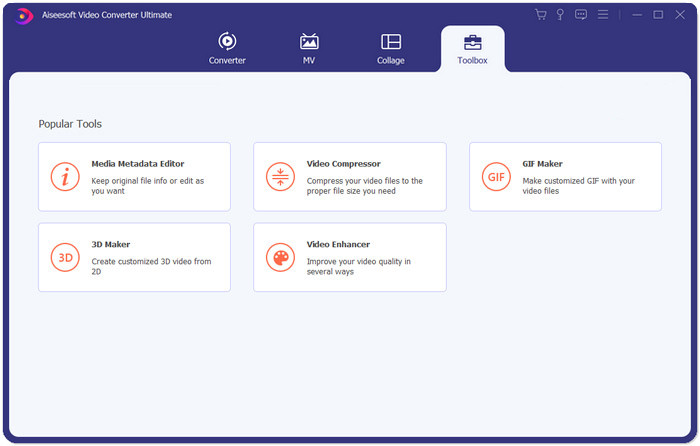
الخطوة 1: قم بتنزيل وتثبيت وتشغيل Aiseesoft Video Converter Ultimate. انتقل إلى علامة تبويب Toolbox ثم انقر زر “+” لإضافة الفيديو الذي تريد ضغطه لإنستغرام.
الخطوة 2: بعد إضافة الفيديو، ستنتقل إلى واجهة Video Compressor. اسحب شريط الحجم لضبط حجم ملف الإخراج، واختر الدقة وصيغة الإخراج التي تريدها.
ملاحظة: يمكنك تغيير معدل البت بشكل غير مباشر فقط، عن طريق تجربة تركيبات مختلفة من الدقة وحجم الإخراج.
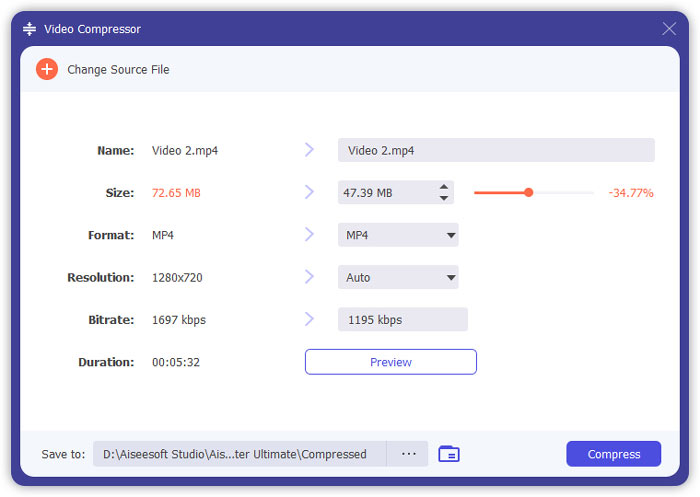
الخطوة 3: انقر زر Compress في أسفل اليمين لبدء ضغط الفيديو لإنستغرام.
قراءة موسَّعة:
كيفية ضغط الفيديوهات أونلاين لواتساب (100 ميجابايت/500 ميجابايت/1 جيجابايت…)
كيفية ضغط فيديو من أجل البريد الإلكتروني وجعله أصغر من 25 ميجابايت
الجزء 4: الأسئلة الشائعة حول تحميل مقاطع الفيديو على Instagram
ما هي متطلبات تحميل الفيديو على Instagram؟
الصيغة: MP4
برنامج الترميز (Codec): H.264
معدل البت: أقل من 3500 kbps
معدل الإطارات: أقل من 30 إطارًا في الثانية.
ما هي أفضل نسبة عرض إلى ارتفاع لمقاطع الفيديو على Instagram؟
أفضل نسبة عرض إلى ارتفاع هي 9:16 وهي أيضًا النسبة القياسية لمعظم الهواتف الذكية.
ما تنسيق الصوت الذي يجب أن يستخدمه الفيديو الخاص بي لتحميل Instagram؟
صوت AAC.
خاتمة
من هذه المقالة ، لديك أداتان مفيدتان لضغط الفيديو الخاص بك على Instagram. هم FVC Free Video Compressor و Video Converter Ultimate. عندما تضغط الفيديو على Instagram ، لا تنس التأكد من أن مدة الفيديو الخاص بك من 3 إلى 60 ثانية وأقل من 20 ميجابايت.
-
 أفضل طريقة لتقليل حجم فيديو Vimeo للتحميل
 في هذا المنشور ، سنوضح لك كيفية ضغط ملف الفيديو الخاص بك لتحميل الملف على Vimeo ، جنبًا إلى جنب مع الإرشادات التي قد تحتاجها لضغط الفيديو والصوت.
-
 كيفية استنتاج حجم ملف الفيديو على YouTube بطريقتين
 مقاطع فيديو YouTube كبيرة وبطيئة التحميل؟ ما عليك سوى ضغط حجم ملف الفيديو إلى حجم أصغر لـ YouTube بطريقتين عبر الإنترنت وعلى الكمبيوتر.
-
 كيفية ضغط الفيديو على Facebook مجانًا وعلى الإنترنت
 إذا تم منعك من تحميل مقطع فيديو كبير على Facebook ، فلا تقلق. ما عليك سوى ضغط حجم الفيديو الكبير من جيجا بايت إلى ميغا بايت باستخدام ضاغط الفيديو المجاني.
