


 محول الفيديو النهائي
 مسجل الشاشة
 إصلاح الفيديو
 تنزيل آمن
تحكم قوي في سرعة الفيديو - DaVinci Resolve Speed Editor
إذا كنت تريد استخدام محرر قوي لسرعة الفيديو، فربما سترغب في استخدام هذه الأداة. يعد DaVinci Resolve Speed Editor أداة لتغيير سرعة الفيديو تعمل عبر لوحة مفاتيح USB. يوفّر هذا المحرر عناصر تحكم عتادية مخصّصة تتيح لك تعديل سرعة الفيديو بسهولة. لذا، إذا كنت تتساءل عمّا يمكن لهذه الأداة أن تقدّمه أكثر، فاقرأ هذه المقالة لتعرف المزيد عن DaVinci Resolve Speed Editor.

الجزء 1. المعلومات الأساسية والميزات والوظائف وسعر DaVinci Resolve Speed Editor
يستخدم العديد من المحررين المحترفين أداة DaVinci Resolve Speed Editor لتغيير سرعة الفيديو الخاص بهم. وإذا كنت جديدًا في استخدام DaVinci Resolve Speed Editor، فربما تودّ التعرف على معلومات هذه الأداة ووظائفها وسعرها. في هذا الجزء، ستتعرّف على المعلومات الأساسية والوظائف وسعر محرر السرعة هذا.
معلومات اساسية
DaVinci Resolve هي لوحة مفاتيح من نوع USB تتيح لك تحرير ملفك. إذا كنت تريد أداة يمكنها تغيير سرعة الفيديو الخاص بك ، فهذه الأداة هي الأفضل لك. يوفر DaVinci Resolve طريقة أسرع وأسهل لتحرير مقاطع الفيديو. إنها أكثر من مجرد لوحة مفاتيح لأنها تحتوي على العديد من ميزات التحرير التي يمكنك استخدامها ، بما في ذلك محرر سرعة الفيديو ، والتحكم في قرص البحث ، وإضافة / إزالة التأثيرات ، واختيار صندوق المزامنة متعدد الكاميرات ، والمزيد. بالإضافة إلى ذلك ، تحتوي أداة محرر السرعة هذه أيضًا على إصدار لاسلكي.
عند شراء لوحة مفاتيح DaVinci Resolve ، سترى كبل USB ومؤشر طاقة البطارية. بمجرد إزالة كبل USB من الجزء الخلفي للجهاز ، ستحاول Bluetooth تلقائيًا الاقتران بجهازك.
علاوة على ذلك ، إذا كنت تطلب محرر السرعة لهذه الأداة ، فيمكنك استخدام عناصر التحكم في عجلة القيادة ، وعناصر التحكم في التشغيل ، وعناصر التحكم في التحرير والتشذيب على لوحة المفاتيح.
الخصائص والوظائف
إذا كنت تتساءل عن ميزات ووظائف DaVinci Resolve ، فنحن نقدم أدناه الميزات والوظائف الأكثر شيوعًا لهذه الأداة.
محرر السرعة
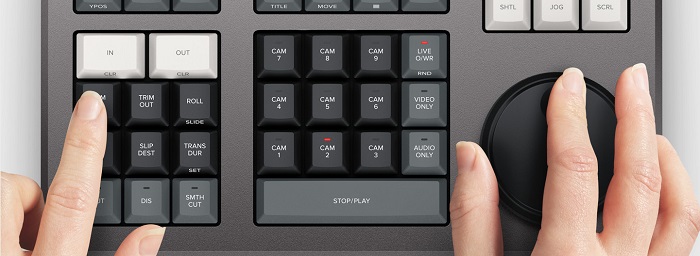
صُمِّم DaVinci Resolve Speed Editor للمحررين المحترفين الذين يريدون تحسين تأثيرات الانتقال في فيديوهاتهم. من خلال استخدام هذا المتحكّم في سرعة الفيديو، يمكنك إبطاء أو تسريع عدد الإطارات في الثانية (fps) في الفيديو، لإبراز أفضل مشاهد الفيديو. هناك العديد من الطرق لاستخدام DaVinci Resolve لتسريع مقطع ما.
◆ استخدم نقاط In وOut عبر التمرير على قرص البحث (search dial) وتحديد نقطتي البداية والنهاية على مخططك الزمني، ثم الانتقال إلى وظائف التحرير لتحرير الفيديو.
◆ استخدم زري Trim in وTrim out وذلك ببساطة عبر الضغط المستمر على أزرار القص (Trim) وتدوير قرص البحث. يتيح لك المؤشر الذكي على المخطط الزمني رؤية الجزء الذي تقوم بقصّه.
إضافة التأثيرات وإزالتها
باستخدام محرر السرعة DaVinci Resolve، يمكنك أيضًا إضافة التأثيرات إلى الفيديو وإزالتها. يعمل المؤشر الذكي على المخطط الزمني كمحدد لنقطة التحرير التي تعمل عليها. اضغط على زر CUT لإزالة تأثير عند نقطة التحرير. وإذا أردت إضافة تلاشي (dissolve) عند نقطة التحرير على المخطط الزمني، فاضغط على زر DIS (dissolve). بالإضافة إلى ذلك، إذا رغبت في انتقال قطع سلس عند نقطة التحرير، فاضغط على زر SMTH CUT (smooth cut).



اللون
تتيح لك هذه الوظيفة تغيير التباين ودرجة الحرارة والنغمة المتوسطة والتشبع وغيرها. تعد صفحة الألوان واحدة من أكثر الوظائف المفضلة لدى DaVinci Resolve ويمكن للمبتدئين استخدامها بسهولة.
Sync Bin
إنّ وظيفة sync bin هي مكان يمكنك فيه العثور على المقاطع أو اللقطات التي تمّت مزامنتها على مخطط التحرير الزمني. بعد ذلك، يمكنك استخدام أزرار الكاميرا لاختيار لقطة بديلة وتحريرها على المخطط الزمني.
مستوى الصوت والعلامة
يمكن لبرنامج DaVinci Resolve أيضًا ضبط الصوت في الفيديو الخاص بك. لضبط مستويات الصوت في المقطع، اضغط باستمرار على المفتاح وقم بضبط مستوى الصوت باستخدام قرص البحث. إذا ضغطت مرتين على مفتاح مستوى الصوت، فسيضيف علامة (Marker). وإذا ضغطت ضغطًا مزدوجًا مع الاستمرار، سيسمح لك بتعيين لون العلامات.
عارض الشاشة الكاملة والمراجعة
يتيح لك هذا المفتاح تحويل العارض إلى وضع ملء الشاشة. لها لون أحمر بحيث يمكنك العثور عليها بسهولة. إذا ضغطت مرتين على هذا المفتاح ، فسوف يصلي من آخر تعديل قمت به.
إضافة انتقالات
باستخدام زر Transition يمكنك إضافة انتقال مخصص إلى الفيديو. وهو يشبه إلى حد كبير زري القطع (Cut) والقطع السلس (Smooth Cut).
Snapper وViewer
يؤدي الضغط على زر Snap إلى تفعيل الالتقاط (Snapping) على المخطط الزمني. وإذا ضغطت مع الاستمرار على زر Snap، فسيتم ضبط حجم العارض (Viewer).
الحذف بالموجة (Ripple Delete)
يتيح لك Ripple delete إزالة المقطع في نقطة التشغيل ؛ يقوم بتموجات الجدول الزمني لإزالة الفجوة بين المقطعين. يعد Ripple delete طريقة جيدة لتقليل مدة المخطط الزمني للفيديو الخاص بك.
السعر
يمكنك شراء DaVinci Resolve Speed Editor لـ $395. وإذا كنت تبحث عن إصدار برنامج من هذه الأداة ، فيمكنك تنزيله مجانًا على أنظمة التشغيل Windows و Mac و Linux. ومع ذلك ، فإن إصدار البرنامج من هذه الأداة معقد للاستخدام.
بديل لبرنامج DaVinci Resolve Video Speed Editor
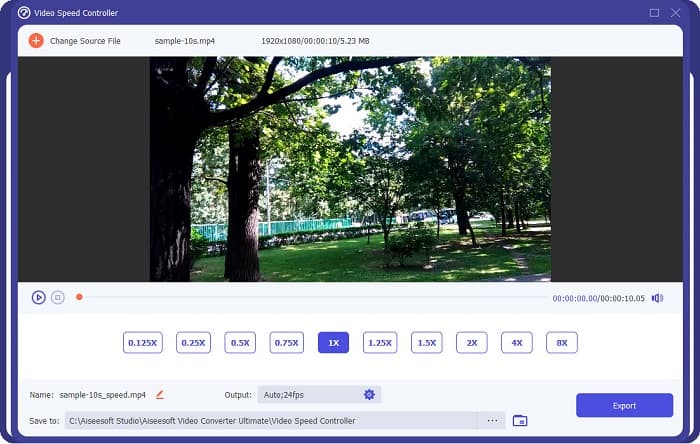
إذا كنت تريد طريقة أسهل لتحرير سرعة الفيديو، فاستخدم FVC Video Converter Ultimate. يتيح لك هذا البرنامج تسريع الفيديو أو إبطاءه بسهولة. وبفضل عملية التشغيل السريعة، لن تستهلك وقتًا طويلًا في تعديل سرعة الفيديو. بالإضافة إلى ذلك، توجد العديد من إعدادات السرعة الجاهزة التي يمكنك الاختيار منها لفيديوهاتك. وإذا كنت تتساءل عمّا يمكنه فعله أيضًا، فهذه الأداة تحتوي على العديد من وظائف التحرير، بما في ذلك ضاغط صوت، وضاغط فيديو، ومحرر بيانات وصفية للفيديو، وغير ذلك. كما يدعم عددًا كبيرًا من صيغ الملفات، مثل MP4 وMKV وMOV وAVI وFLV وWMV وأكثر من 1000 صيغة أخرى. لمعرفة المزيد عن هذا البرنامج، اقرأ الشرح أدناه.
مزايا استخدام FVC Video Converter Ultimate:
1. واجهة مستخدم بديهية.
2. يسمح لك بتغيير سرعة الفيديو من الإعدادات المسبقة للسرعة 0.125x ، 0.50x ، 0.75x ، 1.25x ، 1.5x ، 2x ، 4x ، 8x.
3. يحتوي على العديد من ميزات التحرير المتقدمة لاستخدامها ، مثل أداة قص الفيديو ، ودمج الفيديو ، وصانع ثلاثي الأبعاد ، والمزيد.
4. متوفر على جميع منصات الوسائط ، بما في ذلك Windows و Mac و Linux.
الجزء 2. أسئلة وأجوبة حول DaVinci Resolve Video Speed Editor
هل يستحق DaVinci Resolve Video Speed Editor كل هذا العناء؟
مع سعرها ، فإن أداة محرر سرعة الفيديو هذه تستحق الاستخدام لأنها يمكن أن تنتج مخرجات عالية الجودة ولديها الكثير من ميزات التحرير لاستخدامها.
هل DaVinci Video Speed Editor متوافق مع أي تنسيقات؟
لا يدعم جميع تنسيقات الملفات. ومع ذلك ، يمكنه دعم العديد من تنسيقات الملفات ، بما في ذلك MOV و MXF و DNG و DCP و ARI و MTS وما إلى ذلك.
هل لدى DaVinci Resolve Video Speed Editor نسخة مجانية؟
يحتوي DaVinci Resolve Video Speed Editor على إصدار تجريبي مجاني لفترة محدودة فقط. لاستخدامها لمدى الحياة ، قم بشراء الأداة لـ $395.
خاتمة
جميع استفساراتك حول DaVinci Resolve Video Speed Editor أصبحت الآن مُجابًا عنها. باستخدام الأداة المخصّصة لمحرر سرعة الفيديو، يمكنك بسهولة إبطاء أو تسريع الفيديو وإنشاء انتقالات جميلة من خلالها. ولكن إذا كنت تبحث عن أداة أكثر سهولة وملاءمة في الاستخدام، فجرّب FVC Video Converter Ultimate مجانًا!
-
 كيفية التقديم السريع لمقطع فيديو على iPhone - ضبط سرعة الفيديو
 كيف يمكنني تقديم مقطع فيديو سريعًا على جهاز iPhone الخاص بي؟ كيف يمكنك التقديم السريع لمقطع فيديو على iPhone باستخدام iMovie؟ تعرف على 3 طرق لتسريع الفيديو على أجهزة iPhone و iPad.
-
 كيفية تسريع الفيديو في Premiere Pro وبدائلها
 هل تريد معرفة كيفية استخدام العرض الأول لتسريع الفيديو؟ فأنت في المقالة الصحيحة حيث نقدم خطوات وبدائل أخرى ميسورة التكلفة.
-
 2 طرق سهلة حول كيفية تسريع الفيديو على TikTok
 هل تريد معرفة سر كيفية تسريع الفيديو على TikTok؟ ثم اقرأ هذه المقالة للحصول على فكرة حول كيفية القيام بذلك ومعرفة ما هي الأداتين الأخريين اللتين ستساعدك.
