


 محول الفيديو النهائي
 مسجل الشاشة
 إصلاح الفيديو
3 مساعدات فعالة لمساعدتك على الخروج من حالة تأخير الصوت
Nowadays, to not get bored in this current situation we do love watching videos to kill time.Whatever the genre is on we still watch it to not be bored in our home. In fact, most of us already experience un-sync audio and video which could be very irritating, isn't it? But today we will promise to you that you will never encounter it again. Because in this article we provide solutions on how to fix audio delay on your video and determine what is the reason behind it.

الجزء 1. ما هو تأخير الصوت
Audio delay really happens in different situations whether it is online or offline. There are a lot of different factors why delay happens with your audio. Also, a great example is on this list below. Read it thoroughly to know what could be the reason.
◆ تعرض الفيديو قبل تحميله على صفحة الويب أو الأنظمة الأساسية للتلف بالفعل مما سيؤدي إلى عدم مزامنة الصوت والفيديو.
◆ تمت مقاطعة عملية تنزيل الملف أو عدم اكتمالها مما قد يؤدي إلى فقدان ملف الصوت والفيديو أو تأخيره.
◆ عطل في برنامج التحرير. قد يكون هذا سببًا إذا قمت بتسجيل الصوت والفيديو بشكل منفصل ودمجهما معًا.
يحدث تأخير الأسباب المحتملة الأخرى في هذه الحالة:
◆ إذا حدث تأخير أثناء مشاهدة التلفزيون ، فتوقع أن يكون ذلك بسبب شبكة المنطقة السيئة بين الكابل أو القمر الصناعي أو الهوائي.
◆ تحدث التأخيرات عبر الإنترنت خاصةً إذا تم ضبط الفيديو الخاص بك على 4k أو 1080 بكسل لأن هذه الجودة ستحتاج إلى الكثير من الوقت للتحميل مقارنة بالصوت أو العكس.
والآن بعد أن عرفنا الأسباب ، يمكننا الآن إصلاحها من خلال قراءة النص أدناه. ومع ذلك ، لا يمكن إصلاح السببين الآخرين بواسطة البرنامج أدناه. ولكن يمكننا أن نقترح ما إذا كان الفيديو والصوت غير متزامنين عبر الإنترنت ، فيجب علينا خفض الجودة لتحميل أفضل أو لمجرد العثور على إنترنت أفضل آخر. وإذا كانت مشكلتك على التلفزيون ، فمن الضروري الاتصال بمزود القناة الخاص بك للتحقق من المشكلة وإصلاحها على الفور. الآن ، دعنا ننتقل إلى الحلول الثلاثة الأولى أدناه.
الجزء 2. أهم 3 حلول حول كيفية إصلاح تأخير الصوت
1. استخدام محول الفيديو في نهاية المطاف
If you're looking for the best solution then this must be the first in our list. As this software can easily sync your audio and video easily within 3 minutes, Video Converter Ultimate. This software is cross platforms basically even if you are using a Mac or PC you can download it. Also, the best thing about this tool is that all of the advanced editing features on PC are available on Mac or vise-versa. Its performance already gave the user a wow-factor and it became the most popular choice for beginner and pro. Not only that, this tool supports a fast process so there will be no time wasted. In that being said, let's proceed on how to fix audio delay effectively by following the steps below.
Steps on How to Fix the Delay on Video Converter Ultimate:
Step 1. If this is your first time to use this tool then it is a must to download it first. After the downloading process, install it, set it up and click Start Now to proceed.
تحميل مجانيلنظام Windows 7 أو أحدثتنزيل آمن
تحميل مجانيلنظام MacOS 10.7 أو أحدثتنزيل آمن
Step 2. After the software has already been launched, go to the Toolbox and under it is the Audio Sync then press it.
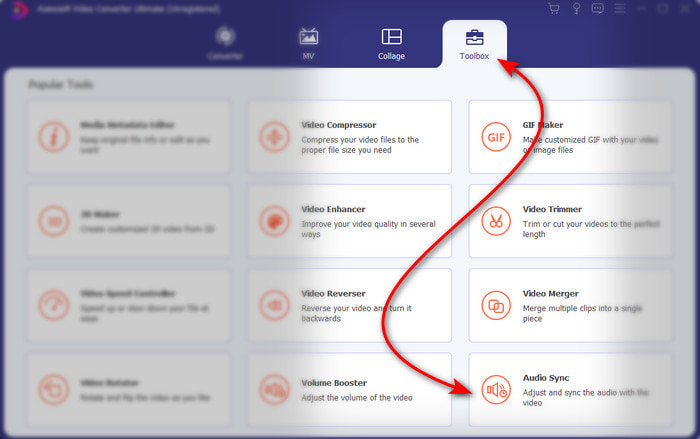
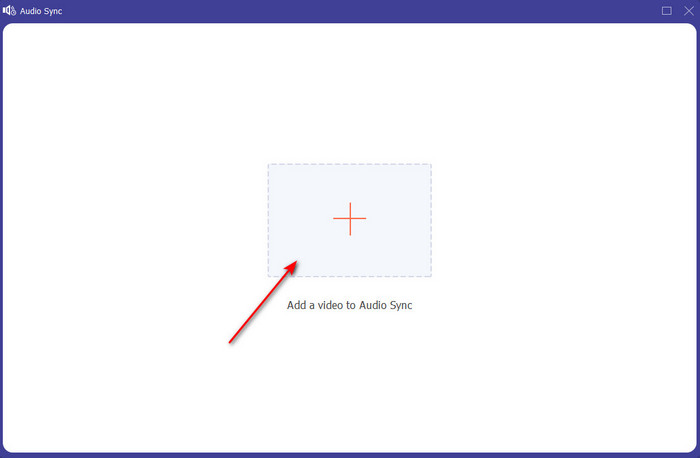
Step 3. Press the + button to add the file you want to sync and a folder will show next. If you already locate the video click Open next.
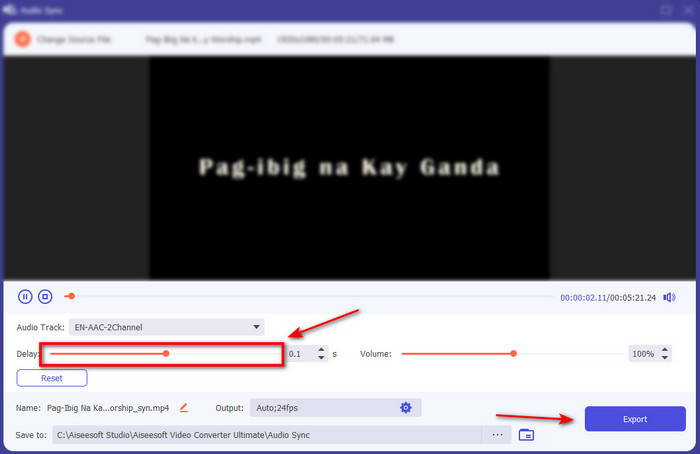
Step 4. An interface like this will show and now is the right time to move the delay slider to make it sync. If the audio and video are now in sync click Export to save the file.
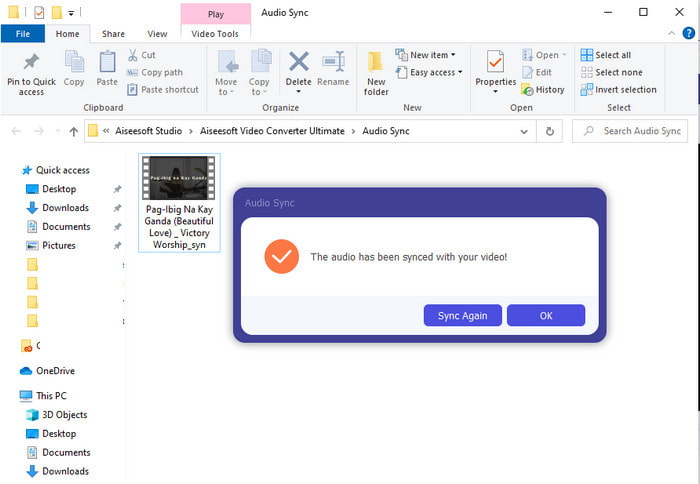
Step 5. After the process is done a file explorer will show next with the file. Click the file to watch and enjoy the magic you've made earlier with this software.
2. استخدم Avidemux
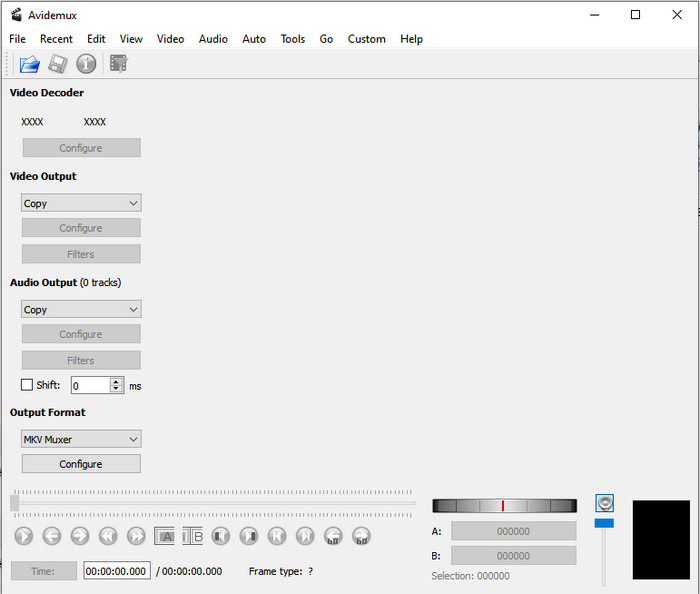
This software can help you to fix the audio delay you've encountered. Also, it is available in all different platforms you are currently using. So, if you use this tool on PC and transfer to Mac you can still use this as your personal editor. However, some of the features on PC are not available on Mac or Linux. Also, if you were about to use this then expect some difficulties. Because other features in this tool are somehow might confuse you. So now, if you want to try and fix the delay you experience on your video then follow the steps as we simplified it. To make the users like you to follow it easily.
How to Sync Audio and Video on Avidemux:
Step 1. Download the software to the main website first. Launch it, then click the File and next is the Open to select a video on the folder.
Step 2. Click the box of the Shift to make the shift apply automatically. Then add the value of ms you want. We suggest that start from - or + 200 first and if the audio and video is still unsync then change the number.
Step 3. And now the video and audio is in right sync it is now the right time to export it by clicking the Save button.
3. استخدم المحول عبر الإنترنت
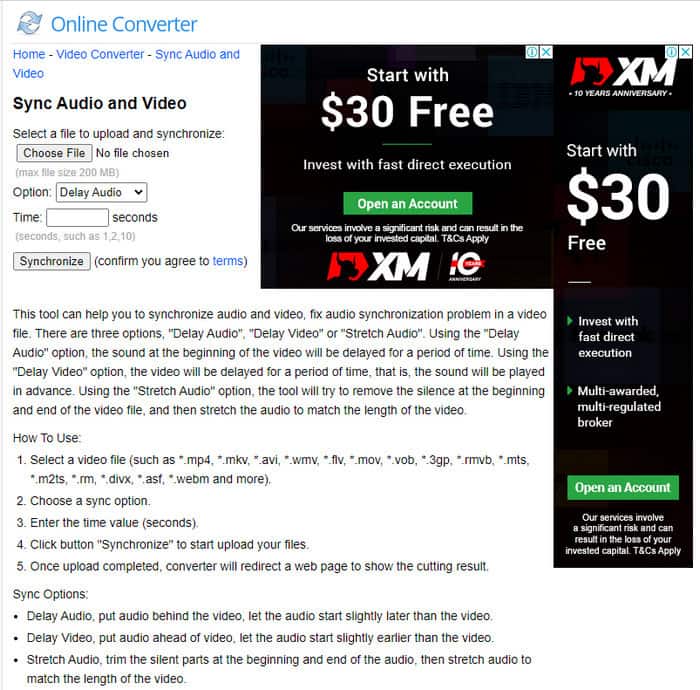
If you don't want to download a software then it is a must to try and use this Online Converter available on the web. As its interface is very simple to understand and easy to use by anyone who has a stable internet. However, this tool is not the best choice if you don't have an internet connection because it is dependent on it. So now, if you want to learn on how to fix audio delay with the Online Converter then follow these steps indicated.
How to Fix Audio and Video Delay with Online Converter:
Step 1. Look for the official webpage of the Online Converter. After opening the website click the Choose File to insert the video and audio file delay.
Step 2. On the Option you can choose whether to fix the delay on your audio or video. Then set the Time on the box.
Step 3. Click Synchronize and wait for the process to be finished then click Download Now to save the synchronized video you've made.
الجزء 3. أسئلة وأجوبة حول إصلاح تأخير الصوت
هل يمكنني استخدام Premiere pro لإصلاح تأخير الصوت؟
Absolutely Yes, you can use the most renowned editor Adobe developed. So, if you don't have any idea on how to do it then click this link to open a new website to fix the audio delay on premiere pro.
كيف يتم دمج الصوت والفيديو بشكل صحيح لتجنب التأخير؟
Looking for a proper software to make your merging properly might be a bit hard. However, we can make your searching easier as we accumulate 4 different ways to add any audio track to a video easily.
هل يمكن أن يؤدي ضغط الفيديو إلى تأخير الصوت؟
As for now, if you try to compress a video it will never have an effect on your audio or have a delay. Because compressing is the way to make the media file size smaller and not destroying it. So, if you're looking for a video compressor that is safe and secured then click this link to know what are the 7 ways to compress videos.
خاتمة
And now that we know what are the different reasons for the audio delay it is now the time to fix it with the tool provided above. Although all of the tools have the same function still there is one tool that stands out among the rest of the 3 presented and that is Video Converter Ultimate. This phenomenal tool has already been used by a million of users and has already helped them. And now if you want to experience the relief to your problem download this tool now.
-
 [مجاني ومدفوع] مُغيّر سرعة الصور المتحركة: أفضل اختيارات عام ٢٠٢٥
 هل أنت غير راضٍ عن صورة GIF التي أنشأتها عبر الإنترنت لأنها مملة وبطيئة؟ سيكون هذا يومك المحظوظ لأننا نقدم مقالًا حول مغير سرعة GIF والتفاصيل التي تساعدك على استخدامه وإتقانه.
-
 أفضل 4 مشغلات فيديو مزودة بوحدة تحكم في السرعة في عام 2025
 ألم تلاحظ سرعة التشغيل لكل مشغل وسائط كلما قمت بتشغيل مقطع فيديو؟ هذه المقالة مناسبة لك لمعرفة كل شيء عن مشغلات الفيديو مع التحكم في السرعة.
-
 3 طرق لتسريع الفيديو على iPhone [مثبت]
 هل تواجه مشكلة في ضبط سرعة تشغيل الفيديو الخاص بك لأنك تستخدم جهاز iPhone؟ هذه مقالة ممتازة لمساعدتك في حل مشكلتك.
