


 محول الفيديو النهائي
 مسجل الشاشة
 إصلاح الفيديو
 تنزيل آمن
2 طرق فعالة لدمج ملفات WebM دون فقدان الجودة
كيفية دمج ملفات WebM؟ عندما تقوم بتنزيل سلسلة من مقاطع الفيديو التي تم تحميلها من الآخرين عبر الإنترنت وترغب في إعادة تشغيلها باستمرار للحصول على تجربة مشاهدة أفضل ، فقد تفكر في دمج مقاطع فيديو WebM هذه في مقطع فيديو واحد. ومع ذلك ، نظرًا لجودتها العالية وصغر حجمها ، فمن الأفضل ضم ملفات WebM إلى MKV للحفاظ على الجودة العالية ضمن حجم صغير نسبيًا. وبالتالي ، هناك طريقتان فعالتان لمساعدتك على دمج WebM كملفات MKV.

الجزء 1: كيفية دمج ملفات WebM مجانًا عبر الإنترنت دون ضياع
أداة دمج الفيديوهات المجانية على الإنترنت FVC هي أداة متعددة الاستخدامات لدمج الملفات بأي صيغة، بما في ذلك دمج ملفات WebM مجانًا عبر الإنترنت. لست بحاجة إلى تنزيل أي برنامج، إذ يمكنك فقط رفع ملفات WebM عبر المتصفح ودمجها خلال بضع نقرات.
- 1. نقرات بسيطة لدمج أي كمية من ملفات فيديو WebM في ملف واحد مجاني تمامًا عبر الإنترنت.
- 2. دعم تصدير تنسيقات الفيديو الشائعة بما في ذلك تنسيق MKV بجودة عالية.
- 3. لا توجد علامة مائية لتحميل مقاطع الفيديو مباشرة على YouTube أو Facebook أو منصات أخرى.
- 4. احذف الملفات التي تم تحميلها نهائيًا خلال 24 ساعة لحماية خصوصيتك.
الخطوة 1: انتقل إلى أداة دمج الفيديوهات المجانية على الإنترنت FVC واتبع الإرشادات لتثبيت الإضافة خلال ثوانٍ قليلة. ثم انقر على زر رفع الفيديوهات للدمج لاختيار أحد ملفات الفيديو WebM المطلوبة.

الخطوة 2: انقر على أيقونة علامة الجمع لإضافة ملفات فيديو WebM الأخرى التي تريد دمجها. ويجب أن تضيف هذه الفيديوهات بالترتيب الذي تريده. بعد ذلك اختر صيغة MKV ودقة 1920*1080 للحفاظ على الجودة العالية للفيديوهات.

الخطوة 3: انقر على زر دمج الآن وبعد اختيار المجلد المحلي، سيبدأ دمج ملفات فيديو WebM تلقائيًا.
الجزء 2: الطريقة الأكثر احترافًا للانضمام إلى ملفات WebM لإنشاء ملف جديد
أداة الدمج المجانية على الإنترنت يمكن أن تساعدك على جمع فيديوهات WebM بسهولة. ولكن إذا أردت دمج أجزاء معينة من ملفات WebM معًا لإنشاء ملف جديد، فيجب عليك استخدام الأداة الاحترافية – Video Converter Ultimate التي لا تقتصر على دمج ملفات WebM فحسب، بل تمكنك أيضًا من تحرير الفيديوهات قبل دمجها.
- 1. دمج ملفات فيديو WebM في ملف واحد بتنسيقات مختلفة بما في ذلك MKV.
- 2. قادرة على الحفاظ على الجودة الأصلية لمقاطع فيديو WebM ، بما في ذلك 1080p HD و 4 K.
- 3. أدوات تحرير سهلة الاستخدام لقص مقاطع الفيديو وإضافة عوامل تصفية وضبط تأثيرات الفيديو وتقسيم مقاطع الفيديو.
- 4. سرعة دمج سريعة لدمج عدة ملفات فيديو WebM في بضع دقائق.
تحميل مجانيلنظام Windows 7 أو أحدثتنزيل آمن
تحميل مجانيلنظام MacOS 10.7 أو أحدثتنزيل آمن
الخطوة 1: قم بتنزيل برنامج Video Converter Ultimate ثم شغِّله. انقر على زر إضافة ملفات في الزاوية العلوية اليسرى لاختيار جميع ملفات WebM التي تريد دمجها.

الخطوة 2: انقر على زر قص لقص كل فيديو واحدًا تلو الآخر. اسحب شريط الزمن أو أدخل نقطة الوقت الدقيقة لتحديد الأجزاء المطلوبة. ثم انقر على زر حفظ للاحتفاظ بالإعدادات.
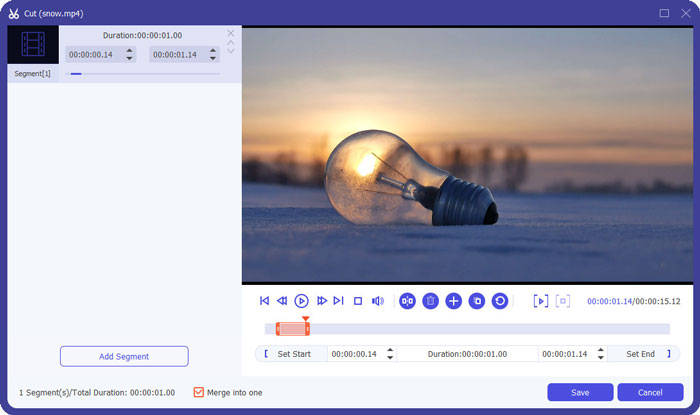
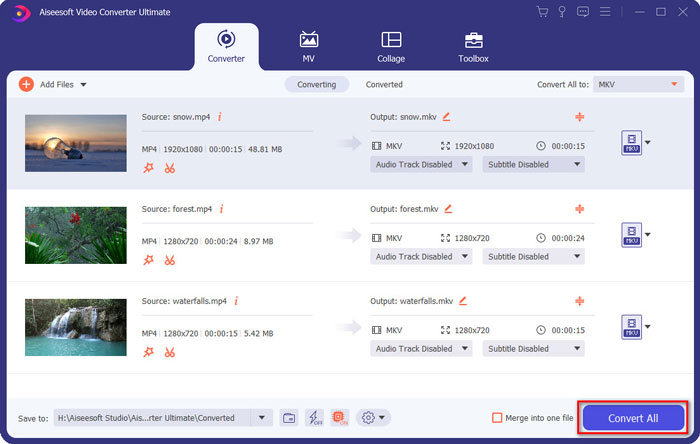
الخطوة 3: انقر على زر تحويل الكل إلى > فيديو > MKV ثم اختر خيار نفس المصدر. على الرغم من أنه سيزيد حجم ملفات WebM قليلًا، فإن الجودة ستبقى مماثلة لجودة الفيديوهات الأصلية.

الخطوة 4: بعد اختيار مسار التخزين، فعِّل خيار دمج في ملف واحد ثم انقر على زر تحويل الكل لحفظ الملف.
قد ترغب أيضًا في معرفة: كيفية دمج الفيديوهات على iPhone.
الجزء 3: الأسئلة الشائعة حول ضم ملفات WebM
1.ما هو WebM؟
WebM هو نوع من تنسيق الفيديو تقترحه Google. ودائمًا ما يتم استخدام مقاطع فيديو WebM على موقع الويب لأنه يمكن تشغيلها بطلاقة على جميع المتصفحات تقريبًا بما في ذلك Google Chrome و Firefox وما إلى ذلك بجودة عالية وصغر الحجم.
2- هل سيؤدي دمج ملفات WebM إلى تقليل جودة الفيديو؟
نعم ، سيتم ذلك ، خاصةً عند دمج عدة ملفات WebM في ملف WebM واحد. أفضل طريقة للحفاظ على الجودة الأصلية هي ضم ملفات فيديو WebM معًا كملفات MKV.
3- هل يمكنني الاحتفاظ بتنسيق WebM بعد دمج ملفات فيديو WebM؟
نعم، يمكنك ذلك. ولكن من الأفضل تحويل الصيغة إلى MKV، وهي الصيغة الأصلية التي بُني عليها WebM. وذلك لأن WebM رغم قدرته على الحفاظ على جودة عالية مع حجم صغير، فإن صيغة MKV تُستخدم بشكل أكثر شيوعًا من WebM. ولكن إذا أردت، يمكنك أيضًا تحويل WebM إلى MP4.
خاتمة
عندما تريد دمج ملفات فيديو WebM التي تم تنزيلها على موقع الويب للحصول على تجربة عرض أكثر سلاسة ، فإن أسهل طريقة هي استخدام أداة دمج فيديو مجانية عبر الإنترنت لمساعدتك. ومع ذلك ، إذا كنت ترغب في إنشاء مقطع فيديو جديد عن طريق دمج ملفات فيديو WebM ، فأنت بحاجة إلى قص الأجزاء المطلوبة قبل الانضمام. في هذه الحالة ، قم بتنزيل محول الفيديو الاحترافي - Video Converter Ultimate لقص ودمج ملفات WebM في نفس الوقت.
-
 أفضل 5 مشغلات WebM لأجهزة Android / iPhone / Windows / Mac
 إذا كنت ترغب في تشغيل WebM بنجاح على جهازك ، فيجب أن تتعلم المزيد عن أفضل 5 مشغلات WebM لأجهزة Android و iPhone و Windows و Mac من هذه المقالة.
-
 ضغط WebM - كيفية ضغط ملف WebM عبر الإنترنت
 كيفية ضغط ملف WebM على الإنترنت؟ ما هي أسرع طريقة لضغط الملفات الكبيرة؟ يوضح هذا المنشور طريقتين مجانيتين لضغط WebM.
-
 محول MP4 إلى WebM - أفضل 4 طرق لتحويل MP4 إلى WebM
 عندما تريد تحويل MP4 إلى WebM مجانًا ، يمكنك معرفة المزيد حول الأساليب الأربعة الأكثر استخدامًا للحصول على مقاطع الفيديو المطلوبة مجانًا من المقالة.
