


 محول الفيديو النهائي
 مسجل الشاشة
 إصلاح الفيديو
 تنزيل آمن
2 طرق سهلة حول كيفية إزالة العلامة المائية Dxtory
عندما يتعلق الأمر بتسجيل أسلوب اللعب في الألعاب والتطبيقات الأخرى، فإن Dxtory يُعد من أشهر برامج تسجيل الشاشة لدى الكثير من المستخدمين. يستخدم العديد هذا المُسجل لأنه واحد من القلائل التي يمكنها التسجيل حتى 120 إطارًا في الثانية. إضافة إلى ذلك، فهو يلتقط معلومات الفيديو من DirectX وOpenGL بسرعة على نظامك. ولكن عند التسجيل باستخدام Dxtory Screen Recorder، يترك علامة مائية على الفيديو. ونتيجة لذلك، يبحث الناس عن طريقة لإزالة تلك العلامة المائية المزعجة. في هذه المقالة ستتعلم كيفية إزالة علامة Dxtory المائية من فيديو تسجيل الشاشة الخاص بك.

الجزء 1. كيفية تسجيل الشاشة باستخدام Dxtory
إذا كنت تبحث عن تطبيق برمجي يمكنه تسجيل النقاط البارزة في طريقة اللعب ، فإن Dxtory هو تطبيق مناسب. Dxtory هو تطبيق يمكن أن يساعدك في تسجيل شاشتك أثناء لعب لعبة أو مناقشة درس عبر الإنترنت أو مشاهدة مقاطع الفيديو على جهاز الكمبيوتر الخاص بك. إنه تطبيق برمجي معروف لتسجيل الشاشة. يحتوي مسجل الشاشة Dxtory على الأدوات اللازمة للوصول إلى إعدادات Global و Advanced و Hotkey و Screenshot والفيديو والصوت ، إلخ.
علاوة على ذلك ، يتيح لك مسجل الشاشة هذا التقاط لقطة شاشة أثناء التسجيل. يمكنك أيضًا تعديل لقطات الشاشة هذه بخيارات الحواف والقياس والقص. كما أن لديها العديد من المصادر الصوتية للتسجيل ، مما يعني أن Dxtory يمكنه في نفس الوقت تسجيل اللعبة وصوت الميكروفون. إنه أيضًا أسرع التقاط فيلم لتطبيقات DirectX و OpenGL. لذلك ، إذا كنت تريد استخدام Dxtory لتسجيل الشاشة ، فاستمر في قراءة هذا الجزء.
كيفية تسجيل اللعب باستخدام مسجل الشاشة Dxtory:
الخطوة 1. أولاً، تحتاج إلى تنزيل برنامج Dxtory على جهازك، ثم اتباع عملية التثبيت. يمكنك شراء الترخيص حتى لا يكون هناك أي قيود على مدة التسجيل، ولن يضع البرنامج أي علامة مائية على مخرجات الفيديو الخاصة بك.
الخطوة 2. شغّل التطبيق الذي تريد تسجيله، ثم شغّل برنامج Dxtory.
الخطوة 3. انتقل إلى علامة تبويب Target، ثم انقر على اللعبة التي تلعبها. ستظهر قائمة العمليات مباشرة في قائمة الهدف.
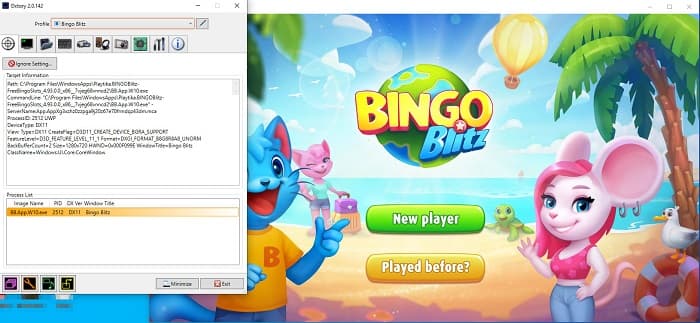
الخطوة 4. بعد ذلك، انتقل إلى علامة تبويب Folder وحدد موقع حفظ الملف. ثم انتقل إلى Hotkeys لاختيار الأزرار التي ستستخدمها لعملية تسجيل الشاشة. يمكنك أيضًا ضبط مستوى الصوت.
الخطوة 5. صغّر نافذة Dxtory وابدأ لعبتك. سترى رقمًا في أعلى يسار واجهة اللعبة يشير إلى عدد الإطارات في الثانية (FPS). اضغط على مفتاح الاختصار لتسجيل الفيديو الذي قمت بتعيينه في لوحة Hotkeys لبدء التسجيل.
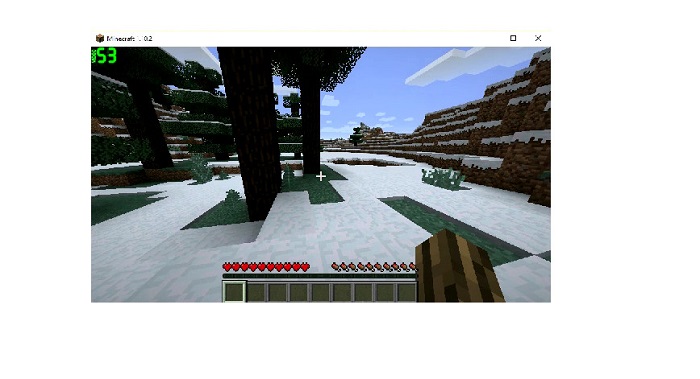
الخطوة 6. إذا أردت إيقاف التسجيل، اضغط على نفس المفتاح الذي استخدمته لبدء التسجيل. سيتم حفظ الفيديو في الموقع الذي حددته عند إيقاف التسجيل.
الآن يمكنك الاستمتاع بمشاهدة فيديو تسجيل الشاشة الخاص بك. إذا لم تشترِ الترخيص، فسترى علامة مائية على الفيديو. لذا إن أردت إزالة العلامة المائية من الفيديو، فاقرأ الجزء التالي.
الجزء 2. كيفية إزالة العلامة المائية Dxtory باستخدام الأداة النهائية
إذا كنت ترغب في إزالة Dxtory Watermark من فيديو مسجل الشاشة ، فربما ترغب في استخدام تطبيق البرنامج المذهل هذا. اقرأ هذا الجزء للتعرف على الأوصاف الكاملة حول هذه الأداة وكيفية استخدامها في عملية إزالة العلامة المائية Dxtory.
يُعد FVC Video Converter Ultimate واحدًا من أشهر البرامج التي تتيح لك إزالة العلامات المائية من أي فيديو. يتمتع بواجهة بسيطة وسهلة الاستخدام، مما يجعله أداة مناسبة للمستخدمين. بالإضافة إلى ذلك، يدعم FVC Video Converter Ultimate العديد من صيغ الملفات، بما في ذلك MP4 وMKV وMOV وM4V وAVI وFLV وأكثر من 1000 صيغة أخرى. وإذا كنت ترغب في الحصول على تطبيق يحتوي على العديد من أدوات التحرير، فإن هذه الأداة هي الأفضل لك؛ فهي تتضمن ميزات تحرير متقدمة عديدة، مثل أداة قص الفيديو، وأداة إزالة العلامة المائية من الفيديو، وأداة دمج الفيديوهات، وأداة تقطيع الفيديو، والمزيد في قسم صندوق الأدوات (Toolbox).
من خلال واجهة المعالجة السريعة ، يمكنك بسهولة إزالة أي علامة مائية مضمنة في الفيديو الخاص بك. لذلك ، اتبع الخطوات أدناه للحصول على فيديو Dxtory بدون علامة مائية.
هناك طريقتان لإزالة العلامة المائية Dxtory على الفيديو الخاص بك.
الطريقة الأولى: كيفية إزالة العلامة المائية Dxtory باستخدام ميزة اقتصاص الفيديو:
الخطوة 1. أولاً، ثبّت برنامج FVC Video Converter Ultimate على جهازك بالنقر على زر Download أدناه لنظامي Windows أو Mac. اتبع خطوات التثبيت ثم افتح التطبيق.
تحميل مجانيلنظام Windows 7 أو أحدثتنزيل آمن
تحميل مجانيلنظام MacOS 10.7 أو أحدثتنزيل آمن
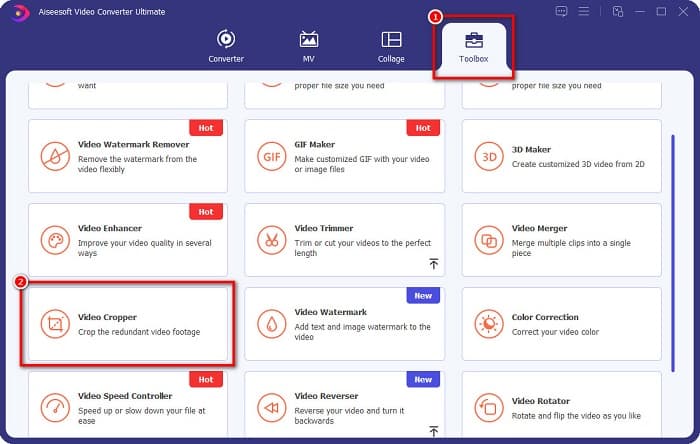
الخطوة 2. في الواجهة الرئيسية، انقر على لوحة Toolbox، ثم اختر ميزة Video Cropper.
الخطوة 3. بعد ذلك، انقر على زر علامة الزائد (+) لتحميل الفيديو الذي تريد إزالة العلامة المائية منه. يمكنك أيضًا سحب الفيديو من ملفات جهازك وإفلاته في البرنامج.
الخطوة 4. بعد ذلك، يمكنك معاينة النتيجة. سترى مربع قص؛ قم بضبط حواف مربع القص حتى لا تكون العلامة المائية ضمن إطار الفيديو.
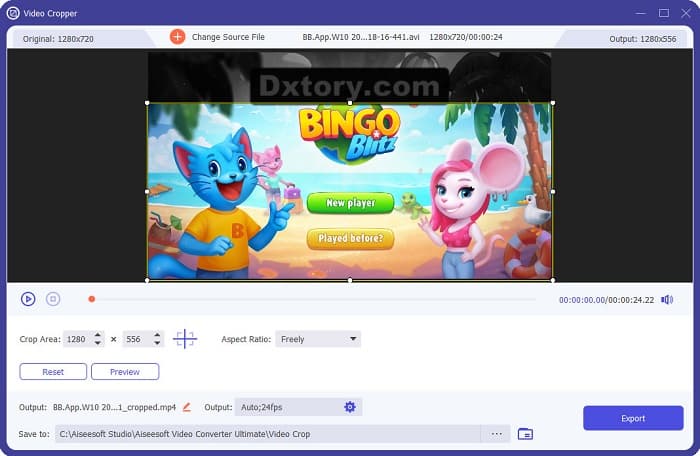
يمكنك ضبط حجم منطقة الاقتصاص من خلال النقر فوق الزر لأعلى لأسفل أسفل معاينة الفيديو الخاص بك.
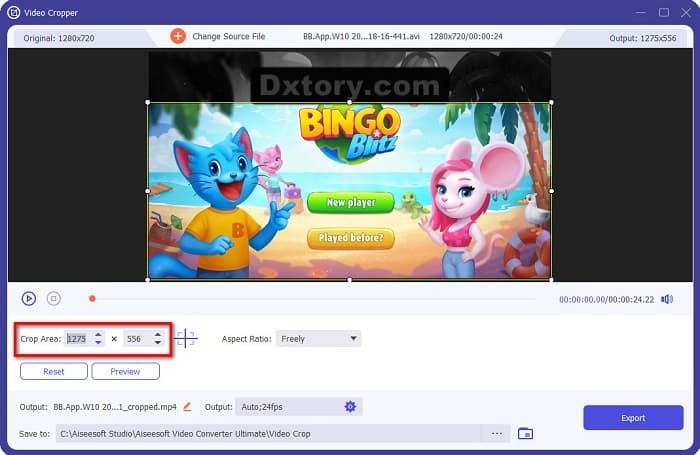
الخطوة 5. أخيرًا، انقر على زر Preview لمشاهدة نتيجة الفيديو، ثم انقر على Export إذا كنت راضيًا عن النتيجة.
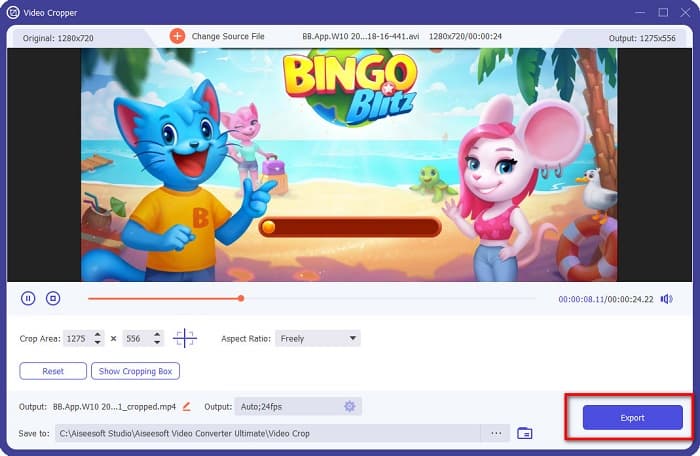
بهذه الخطوات السهلة ، يمكنك إزالة العلامة المائية Dxtory على الفيديو الخاص بك باستخدام ميزة Video Cropper في FVC Video Converter UItimate.
الطريقة 2: كيفية إزالة العلامة المائية Dxtory باستخدام Video Watermark Remover of FVC Video Converter Ultimate:
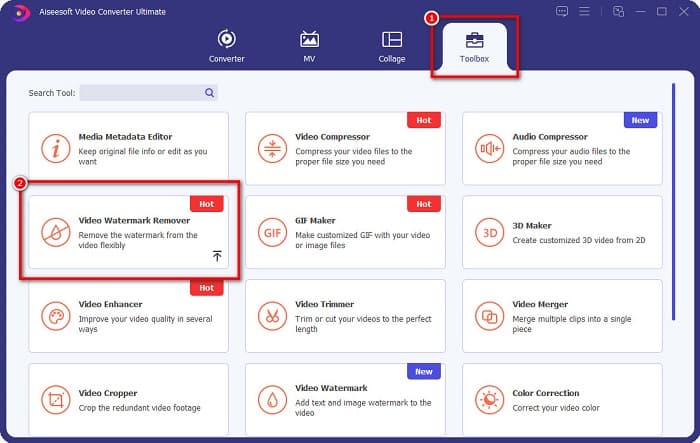
الخطوة 1. إذا كان البرنامج مثبتًا على جهازك، فافتح التطبيق. ثم انتقل إلى Toolbox، واختر أداة Video Watermark Remover.
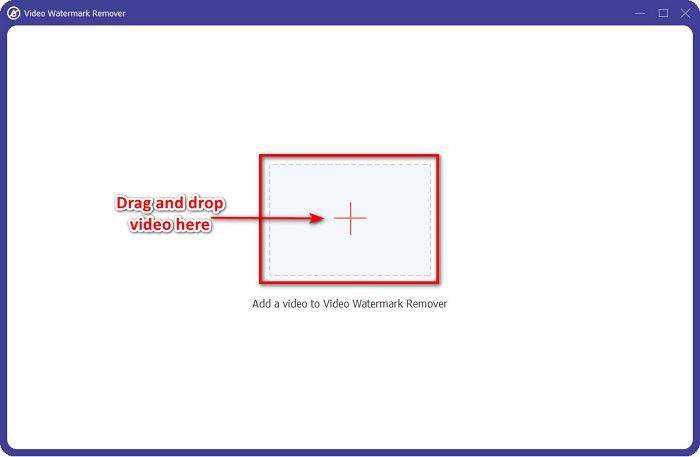
الخطوة 2. بعد ذلك، انقر على زر + أو اسحب وأسقط فيديو Dxtory الخاص بك في مربع علامة +.
الخطوة 3. بعد تحميل الفيديو، سترى معاينة له. انقر على منطقة Add watermark removing.
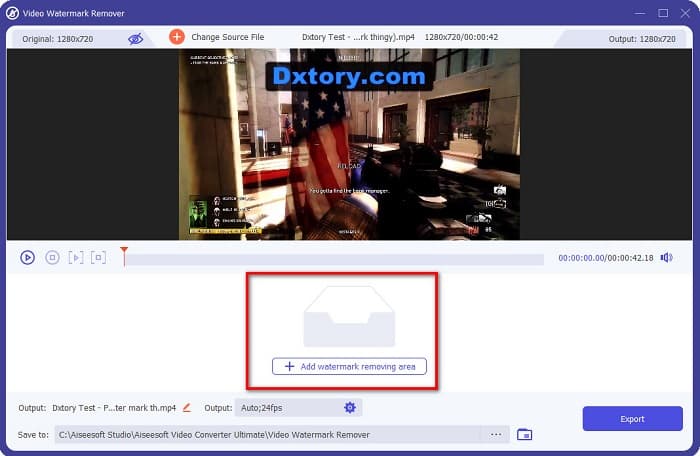
الخطوة 4. ثم ستظهر منطقة إزالة العلامة المائية على الفيديو. ضعها فوق علامة Dxtory المائية.
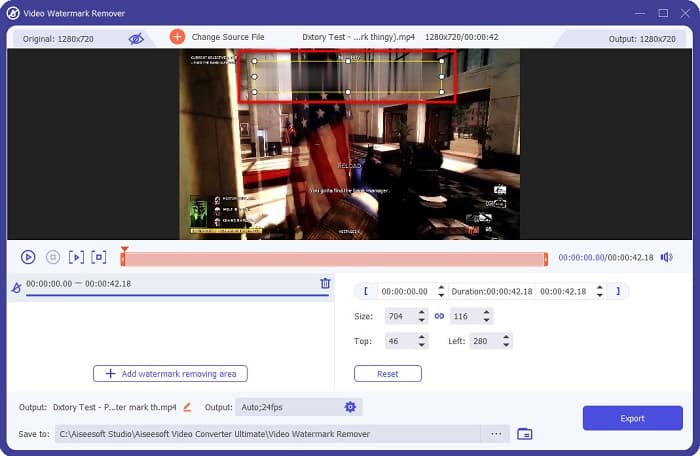
اختياري. إذا كانت هناك علامتان مائيتان أو أكثر على الفيديو، فانقر على add watermark removing area لإضافة مربع إزالة آخر.
الخطوة 5. أخيرًا، انقر على زر Export لحفظ الفيديو الناتج على جهازك. وهكذا تكون قد انتهيت!
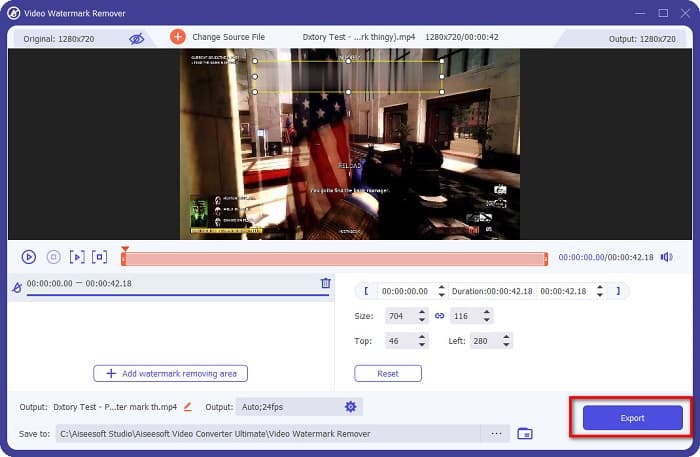
بسيط، أليس كذلك؟ يمكنك إزالة علامة Dxtory المائية من الفيديو بهذه السهولة. كما يمكنك أيضًا إزالة العلامات المائية من تيك توك بالطريقة نفسها المذكورة أعلاه.
الجزء 3. أسئلة وأجوبة حول إزالة Dxtory Watermark
هل يمكن لبرنامج Adobe After Effects إزالة العلامة المائية Dxtory؟
نعم. يُعد Adobe After Effects أشهر برنامج لإزالة العلامات المائية من الفيديو، ويمكنه إزالة أي علامات مائية من الفيديو (شعارات، نصوص، صور). كما يمكنه أيضًا إزالة علامة Dxtory المائية من فيديوهاتك. ومع ذلك، يواجه العديد من المستخدمين صعوبة في استخدامه. حدد موضع العلامة المائية في صورتك، وضع مربع إزالة العلامة المائية فوقها، ثم انتقل إلى لوحة Layer، وأنشئ Null Objects، ثم انقر على Save Frame as، واستورد فيديوهاتك المعدلة، وقلّل Opacity للصورة، واستخدم خيار Pick-up whip.
هل يمكنك إزالة العلامة المائية من صورك؟
يمكنك إزالة العلامات المائية مثل الشعارات أو النصوص أو أي عناصر أخرى من صورك. يمكنك استخدام أداة FVC المجانية لإزالة العلامات المائية لإزالة أي علامات مائية من صورتك.
لماذا يضع Dxtory علامات مائية على مقاطع الفيديو؟
وضع Dxtory علامة مائية على مقاطع الفيديو الخاصة بهم حتى تشتري نسختها المدفوعة. أيضًا ، يقومون بتضمين علامات مائية على مقاطع الفيديو الخاصة بهم بحيث يتم منعهم من حقوق الطبع والنشر.
خاتمة
كما نوقش أعلاه، هناك طرق مجرّبة لمعرفة كيفية إزالة علامات Dxtory المائية من فيديوهاتك. ومن خلال استخدام FVC Video Converter Ultimate، يمكنك بسهولة إزالة أي علامات مائية مزعجة من صورك. قم بتنزيله الآن وجرّب أفضل ميزاته.
-
 كيفية إزالة العلامة المائية من Wondershare DVD Creator بسهولة
 تغطي هذه المقالة معلومات حول كيفية إزالة العلامة المائية من Wondershare DVD Creator. للحصول على جميع المعلومات التي تحتاجها ، لا بد من قراءة هذا.
-
 كيفية إزالة العلامة المائية Coub بخطوات بسيطة
 تعرف على كيفية إزالة العلامة المائية coub على مقاطع الفيديو الخاصة بك باستخدام مزيلات العلامات المائية الشائعة. اقرأ هذه المقالة للتعرف على هذه الأدوات الرائعة وكيفية استخدامها.
-
 كيفية إزالة Lumion Watermark على نظامي التشغيل Windows و Mac بسهولة
 هل تحتاج إلى إزالة علامة Lumion المائية لتقديمها بطريقة احترافية؟ حسنًا ، هناك أدوات يمكنك استخدامها لمساعدتك في التخلص من العلامة المائية التي يتركها.
