


 محول الفيديو النهائي
 مسجل الشاشة
 إصلاح الفيديو
 تنزيل آمن
أسرع وأسهل الطرق لتقصير الفيديو بأفضل الأدوات
يعد قص مقطع فيديو أو تقصيره أمرًا مهمًا لأنه يبرز فقط المقاطع الضرورية من الفيديو الخاص بك. يعني اقتطاع مقطع فيديو إزالة بداية نهاية مقطع الفيديو. يعد هذا العنصر الأساسي للتحرير ضروريًا حتى لا تفقد انتباه جمهورك. لذلك ، إذا كنت تريد قص مقطع الفيديو الطويل أو تقصيره ، فستتعلم في هذه المقالة طرق كيفية تقصير مقطع الفيديو.

الجزء 1. 2 طرق لتقصير مقطع فيديو على أداة تشذيب باستخدام أفضل تطبيق
يُعَدّ FVC Video Converter Ultimate أفضل أداة مكتبية لقص الفيديو الخاص بك. يتمتع هذا البرنامج بواجهة استخدام بديهية وهو مجاني. يتيح لك هذا المحوِّل دون اتصال إضافة مقاطع إلى ملف الفيديو الخاص بك. بالإضافة إلى ذلك، يحتوي على ميزة تُمكِّنك من تقسيم الفيديو بسرعة إلى الأجزاء المختلفة التي تفضّلها. وإذا كنت تبحث عن أداة يمكنها دمج ملفات متعددة الصيغ في ملف واحد، فبإمكان هذا التطبيق القيام بذلك من أجلك.
علاوة على ذلك، يقدّم هذا البرنامج العديد من الميزات المتقدمة مثل صانع GIF، ودمج الفيديو، وإزالة العلامات المائية من الفيديو، وغير ذلك. وما يجعله أكثر تميّزًا هو أنه يدعم العديد من صيغ الملفات، بما في ذلك MP4 وWMV وFLV وAVI وMPG وWebM وMKV وأكثر من 1000 صيغة أخرى. لذا، إذا كنت تريد استخدام هذا التطبيق لتقصير الفيديو الخاص بك، فلدينا طريقتان يمكنك اتباعهما.
الطريقة الأولى: استخدم أداة تشذيب الفيديو من FVC
الخطوة 1. أولاً، قم بتنزيل FVC Video Converter Ultimate بالنقر فوق زر Download أدناه. اتبع عملية التثبيت، ثم شغّل البرنامج.
تحميل مجانيلنظام Windows 7 أو أحدثتنزيل آمن
تحميل مجانيلنظام MacOS 10.7 أو أحدثتنزيل آمن
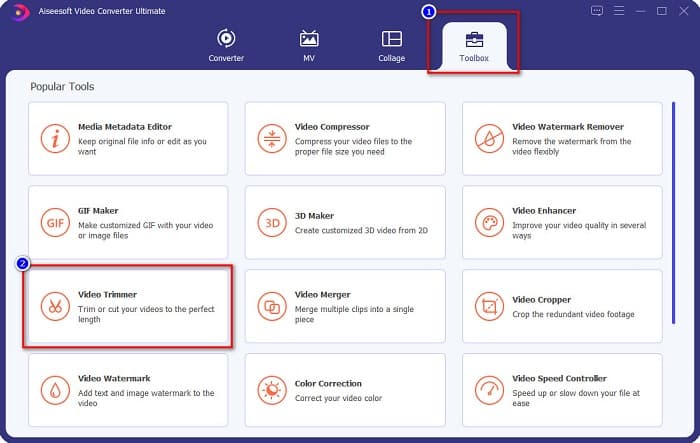
الخطوة 2. بعد ذلك، اختر لوحة Toolbox الموجودة أعلى واجهة البرنامج. ثم في لوحة الأدوات، انقر فوق Video Trimmer.
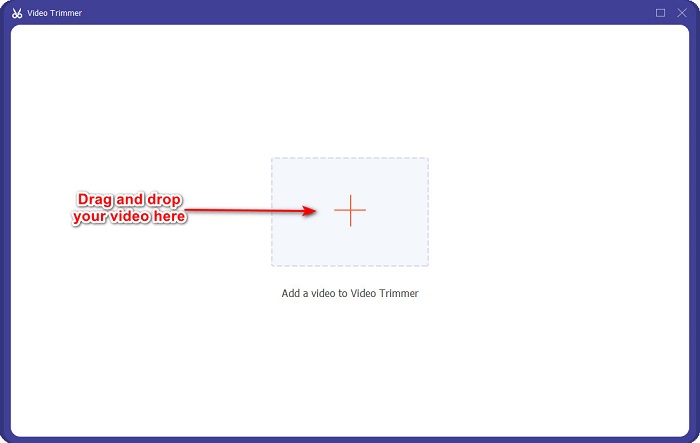
الخطوة 3. بعد ذلك، في الواجهة التالية، انقر فوق زر علامة + أو اسحب وأفلت الفيديو الخاص بك في علامة +.
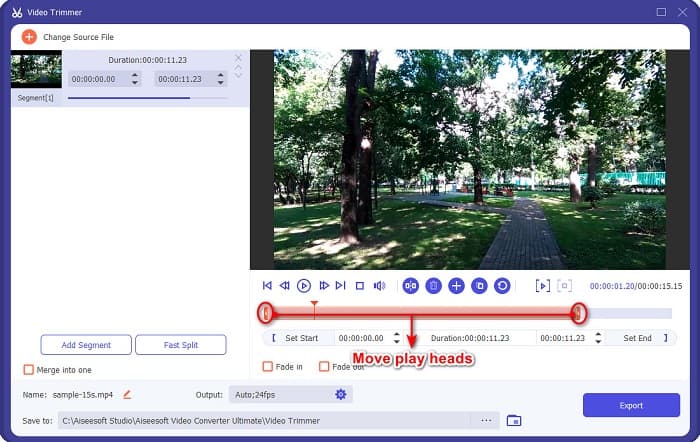
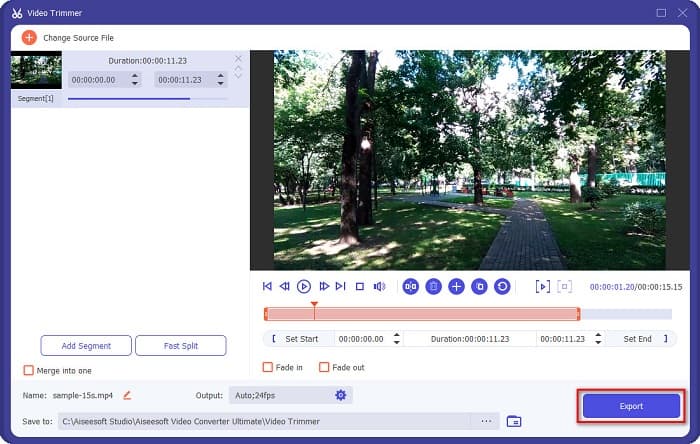
الخطوة 4. ثم حرِّك أزرار رأس التشغيل إلى الطول الذي تريده. يشير رأس السهم إلى موضع معاينة الفيديو الخاص بك، وتشير رؤوس التشغيل إلى طول الفيديو. يمكنك رؤية التغييرات المؤقتة على الفيديو في نافذة المعاينة.
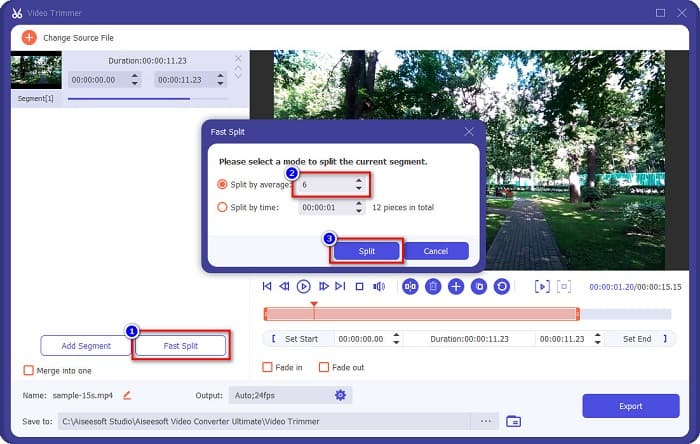
اختياري. إذا كنت تريد طريقة أسهل لتقسيم الفيديو إلى مقاطع:
1. انقر فوق زر Fast Split.
2. اختر عدد الأجزاء التي تريدها في الفيديو، ثم اضغط على Split.
3. إذا كنت لا تريد تقسيم الفيديو الخاص بك ، انتقل إلى الخطوة التالية.
الخطوة 5. أخيرًا، انقر فوق زر Export لتطبيق التغييرات على الفيديو الخاص بك. بعد ذلك سيتم حفظ الناتج تلقائيًا في ملفات جهاز الكمبيوتر لديك.
الطريقة الثانية: استخدم مغير سرعة الفيديو الخاص بـ FVC
يحتوي FVC Video Converter Ultimate أيضًا على ميزة حيث يمكنك تغيير سرعة الفيديو بسرعات 0.125x و 0.25x و 0.5x و 0.75x و 1.25x و 1.5x و 2x و 4x و 8x. وإذا كنت تريد تقصير طول الفيديو الخاص بك ، فاضبط الفيديو الخاص بك على سرعة عالية. لمزيد من الخطوات التفصيلية ، اتبع الدليل أدناه.
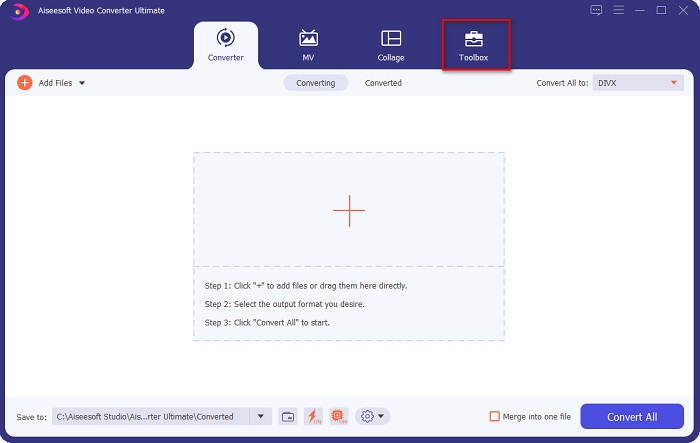
الخطوة 1. افتح FVC Video Converter Ultimate. وعلى الواجهة الرئيسية للبرنامج، انقر خيار Toolbox.
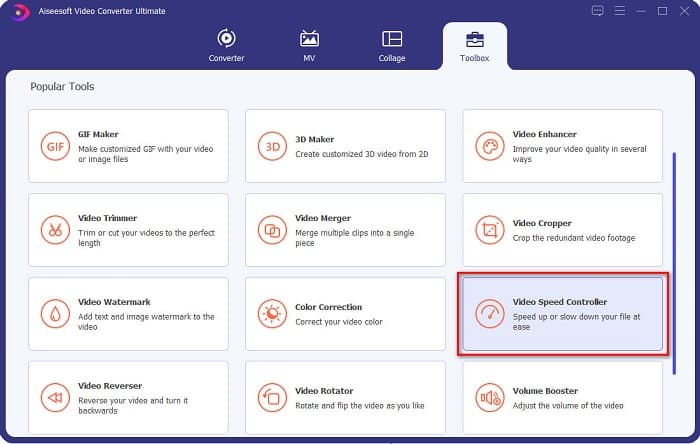
الخطوة 2. ثم انقر فوق Video Speed Controller، وانتقل إلى الخطوة التالية.
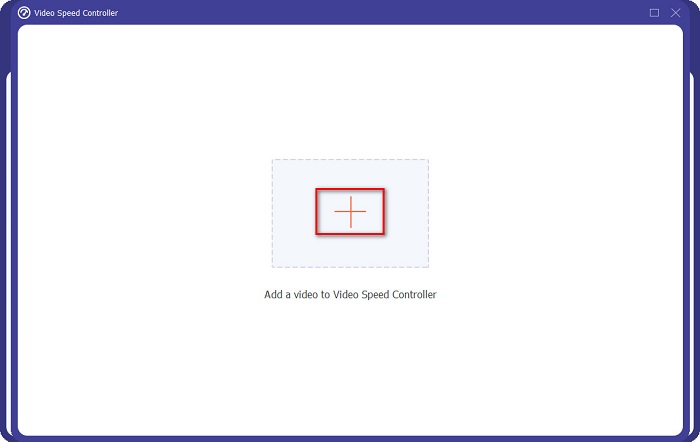
الخطوة 3. بعد ذلك، انقر فوق زر علامة + لرفع الفيديو الذي تريد تقصيره. ستظهر مجلدات جهاز الكمبيوتر الخاص بك لتختار الفيديو ثم ترفعه إلى واجهة البرنامج.
الخطوة 4. لتقصير الفيديو، اختر السرعة من 1.25x حتى 8x.
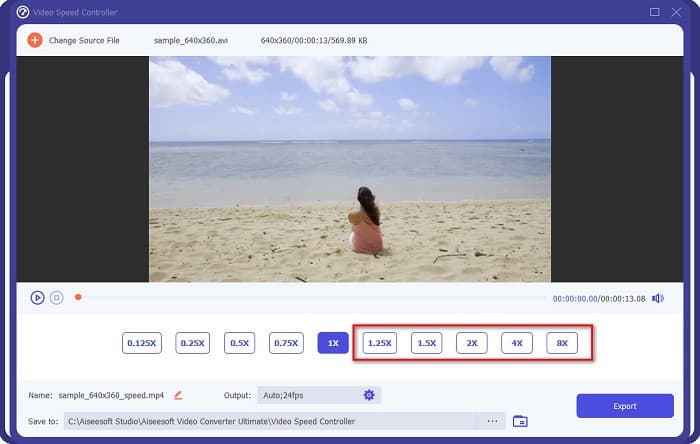
الخطوة 5. في الخطوة الأخيرة، انقر زر Export لحفظ التغييرات على الفيديو الخاص بك. بعد ذلك سيتم حفظ الناتج تلقائيًا في ملفات جهاز الكمبيوتر لديك.
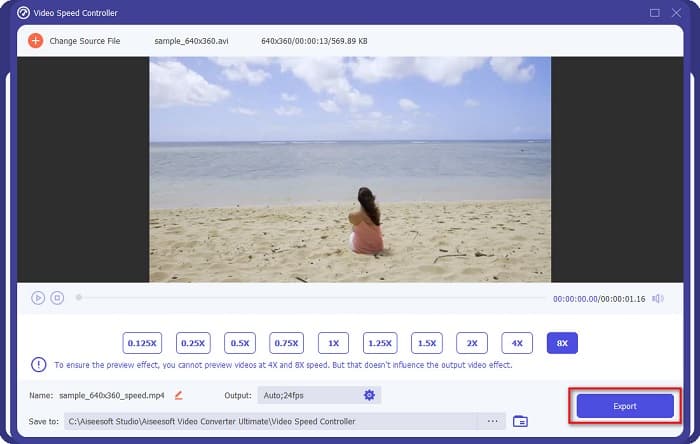
للحصول على مدة فيديو أقصر ، حدد سرعة 8x.
الايجابيات
- وهو يدعم العديد من تنسيقات الملفات ، بما في ذلك تنسيقات MOV و MKV و AVI و MP4 و WMV و WMA و MPEG و 1000+.
- يحتوي على واجهة برمجية سهلة الاستخدام.
- يسمح لك بتقسيم الفيديو الخاص بك بسرعة بنقرات قليلة.
- قابل للتنزيل على جميع الأنظمة الأساسية متعددة الوسائط ، مثل Windows و Mac و Linux.
سلبيات
- قم بشراء التطبيق أولاً قبل الوصول إلى ميزاته الأخرى.
الجزء 2. 2 أداة تشذيب الفيديو عبر الإنترنت للتجربة
إذا كنت ترغب في قص مقطع الفيديو الخاص بك دون تنزيل أي شيء ، فهناك أدوات قص فيديو عبر الإنترنت يمكنك استخدامها. قمنا بإدراج أفضل أدوات قص الفيديو عبر الإنترنت التي يستخدمها العديد من الأشخاص في هذا الجزء.
اقتصاص الفيديو
يُعَدّ Trim Video أداة قص فيديو عبر الإنترنت سهلة الاستخدام بفضل واجهتها البديهية. وهي أداة عملية لأنها لا تتطلب تثبيتًا مثل الأدوات الأخرى عبر الإنترنت. بالإضافة إلى ذلك، تحتوي على ميزة تمكّنك من تدوير الفيديو إلى 90 أو 180 أو 270 درجة. علاوة على ذلك، لا داعي للقلق بشأن أمان بياناتك لأن هذه الأداة محمية بالخصوصية. ومع ذلك، وبما أنها تطبيقًا يعتمد على الويب، فهي تحتوي على إعلانات قد تُشتّت انتباهك.
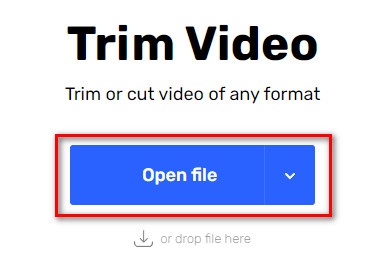
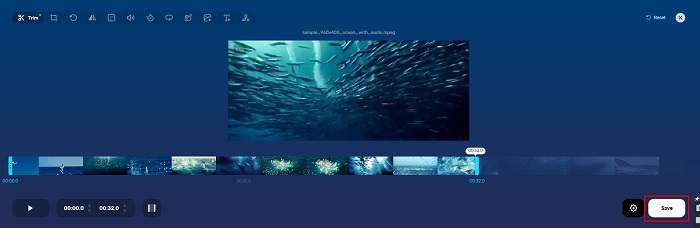
الخطوة 1. في المتصفح لديك، ابحث عن أداة قص فيديو عبر الإنترنت، ثم انقر موقع Trim Video. في الواجهة الرئيسية للأداة، انقر زر Open File.
الخطوة 2. بعد ذلك، اضبط أزرار رأس التشغيل على الطول الذي تريده.
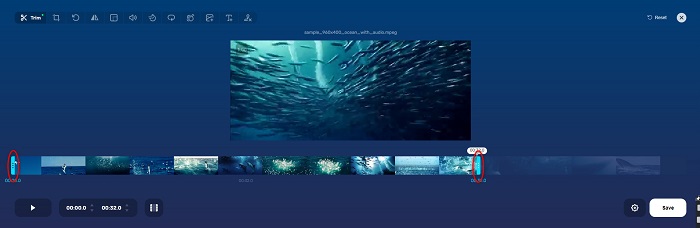
الخطوة 3. انقر زر Save لتغيير طول الفيديو الخاص بك.
الايجابيات
- يحتوي على واجهة مستخدم رسومية سهلة الاستخدام.
- لديها ميزات لاقتصاص وتدوير الفيديو الخاص بك.
- إنه آمن للاستخدام.
سلبيات
- يحتوي على إعلانات مزعجة.
- لديها عملية تحميل وتحميل بطيئة.
كليديو
أداة أخرى لقص الفيديو عبر الإنترنت هي Clideo. تتميز هذه الأداة عبر الإنترنت بواجهة بسيطة، مما يجعلها سهلة الاستخدام. كما تدعم معظم صيغ الملفات الشائعة مثل AVI وMP4 وVOB وMPG وMOV وغيرها. علاوة على ذلك، تفرض هذه الأداة مستوى أمان عالٍ، ما يعني أن بياناتك آمنة ولن يتمكن الآخرون من الاطلاع عليها. بالإضافة إلى ذلك، لا يحتوي Clideo على أي إعلانات قد تُشتّت انتباهك.
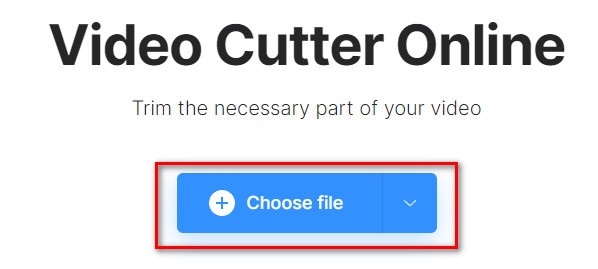
الخطوة 1. في المتصفح الذي تستخدمه، ابحث عن Clideo video trimmer. وفي الواجهة الأولى للأداة، انقر زر Choose File. ستظهر مجلدات جهاز الكمبيوتر لتختار الفيديو الذي تريد تقصيره.
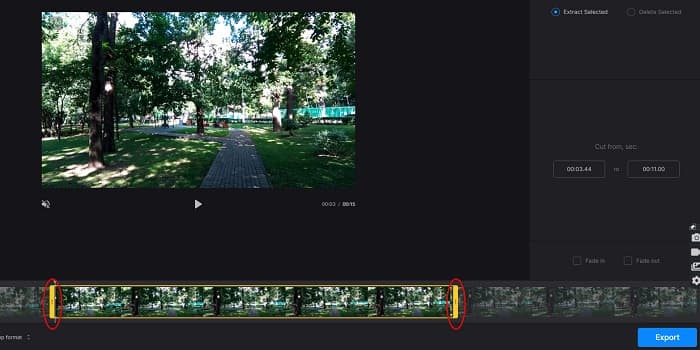
الخطوة 2. حرِّك أزرار رأس التشغيل إلى الطول الذي تريد أن يكون عليه الفيديو.
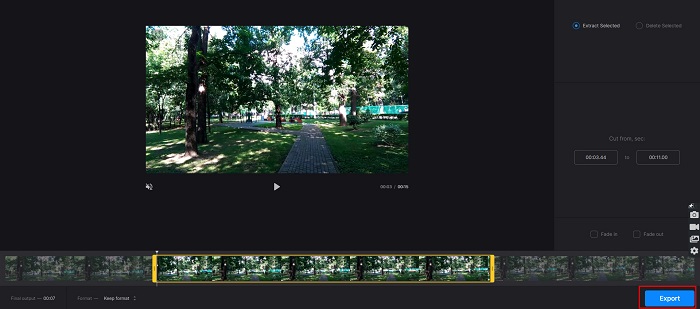
الخطوة 3. في الخطوة الأخيرة، انقر زر Export لتغيير طول الفيديو الخاص بك.
الايجابيات
- له واجهة سهلة الاستخدام.
- إنه آمن للاستخدام.
- لا يحتوي على أي إعلانات.
سلبيات
- قد تواجه عملية بطيئة عندما يكون اتصالك بالإنترنت بطيئًا.
الجزء 3. أسئلة وأجوبة حول كيفية تقصير الفيديو
كيفية تقصير الفيديو على iPhone؟
أولاً ، افتح تطبيق الصور وحدد الفيديو الذي تريد قصه. ثم اضغط على تحرير. بعد ذلك ، انقل أشرطة التمرير إلى طول الفيديو المطلوب وانقر فوق تم لحفظ التغييرات من الفيديو الخاص بك.
هل يؤثر قطع الفيديو على الجودة؟
لا. لا تؤثر معظم أدوات القطع على جودة الفيديو الخاص بك. ولكن إذا كنت مطمئنًا لأداة لا تؤثر على الجودة عند تقصير الفيديو الخاص بك ، فاستخدم FVC Video Converter Ultimate.
هل تقصير الفيديو الخاص بك يؤثر على حجم الملف؟
نعم. كلما كان مقطع الفيديو الخاص بك أقصر ، قل حجم الملف. في المقابل ، إذا كان الفيديو الخاص بك طويلاً ، فإنه يحتوي على حجم ملف ضخم.
خاتمة
هذا كل ما يتعلق بكيفية تقصير الفيديو باستخدام أداة القص ومغيّر سرعة الفيديو. جميع الأدوات المذكورة تقدّم نتائج ممتازة وتضمن لك أفضل أداء. ولكن إذا كنت تبحث عن أفضل أداة تحتوي على العديد من الميزات وسهلة الاستخدام وواسعة الانتشار عندما يتعلق الأمر بتقصير الفيديو، فإن FVC Video Converter Ultimate هو أفضل أداة مناسبة لك.
-
 كيفية قص ودمج الأغاني عبر الإنترنت - أفضل 4 طرق يجب أن تعرفها
 عندما تريد قص الأغاني ودمجها عبر الإنترنت لإنشاء مقطوعة موسيقية ، يمكنك معرفة المزيد حول أفضل 4 أدوات عبر الإنترنت لقص الأغاني ودمج الملفات من المقالة.
-
 اكتشف أفضل أداة تشذيب MP4 مع الإجراء والمعلومات
 هل تريد معرفة كيفية قص مقاطع الفيديو مثل مدوني الفيديو الذين تشاهدهم؟ ثم تابع قراءة هذا المنشور لمعرفة أدوات قص MP4 التي يمكنك استخدامها.
-
 5 قاطعات MP3 لقص أي صوت بسهولة [تم تحديث 2022]
 هل تحتاج إلى قاطع MP3 لقص الصوت؟ في هذه الحالة ، اقرأ هذه المقالة لأننا نقدم الأدوات التي يمكنك الاعتماد عليها والتي توفر قطعًا سهلاً للصوت.
