


 محول الفيديو النهائي
 مسجل الشاشة
 إصلاح الفيديو
[محلول] كيفية استخدام مرشحات الفيديو لتحسين الفيديو الخاص بك بشكل مثالي
اجعل الوسائط المرئية لديك أكثر تميّزًا من غيرها باستخدام فلتر فيديو. يمكن لهذه الفلاتر تعزيز النغمة، وتحقيق الاتساق، وإضافة الجو العام، والمزيد. وعلى الرغم من وجود العديد من تطبيقات الفلاتر في السوق، فإننا نأمل دائمًا أن يتم تنفيذ تحرير الفيديو داخل Video Converter Ultimate، مثل إضافة الفلاتر. لكن قبل أن نقدّم لك دليلًا حول كيفية استخدام هذه الأداة القوية، دعنا نُلقي أولًا نظرة على ماهية فلتر الفيديو وأنواعه التي يمكنك استخدامها لمساعدتك على إنشاء فيديو مثالي. اطّلع عليها أولًا لتحصل على فكرة عامة عنه.

الجزء 1. ما هو مرشح الفيديو
يُعَدّ فلتر الفيديو شائعًا على مستوى الويب بالكامل، إذ يساعد المستخدمين على إنشاء وسائط مرئية أكثر تفصيلًا من دون إضافة مؤثرات خاصة. هذه الفلاتر مدمجة مسبقًا، ما يعني أنها تقدّم تصاميم مختلفة للصورة المرئية من خلال تحسين النغمة، السطوع، العمق، درجة الحرارة اللونية، وغيرها. ورغم أن الفلاتر يمكن أن تساعدك على تحسين الفيديو، فإن الهدف من كل منها يختلف عن الآخر. على سبيل المثال، إذا كنت تحاول تصوير بورتريه، فستحتاج إلى فلتر يناسب هذا النوع. ستعرض لك التفاصيل التالية المعايير التي ينبغي أن تبحث عنها للحصول على أفضل تطبيق فلاتر فيديو يمكنك تنزيله أو استخدامه.
القائمة هنا ليست المرشحات المختلفة ولكنها ستتحدث عن عمليات المرشحات وفوائدها ومعاييرها.
1. لون تصحيح قابل للتعديل
تصحيح اللون هو عملية للتحكم في كمية الضوء التي ستنتقل إلى الفيلم. كمصور ، هدفك هو الحصول على صور مثالية من خلال موازنة فرز كل شيء. ومع ذلك ، لن يكون لديك دائمًا المزج المثالي في كل ما يمكن أن يجعل التصوير الفوتوغرافي الخاص بك أفضل. ولكن باستخدام مرشح تصحيح الألوان لجعل تصوير الفيديو الخاص بك يوازنه عن طريق تصفية المشهد ذي الإضاءة السوداء والسطوع والتباين.
2. مرشحات للوظيفة المثالية
هناك العديد من مرشحات وجه الفيديو المختلفة في السوق ، لكن بعضها ليس جيدًا مثل البعض الآخر. على الرغم من أن محرري الفيديو لديهم مجموعة من المرشحات ، إلا أن البحث عن المرشح المثالي قد يكون من الصعب فهمه ، خاصة إذا لم تكن لديك فكرة واسعة عن هذه المرشحات. على الرغم من أنه يمكنك تجربتها جميعًا ، فسيستغرق الأمر وقتًا طويلاً إذا قمت بذلك. لذا ، إذا كنت ترغب في الحصول على فكرة أكثر عن المرشحات الأكثر انتقاءًا في محرر الفيديو ، فيمكنك الانتقال إلى الجزء الثاني.
3. أفضل محرر فيديو أثناء التنقل
يجب أن تحتوي الأداة التي يجب عليك تحديدها على ميزات تحرير الفيديو لمساعدتك في القص والدمج والاقتصاص والقيام بالمزيد. ومع ذلك ، إذا اخترت أداة للتحرير ، فيجب مراعاة الأشياء أدناه. إذا كنت محترفًا أو مبتدئًا ، فيجب أن تنظر إلى معاييرك للحصول على أفضل محرر فيديو.
للمحترفين:
◆ يقوم محرر الفيديو بإجراء تحرير متقدم للفيديو لمساعدتك على القيام بمهمة معقدة دفعة واحدة.
◆ يدعم أنواع مختلفة من الملفات للاستيراد والتصدير.
◆ يدعم استيراد ملفات الفيديو الخام من الكاميرات أو الهواتف المحمولة أو DSLRs.
للمبتدئين:
◆ يجب أن يكون سهل الاستخدام لإجراء تحرير الفيديو بكفاءة.
◆ على الرغم من أنها ليست أداة احترافية جيدة ، إلا أنها يجب أن تحتوي على أفضل أدوات التحرير التي يحتاجها المبتدئ.
◆ يجب أن تكون واجهة المستخدم الرسومية أقل ثقلًا لتجنب الالتباس في ميزات الأداة.
الجزء 2. ما هي أفضل مرشحات الفيديو التي يمكنك استخدامها
التفاصيل المدرجة هنا هي عوامل التصفية التي يمكنك استخدامها لمساعدتك في ترقية الفيديو. يرجى ملاحظة أن المرشحات لا يمكنها تغيير جودة الفيديو ، لكنها يمكن أن تساعد في ظهور مقطع الفيديو الخاص بك بشكل ممتاز.
1. مرشح وجه الحيوانات
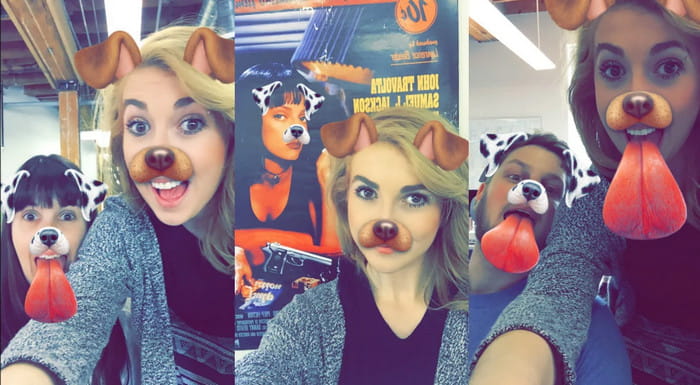
يحب معظم المستخدمين استخدام فلاتر الكلاب أو القطط على الفيديو لأنها فريدة من نوعها وتضحكنا جيدًا. يقوم هذا الفلتر بتحريك حيوان مختلف وأشياء مرحة أخرى ، على عكس المرشحات الأخرى. على الرغم من أنه لا يحسن التصوير الفوتوغرافي الخاص بك ، إلا أنه لا يزال بإمكانك استخدام هذا إذا كنت ترغب في الحصول على مرشح متحرك لغرض مختلف. علاوة على ذلك ، فإن تطبيق التصفية الأعلى الذي يمكنك تنزيله قد أضاف بالفعل عوامل تصفية متحركة لمستخدميه.
2. مرشح رمادي
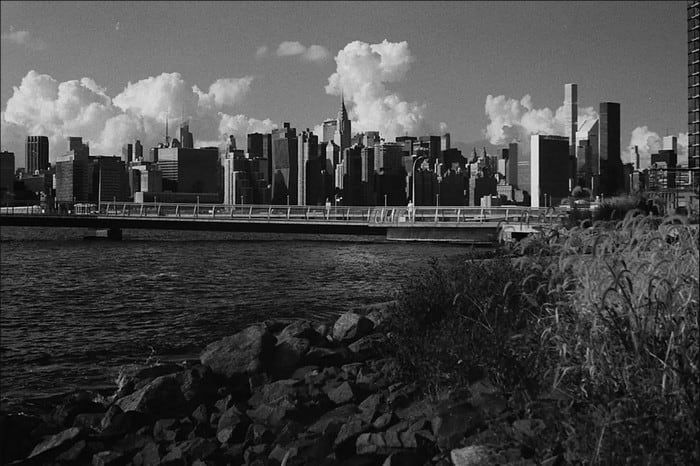
هل تفتقد أجواء التسعينيات وتريد تصوير فيديو بالأبيض والأسود؟ حسنًا، يمكن أن يساعدك الفلتر الرمادي على الحصول على فيديو بطابع التسعينيات. هذا الفلتر لا يشبه الفلاتر الأخرى التي تستخدم تباينًا عاليًا وألوانًا قوية، لأنه يعتمد على مزيج من الأبيض والأسود لخلق إحساس التسعينيات.
3. مرشح الجمال
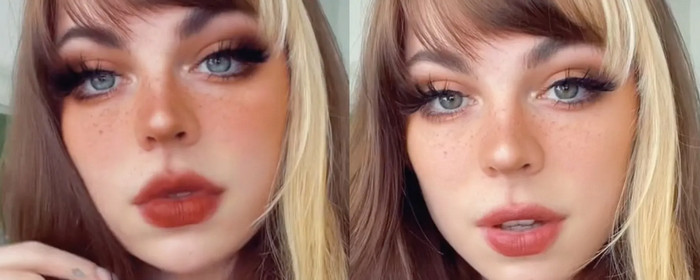
هل تريد تصوير مقاطع فيديو والحصول على مرشح فيديو لتنعيم البشرة؟ حسنًا ، يمكن أن يساعدك مرشح الجمال في تحسين صورتك بنفسك. باستخدام هذا الفلتر ، يمكنك رؤية العديد من الاختلافات بين التصوير الفوتوغرافي الأصلي والمعزز. يختار بعض المؤثرين والفنانين هذا الفلتر لتحسين أفلامهم وصورهم.
4. مرشح دافئ
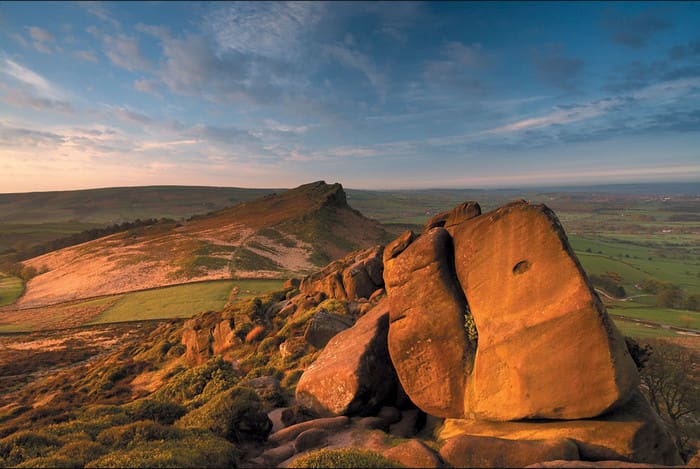
فلتر آخر يمكنه أن يضفي دفئًا على مظهر باهت ويقلّل من انحياز اللون الأزرق. الفلتر الدافئ يأخذ فيديوهاتك إلى مستوى تصبح فيه درجات لون البشرة أفضل حتى مع الإضاءة الإلكترونية أو في الظل الخارجي. وعلى الرغم من أنه يمتص الانحياز الأزرق، فإن بعض الانحيازات الزرقاء العميقة قد لا يستطيع هذا الفلتر امتصاصها جيدًا. ومع ذلك، فهذا الفلتر مثالي إذا كنت تريد تصوير فيديو للسماء.
5. مرشح عادي

يمكن لـالفلتر العادي أن يمنحك تأثيرًا ناعمًا للفيديو الذي قمت بتصويره. هذا الفلتر يقدّم حواف ناعمة وضوءًا أكثر في الألوان مقارنة بالفيديو الخام. وعلى الرغم من أنه فلتر، إلا أن تأثيره على الفيديو ليس كبيرًا، لأنه يحافظ على الشكل الأصلي مع تحسين بسيط. يعمل هذا الفلتر بشكل أفضل إذا كنت لا تريد إضافة الكثير من الفلاتر إلى الفيديو وتفضّل إبراز الفيديو الأصلي.
على الرغم من أننا لم نذكر جميع المرشحات ، فهذه هي أكثر المرشحات استخدامًا في أي تطبيق لتصفية الفيديو. ومع ذلك ، قد يختلف اسمهم في أدوات مختلفة ، لكن المظهر على مرشحهم سيكون هو نفسه.
الجزء 3. أفضل برنامج للتنزيل لإضافة مرشحات الفيديو على أي مقاطع فيديو أو مقاطع على نظامي التشغيل Windows و Mac
يمكنك الحصول على الفلاتر الأربعة المذكورة أعلاه وأكثر إذا قمت بتنزيل Video Converter Ultimate. يوفّر هذا البرنامج الطريقة الأكثر كفاءة لإضافة الفلاتر إلى أي فيديو تلتقطه على أي جهاز مثل الكاميرات والهواتف؛ وحتى إن كنت تستخدم كاميرا DSLR يمكنك استخدام هذه الأداة لاستيراد المقطع وإضافة فلتر إليه. وعلى عكس تطبيقات الفلاتر الأخرى، فهذا التطبيق لا يناسب المبتدئين فقط؛ بل حتى إن كنت محترفًا يمكنك الاعتماد على هذه الأداة.
علاوة على ذلك ، إذا كنت ترغب في الحصول على أفضل محرر فيديو على نظامي التشغيل Windows و Mac ، لحسن الحظ ، يمكنك استخدام هذا. الآن ، إذا كنت ستضيف عامل تصفية فيديو ، فاتبع البرنامج التعليمي السهل المتابعة أدناه لإضافة عامل تصفية لأي فيديو بنجاح.
الخطوة 1. نزّل محرر الفيديو على سطح المكتب لديك من خلال النقر على زر التنزيل أدناه. بعد تنزيل الأداة، عليك تثبيتها باتباع عملية التثبيت ثم فتحها.
تحميل مجانيلنظام Windows 7 أو أحدثتنزيل آمن
تحميل مجانيلنظام MacOS 10.7 أو أحدثتنزيل آمن
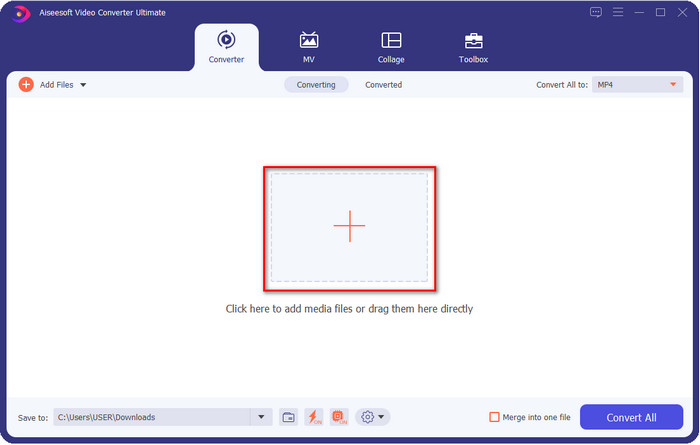
الخطوة 2. لإضافة الملف إلى محرر الفيديو، انقر على زر +. اختر ملف الفيديو من المجلد الذي سيظهر على شاشتك واضغط على Open لإضافته إلى قائمة انتظار الفلترة.
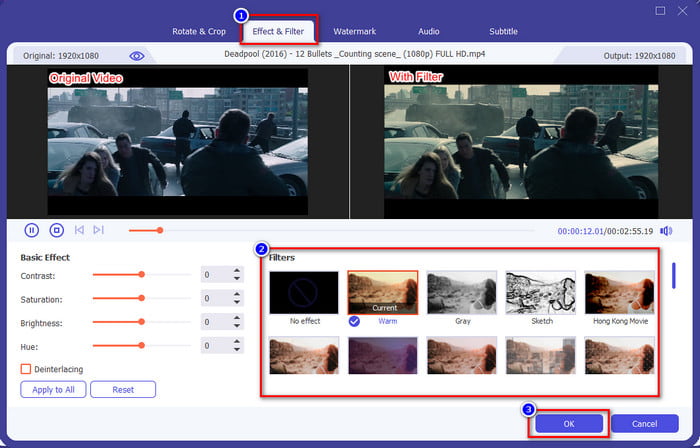
الخطوة 3. ستظهر نافذة جديدة على شاشتك حيث يمكنك التحرير إذا نقرت على زر العصا السحرية. انقر على Effects & Filters في الجزء العلوي، ثم انقر على الفلتر الذي تريد استخدامه، جرّبها جميعًا إن أردت، ثم انقر على OK إذا كنت راضيًا عن الفلتر الذي اخترته.
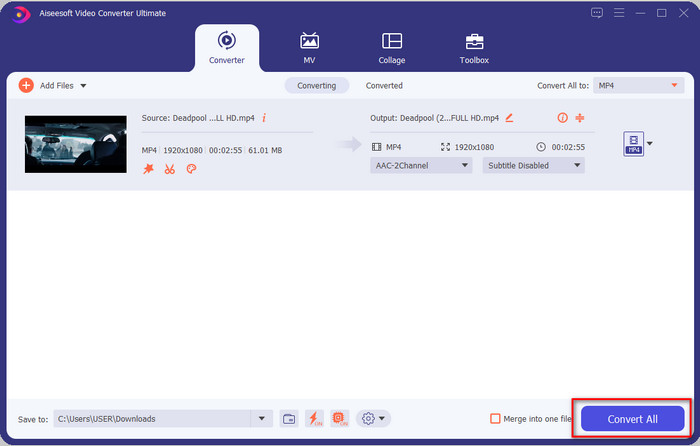
الخطوة 4. صدّر الفيديو من داخل المحرر بالنقر على Convert All. انتظر بضع ثوانٍ لتنزيل ملف الفيديو على جهاز الكمبيوتر، وبهذا سيكون لديك أفضل فيديو مع فلاتر مضافة باستخدام أفضل محرر فيديو على نظامي ويندوز وماك.
ذات صلة:
الجزء 4. أسئلة وأجوبة حول مرشحات الفيديو
هل من الآمن تنزيل تطبيق مرشح الفيديو؟
يعتمد ذلك على موقع الويب الذي تقوم بتنزيله منه. على الرغم من أنه من الآمن تنزيل محرر فيديو على الويب ، إلا أنك تحتاج إلى التأكد من أن موقع الويب الذي تزوره آمن. أو يمكن للبعض الآخر الحصول على بياناتك ومعلوماتك الخاصة.
هل المرشحات تقلل من جودة الفيديو؟
قد تتغير جودة الفيديو بسبب تأثيرات المرشح الذي تضيفه. لذلك ، إذا كنت تريد الاحتفاظ بدقة عالية الجودة ، فيجب أن تفكر في الفلتر الذي تستخدمه لأنه سيغير جودة الفيديو. ولكن إذا كنت تستخدم مرشحًا منقسمًا ، فسيؤثر ذلك على جودة الفيديو.
لماذا تغير التنسيق بعد إضافة الفلتر؟
يكون التنسيق المضبوط في الأداة التي تستخدمها هو التنسيق القياسي منذ البداية. لتجنّب حدوث ذلك، ومع استخدام Video Converter Ultimate، يجب عليك اتباع هذه الخطوات في Video Converter Ultimate. بعد إضافة الفلتر، انتقل إلى Convert All to وابحث عن التنسيق الأصلي، ثم انقر عليه. اتبع الخطوة الأخيرة، وبذلك يتم الاحتفاظ بالتنسيق الأصلي مع الفلتر الذي أضفته إلى الفيديو.
خاتمة
لقد حصلنا الآن على توضيح كافٍ حول فلاتر الفيديو وأشهر الفلاتر المستخدمة. بعد أن شرحنا ما هي والفلاتر التي يمكنك استخدامها، حان الوقت لتنزيل Video Converter Ultimate لإضافة فلتر إلى فيديوهاتك وجعلها تبدو مذهلة. هذه الأداة لا تساعدك فقط على إضافة الفلاتر إلى الفيديو، بل أيضًا على تعديله بطريقة غير معقّدة. يمكنك الحصول على هذه الأداة الرائعة من خلال النقر على زر التنزيل وشرائها للاستمتاع بجميع المزايا الكاملة التي توفّرها.
-
 كيفية إضافة الصوت والموسيقى إلى الفيديو مجانًا على جهاز الكمبيوتر / الهاتف
 توضح هذه المقالة 4 طرق سهلة لإضافة الصوت إلى الفيديو مجانًا. بغض النظر عن المسار الصوتي الذي تريد إضافته إلى الفيديو الخاص بك ، يمكنك الحصول على نتائج مرضية هنا.
-
 تحويل GIF إلى تنسيق الفيديو: تحويل GIF Memes إلى فيديو [2021]
 حدد كيفية تحويل GIF إلى تنسيق فيديو بمساعدة الأدوات المدرجة أدناه. اختر أيًا منها وتعلم كيفية القيام بذلك ، حيث نجمع أدلة كافية عليها.
-
 رائع من GIF إلى تطبيقات الفيديو لأجهزة Android و iOS
 هل تعلم أنه يمكنك تحويل صور GIF إلى أي تنسيق فيديو تريده باستخدام هاتفك؟ اختر أفضل التطبيقات على Android أو iOS.
