


 محول الفيديو النهائي
 مسجل الشاشة
 إصلاح الفيديو
6 أفضل برنامج عكس الفيديو على Mac / Windows / Android / iPhone / Online
أصبح عكس الفيديو واحدًا من أكثر المؤثرات البصرية إبهارًا التي يستخدمها الكثير من المحررين في الوقت الحاضر. فمن خلال مجرد عكس الفيديو يمكنك إضافة عامل الإبهار إلى مقاطعك الجاهزة لتصبح لافتة للانتباه أيضًا. لذلك، في هذا المقال سنستكشف أفضل برامج عكس الفيديو التي يمكنك استخدامها مجانًا أو مدفوعة. والآن، إذا كنت مستعدًا لبدء الرحلة فاشد حزام الأمان ودعنا نبدأ الاستكشاف.

الجزء 1. 2 من أفضل برامج عكس الفيديو لأجهزة الكمبيوتر الشخصية وأجهزة Mac
1. محول الفيديو النهائي
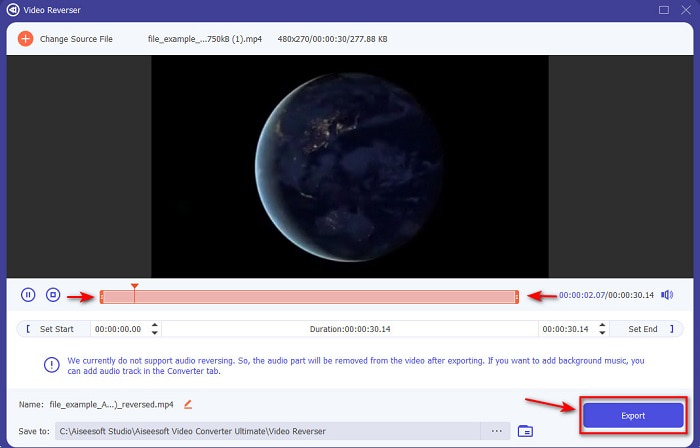
أول أداة في هذه القائمة هي المحوّل المذهل الذي يمكنك استخدامه لصنع فيديو مميز من دون الحاجة إلى أي شرح تعليمي. وبفضل التعليمات الواضحة جدًا يصبح هذا البرنامج مثاليًا للمبتدئين أو حتى للمحترفين الذين يريدون الحصول على فيديو لافت. يُعَدّ Video Converter Ultimate محرر عكس الفيديو من الدرجة الأولى والأكثر اختيارًا في هذه القائمة. يساعد هذا البرنامج مستخدميه على بلوغ كامل طاقاتهم في المونتاج ولكن بطريقة غير معقدة. وكما ذُكر سابقًا، فإن التعليمات والمعلومات الدقيقة في هذا البرنامج تساعد كثيرًا المستخدمين الذين ليست لديهم خبرة في التحرير. ومع ذلك، حتى لو كنت محترفًا يمكنك الاستمرار في استخدام هذا البرنامج لصنع فيديو أكثر إبهارًا مما يتيحه لك محرر الفيديو الحالي لديك.
تحميل مجانيلنظام Windows 7 أو أحدثتنزيل آمن
تحميل مجانيلنظام MacOS 10.7 أو أحدثتنزيل آمن
الايجابيات
- الأفضل في جعل مقطع الفيديو الخاص بك يبدو استثنائيًا مقارنة بالمحرر الآخر.
- إنه سهل الاستخدام ، ولن يستغرق تعلم كيفية استخدام هذه الأداة أكثر من 15 دقيقة أو حتى أقل.
- إذا كنت تبحث عن أداة شاملة ، فيجب أن يكون هذا هو خيارك الأول.
سلبيات
- يتم دفع رسوم للبرنامج ولكن Movavi أغلى بكثير إذا كنا على وشك المقارنة.
- من الضروري تنزيل الأداة أولاً قبل أن تتمكن من استخدامها.
2. برنامج Movavi Video Suite
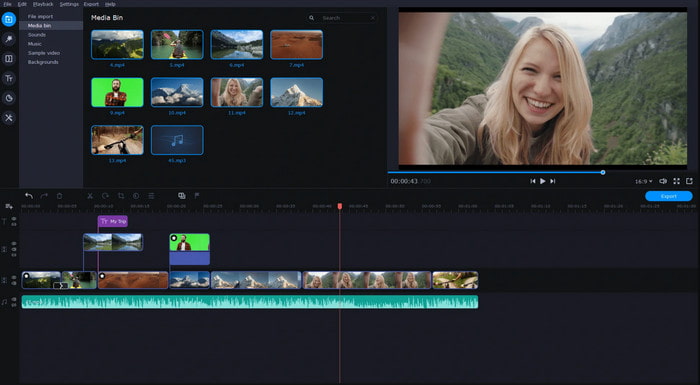
أداة أخرى في هذه القائمة هي Movavi Video Suite. فقد كان هذا برنامج Movavi لعكس الفيديو متواجدًا في الساحة منذ فترة ويستخدمه بالفعل ملايين المستخدمين، وذلك بفضل ميزاته المتقدمة في التحرير المشابهة لما يقدمه Video Converter Ultimate. كما أن هذا البرنامج يقدّم الكثير لعملائه. ومع ذلك، فإن جانب الضعف فيه أن عملية المعالجة (التصدير) تستغرق وقتًا طويلًا وتميل إلى البطء. إضافة إلى ذلك، يدعم البرنامج عددًا محدودًا من الصيغ، لذا لا يمكنك أساسًا اختيار أي صيغة تريدها بسبب نطاق الدعم المحدود.
الايجابيات
- سهل الاستخدام كمحرر شبه محترف.
- الواجهة أنيقة للغاية وبديهية للنظر إليها.
- متوفر في نظامي Mac و Windows.
سلبيات
- الأداة باهظة الثمن مقارنة بالأداة الموجودة في هذه القائمة.
- معظم الميزات التي يمكنك استخدامها على Windows غير متوفرة على Mac.
- يحتوي على عدد أقل من القوالب لتختار من بينها.
ذات صلة:
الجزء 2. 2 من أفضل فيديو عكسي على الإنترنت
1. Kapwing
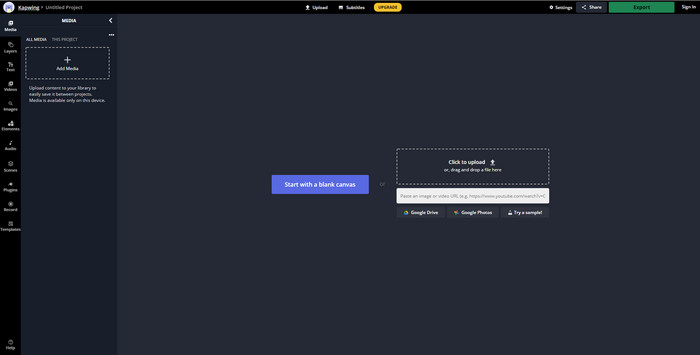
لا تريد الدفع؟ إذن جرّب استخدام خاصية عكس الفيديو في Kapwing التي يمكن تنفيذها بسهولة وبالمجان. يُعَدّ Kapwing واحدًا من أسهل الأدوات الإلكترونية التي يمكنك استخدامها عبر الإنترنت. كما يوفّر بعض ميزات التحرير التي يمكنك استخدامها مجانًا، لكنك ستحتاج إلى اتصال بالإنترنت. واجهة الأداة تبدو رائعة لأنها تشبه إلى حد ما واجهة Adobe Photoshop ولكن على الإنترنت. إلا أن رفع الملفات وتصديرها هنا يمثل بعض العناء لأنه يعتمد على جودة اتصالك بالإنترنت؛ لذا إذا كان اتصالك غير مستقر فتوقّع بطئًا في العملية. وعند تصدير الملفات من خلاله سيظهر علامة مائية في أسفل الجهة اليمنى من الفيديو المعكوس.
الايجابيات
- أداة ويب مجانية.
- سهل الاستخدام.
- عملية عكس سهلة ستحتاج إلى اتباعها.
سلبيات
- يعتمد على الإنترنت ، مما يعني أنه إذا لم يكن لديك اتصال بالإنترنت ، فلا يمكنك استخدام هذه الأداة.
- عملية التحرير سريعة ولكن تحميل الملفات وتنزيلها سيستغرق بعض الوقت.
- يحتوي الإخراج النهائي على علامة مائية في الجانب الأيمن السفلي من الفيديو.
2. VideoReverser .com
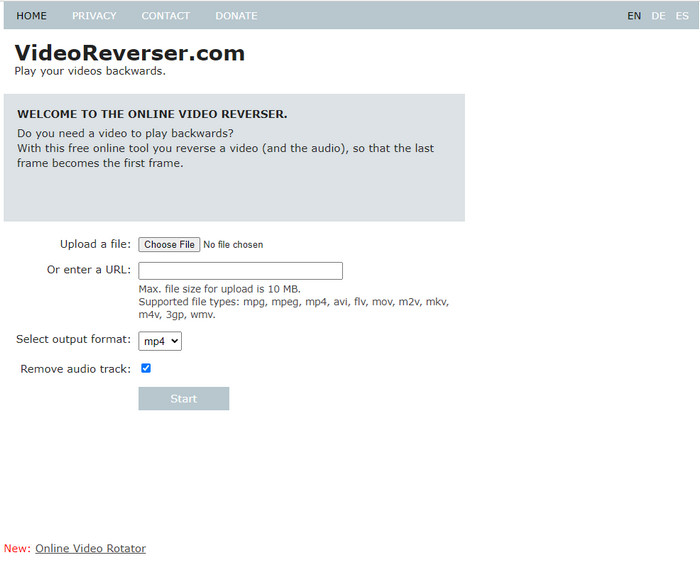
يُعَدّ VideoReverser.com واحدًا من أفضل مواقع عكس الفيديو عبر الإنترنت التي يمكنك البحث عنها واستخدامها على الويب. هذه الأداة الإلكترونية ممتازة لمن يريد عملية عكس فيديو بسيطة وقصيرة. وكما ذُكر، يمكنك فقط إدراج ملف فيديو حجمه أقل من 10 ميجابايت. يعدّ هذا الحجم منخفضًا بعض الشيء إذا قارنّاه بالأدوات الأخرى المعروضة في هذا المقال. ومع ذلك، إذا كان لديك مقطع قصير وتريد عكسه فجرّب استخدام هذه الأداة.
الايجابيات
- لا توجد رسوم خفية إذا قمت بالوصول إلى الأداة.
- واجهة أداة سهلة الفهم.
- تركز الأداة على عكس الفيديو الخاص بك.
سلبيات
- إنه يدعم تنسيقات أقل وفي معظم الأوقات عندما تحاول عكس مقطع فيديو هنا يفشل.
- فقط 10 ميغا بايت كحد أقصى لحجم الملف الذي يمكنك تحميله.
- لا يمكن الوصول إليها إذا لم يكن الإنترنت متاحًا.
الجزء 3. 2 من أفضل تطبيق Video Reverser في Android و iOS
1. عكس الفيديو إلى الوراء (Android)
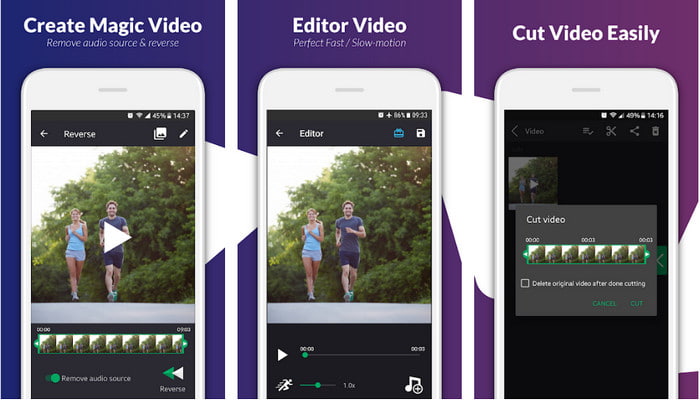
تطبيق reverse video backward متوفر فقط على متجر Play بشكل مجاني. هذا البرنامج المتخصص في عكس الفيديو ممتاز في قلب المقاطع ويمكن لأي شخص لديه هاتف يعمل بنظام أندرويد استخدامه بسهولة. ولكن الكثير من المستخدمين يشتكون من تعطل التطبيق المتكرر، وظهور الإعلانات المنبثقة حتى بعد إغلاقه، إضافةً إلى إمكان تعديل الفيديو عليه أيضًا. التقييم العام للتطبيق منخفض جدًا إذا قارنّاه بالتطبيقات الأخرى ذات الوظيفة المشابهة في متجر Play.
الايجابيات
- قبل تنزيل الأداة ، ستقدم بعض الأفكار لإحداث تأثير عكسي سحري.
- وهو يدعم 50 لغة مختلفة يمكنك الاختيار من بينها.
سلبيات
- هناك حالات تعطل فيها الأداة لأسباب غير معروفة.
- الإعلانات المزعجة موجودة في كل مكان حتى عندما تغلق ستظهر إعلانات الأداة على شاشتك.
- الأداة معيبة عندما نجربها.
2. عكس محرر الفيديو (iOS)
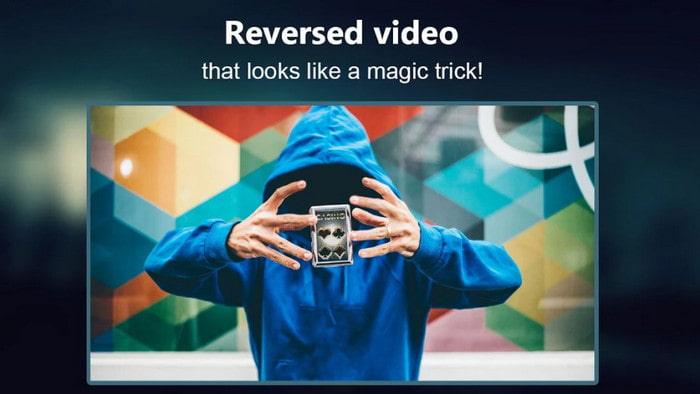
يمكن تنزيل هذا تطبيق عكس الفيديو على أجهزة iOS مجانًا. يحصل Reverse Video Editor على تقييم مرتفع من عدد كبير من المستخدمين؛ فحصوله على 4.5 نجوم قد يكون مضللًا من نواحٍ عديدة، إذ قد تظن أن التطبيق ممتاز من جميع الجوانب. لكن ما لا تعرفه هو أن مطوّر التطبيق يدفع المستخدمين إلى منحه تقييم 5 نجوم قبل أن يتمكنوا من الوصول إلى ميزات التطبيق. كما أن معظم التعليقات غير ذات جدوى ويُعتقد أن بعضها كُتب بواسطة روبوتات لزيادة شعبية التطبيق.
الايجابيات
- الأداة لديها تصنيف رائع قدمه 67.4 ألف مستخدم.
- واجهة رائعة إلى حد ما مقارنة بعكسات iOS الأخرى.
سلبيات
- يضطر المستخدمون إلى تقييم التطبيق بـ 5 نجوم لإلغاء قفل الميزات الخاصة في التطبيق.
- مراجعات التطبيق أدناه غير منطقية. بشكل أساسي ، إذا كنت تريد معرفة ماهية التطبيق ، فلا تنظر إلى المراجعات.
- لا تزال الأخطاء موجودة في هذا التطبيق وغالبًا ما يتجمد الفيديو الذي تقوم بإدراجه في التطبيق.
الجزء 4. مخطط المقارنة
| سمات | محول الفيديو UltiR | موفافي | كابوينج | VideoReverser.com | عكس الفيديو للخلف | عكس محرر الفيديو |
| عكس الميزات |  | | | | | |
| إعلانات مزعجة على الواجهة |  | | | | | |
| العلامة المائية بعد التصدير | | | | | | |
| ميزات التحرير الأخرى مثل القص والقص والمزيد | | | | | إنه متاح لكن المراجعات تقول إنه لا يعمل. | إنه متاح لكن المراجعات تقول إنه لا يعمل. |
| توفر البرنامج | أداة تعتمد على سطح المكتب | أداة تعتمد على سطح المكتب | أداة على شبكة الإنترنت | أداة على شبكة الإنترنت | أداة Android القابلة للتنزيل | iOS قابل للتنزيل على أساس أيضًا |
| نطاق السعر | شهر واحد: $25.00 ترخيص مدى الحياة: $55.20 مدى الحياة ترخيص متعدد المستخدمين / 5 أجهزة كمبيوتر: $119.00 | Movavi Video Editor $39.95 Movavi Video Editor Plus $59.95 | أداة مجانية على الإنترنت | أداة مجانية على الإنترنت | لا في شراء التطبيق | الشراء داخل التطبيق من 3 إلى 50 نطاق $ |
الجزء 5. أسئلة وأجوبة حول Video Reverser
لماذا تفقد مقاطع الفيديو العكسية جودتها؟
تقلل معظم الأدوات من جودة الفيديو العكسي لأنها لا تدعم تنسيق جودة الفيديو الأعلى أو ربما تقوم بتعيين الإعدادات على منخفضة بدلاً من عالية. لا يمكن إصلاح أي من المشكلتين عن طريق تغيير البرنامج أو ضبط الإعدادات.
هل يمكنني استخدام الفيديو المعكوس كتحول؟
بكل تأكيد نعم. بدلاً من استخدام الانتقال المتحرك للإصدار القديم ، يمكنك عكس مقطع الفيديو الخاص بك لجعله أكثر جاذبية من الناحية المرئية. حتى إذا كنت لا تستخدم أداة محرر احترافية أو خبرة في التحرير ، فلا يزال بإمكانك تحقيق انتقال رائع من خلال عكس الفيديو.
إذا قمت بعكس مقطع الفيديو الخاص بي ، فهل يصبح معكوسًا؟
في الواقع لا ، لأن العكس والانعكاس ليسا متشابهين. على الرغم من أن كلاهما يغير المظهر الأصلي للفيديو ، إلا أنهما ليسا متشابهين. على سبيل المثال ، إذا عكست مقطع فيديو ، فسيتم تشغيله من النهاية إلى البداية بينما إذا قلبته ، سينقلب الفيديو رأسًا على عقب ويستمر تشغيله من البداية إلى النهاية.
خاتمة
مع اقترابنا من النهاية، فإن الأدوات التي راجعناها في هذا المقال جميعها رائعة حسب المنصّة التي تستخدمها، وكلها مناسبة لأي شخص سواء كان يعمل على الحاسوب المكتبي أو يملك اتصالًا بالإنترنت أو يستخدم الهاتف المحمول. وإذا وجدت صعوبة في اتخاذ القرار بشأن الأداة الأنسب، فسنقدّم لك اقتراحنا: لقد تجاوز Video Converter Ultimate حدوده بوصفه مجرد محوّل ليصبح محررًا أيضًا. فقد ساعد هذا البرنامج ملايين المستخدمين، وهو الآن مستعد لمساعدتك أنت أيضًا. لذا قم بتنزيله الآن واستمتع باكتشاف جمال هذه الأداة وإمكاناتها.
-
 كيفية تحويل ملفات MKV للعب على PS3 بسلاسة [محلول]
 هل تريد تشغيل مقاطع فيديو MKV على PS3 الخاص بك؟ ومع ذلك ، لا يمكن لـ PS3 تشغيل ملفات MKV مباشرة. ستوضح لك هذه المقالة طرقًا لتحويل مقاطع فيديو MKV إلى تنسيقات فيديو مدعومة من PS3 لتشغيلها على PS3 دون أي متاعب.
-
 Android DVD Player - كيفية تشغيل مقاطع فيديو DVD على هواتف Android المحمولة
 كيف تلعب ملفات DVD على هواتف Android؟ هل هناك أي مشغلات Android DVD؟ في هذه المقالة ، ستتعرف على 3 طرق لتشغيل مقاطع فيديو DVD على هواتف Android المحمولة مع برنامج التشغيل الخارجي أو بدونه.
-
 أفضل 10 مشغلات MP4 مجانية على نظام Android لتشغيل مقاطع فيديو HD / 4K
 على الرغم من أن الهواتف المحمولة التي تعمل بنظام Android تحتوي على المشغلات الافتراضية لتشغيل مقاطع فيديو MP4 ، إلا أنها لا تدعم ضبط إعدادات التشغيل والوظائف الأخرى. وبالتالي ، يمكنك التعرف على أفضل 10 مشغلات Android MP4 من هذه المقالة.
