


 Video Converter Ultimate
 Skærmoptager
 Video reparation
 Sikker download
WTV til MP4 Converter: Sådan konverteres WTV til MP4
WTV, som efterfølger til DVR-MS-format, er udviklet af Microsoft til at gemme tv-indhold, der er optaget af Windows Media Center. Kodet med MPEG-2 og MPEG-4 standard og MPEG-1 Layer II eller Dolby Digital AC-3 understøttes WTV af få software som FFMPEG, Windows Media Center, CyberLink PowerDVD 12, Nero 12, HandBrake, CCextractor osv.

If you want to watch or share WTV files conveniently, you had better convert WTV to MP4, the most popular format for almost any device.
We’ve searched the Internet in a quest for WTV to MP4 converter and found the top 2 free WTV to MP4 converters to turn WTV to MP4.
Del 1. Gratis videokonverter - Konverter WTV til MP4 online
Well, it is very easy to convert WTV to MP4. The easiest way to change WTV to MP4 is to finish it online. Free Online Video Converter is the freeware to convert WTV to MP4 and other mainstream video and audio formats. This free online tool is compatible with Windows 10/8/7 and Mac OS X 10.7 or above, and you can easily transcode WTV to MP4 within steps.
For at strømline processen kan du følge guiden:
1. Click Add Files to Convert button to upload WTV files from PC.
2. Select MP4 from the checkbox.
3. Click Convert to convert and download WTV files automatically.
Nu er vi her for at gå igennem, hvordan du konverterer WTV til MP4 i detaljer.
Step 1. Add WTV files
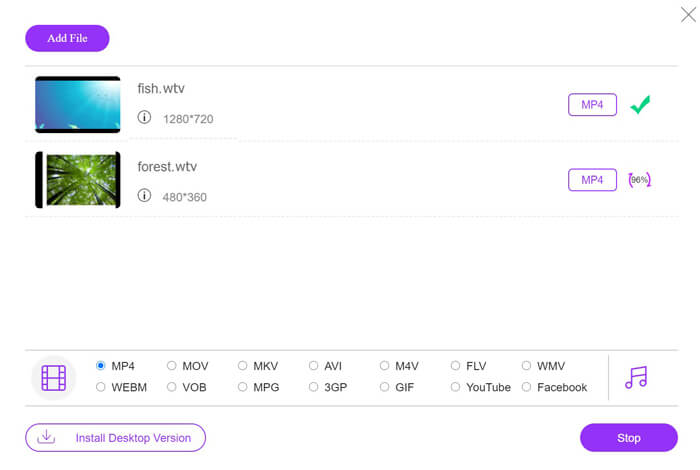
Open this free online WTV to MP4 converter via your browser. Click Add Files to Convert button, and a pop-up window prompts to tell you to download and install the launcher. Just download it and the open-source window will appear after the successful installation. Then you can select the WTV recordings on your computer for uploading. This freeware supports batch conversion and you can add more than one WTV files online.

Step 2. Select MP4
Tick the checkbox of MP4 on the bottom, where you can find various output options like MKV, AVI, M4V, FLV, VOB, GIF, YouTube, Facebook, MP3, AAC, WMA, WAV, FLAC, etc.
In addition, you can click the Settings icon next to the output MP4 pane to adjust the encoder, frame rate, resolution, bitrates, and other parameters.

Step 3. Convert WTV to MP4
After everything is done, click the Convert button and a window appears that requires you to select the destination to store the converted MP4 files. Choose the destination and return to this free online converter, click Convert again to start converting and downloading the MP4 files automatically. You can see the conversion progress percentage directly.
Del 2. Håndbremse - Konverter WTV til MP4 på PC / Mac
En anden gratis måde at konvertere WTV til MP4 er at bruge HandBrake. HandBrake er det få software, der kan læse WTV-filer. Desuden kan det også omkode WTV til MP4 / MKV på din Windows- og Mac-computer.
HandBrake er open source-desktopsoftwaren, så du skal downloade denne gratis konverter først på din computer.
Igen er de enkle trin til konvertering af WTV til MP4 i HandBrake som følger:
1. Tilføj WTF-filerne eller hele mappen i HandBrake.
2. Brugerdefineret MP4-profil i håndbremse.
2. Vis og konverter WTV til MP4.
Her er den omfattende guide til ændring af WTV til MP4 i HandBrake.
Step 1. Add WTV files into HandBrake
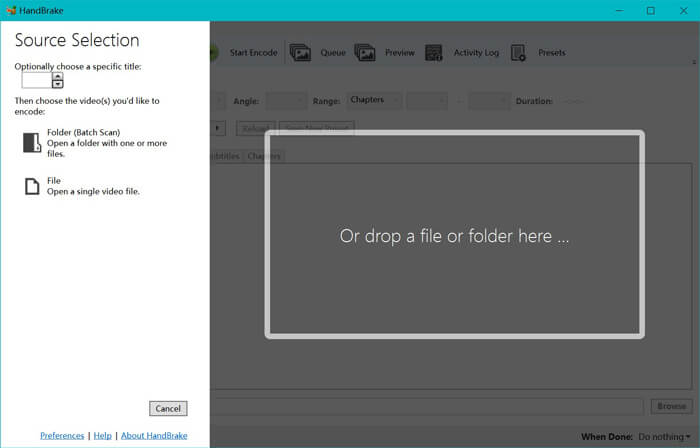
Once you have installed HandBrake on your computer, HandBrake will present the open-source dialog by default. Here you can click Folder or File to select the WTV files or folder into main window. Alternatively, you can also drag and drop the WTV files into this software.
Step 2. Select MP4 format
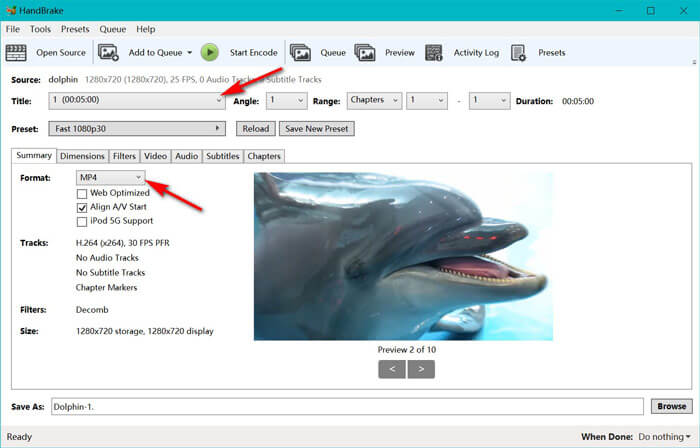
Once you have loaded the WTV files, you can select the exact WTF file from the Title drop-down option. Then select MP4 in the tab of Summary as the output for the selected WTV file. Besides, HandBrake allows you to adjust the dimensions, filters, video codec/quality, audio track, etc. Not only MP4, it can also convert other formats like AVI, MOV, M2TS, etc., to MKV.
Step 3. Preview and convert WTV to MP4
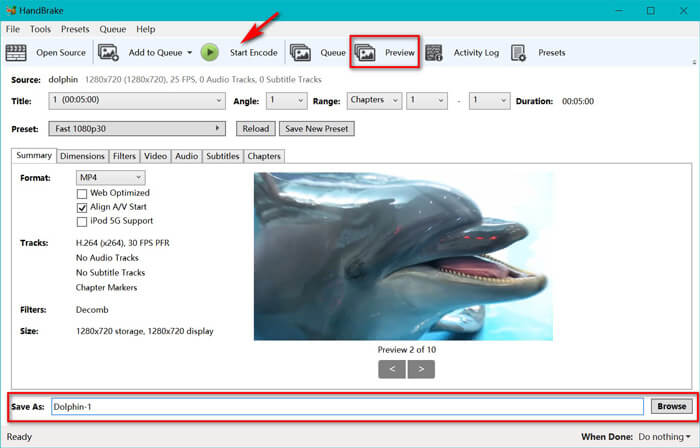
HandBrake’s Preview on the toolbar feature allows you to see what your new MP4 video will look before encoding it. After all your settings are just right, give the name of the converted MP4 files and select the location of your new videos by clicking the Browse button at the bottom. Finally, just click Start Encode button on the toolbar to convert WTV to MP4.
Del 3. Ofte stillede spørgsmål om WTV til MP4
Hvorfor gemmer HandBrake MP4 som M4V?
Til MP4-filer vil HandBrake MP4-filerne automatisk bruge udvidelsen M4V, når du vælger AC3-lyd og SRT-undertekster eller har kapitelmarkører til tilpasning af MP4-filen. Men du kan ændre .m4v-udvidelsen til .mp4 direkte.
Kan VLC-afspiller afspille WTV-filer?
VLC kan ikke afspille WTV-filer direkte. Du skal installere K-Lite Code Pack for at installere WTV-kodepakken og derefter afspille WTV-filer på VLC.
Kan jeg konvertere beskyttede WTV-filer?
Ja du kan. Imidlertid understøtter kun MCEBuddy de beskyttede kommercielle WTF-filers redigering og konvertering. Du skal bruge denne software til at kopiere og konvertere de beskyttede WTV-filer.
Konklusion
For at bruge Window Media Center-indspillede WTV-filer bekvemt, skal du først konvertere WTV til MP4. Dette indlæg deler 2 gratis måder at konvertere WTV til MP4 online via Free Online Video Converter og HandBrake. Gratis online videokonverter lader dig konvertere WTV til MP4 og andre populære formater, mens HandBrake giver dig flere kontrolmuligheder for redigering med begrænsede outputformatindstillinger.
Hvilken vej er din foretrukne?
Eller måske har du en bedre WTV til MP4 konverter?
Uanset hvad, vil jeg gerne høre fra dig. Så fortsæt og skriv en kommentar nedenfor.
-
 Sådan konverteres MXF til MP4 via gratis konverter
 Dette indlæg er den detaljerede guide til konvertering af MXF til MP4 på computeren. Du kan få 4 gratis MXF til MP4 konvertere til at omkode videokamera MXF til MP4 i enkle trin.
-
 Top 3 måder at gratis konvertere MP4 til MOV
 Sådan konverteres MP4 til MOV på Mac? Er der nogen gratis måde at konvertere MP4 til MOV uden kvalitetstab? Dette indlæg deler 3 enkle måder at hjælpe dig med at lave videokonvertering fra MP4 til MOV på Mac, Windows PC og online.
-
 Sådan konverteres M2TS til WMV på Windows / Mac / Online (helt gratis at bruge)
 Her er 3 nemme måder at konvertere M2TS til WMV-videoer. Du kan ændre videoformat fra M2TS til WMV gratis på Windows, Mac og online hurtigt. Batchkonverteringen understøttes.
