


 Video Converter Ultimate
 Skærmoptager
 Video reparation
Offline- og onlineværktøjer til konvertering af TRP til FLV, du bør kende til
TRP er et filformat til lagring af optagede tv‑filer. Da kun få afspillere kan håndtere denne filtype i dens originale version, kan det være nødvendigt at konvertere filen til et andet format, før du kan se den. For at kunne konvertere TRP‑filer til FLV‑filer skal du bruge det rette softwareværktøj. Heldigvis er dette meget lettere ved at bruge vores software eller dens onlineudgave, som ikke vil give dig nogen form for besvær under selve konverteringsprocessen. Følg trinene, vi giver dig, for at konvertere dine TRP‑videoer til FLV‑format uden problemer.

Del 1. Offline metode til at konvertere TRP til FLV
Et TRP‑filformat er for det meste ukendt for almindelige videobrugere og anvendes heller ikke ofte af skabere. På grund af dette understøtter de fleste programmer og onlineværktøjer ikke denne type videofil. Derfor er Video Converter Ultimate værd at overveje, når du har behov for at konvertere videoer fra ét format til et andet. Denne software kan konvertere din TRP‑fil til et hvilket som helst format, du ønsker, med ét klik.
Dette videokonverteringsværktøj giver avancerede redigeringsfunktioner og har en grafisk grænseflade, der er nem at bruge, selvom du ikke har nogen teknisk viden eller færdigheder. Ved hjælp af denne applikation kan du konvertere filer og drage fordel af superhurtige konverteringstider og output af høj kvalitet. Her giver vi dig de enkle trin, du skal følge:
Trin 1: Download .exe‑filen ved at klikke på knappen Free Download nedenfor alt efter hvilket operativsystem, du bruger. Når du er færdig med at downloade, skal du åbne filen og starte installationsprocessen. Vent, til installationen er færdig, og start derefter programmet.
Gratis download til Windows 7 eller nyere Sikker download
Gratis download til MacOS 10.7 eller nyere Sikker download
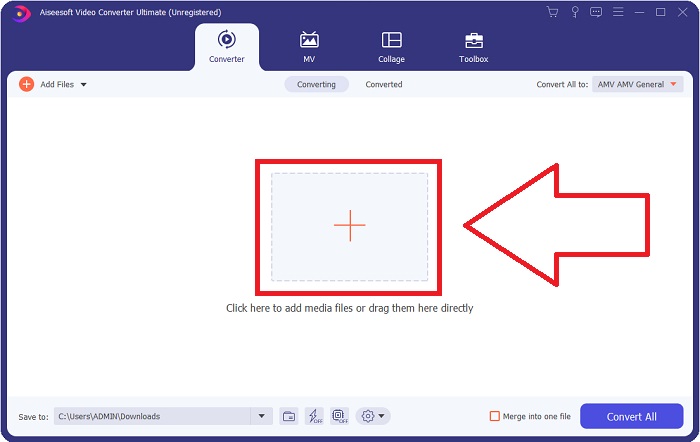
Trin 2. En brugerflade vises, når programmet starter. Derfra klikker du på +-knappen i midten og begynder at importere den videofil, du vil konvertere, eller du kan blot trække og slippe filen ind.
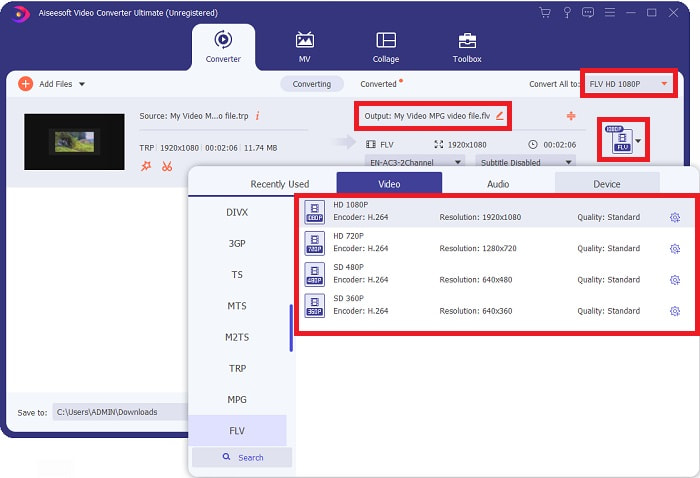
Trin 3: Du vil se den nuværende formattype for din video i højre side af filen. For at vælge, hvilket format videoen skal konverteres til, klikker du på formatet, og alle tilgængelige formater vil blive vist. Find FLV, eller skriv det blot i søgefeltet. Der findes også forskellige videokvaliteter til højre for dig.
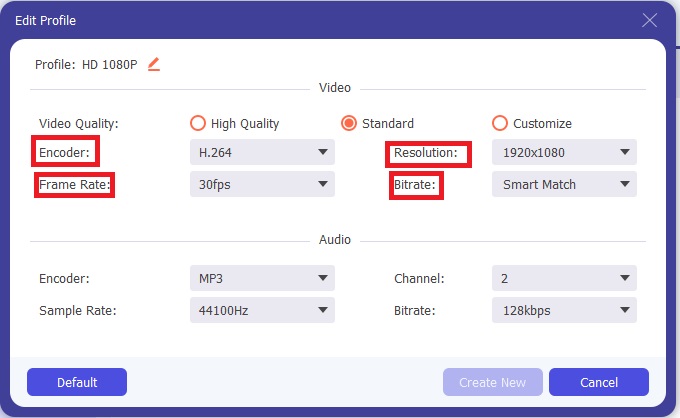
Trin 4: For de ekstra funktioner, vi taler om, skal du klikke på tandhjulsikonet til højre for den videokvalitet, du har valgt, hvorefter en ny brugerflade vises. Her kan du redigere en række video‑ og lydindstillinger, så de passer til dine behov. Klik på knappen Create New for at gemme ændringerne.
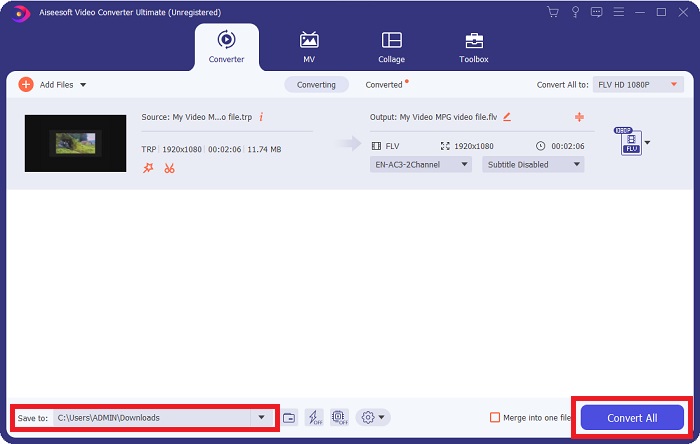
Trin 5: Når du er færdig med alle justeringer og redigeringer, skal du klikke på knappen Convert All nederst til højre i vinduet for at starte konverteringsprocessen og vente, til den er færdig.
Del 2. Online metode til at konvertere TRP til FLV
Konvertering af videofiler er en anden mulighed, du kan overveje, hvis du vil udføre opgaven ved at bruge et webværktøj i stedet for at installere det fulde program. I dette tilfælde har vi også en onlineudgave af softwaren – FVC Free Video Converter Online. Den tilbyder stadig de ekstra indstillinger fra programmet, men ikke alle funktioner. Den opfylder dog stadig formålet inden for en fornuftig tidsramme. For at bruge dette webværktøj skal du følge trinene nedenfor:
Trin 1: Gå til konverteren ved at klikke på dette link. Derfra kan du begynde med at downloade den startprogramfil, du skal bruge for at importere dine filer. Klik på knappen Add Files to Convert midt på siden for at begynde processen.
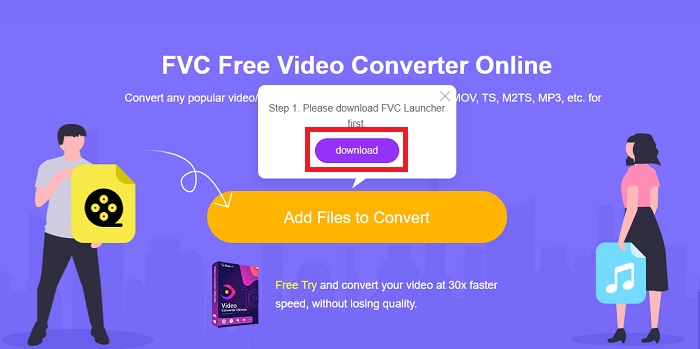
Trin 2: Klik på den nævnte knap igen, og upload den videofil, du vil konvertere. Når du har importeret en fil, vises en ny brugerflade, der viser alle de tilgængelige formater, du kan vælge imellem. I dette tilfælde skal du vælge FLV.
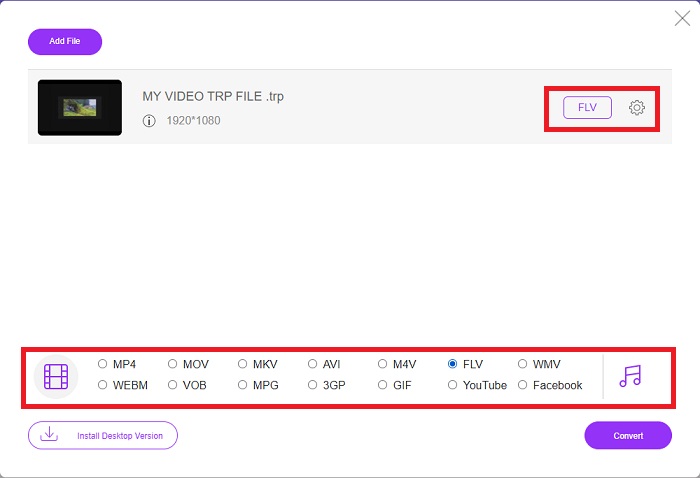
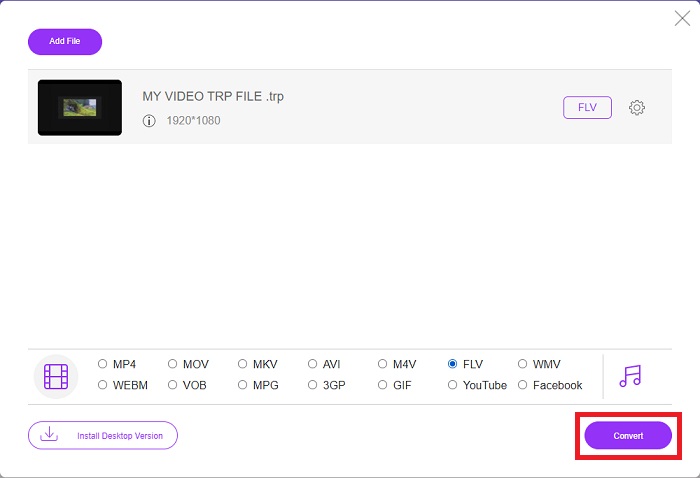
Trin 3: For de ekstra indstillinger, ligesom i selve programmet, skal du klikke på tandhjulsikonet til højre. Video‑ og lydindstillingerne vil blive vist, så du yderligere kan redigere din video med hensyn til opløsning, billedhastighed og meget mere. Når du er færdig, skal du klikke på OK for at gemme ændringerne. Til sidst starter du konverteringsprocessen ved at klikke på knappen Convert nederst til højre.
Relateret:
Del 3. Udvidet viden om TRP og FLV
For at vide mere om de to nævnte formater giver vi dig kort information samt en sammenligning af de to.
TRP-filer er normalt forbundet med VideoLAN's VLC. TRP-filnavnet kan samles med MPEG-2 Part 1, der indeholder højopløsningsfilm. TRP-filer kan indeholde og gemme datapakker sendt som digital video og lyd på tværs af digitale videoudsendelsesnetværk, radiofrekvenser eller lineære optageenheder som videooptagere. Flere lyd- og videostreams samt fejlkorrigerende kode er inkluderet i en TRP-fil. Brugere kan også inkludere metadata såsom optagelsestidspunkt, kamera-id og kilde i filens indhold.
På den anden side står en fil med filtypenavnet .flv for Flash Video. FLV-filudvidelsen refererer til en video- eller lydfil, der sendes over internettet ved hjælp af Adobe Flash Player eller Adobe Air. Flash Video har længe været det primære videoformat for næsten alle indlejrede videoer på internettet, inklusive videoer på YouTube, Hulu og forskellige andre websteder. Streamingudbydere og softwareudviklere har på den anden side opgivet Flash til fordel for HTML5 og andre formater siden Adobes formelle ophør.
| TRP | FLV | |
| Filudvidelse | .trp | .flv |
| Udvikler | VideoLAN projektteam | Adobe Systems Incorporated |
| Understøttende programmer | ◆ SMPlayer ◆ VLC Media Player ◆ Apple QuickTime Player | ◆ RealPlayer ◆ Apple QuickTime Player ◆ Mplayer ◆ VLC Media Player |
Del 4. Ofte stillede spørgsmål om TRP til FLV-konvertering
Hvordan åbner man TRP-videoformat ved hjælp af VLC?
Når VLC Media Player er blevet installeret på din computer, skal du finde TRP-videofilen på din harddisk og vælge den med højre museknap. Vælg 'VLC media player' fra rullemenuen 'Åbn med'. Systemet åbner videofilen, der vil blive afspillet fra dette program, så snart det er lanceret.
Hvordan konverterer jeg en FLV-fil til Windows Media Player?
Du skal først vælge den FLV-fil, du ønsker at konvertere. Du kan vælge WMV som det format, du vil konvertere din FLV-fil til. For at konvertere din FLV-fil skal du vælge 'Konverter' fra rullemenuen.
Kan jeg spille TRP hvor som helst?
Konvertering af TRP til almindeligt kendte MP4, AVI, MOV, MKV, FLV, WMV og andre formater er en foreslået mulighed, hvis du ønsker at afspille TRP-filer overalt og på eller på enhver enhed eller medieafspiller.
Konklusion
Samlet set er Video Converter Ultimate og dets modstykke til onlineværktøj den, du leder efter for at få hele konverteringsprocessen færdig, mens du leverer alle de nødvendige funktioner, du har brug for. Det forårsager ingen besvær, plus det er tilgængeligt på ethvert tidspunkt af dagen, hvis du har softwaren installeret på dit skrivebord. Du vil aldrig vide, hvornår du får brug for en konverter som denne, så vi anbefaler at bruge denne software for din lethed.
-
 Nemmeste guide til, hvordan man konverterer TRP til AVI på Windows og Mac
 Måske er du ikke bekendt med TRP-videoformatet og spekulerer på, hvordan du vil konvertere TRP til AVI? Læs denne artikel yderligere for at kende detaljerne, der vedrører problemet.
-
 3 løsninger til at konvertere MTS til FLV gratis og online
 Vil du konvertere MTS til FLV? Her er 3 gratis MTS til FLV konverteringssoftware, du kan prøve at konvertere MTS til FLV på Mac OS X og Windows 10/8/7.
-
 Bedste måder at konvertere VOB til FLV [gratis og online inkluderet]
 Vil du konvertere en VOB-fil til en FLV-fil? Du kan nemt fuldføre opgaven med enten desktop- eller online-konvertere. Læs denne vejledning, og lær, hvordan du omdanner VOB til FLV nemt og hurtigt.
