


 Video Converter Ultimate
 Skærmoptager
 Video reparation
2 anbefalede MXF til WMV-konvertere tilgængelige online og offline
Mange brugere spørger, hvordan man kan konvertere MXF til WMV, fordi de gerne vil streame videoen online. I modsætning til MXF-filer er WMV mere velegnet til at distribuere videoindhold og gemme det på HD DVD eller Blu-ray. I stedet for at læse utallige artikler om MXF‑konvertere, hvorfor så ikke læse videre her først? For at finde ud af, hvordan du kan konvertere dine MXF‑filer uden kvalitetsforringelse ved hjælp af de to muligheder herunder.

Del 1. Kort introduktion af MXF og WMV
Før vi fortsætter med at konvertere MXF til WMV, lad os få et smugkig på disse to formater og kende årsagen til at konvertere formatet.
Material eXchange Format, kendt som MXF, er et medieformat, der indeholder et alternativt videobånd. Men i stedet er det på et bånd nu digitaliseret. Dette format fungerer bedst ved at inkludere metadata og tidskode om video- og lyddetaljerne. Det er mest almindeligt brugt til at overføre annoncer på tv-stationer eller arkivere tv-udsendelser.
Mens WMV- eller Windows Media Video-filen har ensartethed med ASF-formatet, da den ombryder bitstrømmen af mediefilen. Dette format er uden tvivl mindre end MXF, fordi det bruger tabsfri komprimering til at komprimere filens størrelse. Alligevel vil kvaliteten af det ikke blive påvirket. Desuden blev WMV oprindeligt lavet til online streaming, men med den nye version, WMV9, er den tilpasset til HD DVD'er og Blu-ray diske.
Du skal konvertere din MXF-fil, fordi det er meget nemmere at afspille videoer i formatet WMV, især på Windows, end på MXF. Til distribution online er WMV bedre end MXF-filen. Men hvis du vil have en tidskode og metadatapost, så vil MXF give dig denne mulighed.
Del 2. Konverter MXF til WMV med Amazingly Ultimate Converter på Windows og Mac
FVC Video Converter Ultimate giver den bedste konverteringsproces fra MXF til WMV med tabsfri kvalitet. Derudover kan du kode MXF til AVI, MOV, MKV, MP4 og mere uden at forringe kvaliteten af den originale MXF‑fil. Dette værktøj er mere end blot en konverter, fordi du kan lave mange fantastiske ting her, såsom redigering osv. Det er også kompatibelt med alle skrivebordsstyresystemer som Windows og Mac med de samme funktioner. Så vil du nu gerne vide, hvordan man bruger denne enestående konverter? Hvis ja, skal du følge trinene herunder og lære, hvordan du konverterer.
Trin til, hvordan du konverterer MXF til WMV med FVC Video Converter Ultimate:
Trin 1. Først og fremmest skal du downloade softwaren til din computer ved at klikke på downloadknappen. Følg installationen med det samme, og start programmet.
Gratis download til Windows 7 eller nyere Sikker download
Gratis download til MacOS 10.7 eller nyere Sikker download
Trin 2. Upload filen ved at klikke på Add Files; vælg derefter i mappen den MXF‑fil, du vil konvertere, og tryk på Open.
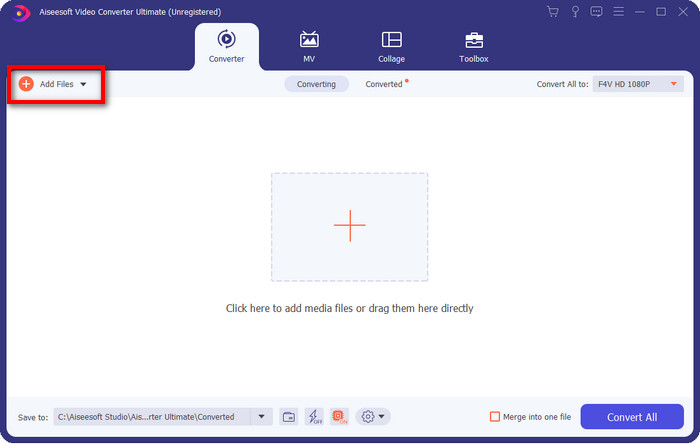
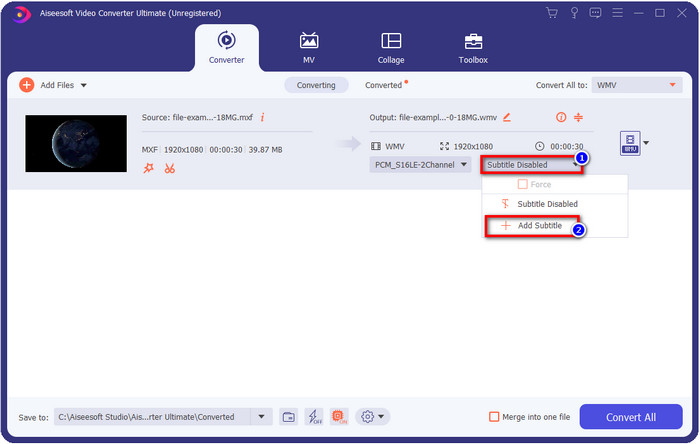
Vil du tilføje undertekster til din video? Hvis ja, skal du klikke på rullemenuen og trykke på Add Subtitle. Find undertekstsfilen i din skrivebordsmappe, og tryk på Open.
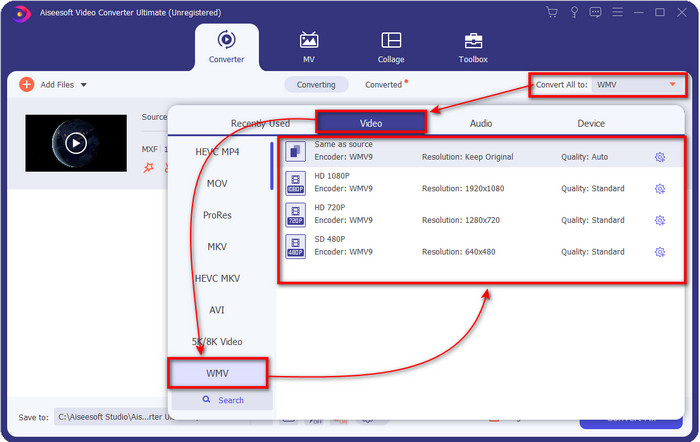
Trin 3. Lad os ændre formatet til WMV ved at klikke på Convert All to.
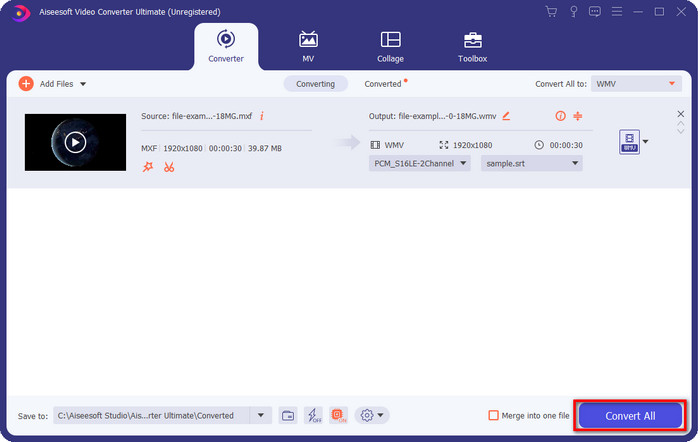
Trin 4. Når du har fulgt alle trinene, er det nu tid til at konvertere filen til WMV ved at klikke på Convert All.
Fordele
- Det understøtter et stort format til at konvertere MXF til WMV, FLV, MKV, AVI, MOV og mere.
- Tilgængelig i alle operativsystemer til download på Windows og Mac.
- Den understøtter unikke redigeringsfunktioner for at gøre din video unik og mere iøjnefaldende end andre.
- Oplev den hurtigste og fænomenale konverteringsproces med FVC Video Converter Ultimate.
Ulemper
- Det er nødvendigt at købe softwaren.
- Download softwaren på dit skrivebord, før du kan bruge den.
Del 3. Hurtigst og nemmest at konvertere MXF til WMV med onlineservice
FVC Free Online Video Converter er en førsteklasses videokonverter, som du nemt kan få adgang til på nettet. Du kan uploade et pænt udvalg af formater her, såsom MP4, MOV, MKV, FLV, AVI og andre videoformater. I modsætning til andre online videokonvertere er der ingen begrænsninger på, hvor mange filer eller hvor stor filstørrelse du vil konvertere. Dog kan du ikke udføre batchkonvertering her, da det ikke understøttes. Lad os følge trinene herunder for at konvertere MXF til WMV.
Trin til, hvordan du konverterer MXF til WMV med FVC Free Video Converter Online:
Trin 1. Klik på dette link for at åbne hovedsiden for websitet.
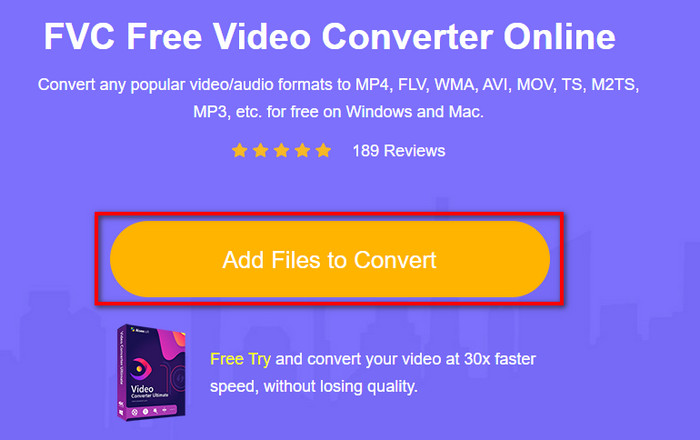
Trin 2. Tryk på Add Files to Convert for at åbne mappen, hvor din MXF‑fil ligger. Klik på filen, og tryk på Open.
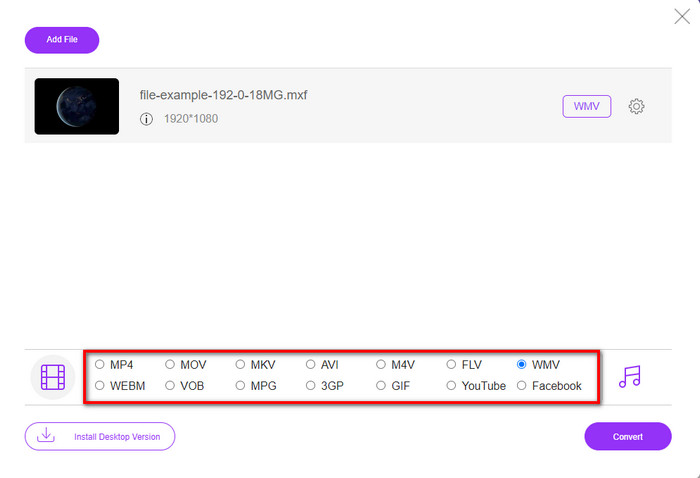
Trin 3. Vælg det format, du vil konvertere til, under listen i det nye web‑interface, eller klik på WMV.
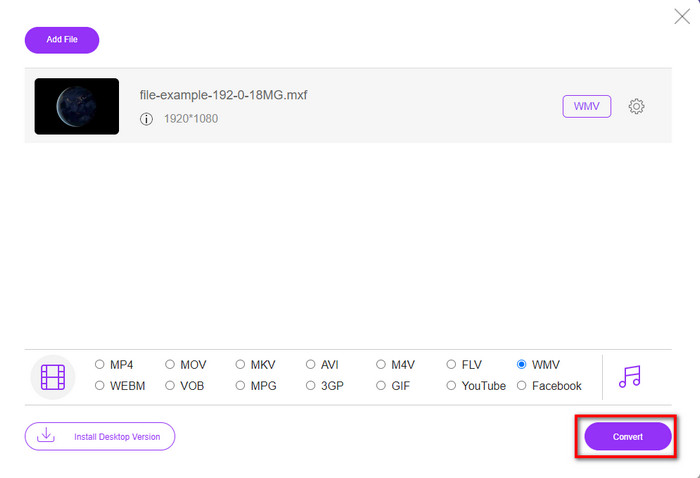
Trin 4. Start konverteringen af formatet ved at klikke på Convert, hvorefter processen går i gang.
Fordele
- Det er en af de sikreste måder at konvertere MXF til WMV, AVI, MOV, MP4 og andre berømte formater.
- Få adgang til den på din yndlingsbrowser når som helst og hvor som helst.
- Gratis, og den er let.
Ulemper
- Du skal bruge internetforbindelse for at bruge.
- Det understøtter ikke batch og hurtig konvertering
Del 4. Ofte stillede spørgsmål om MXF til WMV-konvertering
Hvorfor er MXF-filer for store?
En af grundene til, at MXF‑filer er store, er den metadata, de indeholder, som øger filstørrelsen. Men du kan komprimere filen for at gøre den mindre ved at læse denne artikel og lære hvordan man komprimerer MXF‑filer.
Tager det lang tid at konvertere MXF-filer?
Det afhænger af den konverter, du bruger. Hvis du for eksempel bruger et webværktøj, vil det afhænge af din internetforbindelse. At bruge en MXF‑konverter online tager meget længere tid end at bruge en skrivebordskonverter, du kan downloade til din pc eller Mac. Så hvis du vil opleve lynhurtig konvertering, skal du bruge FVC Video Converter Ultimate.
Er MOV- og MXF-formater de samme?
Hvis vi skal tale om, hvad de indeholder, har MXF og MOV næsten de samme elementer. For eksempel video, lyd og metadata, men MXF giver langt mere detaljeret information om filen end MOV, især metadata og tidskode. MOV er dog meget lettere at bruge end MXF. I mange tilfælde spørger mange brugere, om de kan konvertere deres MXF til MOV. Så hvis du er en af dem, skal du klikke på dette link og læse alle detaljer om MXF‑til‑MOV‑konvertere.
Konklusion
For at runde diskussionen af er det nu blevet nemmere for os at kende til de konvertere, hvad enten de er webbaserede eller til skrivebordet, der kan konvertere MXF til WMV. Da begge konvertere giver dig et fremragende resultat, men hvis du vil have et mere professionelt resultat, skal du vælge FVC Video Converter Ultimate. Der er ingen tvivl om, at dette værktøj vil hjælpe dig med alle dine konverteringsproblemer. Og hvis du nogensinde får brug for at vende en video, flette, forbedre og meget mere, er dette din eneste løsning på alle disse problemer.
-
 4 gratis måder at konvertere videokamera MXF til MP4 til universel afspilning
 Dette indlæg er den detaljerede guide til konvertering af MXF til MP4 på computeren. Du kan få 4 gratis MXF til MP4 konvertere til at omkode videokamera MXF til MP4 i enkle trin.
-
 4 øverste MXF-konvertere til at konvertere MXF til AVI [gratis og betalt]
 Hvad er en MXF fil? Sådan konverteres MXF til AVI? Det er de få spørgsmål, vi besvarer. Så hvis du har det samme spørgsmål, så læs denne artikel.
-
 Sådan konverteres MXF til FLV ved hjælp af forskellige metoder [Bevist]
 Har du prøvet at konvertere MXF til FLV på en eller anden mærkelig konverter, der er tilgængelig online. Alligevel kan du ikke få den kvalitet, du ønsker på din video? Vi anbefaler, at du læser denne artikel for at vide mere om konverteringen fra MXF til FLV.
