


 Video Converter Ultimate
 Skærmoptager
 Video reparation
[Hurtig og nem måde] Konverter RMVB-filer til WMV med de 2 bedste RMVB-konvertere
Nowadays, Asians produce more television episodes, animated films, and movies then distribute them worldwide, similar to North Americans. Most of these films are embedded with .rmvb to encode the file because RMVB is smaller and has a lower bitrate, but its quality is best. However, when you download the file on your Windows, your native media player won't play this format because it is unsupported. Isn't troublesome, right? But today, we can convert your RMVB file into a playable WMV. For that reason, let's start a journey to determine how to convert RMVB to WMV with the two tools you can use.

Del 1. Andre grunde til, hvorfor du skal konvertere din RMVB-fil til WMV
Inden vi starter vores konverteringsekspedition, lad os først forstå den mulige årsag til at konvertere RMVB-filen. Listen nedenfor er de mulige årsager til, at du har brug for en RMVB til WMV-konverter online eller offline.
It said above that the RMVB file is not compatible with almost all media players, especially Windows Media Player. This problem is not new to us because there are many formats Windows Media Player doesn't support; unfortunately, RMVB is one of them. Although you can convert the RMVB to a new compatible format, there is still another solution by downloading a third-party media player like the Blu-ray Player. This media player supports a much broader scope of format to play your video compared to Windows Media Player. So, if you want to download this media player, you can click the download button below. But if you want to read more detailed information about the RMVB Players, click this link.
Gratis downloadTil Windows 7 eller nyereSikker download
Gratis downloadTil macOS 10.7 eller nyereSikker download
RMVB-filer er en open source-filcontainer, som dette format ikke bruger et specifikt codec. Selvom det er en stor fordel at manipulere codec'et, understøtter ikke alle programmer åbenlyst alle former for codecs. Derfor, hvis du vil bruge RMVB-filen til redigering eller afspilning, bør du ikke blive overrasket, hvis den ikke vil fungere med det ikke-understøttede codec.
Så nu, for at finde ud af, hvordan man konverterer RMVB til WMV, lad os fortsætte med detaljerne nedenfor og læse det omhyggeligt. Du vil kun bruge fem minutter på at læse denne artikel og få nok viden om, hvordan du konverterer dine RMVB-filer med de tilgængelige konvertere.
Del 2. Mest enestående konverter til at konvertere RMVB til WMV med Video Converter Ultimate
FVC Video Converter Ultimate specializes in converting your RMVB to WMV, AVI, MKV, MOV, MP4, and more in less than a minute. It has a built-in super-fast conversion and hardware acceleration to finish your conversion faster than a bolt of lightning. If truth be told, this converter supports multiple and super-advanced editing features you would be going to love. So now, want to finish the task of converting your RMVB file because you are in a hurry? Then what are we waiting for? Let's proceed directly to the process by copying the steps below.
Steps on How to Convert RMVB files into WMV Format with the FVC Video Converter Ultimate:
Step 1. Download the FVC Video Converter Ultimate on your Windows by clicking the download button below. But if you are a Mac user, you must click the other button to download the Mac version of the tool. Follow the installation process and open the converter.
Gratis download til Windows 7 eller nyere Sikker download
Gratis download til MacOS 10.7 eller nyere Sikker download
Step 2. Insert the RMVB files on the converter by pressing the Add Files, locate the file on the folder that will show on your screen, and press Open.
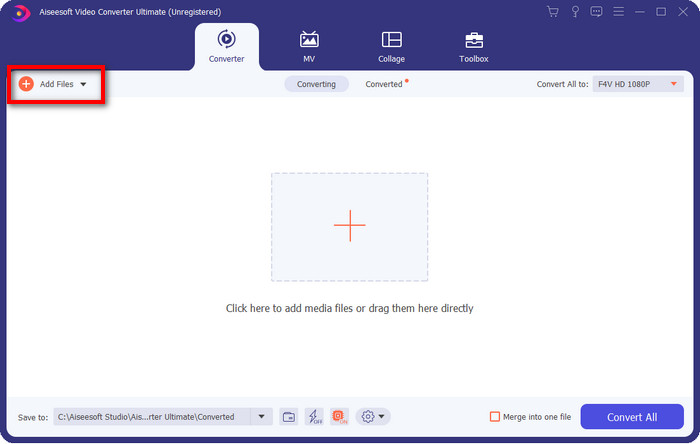
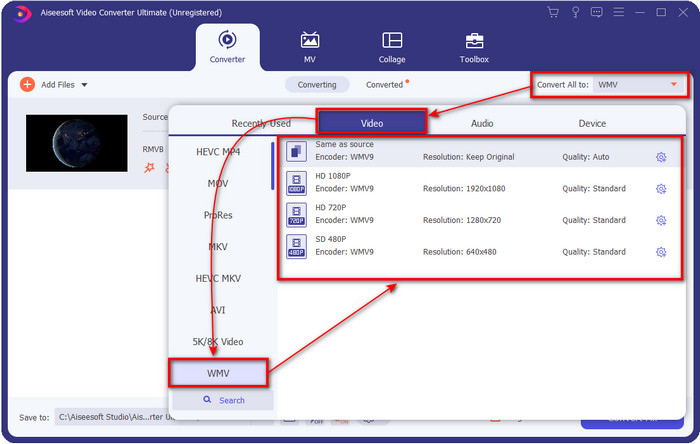
Step 3. Press the Convert All to button, and a list of the formats will show; pick one format you want or the WMV by clicking it.
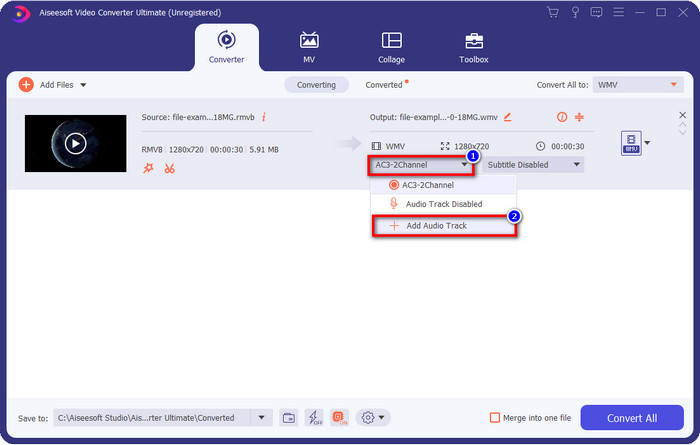
Optional: Want to add audio to your video before converting the file? If so, click the drop-down button, click Add Audio Track, browse the audio track saved on your desktop, and hit Open.
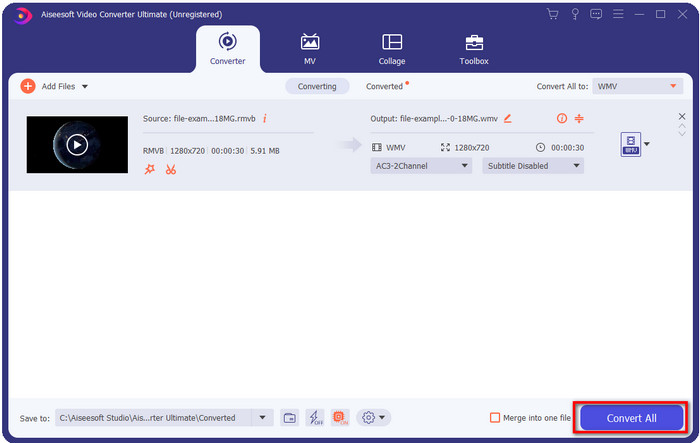
Step 4. By clicking the Convert All button, converting your file will start eventually. A folder with the converted file will show on your screen after the process.
Del 3. Bedste Web Converter til at konvertere RMVB til WMV Online
Suppose you are looking for a powerful RMVB to WMV converter online. In that case, you must use the FVC Free Video Converter Online. This web converter is the best solution for your converting problem without a single doubt. However, it supports a limited format you can upload and choose on; this is a problem, right? But the RMVB file is supported here if you are looking for an online solution. Furthermore, here in the list below is how to use this web tool.
Steps on How to Convert RMVB files into WMV Format with the FVC Free Video Converter Online:
Step 1. Click this link, and a new tab will show on your web browser.
Download skrivebordsversionen for at konvertere filer i batch.
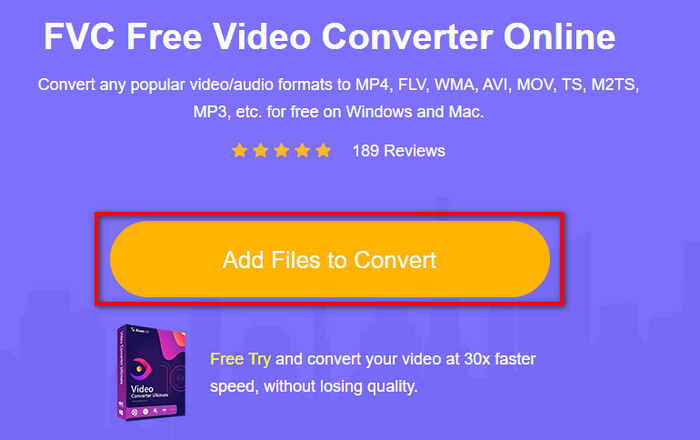
Step 2. Click Add Files to Convert on the website, and a desktop folder will show on your screen. Select the RMVB file you want to convert and press Open.
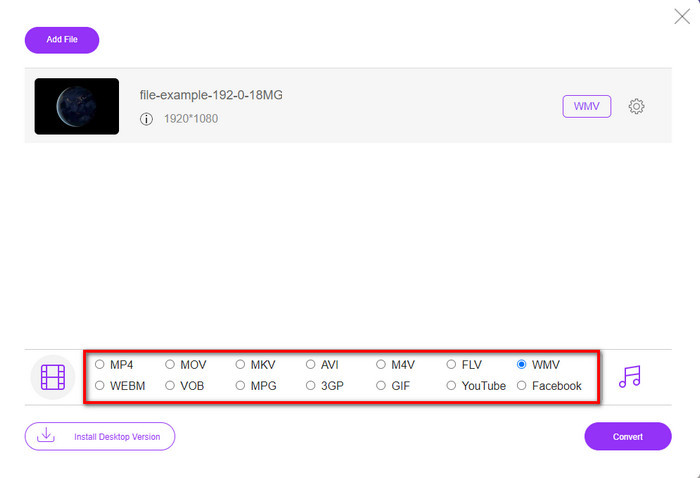
Step 3. Once uploaded, pick the WMV format below or whatever format you want under the list.
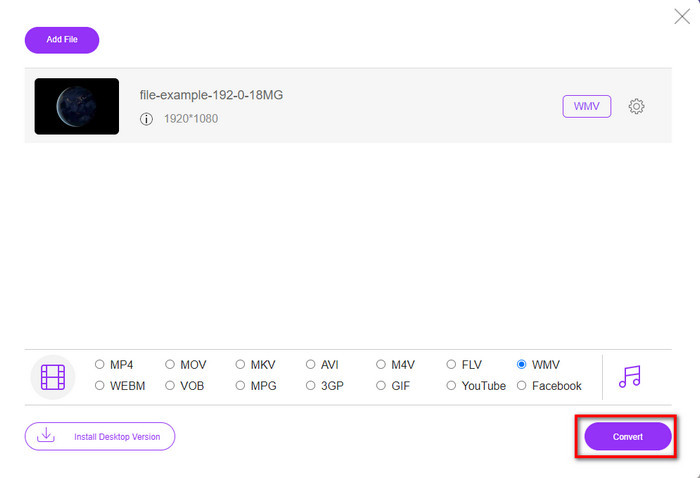
Step 4. Click Convert to start the converting process.
RMVB vs. WMV
RMVB, en nyere variant af standardformatet Real Media (.RM), er et Real Media-videofilformat komprimeret ved hjælp af en variabel bitrate. Det er et populært format til asiatiske film og anime. RMVB-filer er mindre i størrelse og har lavere bithastigheder, men bedre kvalitet.
Produceret af Microsoft var WMV et af de mest almindelige videoformater tilbage i 2000'erne. Den kan ses over nettet og afspilles af forskellige medieafspillere på Windows. Og det er også standardvideofilformatet for Windows Media Player. Men det er blevet overtaget af andre formater for nylig.
Del 4. Ofte stillede spørgsmål om RMVB til WMV-konvertering
Er RMVB og RM det samme?
Der er ingen væsentlig forskel mellem de to beholdere. Navneændringerne skyldes, at CBR var ældre rigtige codecs til kun streamingformål. Navnet er ændret, men formålet med formatet er ikke.
Hvad skal jeg gøre for at afspille RMVB-filer på Mac?
You can download a third-party RMVB player on your Mac to play the video. But if you don't want to download a third-party player, consider converting the RMVB to MOV. Want to know how to do it? Then click this link to learn how to convert RMVB to MOV.
Mister kvaliteten ved konvertering af RMVB-filen?
Konvertering af din RMVB bør ikke forringe kvaliteten af selve videoen. Men det meste af konverteren ændrer kvaliteten, fordi 1080 eller endnu højere kvalitetspixels ikke understøttes. Så nu, hvis du vil konvertere dine filer uden at miste kvaliteten, skal du bruge FVC Video Converter Ultimate. Dette værktøj understøtter konvertering af fil 1080 og endnu højere uden at forringe kvaliteten.
Konklusion
If you want to download a converter on your desktop and keep it or use an online tool, FVC got your back. These two mentioned converters are excellent in many aspects if we compare them with the other converters online or offline. Instead of comparing these two tools with the others, let's compare the tools with each other. FVC Free Video Converter Online will help you with your converting problem. Moreover, the great advantage of this tool is that it is ready to use whenever you have an internet connection. On the contrary, FVC Video Converter Ultimate provides a phenomenal output that will amaze you and others. So, if you want to make your converting process even more exciting, use this ultimate converter and do more.
-
 Top 4 gratis RMVB til FLV Converter-apps på Desktop eller Online
 Denne artikel fortæller dig den bedste RMVB til FLV-konverteringssoftware og webapps, der kan konvertere RMVB-filer (RealMedia Variable Bitrate) til FLV-video.
-
 2 af de bedste valg af RMVB-fil til AVI-konverter [Online & Offline]
 Ved du ikke, hvordan man konverterer RMVB til AVI? Denne artikel fokuserer på de konvertere, du kan bruge til at konvertere RMVB til AVI, uanset om det er online eller offline.
-
 Guide til, hvordan du konverterer RMVB til MP4 på Windows / Mac (3 gratis måder)
 Vil du konvertere RMVB til MP4 for nem afspilning på din computer eller mobiltelefon? Du finder enkle måder at konvertere dine RMVB-filer til MP4 i denne vejledning.

