


 Video Converter Ultimate
 Skærmoptager
 Video reparation
 Sikker download
Komplet måder at fjerne Picsart-filtervandmærket på dine videoer effektivt
I dag er det næsten uundværligt at have et billedredigeringsprogram på computeren, som du kan stole på – som for eksempel Picsart. Med det kan du justere nogle få indstillinger og forvandle et almindeligt billede til et fotografi, som ingen har set mage til. Du kan få flere kunder eller tilskuere med et iøjnefaldende billede, du selv har skabt. Men der er et problem ved at bruge Picsart, nemlig vandmærket, der tilføjes, når du eksporterer billedet. Vandmærket er ret irriterende og kan virke forstyrrende visuelt, hvis det ikke fjernes. Så hvis du vil have både softwaren og en vejledning i at fjerne Picsart-filterets vandmærke, skal du læse videre i denne artikel og lære mere om det!

Del 1. Sådan fjerner du Picsart-filtervandmærke ved hjælp af den gratis software på skrivebordet
FVC Video Converter Ultimate - Nummer ét vandmærkefjerner på Windows og Mac
Lad os begynde med at præsentere det program, vi har som nummer ét på listen, som kan hjælpe dig og lære dig, hvordan du fjerner Picsart‑vandmærket. FVC Video Converter Ultimate er det uundværlige våben i dit arsenal, når du nemt vil fjerne vandmærker på videoer og stadig få et professionelt resultat. På grund af ydeevnen og de uovertrufne funktioner har mange brugere allerede prøvet det, og værktøjet skuffede dem ikke. Har du brug for hjælp til at fjerne vandmærket på din video, kan du følge trinene nedenfor og gøre det samme.
Trin 1. Du kan få det komplette program på din enhed ved at klikke på den relevante downloadknap herunder. Derefter skal du installere programmet på din computer og klikke på Start nu for at åbne det.
Gratis download til Windows 7 eller nyere Sikker download
Gratis download til MacOS 10.7 eller nyere Sikker download
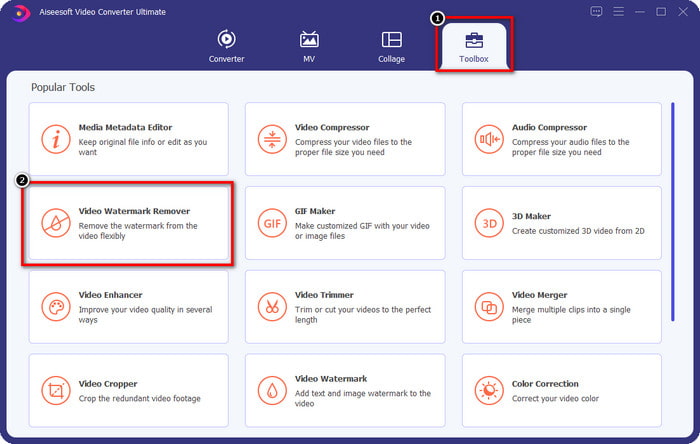
Trin 2. I sektionen Værktøjskasse ser du andre funktioner, du kan bruge til at give din video et flot, professionelt præg. Men i dag skal du klikke på Video Watermark Remover.
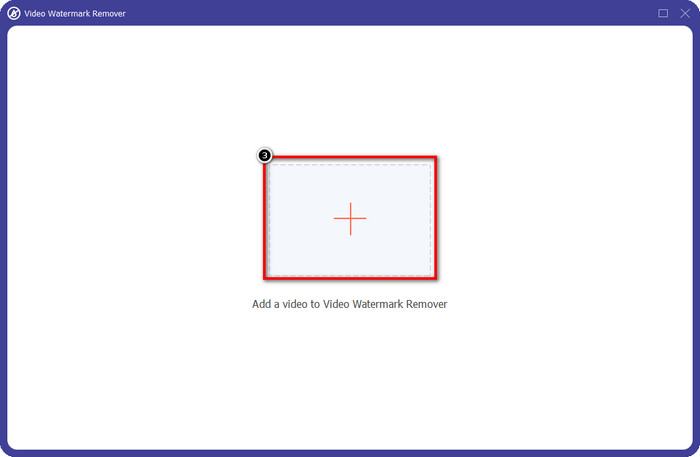
Trin 3. Upload den video, du har redigeret i Picsart, ved at klikke på +-ikonet. Find filen i den mappe, der åbnes på skærmen, og klik derefter på Åbn.
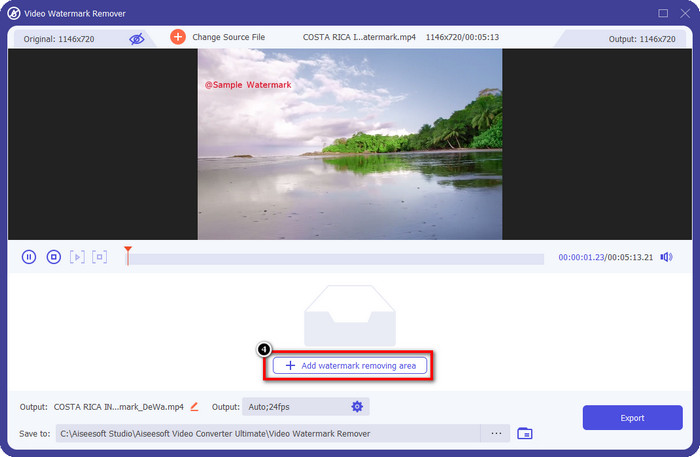
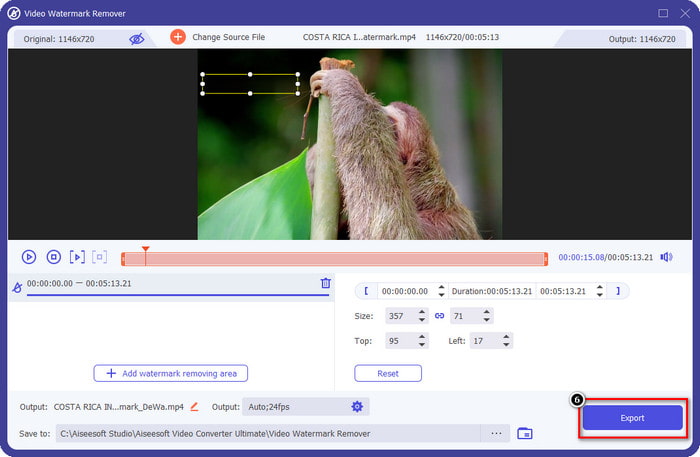
Trin 4. Tryk på Add Watermark Removing Area for at fjerne vandmærket, der er indlejret i videoen, du har uploadet.
Trin 5. Hold og placer markeringsfeltet over vandmærket, så det bliver dækket. Du kan udvide eller formindske feltet efter behov.
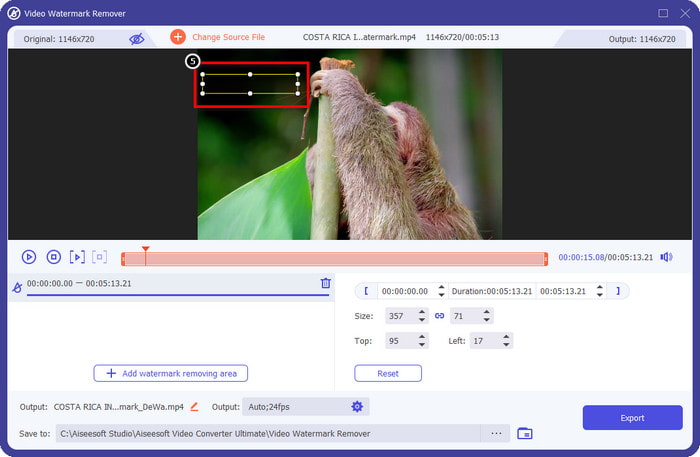
Trin 6. Når du er færdig med at dække vandmærket med markeringsfeltet, skal du klikke på Eksportér for at gemme det endelige resultat på din lokale disk.
Billeder på Windows- Dækvandmærke med 3D-design
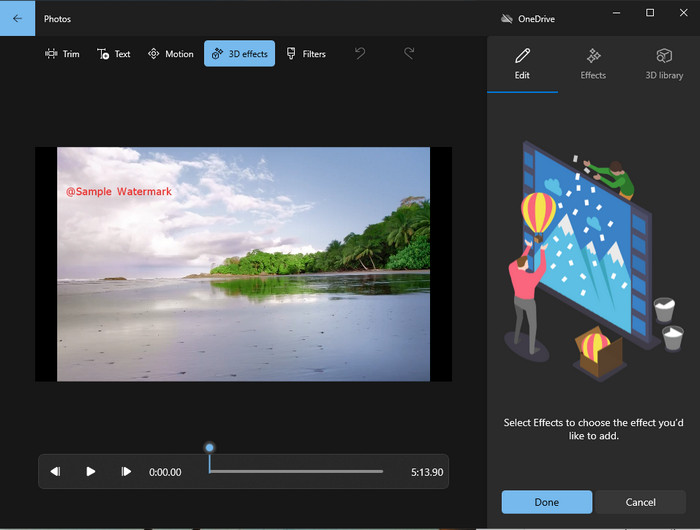
Hvis det ikke er din stærke side at downloade programmer, og du er Windows‑bruger, bør du prøve at bruge Fotos til at redigere vandmærket i din video. At lære at fjerne Picsart‑vandmærket med dette værktøj går endnu hurtigere, fordi du slipper for at downloade en app. Værktøjet fjerner ikke selve vandmærket i videoen, men du kan dække det med 3D‑designs. Ikke desto mindre er ydeevnen for denne standard billed- og videofremviser og -editor god. Er du i tvivl? Så kan du læse trinene nedenfor og følge dem, hvis du vil.
Trin 1. Klik på Windows‑knappen på proceslinjen, og søg efter Fotos for at åbne appen.
Trin 2. Når du har åbnet den indbyggede editor, skal du klikke på +-tegnet for at uploade den video, du vil redigere her.
Trin 3. Gå til 3D‑effekter, klik på 3D‑bibliotek, og søg efter det design, du vil bruge til at dække vandmærket. Placer det valgte design på det område, hvor vandmærket er.
Trin 4. Tryk på Afslut video for at gemme det endelige resultat på din Windows‑computer.
PickFrom Blur Video Online

PickFrom Blur Video Online kan hjælpe dig med at fjerne PicsArt‑vandmærket på de videoer, du har liggende online. Værktøjet er ikke kendt af mange, men vi præsenterer det i dag. Vi har taget dette program med på grund af dets effektivitet til at fjerne vandmærker på de videoer, du uploader. Brugerfladen er enkel og overskuelig, så du farer ikke vild, når du skal bruge det. Så hvis du vil fjerne vandmærket, går vi videre til processen nedenfor.
Trin 1. Åbn din webbrowser, søg efter navnet på værktøjet, og klik på det første resultat for at åbne den online vandmærkefjerner.
Trin 2. Klik på Click to Add File, så du kan uploade videoen her.
Trin 3. Markér Blur Part of the Video, og placer derefter markeringsfeltet over vandmærket.
Trin 4. Tryk på Start for at downloade videoen uden vandmærket.
Del 2. Sådan fjerner du Picsart-vandmærke ved at købe Premium-versionen
Du skal købe softwaren, hvis du ikke vil have problemer med at fjerne Picsart guldvandmærket. Det vil koste dig et vist beløb, fordi du skal betale for det, før du kan bruge det og derefter eksportere videoen uden indlejret vandmærke. Så hvis du vil have en trin-for-trin vejledning om at købe Picsart, skal du følge den næste vejledning, vi tilføjer.
Trin 1. Åbn Picsarts officielle hjemmeside, og log ind på din konto. Har du ikke en konto, skal du oprette en ved at tilmelde dig her.
Trin 2. På hovedsiden skal du klikke på Pricing og se priserne på de forskellige tilgængelige produkter.
Trin 3. Vælg det abonnement, du ønsker, månedligt eller årligt, og klik derefter på Go to Payment.
Trin 4. Tilføj faktureringsoplysninger ved at udfylde de nødvendige felter, og klik derefter på Purchase Now.
Relateret:
Fjern vandmærke fra eksamensbilleder
Del 3. Ofte stillede spørgsmål om, hvordan du fjerner Picsart-vandmærke
Kan jeg købe Picsart Gold permanent?
Det understøtter ikke en engangsbetalingsbasis eller -plan, så hvis du vil bruge Picsart Gold, bliver du nødt til at benytte den månedlige eller årlige plan. Tjek prisen for hver plan ved at gå til dens officielle hjemmeside.
Kan jeg oprette et tilpasset abonnement på Picsart?
Ja, du kan oprette et abonnement for et hold på Picsart. Du kan indstille antallet af personer, der skal bruge appen.
Hvor kan jeg få adgang til Picsart?
Du kan downloade Picsart på Windows, Android og iOS. Desværre har appen ikke en Mac-version lige nu, men vær ikke ked af det, fordi du kan bruge anden medieredigeringssoftware, der er tilgængelig på dit system.
Konklusion
Den vejledning, vi lærte tidligere, giver dig en idé om at fjerne vandmærker ved hjælp af PicsArt og de bedste vandmærkefjernere, du kan bruge. Du kan nu nyde den video, du redigerer på Picsart uden at bekymre dig om produktets vandmærke, det tilføjer til det endelige output. Så hvis du stadig ikke er overbevist om de værktøjer, vi præsenterer, er det et must at prøve dem først, især FVC Video Converter Ultimate. Klik på download-knappen og få den gratis på din Windows og Mac, og nyd derefter de funktioner og funktioner, som du kan drage fordel af.
-
 Sådan fjerner du Pond5-vandmærke ved hjælp af de ultimative værktøjer
 Lær hvordan du fjerner Pond5 vandmærke ved at følge de enkle trin nedenfor. Du kan nemt fjerne Pond5-vandmærket på dit billede ved hjælp af disse imponerende værktøjer.
-
 2 kraftfulde måder til, hvordan du fjerner Dxtory-vandmærke
 Lær hvordan du fjerner Dxtory Watermark ved at følge de to bedste metoder. Hvis du leder efter det bedst egnede værktøj til at fjerne Dxtory-vandmærket, så læs her.
-
 Fremragende Arnold Maya vandmærkefjernere, du ikke må gå glip af
 Mange vandmærkefjernere kan fjerne Arnold Maya-vandmærket. Men hvis du vil vide, hvad der er de bedste Arnold Maya vandmærkefjernere, så læs denne side.
