


 Video Converter Ultimate
 Skærmoptager
 Video reparation
 Sikker download
Nemme trin til, hvordan du ændrer størrelse på foto til Facebook
Mange millennials og voksne bruger Facebook som den mest populære sociale medieplatform. Facebook er en app, hvor du kan uploade billeder og dele eller sende dem til dine venner. Og mange mennesker vil gerne have billeder i høj kvalitet at uploade på Facebook. Hvis du også vil uploade fotos i høj opløsning og høj kvalitet, har vi det værktøj, der kan hjælpe dig. Heldigvis har vi fundet apps til iPhone, Android og online, som hurtigt og effektivt kan ændre størrelsen på billeder. Så spænd sikkerhedsbæltet, for i dette indlæg lærer du hurtigt, hvordan du kan ændre størrelse på fotos til Facebook.

Del 1. Sådan ændrer du størrelse på foto på iPhone til Facebook
Hvis du bruger en iPhone-enhed, kan apps downloades på din AppStore for at hjælpe dig med at ændre størrelsen på dit billede. Derudover er der gratis apps, som du kan bruge på din iPhone-enhed. Det er dog ikke alle apps, der producerer output af høj kvalitet. Det er derfor, vi søgte efter den bedste app til at ændre størrelsen på billeder med det samme.
Remini er den mest populære app til ændring af billedstørrelse, som du kan downloade på din iPhone. Denne app har en brugervenlig grænseflade, fordi den har intuitive funktioner. Derudover kan Remini forbedre dit billede ved hjælp af sin AI‑ (kunstig intelligens) forstærker, som automatisk ændrer størrelsen på dit billede og forbedrer det til den bedst mulige kvalitet. Og ikke nok med det – med denne app kan du også forbedre dine videoer med funktionen til video‑forbedring. Desuden understøtter den alle almindelige billedformater som JPEG, JPG og PNG. Det fantastiske ved denne app er også, at du kan downloade den gratis i App Store. Så hvis du vil bruge denne app til at ændre størrelse på et foto til Facebook‑forside, skal du følge trinene nedenfor.
Sådan ændrer du størrelsen på et billede ved hjælp af Remini-appen:
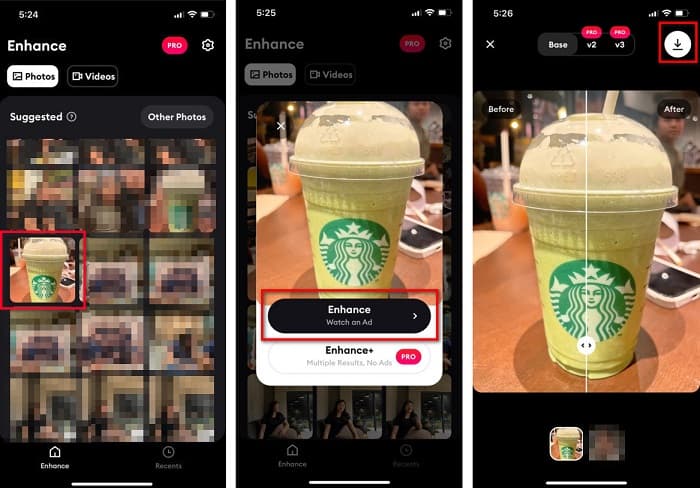
Trin 1. Åbn App Store, søg efter appen Remini, og download den til din enhed. Når appen er installeret, skal du åbne den.
Trin 2. Når du har åbnet appen, vil du se dine fotos og kan vælge det billede, du vil forbedre. Tryk derefter på knappen Enhance for at gå videre til næste skærmbillede.
Trin 3. Før du går videre til den næste grænseflade, skal du først se en reklame. Derefter vil du se før‑ og efterversionen af dit billede. Tryk på Download‑ikonet øverst til højre på skærmen.
Del 2. Sådan ændrer du størrelse på foto på Android til Facebook
Er du Android-bruger? Vær ikke urolig; vi vil også præsentere et program, du kan bruge til at ændre størrelsen på et billede. Selvom der er mange apps, du kan downloade fra PlayStore, har vi valgt de bedste blandt dem til at præsentere for dig. Læs nedenfor for at lære, hvordan du ændrer størrelse på billeder til Facebook på Android.
AI Photo Enhancer & PixelLeap er en anden fremragende app, der hjælper dig med at ændre størrelsen på dit billede for at få bedre kvalitet. Denne billedresizer er gratis at downloade i Play Store‑appen og er sikker at bruge. Hvis du desuden vil forbedre eller gendanne et gammelt billede, kan du bruge AI Photo Enhancer & PixelLeap. Med sin AI‑teknologi skal du blot uploade det billede, du vil ændre størrelsen på, så vil appen automatisk forbedre dit billede. Derudover har den en simpel brugergrænseflade, hvilket gør den til en rigtig god app, hvis du er begynder. Den har også andre redigeringsfunktioner, du kan bruge, såsom at rette, farvelægge, animere, tilføje mimik og gøre dit billede lysere. Problemet med denne app er dog, at den indeholder mange reklamer, som tager tid at komme igennem, og den efterlader et vandmærke på dit resultat. Ikke desto mindre er denne app løsningen, hvis du vil ændre størrelse på et foto til Facebook uden at beskære.
Sådan ændrer du størrelsen på et billede ved hjælp af AI Photo Enhancer og PixelLeap:
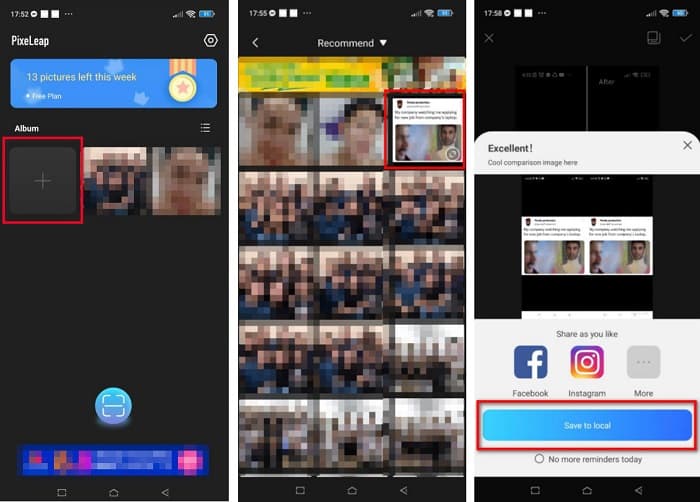
Trin 1. Installer AI Photo Enhancer & PixelLeap på din Android‑enhed.
Trin 2. Tryk derefter på +‑feltet i appens hovedgrænseflade for at uploade det billede, du vil ændre størrelsen på. Appen lader dig derefter se en reklame, før du går videre til næste skærmbillede.
Trin 3. Gennemse og find det billede, du vil ændre størrelsen på, og tryk på det. Når du har valgt billedet, skal du trykke på Enhance. Appen vil så automatisk forbedre dit billede. Tryk på Save to local for at downloade dit resultat.
Del 3. Sådan ændrer du størrelse på foto online til Facebook
Fordelen ved at bruge en onlineapplikation er, at den giver dig mulighed for at spare plads på din enhed. Derudover er der mange gratis tilgængelige webapps, som du kan bruge i din browser. Så hvis du vil bruge en onlineapplikation til at ændre størrelsen på et billede til at uploade på Facebook, viser vi dig, hvordan du ændrer størrelsen på et billede til Facebook.
FVC Free Image Upscaler er den bedste online billedresizer, der giver dig mulighed for at opskalere dit billede op til 2x, 4x, 6x og 8x forstørrelse. Med sin enkle brugergrænseflade kan begyndere nemt ændre størrelse på et billede. Desuden understøtter den alle billedformater, herunder JPEG, JPG, PNG og BMP. Det endnu mere imponerende ved denne applikation er, at den bruger AI‑teknologi, som automatisk registrerer den lavopløselige del af et billede og derefter forbedrer den. Derudover kan den fuldstændigt og perfekt genskabe mistede pixels, farveteksturer og flere detaljer. Den er også tilgængelig i alle webbrowsere, herunder Google, Firefox og Safari. Hvis du derfor vil bruge FVC Free Image Upscaler til at ændre størrelse på eller forbedre dit billede, skal du følge de enkle trin nedenfor.
Sådan ændrer du størrelsen på et billede til Facebook ved hjælp af FVC Free Image Upscaler:
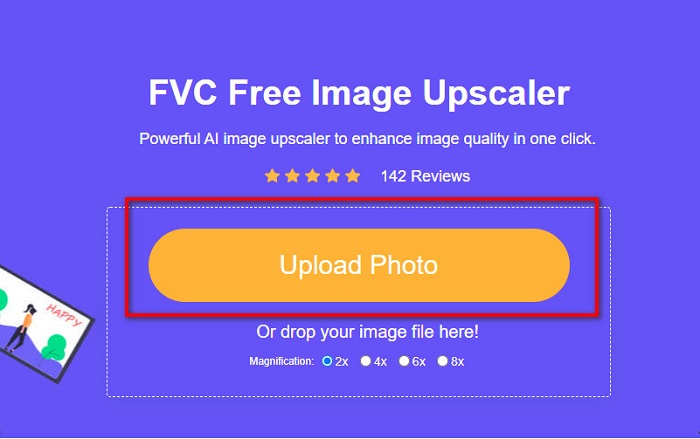
Trin 1. Åbn din browser, og skriv FVC Free Image Upscaler i søgefeltet. Du kan klikke på det angivne link for at blive ført direkte til websiden. Klik på Upload Photo for at starte appen.
Trin 2. Klik på Upload Photo i programmets hovedgrænseflade for at importere det billede, du vil ændre størrelsen på.
Trin 3. Vælg på næste skærmbillede den forstørrelsesindstilling, du ønsker til dit billedresultat. Du kan vælge mellem 2x, 4x, 6x og 8x forstørrelse. Gå derefter videre til næste trin.
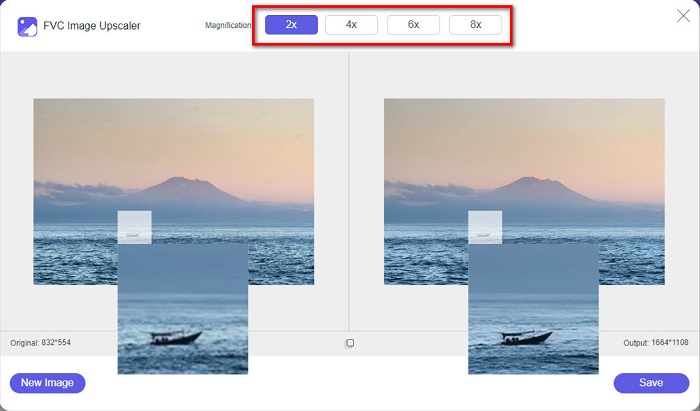
Trin 4. Til sidst skal du klikke på knappen Save for at gemme dit resultat på din computer. Du vil se forskellen mellem din originale fil og det billede, der har fået ændret størrelse. På få sekunder vil dit billede være gemt.
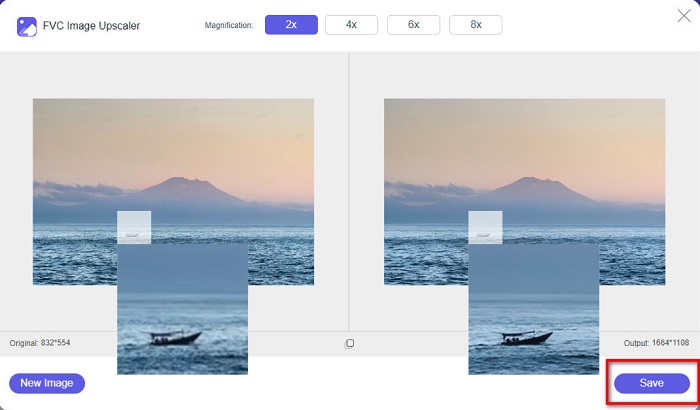
Og det er det! Så nemt som ABC, dit billede er nu forbedret og ændret størrelse.
Relateret til:
Sådan gør du et billede skarpere online og offline på 4 nemme måder
Sådan ændrer du billedstørrelse – Adobe Resize Image [online og offline]
Del 4. Ofte stillede spørgsmål om, hvordan man ændrer størrelse på foto til Facebook
Hvad er det bedste fotoforhold for Facebook?
Med hensyn til fotoforhold er det bedst at bruge et lodret billede med et billedformat på 4:5 og 1200 x 1500 px. Og hvis du vil have et kvadratisk billede, skal opløsningen være 1080 x 1080 px.
Hvad er størrelsen på et Facebook-opslag?
Den anbefalede billedstørrelse for et Facebook-opslag er 1200 x 630 pixels for at undgå pixelering og have en hurtigere indlæsningstid.
Hvad er det bedste billedformat at uploade på Facebook?
Det bedste og anbefalede billedformat at uploade på Facebook er JPG-format. Det er bedst at uploade et JPG-format med en RGB-farve på mindre end 15 MB.
Konklusion
Vi har løsningerne ovenfor, hvis du vil ændre størrelse på et foto til Facebook. Ved grundigt at læse denne artikel håber vi, at du har lært alt det nødvendige, du skal gøre. Du kan helt sikkert ændre størrelsen på ethvert billede, du ønsker, ved hjælp af iPhone‑, Android‑ eller onlineapps. Men for bedre resultater kan du bruge FVC Free Image Upscaler, som også gør det muligt at spare plads på din enhed.
-
 Bedste Photo Resizer-app online, offline, Android og iPhone
 Hvad er de bedste fotoresizer-apps? Klik på siden for at lære de fem mest effektive fotoresizer-apps, du kan bruge til at forbedre eller ændre størrelsen på din fil.
-
 Sådan ændrer du størrelse på billede - Adobe Ændre størrelse på billede [online og offline]
 Hvis du søger efter Adobe resize image, så har vi løsningen til dig. Se dette indlæg grundigt for at lære, hvordan du ændrer størrelse på billeder ved hjælp af Adobe på din pc.
-
 Top 4 offline og online GIF-forstørrelsesprogrammer, du ikke må gå glip af
 Dette indlæg er til dig, hvis du leder efter de bedste GIF-forstørrelsesprogrammer. Vi listede de bedste online og offline GIF-forstørrelser til din computer.
