


 Video Converter Ultimate
 Skærmoptager
 Video reparation
 Sikker download
Sådan fjerner du hurtigt et billede med 3 bedste løsninger at bruge
Afpikselér billede er den løsning, du har brug for, når du vil give et makeover til et billede, der er endt med at blive pixeleret, eller hvis dit billede er bitmappet med små firkanter. Mange brugere synes, det er besværligt at ændre, justere, rette og forbedre billedet – og det var det også, men det hører fortiden til. Med den avancerede teknologi, vi har adgang til, er denne opgave blevet let at løse, når du bruger det rigtige værktøj.
Har du ikke det rigtige værktøj til at fjerne pixeleringen på dit billede? Heldigvis vil denne artikel bringe dig de tre bedste software, vi fandt, der kunne hjælpe dig med at redigere billedets pixelering og en vejledning om hver for at løse problemet.

Del 1. Sådan unpixeleres et billede online med den bedste valg fotoeditor [anbefalet]
FVC Free Image Upscaler er et fuldautomatisk onlineværktøj, du kan bruge til gratis at afpikselere billeder online. Du kan åbne det i enhver webbrowser, du har ved hånden – der er ingen grund til at downloade en launcher for at starte det, så du kan bruge værktøjet med det samme, når du får adgang til det. Selvom softwaren er webbaseret, er dens styrke og ydeevne til at depikselere billeder på niveau med de mest professionelle billedredigeringsprogrammer, du kan bruge, både online og offline. Måske tror du, at du vil få problemer med at bruge dette værktøj, men det vil du ikke. Stadig ikke overbevist? Hvis ikke, kan du læse eller følge vejledningen nedenfor for at få en gennemgang af, hvordan du nemt bruger værktøjet.
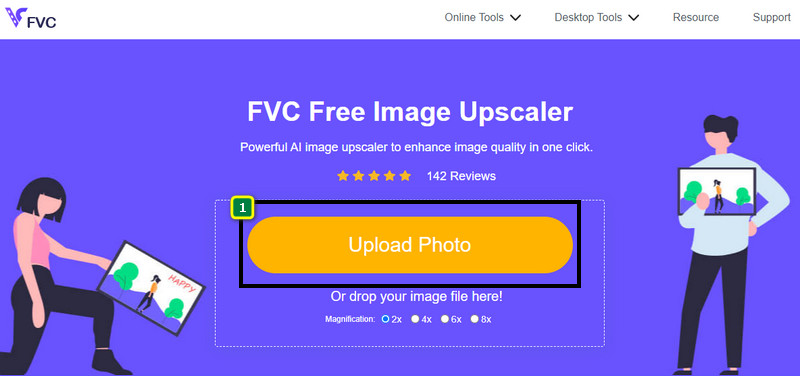
Trin 1. Du kan få adgang til dette webværktøj i enhver webbrowser på din enhed ved at søge på navnet eller klikke på dette link for at åbne hovedsiden.
Trin 2. Når du er på webværktøjet, skal du klikke på Add Image for at uploade det pixelerede billede. En dialogboks med filer vises på skærmen; find det billede, der er gemt på din lokale disk, og tryk derefter på Open for at uploade det.
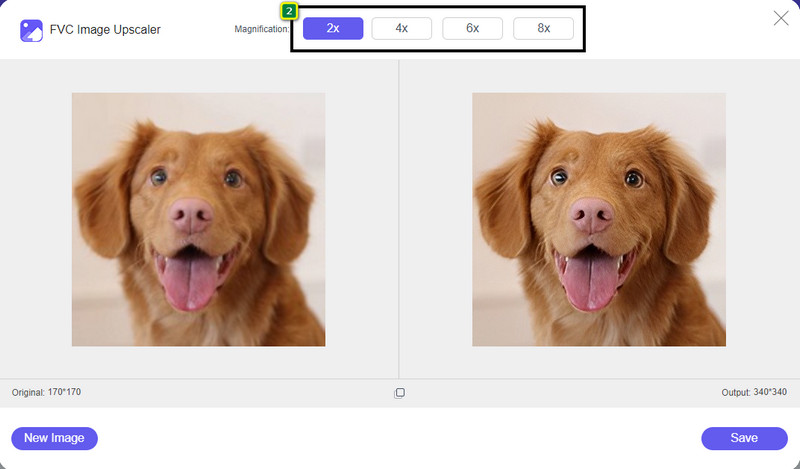
Trin 3. Vælg derefter den forstørrelsesindstilling, du vil anvende på dit billede, for at udglatte udseendet, så det ikke længere ser bitmappet ud med små firkanter.
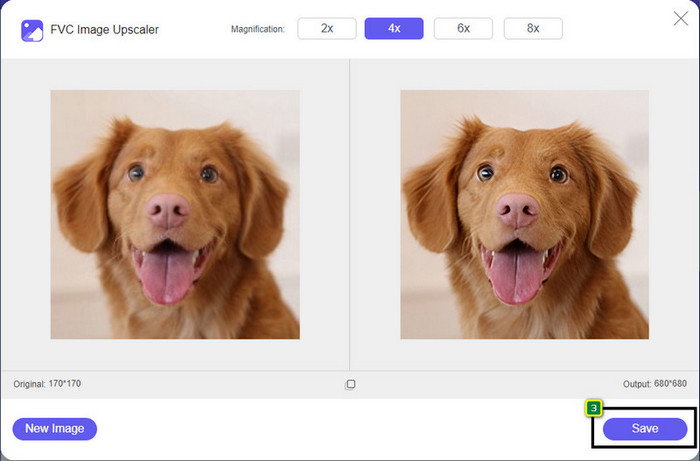
Trin 4. Så enkelt er det: Klik på Save for at downloade den afpikselerede version til din lokale disk.
Del 2. Sådan unpixeleres et billede offline ved hjælp af 2 måder på Windows og Mac [Nem]
Pixbim - Unpixelate Photos on Windows
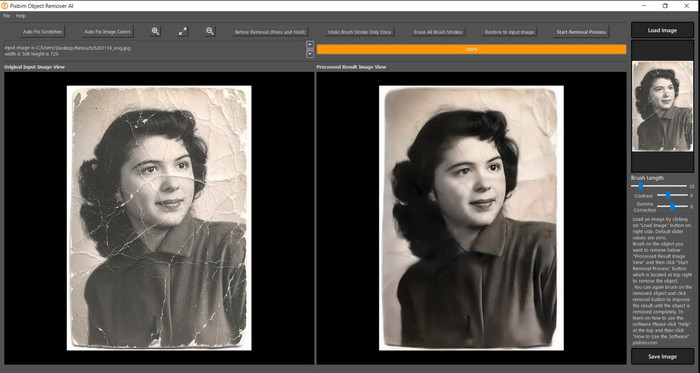
Pixbim er et af de mest kraftfulde, AI-understøttede værktøjer til afpikselering af billeder, som du kan downloade til Windows for at løse dette problem. Denne editor fortjener at blive nævnt i denne artikel, fordi den hurtigt og effektivt retter pixelerede billeder. Med den justerer AI parametrene for dig, så du ikke får problemer med at bruge softwaren. På grund af dens funktioner og muligheder skal du købe en licensnøgle for at fortsætte med at bruge den efter prøveperioden. Det kan være dyrt for mange, der gerne vil have den på deres pc’er.
Trin 1. Når du har downloadet softwaren, skal du starte den, så vi kan gå videre til næste trin.
Trin 2. Tryk på Load Image for at tilføje det pixelerede billede, du vil forbedre her.
Trin 3. Justér derefter parametrene ved at trække sliders til de værdier, du ønsker at opnå.
Trin 4. Når du er færdig med at justere billedet, skal du gemme resultatet for at eksportere det.
Movavi Photo Editor [Windows og Mac]
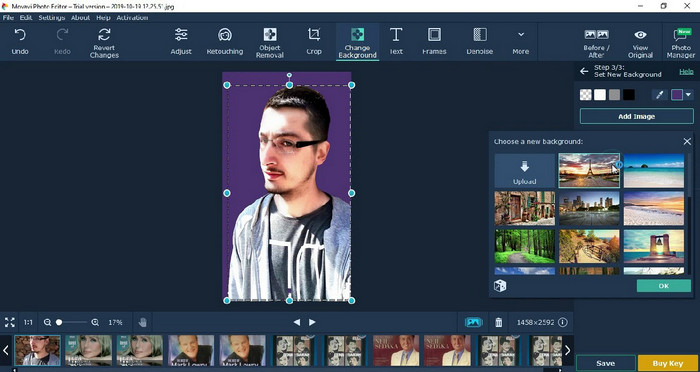
Mange brugere har allerede prøvet Movavi Photo Editor på grund af dens alsidighed i billedredigering. Ligesom Pixbim kan den genskabe de mistede pixels i billedet ved hjælp af neurale netværk i sin AI. Med denne editor ved hånden kan du lave både basal og avanceret redigering af udseendet, såsom beskæring, rotation, tilføjelse af filtre, rettelse af pixels og meget mere. Men du får ikke adgang til det hele, hvis du ikke køber premium-versionen til din computer.
Den har næsten samme pris som Pixbim, som er ret dyr for mange. Men hvis du har et budget til at købe en editor, er det måske denne, du har brug for. Lær, hvordan du ophæver billeder med denne app ved at følge trinene.
Trin 1. Download programmet til din Windows- eller Mac OS-enhed.
Trin 2. Start softwaren, og upload derefter det foto, du vil afpikselere, her.
Trin 3. Nu hvor du har uploadet billedet, skal du klikke på Magic Enhance for automatisk at forbedre billedet med AI.
Trin 4. Eksportér billedet, og nyd resultatet.
Del 3. Ofte stillede spørgsmål om, hvordan man oppixelerer et billede
Hvorfor er der et vandmærke på det eksporterede unpixelate-billede?
Når du bruger en gratis prøveversion af applikationen, er der en chance for, at den efterlader et vandmærke, når den eksporteres. Så hvis du vil eksportere et billede uden vandmærket, kan du købe applikationens licens eller bruge FVC Free Image Upscaler, for det vil ikke efterlade et vandmærke på det eksporterede billede.
Hvad er forskellen mellem sløret og pixeleret?
Mange artikler har bevist, at det slørede og pixelerede ikke er det samme på grund af nogle faktorer. Slørede billeder er grunden til, at du optager en højhastighedsbevægelse eller tager et billede med et rystende kamera. Når du forstørrer et snapshot, starter det en pixelering, mens du er pixeleret, og du vil se en bitmap med en lille firkant.
Hvad er den faktor, der gør billedet pixeleret?
Nogle grunde gør billeder til pixels; en almindelig årsag er, når du forstørrer et rasterbillede. Rasterformater, såsom PNG, JPG, GIF og mere, er sammensat af små firkanter, der opbygger udseendet af objektet, der er gemt i disse beholdere. Normalt, når du forstørrer billedet, vil du se, at der er firkanter, kendt som pixels, der indeholder farvedata, der bliver visuelt præsenteret. Det kan være et problem for mange redaktører, især når pixelering sker.
Hvordan kan jeg rette billedstøjen?
Det er et andet almindeligt problem, du kan støde på med de billeder, du tager, og løsningen, du har brug for, findes måske i denne artikel. Klik på dette link for nemt at læse, løse og lære hvordan man fjerner billedstøj.
Konklusion
Så nemt er det – nu kan du uden besvær afpikselere et billede ved hjælp af de bedste billedredigeringsprogrammer, du kan downloade eller bruge på nettet. Sagen er løst! Hvis du nogensinde støder på et problem med pixellering, kan du støtte dig til denne artikel. Det bedste værktøj, du kan få brug for, er her og klar til at hjælpe dig, såsom FVC Free Image Upscaler. Det er bedst at løse pixelleringen i selve udseendet, så den ikke længere er synlig for alle. Sig farvel til pixellering, når du bruger denne online billededitor.
-
 7 Image Upscaler, du kan bruge til at forbedre og forbedre hvert billede [2022]
 Har du brug for billedopskaleren? Heldigvis dækker denne artikel den bedste software, du kan få adgang til og downloade på dit skrivebord.
-
 5 billedopløsningsforstærkere, du skal bruge denne 2022 [Seneste valg]
 Ved du ikke, hvilken billedopløsningsforstærker du skal bruge? Læs denne artikel, mens vi gennemgår fem værktøjer til at bruge og forbedre opløsningen af billeder.
-
 4 apps til at øge billedopløsningen på dine mobile enheder [Bedste valg]
 Du skal bruge apps til at øge din billedopløsning, hvis du vil opnå 1080p, 4k eller lignende. Med listen nedenfor kan du nemt gøre det!
