


 Video Converter Ultimate
 Skærmoptager
 Video reparation
 Sikker download
En fremragende applikation til at ændre størrelse på billede - FastStone Photo Resizer
Det er nemt at søge efter en billed-resizer på internettet. Især i dag findes der mange billedredigeringsprogrammer online. Når det gælder ændring af størrelse og konvertering af billeder, kan du finde mange fremragende værktøjer både online og offline. Men hvis du har svært ved at vælge ét, vil vi gøre det nemt for dig at finde et. FastStone er en billedredigeringsplatform, du kan bruge til at ændre størrelsen på dine billeder. Og i dette indlæg giver vi dig alle detaljer om FastStone og hvordan du bruger FastStone Photo Resizer.

Del 1. FastStone Photo Resizer Review
FastStone Photo Resizer er et billedredigeringsprogram, du skal bruge. Du kan bruge det på dit Windows-skrivebord og nemt downloade det. Derudover har den en ren og nem at bruge grænseflade, hvilket gør den til et brugervenligt værktøj. FastStone Photo Resizer understøtter forskellige billedformater, såsom JPEG, BMP, PNG, TIFF og GIF. Den indeholder også mange redigeringsfunktioner, som du kan bruge til at konvertere, omdøbe, beskære, tilføje tekst, ændre farve, tilføje vandmærke og mere.
Ydermere tilbyder det batchbehandling, hvor du samtidigt kan behandle to eller flere billeder. Og hvis du vil forhåndsvise den konvertering, du laver, giver FastStone dig mulighed for at gøre det. Du kan downloade FastStone image resizer gratis på din Windows-computer, men du skal købe appen for at bruge dens eksplicitte funktioner. Følg vejledningen nedenfor, hvis du vil vide, hvordan du ændrer størrelse på billeder ved hjælp af FastStone.
Fordele
- Det tilbyder en række redigeringsfunktioner og værktøjer.
- Det har en lav pris.
- Den har en ligetil brugergrænseflade.
- Det har en nem fildelingsproces.
Ulemper
- Den har kun en begrænset support- og hjælpefacilitet.
- Det er ikke gratis at bruge.
- Kun tilgængelig på Windows-software
Sådan bruger du FastStone Photo Resizer til at ændre størrelse på billeder:
Trin 1. Først skal du downloade og installere FastStone Photo Resizer på din Windows-computer. Når du har installeret appen, skal du starte den på din computer. Klik derefter på Batch Convert-knappen i Menu i appens hovedgrænseflade for at uploade det billede, du vil ændre størrelsen på.
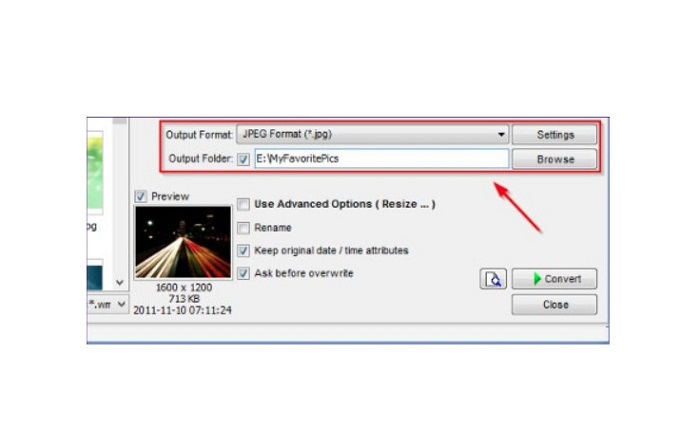
Trin 2. Når du har importeret dit/dine billede(r), vises det/de i grænsefladen. Klik derefter på Output Format-rullemenuen for at vælge det ønskede filoutputformat. Og for at vælge destinationen for dit output skal du klikke på Browse-knappen ved siden af Output Folder.
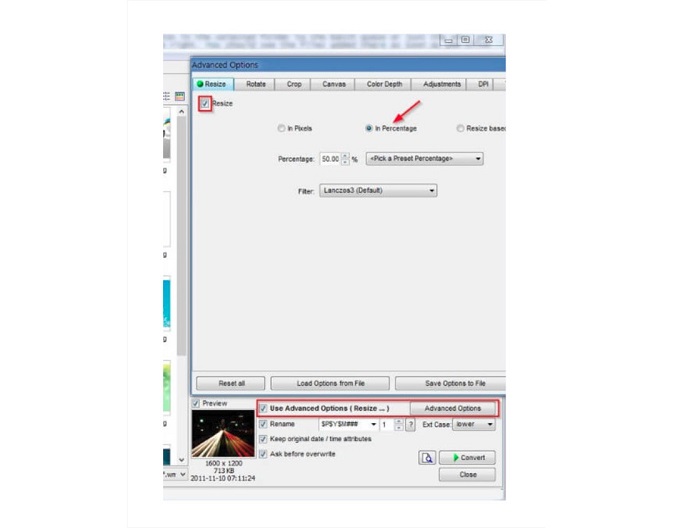
Trin 3. Klik derefter på Advanced Options, og en ny fane vises. Gå så til fanen Resize, og markér In Percentage-indstillingen for at ændre billedstørrelsen i procent. Du kan vælge et filter ved at klikke på rullemenuen ved siden af Filter.
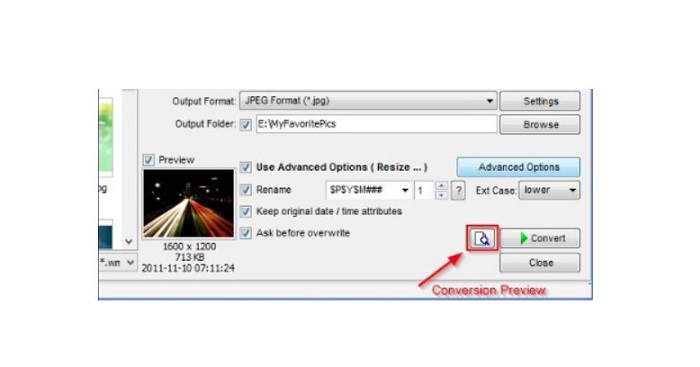
Trin 4. Derefter kan du forhåndsvise dit billede og sammenligne det med den originale fil ved at klikke på Preview-ikonet ved siden af Convert-knappen.
Trin 5. Til sidst skal du klikke på Convert-knappen for at starte processen med at ændre størrelsen. Den konverterer også din billedfil til det format, du valgte i det forrige trin. Når FastStone har ændret størrelsen på dit billede, vises et nyt vindue, hvor du kan se outputbilledet og deres størrelser.
Og det er slutningen af FastStone Photo Resizer tutorial. Ved at følge ovenstående trin kan du nemt ændre størrelsen på dit billede ved hjælp af FastStone.
Del 2. Alternativer til FastStone Photo Resizer
FastStone Photo Resizer er kun tilgængelig på Windows-desktops. Og et andet tilbageslag er, at du skal købe appen, før du får adgang til dens andre redigeringsfunktioner. Så hvis du foretrækker at bruge en videotrimmer-app, der er tilgængelig på Windows-, Mac- eller Linux-enheder og tilgængelig online, skal du læse dette afsnit grundigt.
FVC Free Image Upscaler
FVC Free Image Upscaler er en af de mest anvendte billed-resizer-apps, der er tilgængelig online og i alle browsere, herunder Google, Firefox og Safari. Dette onlineværktøj kan også hjælpe dig med dine slørede billeder. Hvis du har et sløret eller billede i lav kvalitet, kan du bruge dette onlineværktøj til at fjerne slør og forbedre kvaliteten. Derudover kan du forstørre dit billede med 2x, 4x, 6x og 8x. Det imponerende ved FVC Free Image Upscaler er, at det bruger en AI-teknologiproces, som automatisk registrerer de slørede dele af dit billede og derefter forbedrer dem.
Desuden understøtter det alle billedformater, såsom PNG, JPG, JPEG og BMP. Du behøver heller ikke at registrere eller logge ind for en konto for at bruge dette værktøj. Og hvis du vil tjekke forhåndsvisningen af dit output, før du gemmer det, kan du gøre det, mens du bruger denne applikation. Derudover er den sikker at bruge og praktisk at bruge. Og på trods af at det er en internetafhængig applikation, har den en hurtig behandlingsgrænseflade, hvor du ikke vil have svært ved at uploade billeder for at ændre størrelsen.
Trin 1. Åbn din browser, og skriv FVC Free Image Upscaler i søgefeltet. Klik på det angivne link for at gå direkte til hovedsiden.
Trin 2. Start programmet på din computer ved at klikke på knappen Upload Photo. Når appen er åbnet, skal du klikke på knappen Upload Photo for at uploade det billede, du vil ændre størrelse på/fjerne slør fra.
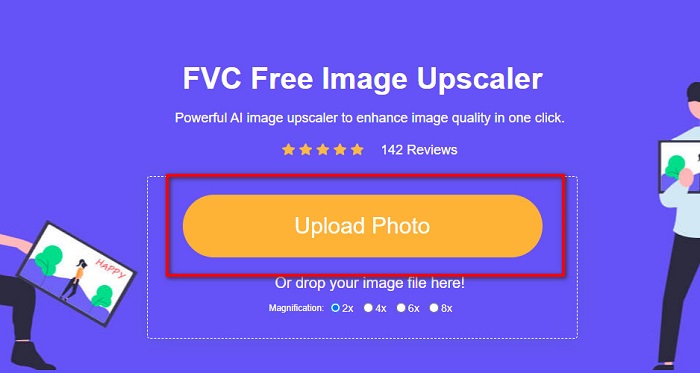
Trin 3. Derefter vil du se forudindstillingerne for forstørrelse, som du kan vælge imellem. Du kan vælge mellem 2x, 4x, 6x eller 8x.
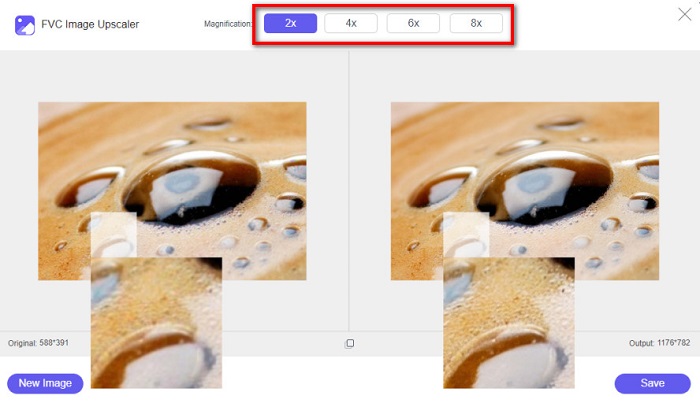
Trin 4. Flyt din markør for at se en forhåndsvisning af dit billede. Og hvis du er tilfreds med resultatet, skal du klikke på knappen Save nederst i højre hjørne af grænsefladen.
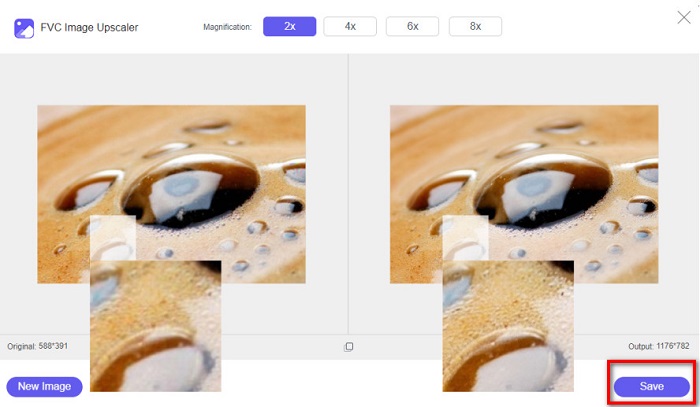
Image Resizer.com
Et andet fantastisk onlineværktøj til at ændre billedstørrelse, som du kan bruge, er Image Resizer.com. Image Resizer.com giver dig mulighed for at ændre størrelsen på dit billede ved at justere billedets dimensioner. Desuden har det en funktion til at beskære eller rotere dit foto. Det er også et begyndervenligt værktøj, fordi det har en brugervenlig grænseflade. Det indeholder dog mange irriterende annoncer, som kan distrahere dig.
Trin 1. Søg efter Image Resizer.com i din browser. Og i hovedgrænsefladen skal du klikke på knappen Select Image for at uploade det foto, du vil ændre størrelsen på.
Trin 2. På den følgende grænseflade kan du ændre dit billedes dimensioner efter mål eller procent. Skriv derefter den Width and Height, du foretrækker til dit billede.
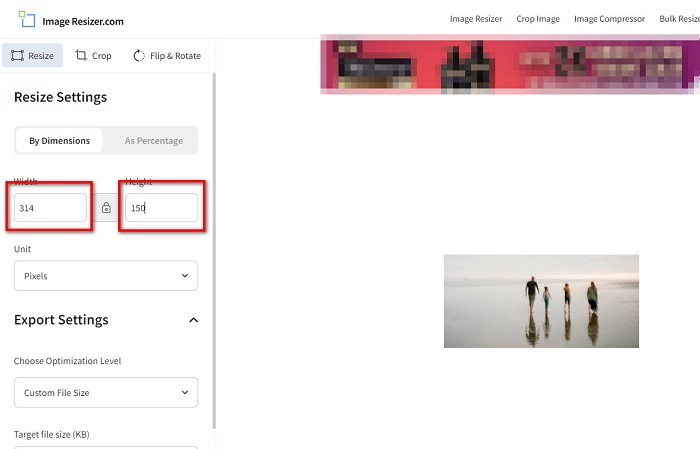
Trin 3. Når du er færdig med at ændre størrelsen på dit billede, skal du klikke på knappen Resize Image for at afslutte processen.
Del 3. Ofte stillede spørgsmål om FastStone Photo Resizer
Hvor meget koster FastStone Photo Resizer?
Du kan købe den fulde version af FastStone Photo Resizer til $19.95 (livstidslicens)
Er FastStone-fremviseren gratis?
FastStone Image Viewer er en billedfremviser, der bruges til Microsoft Windows. Du kan bruge FastStone Image Viewer gratis og uden beregning.
Ødelægger FastStone Photo Resizer billedkvaliteten?
Nej. Når du optimerer dit billede ved hjælp af FastStone Photo Resizer, mister du ikke kvaliteten af dit billede.
Konklusion
FastStone Photo Resizer er en fremragende applikation, hvis du vil ændre størrelsen på dit billede på din Windows-computer. Ud over det har det mange redigeringsfunktioner og er også et brugervenligt værktøj. Men hvis du spørger, om der findes en FastStone Photo Resizer til Mac, er svaret nej. Så hvis du ønsker en billed-resizer, der er tilgængelig på alle platforme, skal du bruge FVC Free Image Upscaler nu.
-
 Komplet guide til Imglarger – løsning til fotodesignere
 Imglarger er et af de mest fremtrædende billedløsningsværktøjer. Klik på denne side for at lære de fulde beskrivelser, fordele og ulemper, pris og alternativer af Imglarger.
-
 Bedste Photo Resizer-app online, offline, Android og iPhone
 Hvad er de bedste fotoresizer-apps? Klik på siden for at lære de fem mest effektive fotoresizer-apps, du kan bruge til at forbedre eller ændre størrelsen på din fil.
-
 6 måder at forstørre et billede på på nettet og offline [100% fungerer]
 Med den vejledning, vi tilføjer her, kan du nu nemt ændre størrelsen på et billede baseret på din foretrukne størrelse. Lær hvordan du gør det her!
