


 Video Converter Ultimate
 Skærmoptager
 Video reparation
 Sikker download
Sådan fjernes bideligt vandmærke fra dine videoer uden besvær
Hvis du leder efter gode og nemme måder at fjerne Biteable‑vandmærker fra dine videoer på, behøver du ikke bekymre dig længere. Helt ærligt kan det være irriterende og frustrerende at se en video med vandmærker. Du kan ikke rigtigt nyde den video, du ser. Derudover virker disse vandmærker forstyrrende på seerne. Det er forståeligt, at vandmærker bruges til at beskytte videoens ejer. Men at placere et stort vandmærke er ikke godt. Det giver kun negativ feedback fra folk, der elsker at se deres yndlingsvideoer. Et eksempel er Biteable‑vandmærkerne. Disse Biteable‑vandmærker stammer fra Biteable‑applikationen, hvor vandmærker automatisk tilføjes efter, at man har lavet eller gemt en video. Heldigvis kan du bruge forskellige programmer til at fjerne disse vandmærker fra dine videoer. Du kan se dine yndlingsvideoer uden at føle dig irriteret og frustreret. Hvis du vil kende de bedste og mest pålidelige programmer, du kan bruge til at fjerne disse vandmærker, så læs videre i denne artikel.

Del 1: Bedste måde at fjerne bideligt vandmærke fra videoer
Video Converter Ultimate er det mest fremragende program, du kan bruge til at fjerne Biteable‑vandmærker fra dine videoer. Derudover er denne glimrende software i stand til at fjerne andre irrelevante og forstyrrende objekter, såsom logoer, tekster, signaturer osv. Desuden er processen med at fjerne og gemme meget hurtig, så du ikke behøver at bruge meget tid. Video Converter Ultimate kan desuden give to enkle metoder til at fjerne vandmærker fra dine videoer: videobeskæreren og værktøjet til fjernelse af video‑vandmærker. Den har også flere redigeringsværktøjer, du kan få glæde af, såsom hastighedsregulering af video, videokonverter, videokompressor, farvekorrektion, collageværktøj, GIF‑fremstiller, videobeskærer, billedkonverter og mere. Det bedste ved dette værktøj er, at det er let at bruge, fordi det har en overskuelig og enkel brugerflade, som er perfekt til begyndere. Det understøtter også forskellige filformater som MP4, MOV, FLV, MKV, OGV, DIVX og flere. Endelig er Video Converter Ultimate tilgængelig til både Windows og Mac, hvilket er meget praktisk for brugerne. Hvis du vil fjerne et vandmærke fra en video, skal du følge de enkle trin nedenfor.
Brug af værktøjet Video Watermark Remover
Trin 1: Gå til Video Converter Ultimates hjemmeside, og download programmet. Fortsæt derefter med installationsprocessen. Når installationen er færdig, skal du starte programmet.
Gratis download til Windows 7 eller nyere Sikker download
Gratis download til MacOS 10.7 eller nyere Sikker download
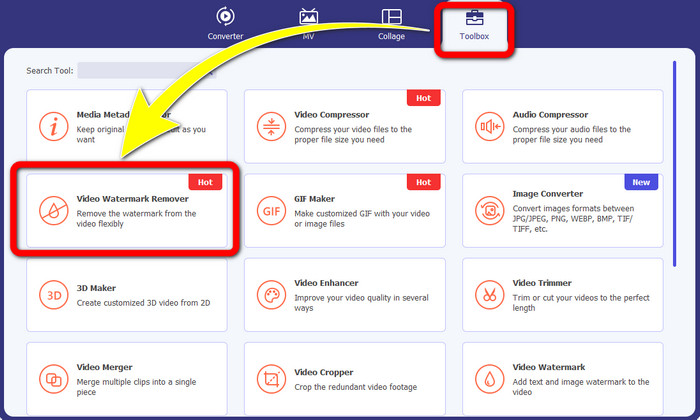
Trin 2: Når du har åbnet Video Converter Ultimate, skal du klikke på knappen Toolbox > Video Watermark Remover. Derefter vises en ny grænseflade på skærmen.
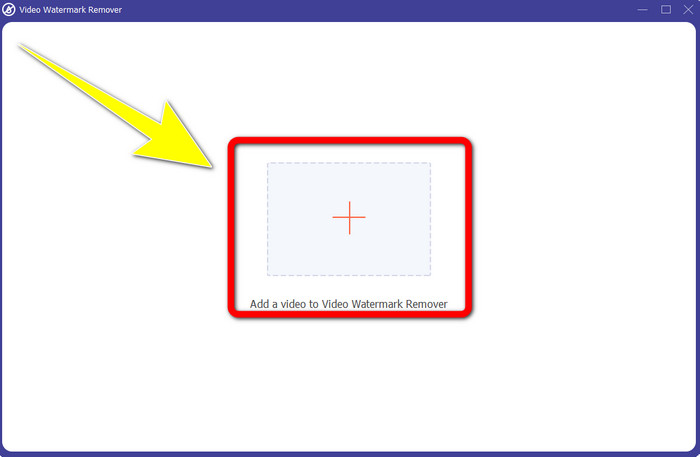
Trin 3: Når den nye grænseflade er dukket op på skærmen, skal du klikke på Plus-ikonet for at tilføje din video med et Biteable‑vandmærke.
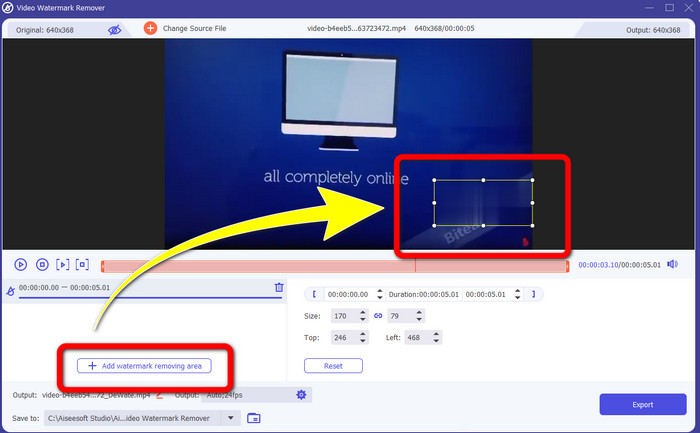
Trin 4: Når du har tilføjet din video, skal du klikke på Add Watermark Removing Area. Derefter vises en lille boks på din video. Træk boksen hen over vandmærket, så det bliver dækket.
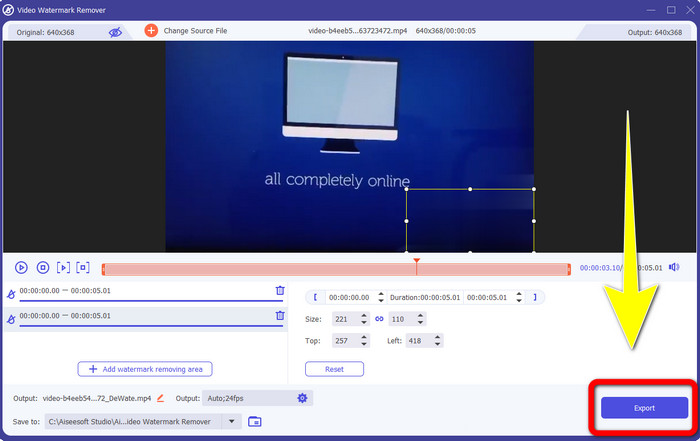
Trin 5: Når du har fjernet Biteable‑vandmærket fra din video, skal du klikke på knappen Export for at gemme dit endelige resultat.
Brug af Video Cropper-værktøjet
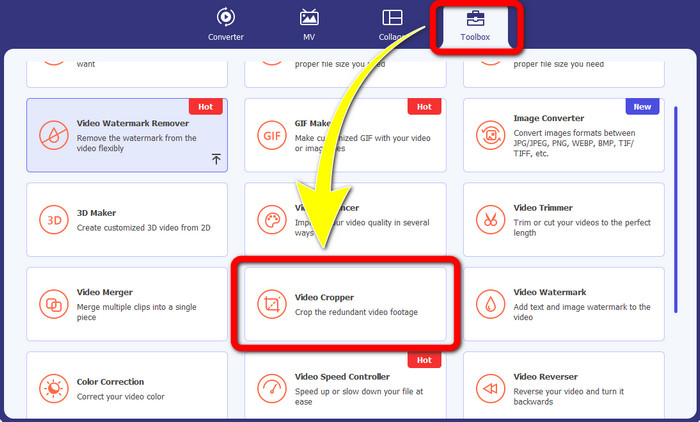
Trin 1: Start Video Converter Ultimate. Klik på knappen Toolbox > Video Cropper.
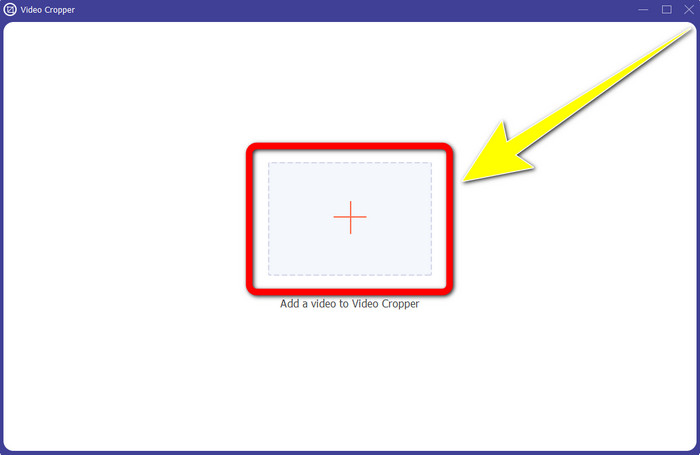
Trin 2: Når du har klikket på Video Cropper, vil en ny grænseflade dukke op på skærmen. Klik på Plus-ikonet, og tilføj din video med et Biteable‑vandmærke.
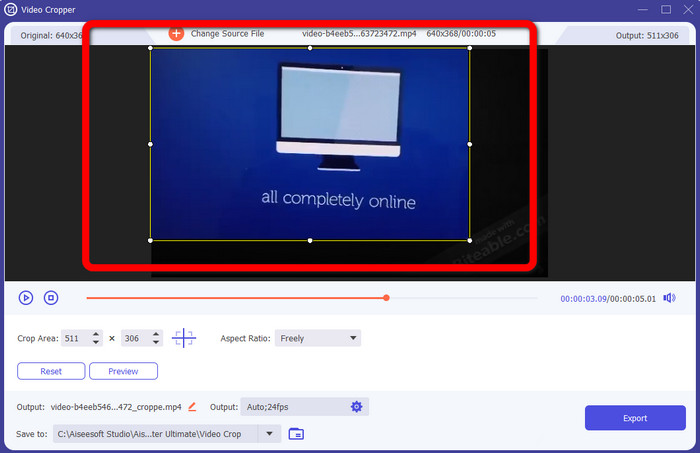
Trin 3: Når du har tilføjet din video, kan du nu Crop den for at fjerne vandmærkerne.
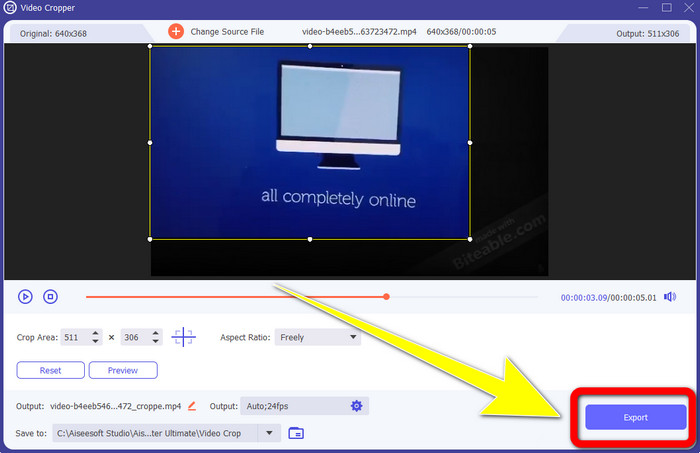
Trin 4: Når du er færdig med at beskære din video, skal du klikke på knappen Export og gemme din video uden Biteable‑vandmærke.
Del 2: Sådan fjerner du bideligt vandmærke fra videoer online
1. Brug af BeeCut
Hvis du ønsker at fjerne det bidende vandmærke gratis online, er BeeCut den bedste onlineapplikation, du kan bruge. Det er i stand til at fjerne vandmærker fra dine videoer. Det er et simpelt online værktøj, du kan bruge, som er perfekt til begyndere. Du kan fjerne bidende vandmærker fra fire videoer med blot et par trin.
Desuden har BeeCut mange redigeringsværktøjer, såsom trimning, klipning, opdeling og kombination af videoer. Derudover, hvis du vil lave en video, kan du tilføje undertekster til din video nedenfor, hvilket er praktisk for seerne. Det er dog langsomt med at uploade filer og gemme processer ved hjælp af dette værktøj. Du kan heller ikke bruge dette værktøj, hvis du ikke har en internetforbindelse. Hvis du vil fjerne bidelige vandmærker fra din video ved hjælp af dette onlineværktøj, skal du følge de få trin nedenfor.
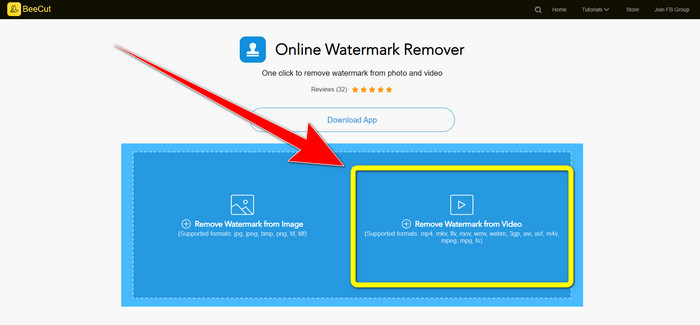
Trin 1: Gå ind på BeeCuts hjemmeside. Klik derefter på knappen Remove Watermark from Video, og tilføj din video med et Biteable‑vandmærke.
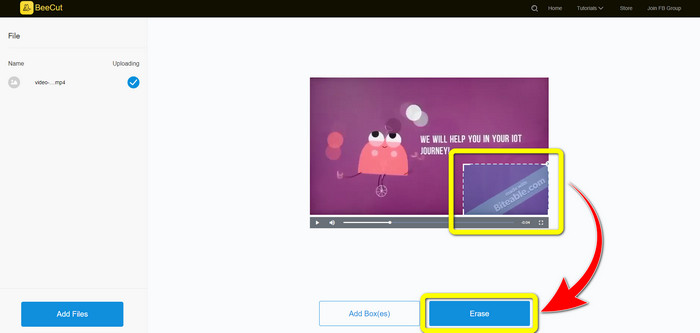
Trin 2: Når du har tilføjet din fil, vises en lille boks på din video. Træk den hen, så den dækker Biteable‑vandmærket. Når du er færdig med at dække vandmærkerne, skal du klikke på knappen Erase.
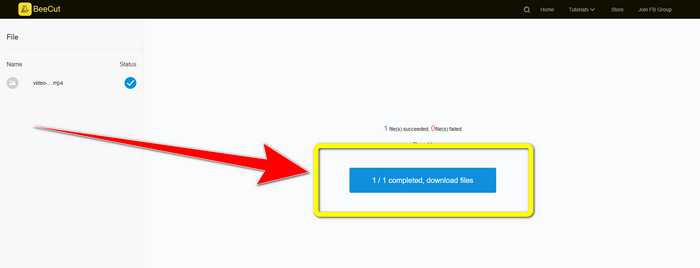
Trin 3: Når du har klikket på knappen Erase, skal du vente på, at fjernelsesprocessen bliver færdig. Derefter kan du downloade filen og nyde at se videoen uden Biteable‑vandmærket.
2. Brug af Blur Video Online
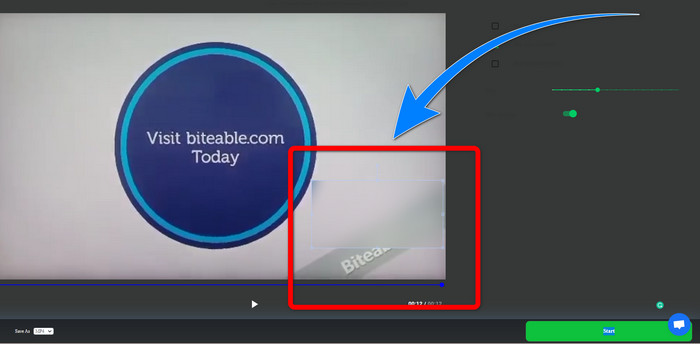
Hvis du stadig leder efter et andet program, som du kan bruge til at fjerne det bidende vandmærke fra din video online, er Blur Video Online et fantastisk værktøj for dig. Og Blur Video Online er tilgængelig for næsten alle enheder og browsere, som Google Chrome, Opera, IE, Mozilla Firefox og mere. Denne webafhængige applikation er dog for langsom til at importere videofiler, og processen med at fjerne vandmærker er tidskrævende. Det er også et internetafhængigt værktøj, hvilket betyder, at det kun fungerer, hvis du har en internetforbindelse. Følg de enkle trin nedenfor for at fjerne/sløre et bidebart vandmærke fra din video.
Trin 1: Gå til Blur Video Onlines hjemmeside. Klik derefter på knappen Click to Add File, og tilføj din video med et vandmærke.

Trin 2: Når du har indsat din video, vises en boks på din video. Træk den hen over vandmærkerne, og gem dit endelige resultat.
Relateret til:
Bedste måde at fjerne vandmærke fra Camtasia 9 på din Windows‑computer
Sådan fjerner du hurtigt vandmærkebanneret fra AVS Video Editor
Del 3: Ofte stillede spørgsmål om fjernelse af bidelige vandmærker fra videoer
Kan jeg fjerne et datostempel ved hjælp af Video Converter Ultimate?
Ja du kan! Video Converter Ultimate kan hjælpe dig med at eliminere forstyrrende objekter fra dine videoer, såsom datostempler, vandmærker, tekst osv.
Er det tidskrævende at fjerne vandmærker fra mine videoer?
Det afhænger af de applikationer, du bruger. Nogle applikationer kan øjeblikkeligt fjerne vandmærkerne fra dine videoer, og nogle applikationer tager tid at fjerne vandmærker.
Er der en vandmærkefjerner, jeg kan bruge uden at miste kvaliteten af mine videoer?
Ja, det er der! Du kan bruge Video Converter Ultimate. Det er ikke kun godt til at fjerne vandmærker og redigere videoer. Med dette program kan du fjerne vandmærker fra dine videoer uden at miste kvalitet.
Konklusion
At fjerne vandmærket fra dine videoer er en god idé, især hvis du vil se dine yndlingsvideoer uden unødvendige objekter. Denne artikel har givet dig praktiske programmer, du kan bruge til at fjerne Biteable‑vandmærker fra dine videoer. Til sidst er det bedste valg at bruge Video Converter Ultimate, hvis du leder efter det mest fremragende og bemærkelsesværdige program til at fjerne vandmærker fra dine videoer.
-
 Sådan fjerner du Powtoon-vandmærket ved hjælp af 4 effektive metoder
 Læs denne artikel for at lære, hvordan du fjerner Powtoon-vandmærket ved hjælp af de bedste værktøjer, vi inkluderede her og en tutorial.
-
 Apowersoft Watermark Remover Review – Funktioner, fordele og ulemper og priser
 Apowersoft Watermark Remover er et af de bedste fjernelse af vandmærker, der understøtter online og offline, klik her for at vide mere!
-
 3 af de nyeste Shutterstock-vandmærkefjernere, du nogensinde får brug for
 Kan du ikke lide Shutterstock-vandmærket knyttet til eksporteret video? Du kan bruge en Shutterstock vandmærkefjerner til at slette det effektivt.
