


 Video Converter Ultimate
 Skærmoptager
 Video reparation
 Sikker download
Sådan konverteres SVG til JPG hurtigt [Supernemme måder]
Du kan have brug for at konvertere et SVG‑billede til et JPG‑billede af flere grunde. En mulighed er at gøre redigeringen enklere. Et vektorbilledredigeringsprogram er nødvendigt til SVG‑filer, mens rasterbaserede billedredigeringsprogrammer er langt mere udbredte blandt brugere. Microsoft Paint og Adobe Lightroom hører til denne kategori. Det kan være muligt at redigere en SVG i Lightroom, hvis du først konverterer den til JPG. Deling på nettet er en anden grund til at konvertere SVG til JPG. JPG accepteres næsten altid af websites og apps, der tillader upload af billeder. Derimod er det usandsynligt, at de tager imod SVG. For eksempel accepterer Instagram JPG, men ikke SVG. Denne artikel giver dig praktiske metoder til at ændre SVG til JPG. Du vil også få kendskab til de bedste billedkonvertere, du kan bruge både online og offline.

Del 1. Sammenlign SVG og JPG
| Filformat | SVG | JPG |
| Filnavnsudvidelse | .svg | .jng |
| Udviklet af | World Wide Web Consortium | JPEG-udvalget |
| Udviklet af | SVG er et vektorbilledfilformat til 2D-grafik baseret på XML. Animation og interaktivitet understøttes. I XML-tekstfiler er SVG-billeder og deres adfærd defineret. Da SVG-filer kun er XML-filer, kan de redigeres med enhver teksteditor. | JPG er bruges til websteder og e-mail, fordi de har reducerede filstørrelser. Men da JPG er tabsgivende, vil det påvirke billedkvaliteten efter komprimering. Den resulterende "tabte" fil betyder, at kvaliteten er tabt. Hukommelseskortene til digitale kameraer bruger JPG-formatet. |
| Tekniske detaljer | SVG er et format, der bruges til at definere XML-baseret vektorbaseret grafik til internettet. Denne fil vil ikke miste billedkvalitet, selv når den zoomes ind eller ændres størrelse. SVG-filens elementer og attributter kan alle animeres. | JPG er et billedfilformat til redigering af stillbilleder. Det giver en symmetrisk kompressionsteknik, der er processorintensiv. Det er også tidskrævende i både kompression og dekompression. JPEG er en fælles standard for International Telecommunications Union. Det omfatter også Den Internationale Standardiseringsorganisation. |
| Tilknyttede programmer | Adobe Photoshop Adobe Preview Corel Paint Shop Pro Corel SVG Viewer | Microsoft Windows Photo Gallery Viewer Adobe Photoshop Adobe Preview Corel Paint Shop Pro |
Del 2. Bedste måde at konvertere SVG til JPG Online
Det bedste værktøj, du kan bruge, er FVC Free Image Converter. Det kan uden besvær konvertere SVG til JPG. Desuden er det muligt at konvertere flere SVG‑filer til JPG på samme tid. Det tilbyder en brugervenlig grænseflade med letforståelige instruktioner, hvilket er ideelt for brugere. Denne billedkonverter understøtter batchkonvertering. Derudover kan du downloade adskillige konverterede filer med ét klik. Et af de positive aspekter ved dette værktøj er, at det ikke har irriterende reklamer. Du kan fokusere på at konvertere filer uden at støde på annoncer. Derudover accepterer det inputfiler i forskellige formater, såsom PNG, BMP, TIFF, GIF osv. Det er heller ikke nødvendigt at installere denne konverter. Den kan styres direkte i din browser. Desuden vil billedkvaliteten efter konvertering være den samme som originalen. På den måde kan du sikre, at dit billede stadig ser fremragende ud. Dine oplysninger er også sikre på dette website. Efter konvertering og lagring af billederne bliver alle dine data automatisk slettet.
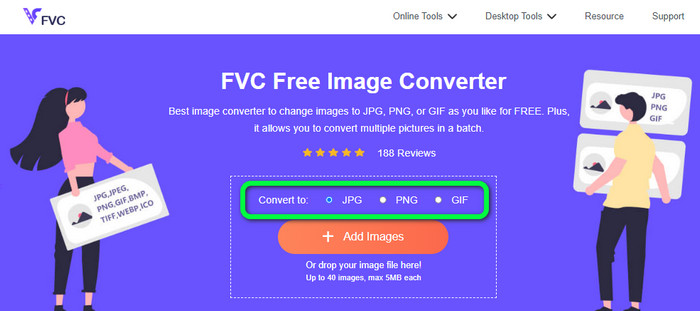
Trin 1: Gå til hovedsiden for FVC Free Image Converter. Før du tilføjer SVG‑billedfilen, skal du vælge dit ønskede outputformat. Klik på formatet JPG i formatindstillingerne.
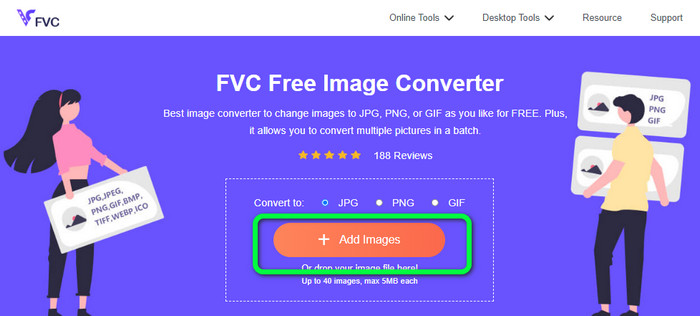
Trin 2: Klik på knappen Add Images midt på skærmen. Derefter vises din filmappe på skærmen. Vælg det SVG‑billede, du vil konvertere, og åbn det. Du kan også trække SVG‑filen direkte ind i boksen. Klik på knappen Add Images igen for at udføre en batchkonvertering.
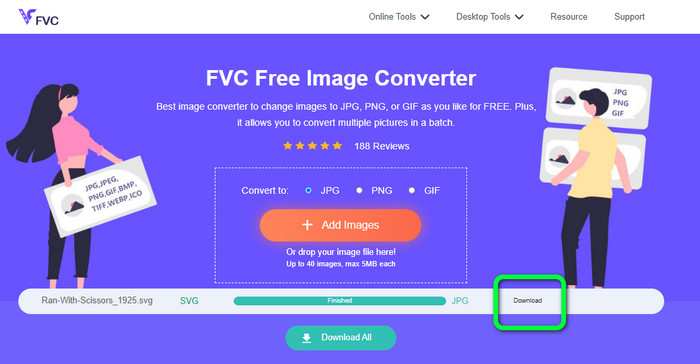
Trin 3: Mens filen uploades, bliver billedet automatisk konverteret. Som sidste trin skal du klikke på knappen Download i højre side af grænsefladen. Når filen er gemt, kan du åbne det konverterede billede på din computer.
Del 3. Nem metode til at konvertere SVG til JPG på Windows
I dette afsnit får du den bedste metode til at konvertere SVG til JPG offline på Windows‑computere. Brug af HitPaw Video Converter er en af de effektive metoder. Image Convert‑funktionen i HitPaw Video Converter gør batchkonvertering af billeder enkel. Du kan importere fotos og grafik i forskellige formater og konvertere dem til det format, du ønsker. Til justering af billedformat for mange eller enkelte billeder ad gangen er dette et glimrende valg. Programmet understøtter også alle almindeligt anvendte fotoformater. Disse formater er PNG, JPG, HEIC, RAW, BMP og flere. Så du kan også bruge dette værktøj til at konvertere BMP til JPG eller PNG. Derudover tilbyder dette downloadbare program flere funktioner end blot konvertering. Du kan downloade musik‑ og videofiler med softwaren. Dine videoer kan også redigeres ved at rotere, beskære og anvende filtre. HitPaw Video Converter kan dog være svær at bruge, især for begyndere. Det har en forvirrende grænseflade, som gør det svært at forstå. Installationsprocessen tager også lang tid.
Trin 1: Installer HitPaw Video Converter på din Windows‑computer. Kør derefter programmet efter installationen.
Trin 2: Gå til panelet Toolbox, og vælg værktøjet Image Converter. Vælg den SVG‑billedfil, du vil konvertere, i din computerens mappe.
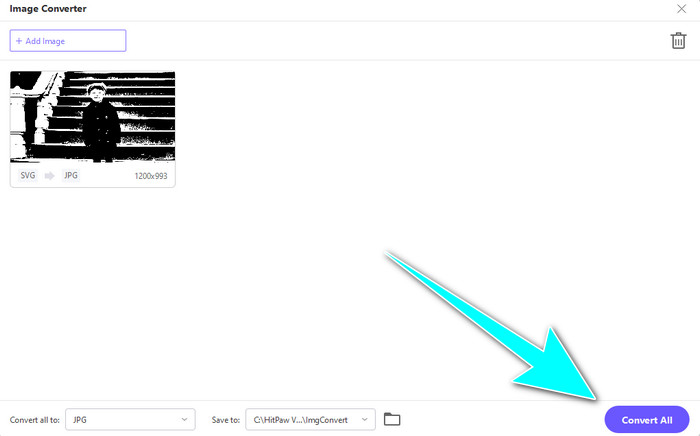
Trin 3: Klik på indstillingen Convert All to i nederste venstre hjørne af grænsefladen. Vælg derefter JPG som dit outputformat.
Trin 4: Klik til sidst på knappen Convert All i nederste højre hjørne af grænsefladen. Vent på, at konverteringen afsluttes. Derefter kan du allerede åbne dit billede i PNG‑filformat.
Del 4. Sådan konverteres SVG til JPG på Mac
Hvis du ønsker at konvertere SVG til JPG på Mac, kan du bruge BatchPhoto Pro. Det understøtter forskellige billedformater, herunder JPG, PNG, ICO, SVG, EPS og mere end 170 andre. Du kan endda gemme billeder som PDF‑filer. Det tilbyder også batchkonvertering, så du kan konvertere flere filer på samme tid. Derudover har det, ud over billedkonvertering, også redigeringsfunktioner. Du kan redigere dit foto ved at ændre størrelse, rotere og justere farveindstillingerne. Du skal dog købe programmet, hvis du vil bruge det kontinuerligt. Det tilbyder kun en prøveversion i få dage. Konverteringsprocessen er også svær at forstå. Ikke‑professionelle brugere vil finde det kompliceret at konvertere billeder.
Trin 1: Download og installer BatchPhoto Pro. Du kan hente den gratis prøveversion. Når programmet er installeret, skal du starte det.
Trin 2: Vælg indstillingen Add Photos øverst i grænsefladen. Når du har klikket, skal du tilføje de SVG‑billeder, du vil konvertere til JPG‑format. Du kan tilføje flere filer på én gang.
Trin 3: Gå til indstillingen Set Up øverst i grænsefladen. Gå til indstillingerne for Output Format, og vælg JPG‑formatet.
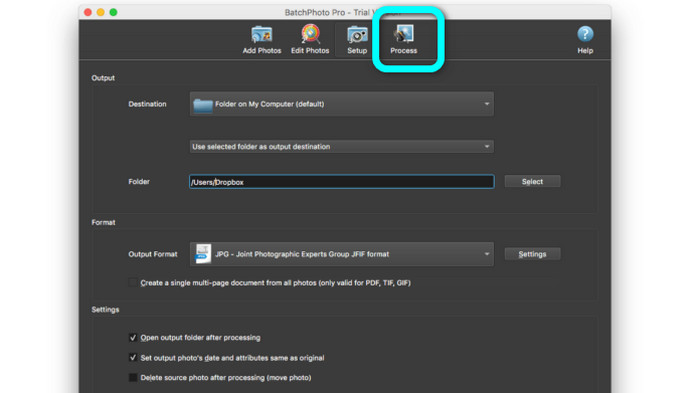
Trin 4: Klik på indstillingen Process for at starte konverteringsprocessen. Når den er færdig, skal du gå til din outputmappe og tjekke dit konverterede billede.
Del 5. Ofte stillede spørgsmål om konvertering af SVG til JPG
1. Hvorfor skal du konvertere SVG til JPG?
Sammenlignet med SVG er JPG mere velegnet til sociale medier og andre enheder. Det er et af de populære billedformater, du kan bruge i dag. I SVG kan du kun åbne denne fil i webbrowsere. Så det er nødvendigt at konvertere SVG til JPG for mere kompatibilitetsbrug.
2. Hvad er fordelene og ulemperne ved SVG-filer?
Du kan udvide eller formindske en SVG-fil til enhver størrelse uden at miste kvalitet. SVG'er er ligeglade med skærmtypen eller billedstørrelsen. Måden de ser ud på er konstant. SVG'er giver også designere og udviklere stor kontrol over, hvordan de ser ud. Det er bedre end at redigere dem i en teksteditor. Selv andre visuelle elementer som skygger og farveovergange er justerbare. Der er dog bedre formater end SVG til et detaljeret foto i høj kvalitet. Brugere konstruerer vektorgrafik ved hjælp af punkter og stier i stedet for pixels. Kode er også nødvendigt.
3. Hvordan åbner jeg en SVG-fil?
Den bedste måde at åbne en SVG‑fil på er at bruge din browser. Tryk på ctrl+o på tastaturet. Vælg derefter den SVG‑fil, du vil se, og klik på Open.
Konklusion
Det var det! Ovenstående information viser, hvordan du kan konvertere SVG til JPG på Windows, Mac og online. Det kan dog være besværligt at downloade en billedkonverter. Hvis du derfor vil have en enklere måde at konvertere billeder på, så brug FVC Free Image Converter. Denne online billedkonverter lader dig konvertere billeder direkte i browseren.
-
 Nyttige metoder til nemt at konvertere TIFF til JPG/PNG
 Gå ikke glip af disse fremragende måder at omdanne TIF til JPG/PNG-formater. Dette indlæg vil give den nødvendige information, du har brug for at vide. Det inkluderer deres forskelle.
-
 Konverter JPEG til JPG effektivt [Fem metoder på listen]
 Kom og få de mest ligetil tutorials om konvertering af JPEG til JPG billedfilformat. Klik på denne guidepost og begynd at lære dine foretrukne metoder
-
 Top 5 førende tutorials til hurtigt at konvertere PNG til JPG
 Hvis du har brug for at konvertere din PNG-fil til JPG-format, kan du lære de bedste måder her. Du vil også lære forskellen mellem PNG- og JPG-filformater
