


 Video Converter Ultimate
 Skærmoptager
 Video reparation
 Sikker download
Ændr størrelse på video til TikTok for at få dine TikTok-videoer til at skille sig ud fra mange
Er du klar til at tage dine TikTok-videoer til næste niveau? En måde at gøre dine videoer mere visuelt tiltalende på er ved at beskære dem! Beskæring giver dig mulighed for at fokusere på de vigtigste dele af dit indhold og samtidig give det et friskt og unikt udseende.
Bare rolig, hvis du aldrig har beskåret en video før. Det er supernemt! På ingen tid kan du beskære dine videoer som en professionel og skabe indhold, der skiller sig ud på platformen. Så tag din telefon, og lad os komme i gang. Her vil vi introducere forskellige virkeligt effektive metoder til at ændre størrelse på videoer til TikTok.

Del 1. Grunde til at beskære videoer til TikTok
Da TikTok er en populær platform til at vise indhold om uddannelsesmæssigt, rekreativt og meget mere, har de deres grunde til at beskære videoer. Når det er sagt, er der mange grunde til at beskære videoer til TikTok. I dette afsnit vil vi nævne nogle af de berømte grunde.
Beskæring af din video hjælper dig med at finde de mest afgørende aspekter af dit indhold, så du kan fremhæve og understrege de mest vitale punkter. Dette kan hjælpe dig med at få din pointe igennem og holde dit publikum interesseret. En anden, beskæring af en video kan gøre den mere æstetisk tiltalende ved at fremhæve forgrundsmotivet eller handlingen og eliminere distraktioner.
Bortset fra det ses TikTok-videoer typisk i portrættilstand, men du kan have indhold, der er optaget i liggende eller firkantet, så du bliver nødt til at justere billedformatet i overensstemmelse hermed. Hvis din video ser bedst ud på platformen, skal du muligvis beskære den til det korrekte billedformat. Endelig kan beskæring bruges kreativt til at give dine videoer et udseende, der er helt dit eget. Du kan få mere opmærksomhed og følgere, hvis du gør dette.
Del 2. Sådan beskærer du en video ved hjælp af TikTok
TikTok er en social medieplatform, der hurtigt bliver en af de mest populære apps til deling af kortformede videoer. Det er, som om denne platform kommer med en TikTok video resizer funktion. Beskæring lader dig fokusere på de mest væsentlige dele af din video og gøre den mere visuelt tiltalende. Uanset om du ønsker at fremhæve et bestemt emne eller handling eller skabe et unikt look, kan beskæring hjælpe dig med at nå dit mål. Her er trinene til, hvordan man beskærer videoer ved hjælp af TikTok:
Trin 1. Optag eller upload den video, du vil beskære. Når den er klar, skal du trykke på knappen med Fluebenet for at gå videre til redigeringsskærmen.
Trin 2. På redigeringsskærmen vil du se forskellige muligheder, herunder Trim, Lyd og Effekter. Brug dine fingre til at justere videoens størrelse og position for at beskære den, som du ønsker.
Trin 3. Når du er tilfreds med beskæringen, skal du trykke på knappen Gem for at gemme dine ændringer. Du kan redigere din video ved at tilføje filtre, musik og tekst efter ønske. Når du er klar, skal du trykke på Næste-knappen for at gå videre til skærmen, hvor du kan poste.
Trin 4. Tilføj en billedtekst og relevante hashtags, og tryk derefter på Post for at dele din beskårne video med TikTok-fællesskabet. Processen er den samme, hvis du vil lære, hvordan man beskærer en video på TikTok på iPhone.
Del 3. Sådan beskæres en video til TikTok med tredjepartsværktøjer
Vi leverede nogle nedenfor, hvis du leder efter andre apps end TikTok til at beskære videoer. Tjek dem ud og lær, hvordan du beskærer en video på TikTok ved hjælp af disse værktøjer.
1. Video Converter Ultimate
FVC Video Converter Ultimate er et kraftfuldt videoredigeringsprogram, der kan hjælpe dig med at beskære og redigere dine videoer til TikTok. Med sin brugervenlige grænseflade og avancerede redigeringsfunktioner er FVC Video Converter Ultimate et glimrende værktøj for alle, der vil skabe videoer i høj kvalitet til platformen.
Nøglefunktioner i FVC Video Converter Ultimate:
1. Beskær og ændr størrelse på videoer: Med FVC Video Converter Ultimate kan du beskære dine videoer til enhver størrelse eller ethvert billedformat, du behøver til TikTok.
2. Redigér og forbedr videoer: FVC Video Converter Ultimate leveres også med en række redigeringsværktøjer, som lader dig justere lysstyrke, kontrast, mætning og andre aspekter af din video.
3. Højkvalitets output: FVC Video Converter Ultimate bruger avancerede algoritmer til at sikre, at dine videoer konverteres i den højest mulige kvalitet.
4. Hurtig konverteringshastighed: FVC Video Converter Ultimate er designet til at konvertere dine videoer hurtigt og effektivt.
Her er trinene til at ændre størrelsen på videoer til TikTok ved hjælp af dette program:
Trin 1. Hent programmet
For at komme i gang skal du blot downloade softwaren gratis ved at klikke på ikonet nedenfor. Programmet kan derefter startes, når det er installeret.
Free DownloadTil Windows 7 eller nyereSikker download
Gratis downloadTil macOS 10.7 eller nyereSikker download
Trin 2. Tilføj en video
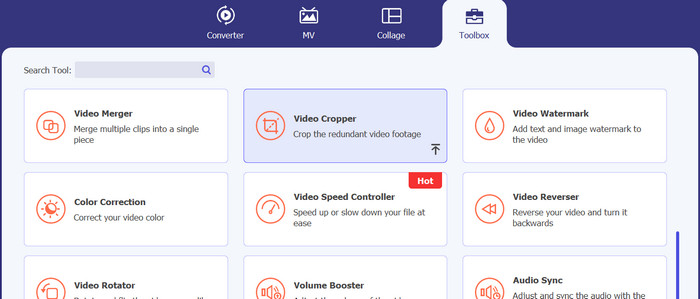
For at få adgang til Video Cropper skal du klikke på menuen Værktøjskasse. Klik på plus-symbolet for at importere en videofil fra din computers harddisk til beskæring.
Trin 3. Beskær videoen
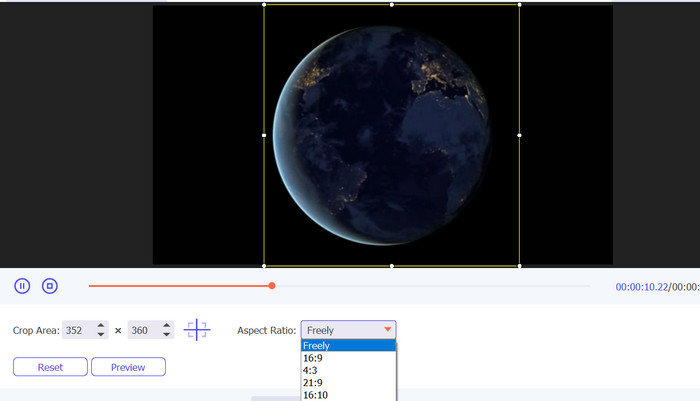
Beskær videoen til det passende billedformat. Billedformatet og kanterne kan justeres med skyderne. Til sidst kan du finjustere video- og lydoutputindstillingerne i undermenuen Output.
Trin 4. Gem videoen
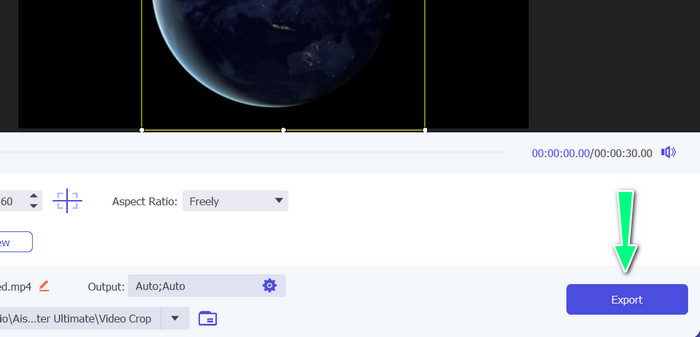
Knappen Eksportér lader dig gemme den beskårne video på din computer, når du har forhåndsvist ændringerne i realtid.
Yderligere læsning
2 enkle måder til, hvordan du sætter fart på en video på TikTok
4 effektive måder at fjerne TikTok-vandmærker fra TikTok-videoer
2. Vid.Sjov
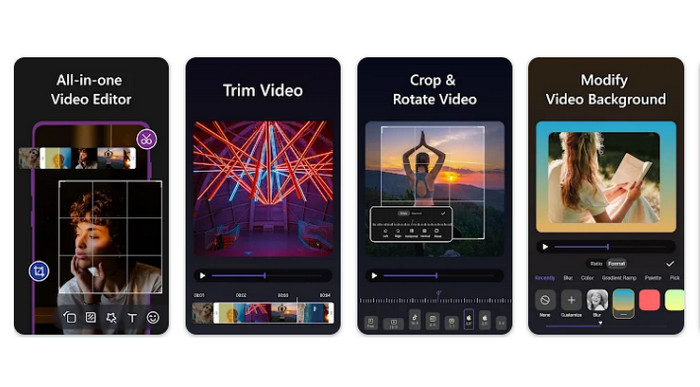
Hvis du leder efter en hurtig måde at beskære videoer på Android til TikTok, er Vid.fun et godt valg. Vid.fun har en række billedformater at vælge imellem, inklusive 1:1, 4:5, 9:16 og flere, så du kan være sikker på, at dine videoer ser flotte ud på TikTok. Følg den enkle vejledning nedenfor for at lære, hvordan du bruger det.
Trin 1. Hent Vid.fun fra Google Play, og start et nyt projekt.
Trin 2. Træk det klip, du vil beskære, fra din enheds galleri eller kamerarulle ned på tidslinjen.
Trin 3. Træk i hjørnerne af den firkant, der er placeret på filmen. Træk blot i hjørnehåndtagene for at beskære videoen. Del derefter filmen med familien, eller læg den op online.
Konklusion
At beskære en video på TikTok er en enkel proces, der kan udføres direkte i appen. Du kan også lære at ændre størrelsen på en video til TikTok med de nævnte programmer. Ved at følge trinnene i denne vejledning kan du beskære dine videoer til det perfekte billedformat for optimal visning på TikTok.
-
 3 effektive måder at tilføje videoer og billeder sammen på Tiktok
 Vil du vide, hvordan du tilføjer billeder på Tiktok-videoer? I så fald skal du klikke og læse denne artikel for at lære, hvordan du nemt tilføjer billederne til din Tiktok-video.
-
 Lær hvordan du bremser en video på Tiktok [Easy Ways]
 Vil du vide, hvordan man bremser en video på Tiktok? Sæt farten ned eller fremskynd din TikTok-video perfekt ved at følge disse nemme trin.
-
 Sådan beskæres en MP4-fil uden at miste kvaliteten af videoen [2023]
 Lær, hvordan du beskærer MP4 med enkle trin, der kun er til rådighed for dig. Så hold tempoet oppe, fordi vi præsenterer dig for de bedste af de bedste beskæringsværktøjer, du kan bruge.
