


 Video Converter Ultimate
 Skærmoptager
 Video reparation
 Sikker download
Cut WMA Files: Ultimate Guide til Windows- og Mac-brugere
Det er sjovt at redigere lydfiler – lige indtil du skal håndtere lange WMA-spor, der virker umulige at klippe i. Uanset om du er podcaster, musiker eller bare en, der elsker at nørkle med lyd, kan at klippe WMA-filer virke som en uoverskuelig opgave uden de rette værktøjer og den nødvendige viden. Denne artikel har til formål at gøre processen enkel for både Windows- og Mac-brugere ved at give dig trin-for-trin-vejledninger og de bedste værktøjer til at gøre din lydredigering mere smidig og effektiv. Læs videre i denne artikel for flere oplysninger.

Del 1: Bedste måde at klippe WMA-fil på Windows/Mac
Den bedste og mest komplette måde at klippe WMA-filer på, både i Windows og på Mac, er ved hjælp af den nøje udvalgte Video Converter Ultimate. Dette alt-i-en video- og lydkonverteringsværktøj fungerer særligt godt med WMA-formater, især når det gælder klipning. Værktøjet har en specialfunktion, der nemt beskærer lydfiler. Det er især nyttigt for dem, der skal klippe WMA-filer, som er upraktisk lange, eller som indeholder uønskede dele eller sektioner. Desuden kan du med dette værktøj manuelt vælge den del af WMA-filen, du vil klippe, eller du kan lade den trimme automatisk ved hjælp af dens hurtige klippefunktion (Fast Slip).
Trin 1. Download og installer først Video Converter Ultimate på din Mac- eller Windows-computer.
Gratis download til Windows 7 eller nyere Sikker download
Gratis download til MacOS 10.7 eller nyere Sikker download
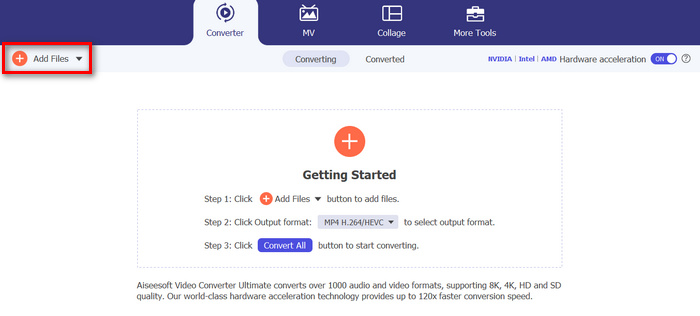
Trin 2. For at importere de WMA-filer, du vil klippe, skal du klikke på knappen Add Files.
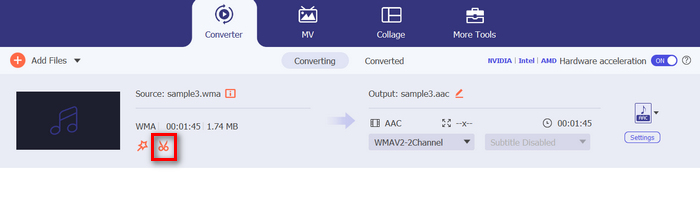
Trin 3. Klik derefter på knappen Cut.
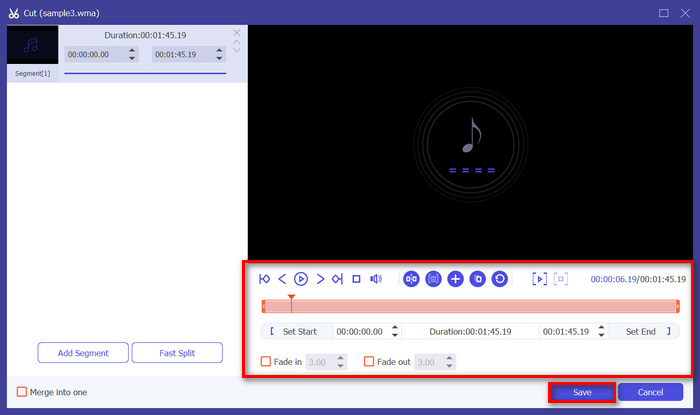
Trin 4. For at trimme dine WMA-filer kan du gøre det manuelt ved nemt at justere eller flytte start- og slutbjælken på klippet ved at trække den fra venstre mod højre eller ved at indtaste start- og sluttidspunktet for den del af WMA-filen, du vil trimme.
Denne proces skærer automatisk delen af lyden ud baseret på det tidspunkt, hvor du vil starte og afslutte trimningen.
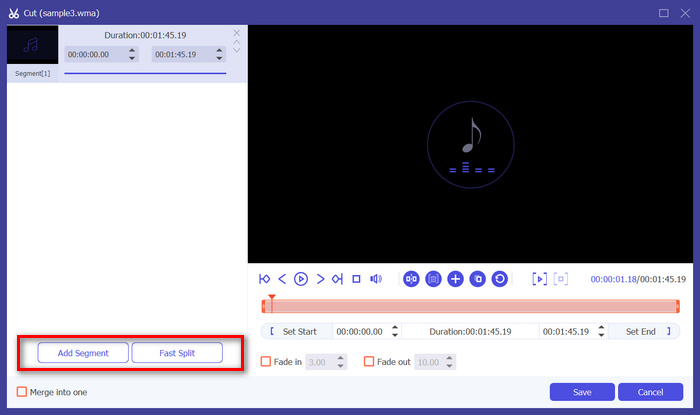
Trin 5. Hvis du i stedet vil klippe ved hjælp af funktionen Fast Slip trimmer, skal du blot klikke på knappen Fast Slip ved siden af knappen Add Segment. Vælg derefter en tilstand, du vil opdele segmentet efter. Hvis du vælger at opdele efter gennemsnit, skal du blot angive antallet, men hvis du vil opdele efter tid, skal du angive tiden. Klik derefter på knappen Save.
Trin 6. Til sidst, for at eksportere den trimmede WMA-fil, skal du klikke på knappen Convert All.
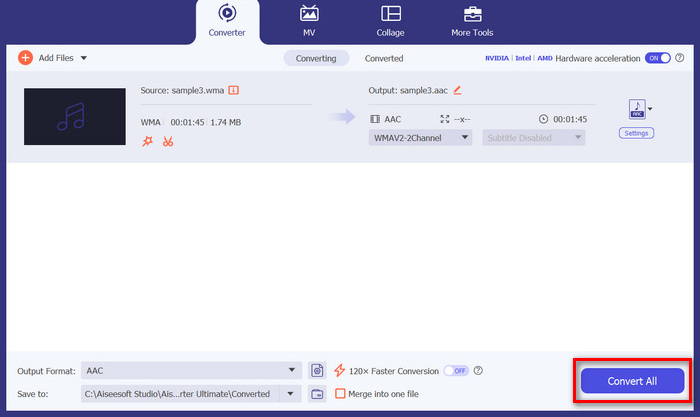
Når det kommer til at skære WMA-filer, er denne FVC-valgte Video Converter Ultimate virkelig en must-have-løsning. Dens enkle og brugervenlige grænseflade sikrer, at du ubesværet og præcist kan trimme dine WMA-filer, og dens forskellige trimningsmuligheder giver dig fleksibilitet til, hvordan du nemt vil klippe dine lydfiler.
Del 2: Klip WMA-fil online gratis
Audio Trimmer er et gratis værktøj, der giver brugerne mulighed for at trimme lydfiler på farten. Dette understøtter en lang række populære lydformater, inklusive WMA, hvilket gør dette værktøj til et af de bedste alternativer, hvis du foretrækker at klippe WMA-filer online.
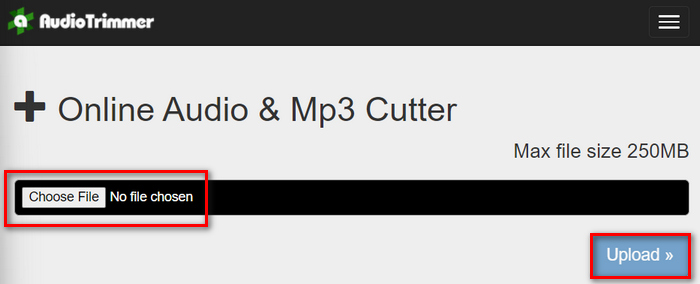
Trin 1. For at importere de WMA-filer, du vil klippe, skal du klikke på knappen Choose File og derefter klikke på knappen Upload.
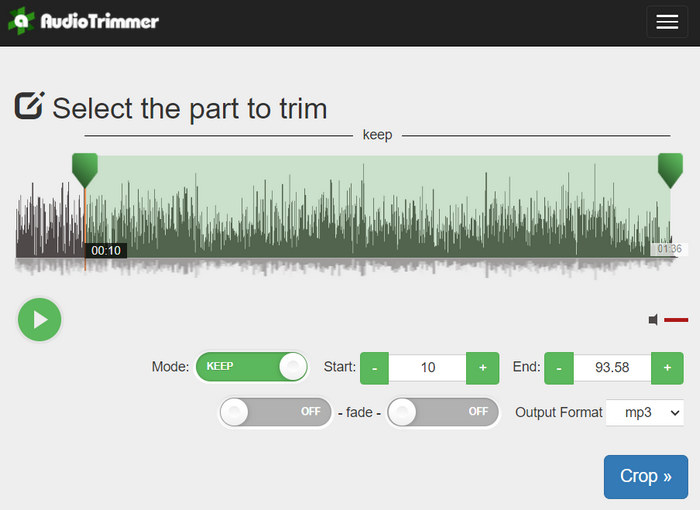
Trin 2. Træk nu i bjælken nedad, og vælg den del af lydsporet, du vil trimme. Når du er færdig, skal du klikke på knappen Crop.
Trin 3. For at gemme din trimmede WMA-fil skal du til sidst bare klikke på knappen Download.
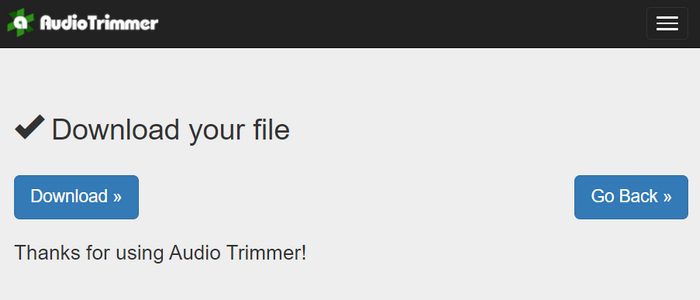
Så er det gjort, og du kan afspille dine klip med WMA-afspilleren for at se, om du har klippet dem korrekt. Med dens enkle og meget intuitive grænseflade tager det kun 3 trin at klippe WMA-filer. Selvom den gør det let at trimme lydfiler, er det ikke alle brugere, der kan få fuldt udbytte af dette gratis onlineværktøj, da det er begrænset til behandling af filer på under 250 MB.
Del 3: Skær WMA med VLC Media Player
VLC Media Player er en meget brugt open source medieafspiller på grund af dens alsidighed. Dette værktøj understøtter en lang række lyd- og videoformater, inklusive WMA-filer. Ud over dets funktioner til afspilning, streaming og optagelse af medier, kan dette værktøj også bruges til at klippe WMA-filer. Med dette kan brugere nemt trimme sektioner ved at optage i realtid uden at skulle ændre afspilningstiden manuelt.
Trin 1. Åbn VLC Media Player. Træk og slip blot den WMA-fil, du vil trimme.
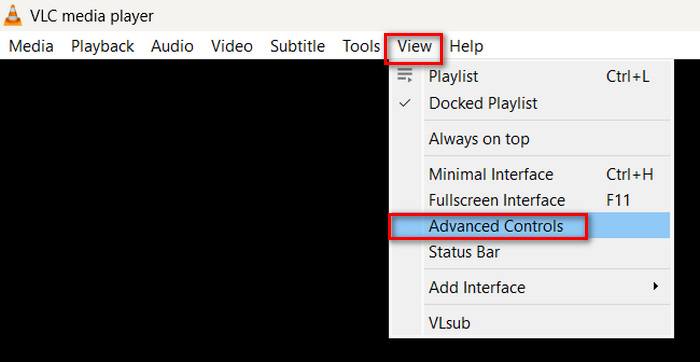
Trin 2. Lyden begynder automatisk at afspille. Sæt den på pause et øjeblik, og klik derefter på knappen View, og markér indstillingen Advanced Controls. Du vil nu se fire nye knapper vises over afspilningsikonet.
Trin 3. Træk statusbjælken til det punkt, hvor du vil starte dit klip. Justér nu bjælken til det sted, hvor du vil begynde at trimme din WMA-fil. Når du er klar, skal du afspille den og klikke på knappen Record.
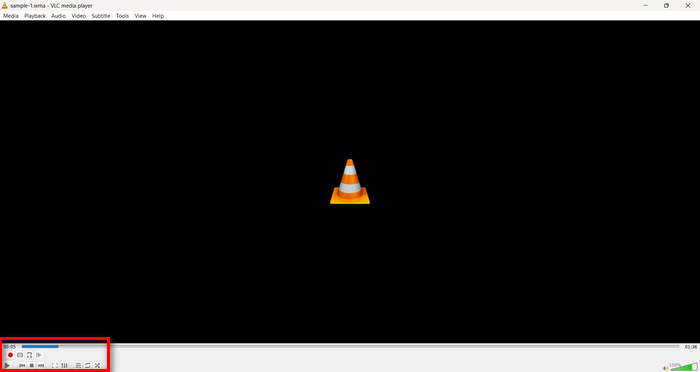
Trin 4. Når du når slutningen af den sektion, du vil gemme, skal du klikke på knappen Record igen for at stoppe optagelsen.
Undgå at trække i statusbjælken for at ændre afspilningstiden, mens du optager, da VLC skal optage segmentet i realtid. Hvis du kan lide dette værktøj, bør du ikke gå glip af VLC-alternativerne her.
Del 4: Ofte stillede spørgsmål om skæring af WMA
Hvordan klipper jeg en del fra en lydfil?
For at klippe en del fra en lydfil kan du bruge værktøjer som Video Converter Ultimate. For at gøre det skal du blot importere din WMA-fil, klikke på knappen Klip og justere start- og sluttidspunkterne.
Er WMA bedre end MP3?
WMA har ofte bedre lydkvalitet ved lavere bitrater sammenlignet med MP3, hvilket giver mindre filstørrelser med god lydkvalitet. MP3 er dog mere udbredt og understøttes på langt flere enheder og platforme. Valget mellem WMA og MP3 afhænger af dine behov for kvalitet og kompatibilitet. Du kan også hurtigt ændre WMA til MP3 med WMA til MP3-konverteringsværktøjerne.
Hvordan trimmes lydfiler i Windows Media Player?
For at trimme lydfiler i Windows Media Player skal du bruge et plugin kaldet SolveigMM WMP Trimmer Plugin Home Edition. Dette plugin gør det muligt for brugere nemt at trimme lydfiler direkte i Windows Media Players grænseflade, hvilket giver en bekvem løsning til lydredigeringsopgaver.
Konklusion
At klippe WMA-filer behøver ikke at være stressende. Uanset om du foretrækker software som Video Converter Ultimate, et onlineværktøj som Audio Trimmer eller den alsidige VLC Media Player, findes der effektive metoder for både Windows- og Mac-brugere. Vælg den metode, der passer bedst til dig, og begynd at redigere dine lydfiler uden besvær. Klar til at gøre din lydredigering lettere? Prøv en af disse metoder i dag!
-
 2 metoder til at konvertere FLV til WMA-lyd [gratis og online]
 Vil du udtrække WMA-lyd fra FLV-video? Her er 2 gratis WMA-lydudtræk til at konvertere FLV (Flash Video) til WMA (Windows Media Audio) med hurtig konverteringshastighed på Mac OS X og Windows 10/8/7.
-
 Topvalgte WMA Metadata Editors, du ikke bør gå glip af [2024]
 Hvorfor kan jeg ikke redigere WMA-tags? Dette problem er almindeligt hos brugere' forespørgsler. Men i dag vil vi give dig de WMA-meta-editorer, du kan bruge i 2024.
-
 8 måder at konvertere MP4 til MP3-lyd (batchkonvertering og stor størrelse)
 Hvis du vil udtrække MP3-lyd fra MP4-video, kan du tjekke denne artikel og få 8 løsninger. Der er online og offline måder at konvertere MP4 til MP3 på din telefon eller computer med lethed.
