


 Video Converter Ultimate
 Skærmoptager
 Video reparation
 Sikker download
Sådan flettes MPG-filer på computeren
Når du forsøger at rippe en film fra DVD til computer, vil den som regel blive gemt i MPG-format. Da den rippede film altid bliver opdelt i flere korte MPG-klip, vil du måske gerne samle flere filmklip i MPG-format til én fil for at få den komplette film. I denne artikel viser vi dig, hvordan du samler MPG-filer på 2 måder.

Del 1. Sådan tilsluttes MPG-filer med Video Converter Ultimate
Hvis du vil flette MPG-film og redigere dem, har du muligvis brug for professionel software til videotilslutning. Video Converter Ultimate er den bedste måde at løse dit problem på. Med kraftfulde funktioner til videofletning, konvertering og redigering er du velkommen til at deltage i mange MPG-filer og justere dem på din computer.
- 1. Deltag i og konverter forskellige typer videoformater inklusive MPG-filer med et enkelt klik.
- 2. Flere MPG-videoredigeringsfunktioner inklusive trimning, opdeling af rotation og tilføjelse af vandmærke og undertekster.
- 3. Speciel værktøjskasse, som giver dig MPG-videoforstærker til at opgradere videokvaliteten.
- 4. Tilføj tema og filtre for at dekorere dine mpg-filmklip
Gratis download til Windows 7 eller nyere Sikker download
Gratis download til MacOS 10.7 eller nyere Sikker download
Trin 1. Download og installer Video Converter Ultimate. Vælg grænsefladen Converter. Derefter kan du tilføje de MPG-filer, du vil samle, ved at klikke på feltet Add Files i midten af grænsefladen. Du kan også trække flere MPG-filer ind i feltet for at tilføje dem. Programmet understøtter, at du tilføjer flere MPG-filer og sammenfletter dem til én.
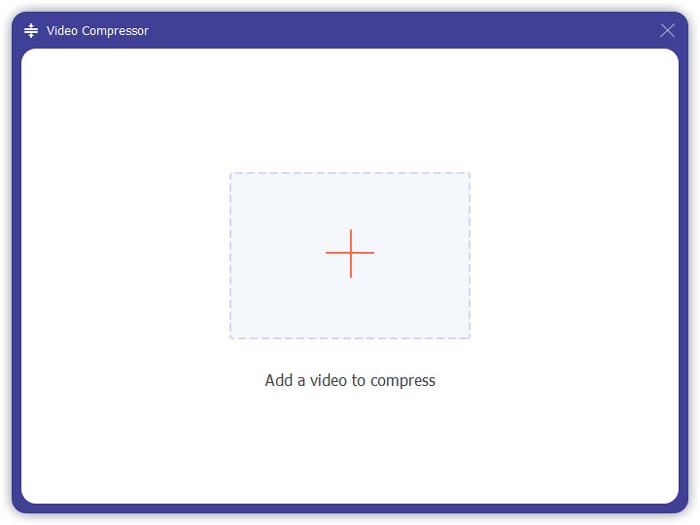
Trin 2. Vælg derefter det videoformat, du vil eksportere til, ved at klikke på feltet Convert All to i højre side. Du kan vælge forskellige typer formater i menuen, herunder MP4, MOV, MKV osv. Du kan manuelt justere formatets parametre ved at klikke på gear-ikonet.
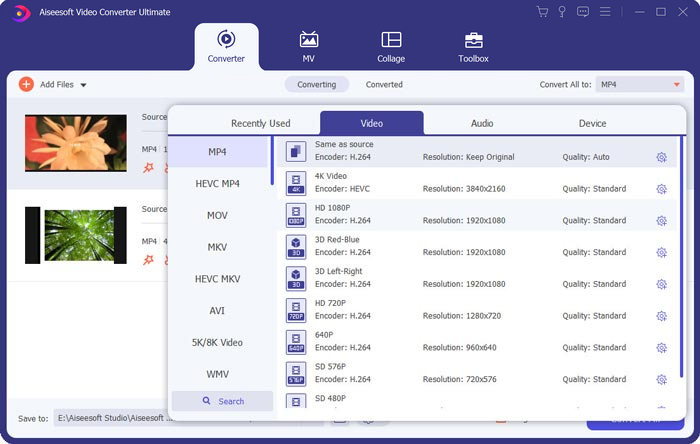
Trin 3. For at redigere dine videoer kan du klikke på saks-ikonet for at åbne redigeringsgrænsefladen. Du kan angive start- og sluttidspunkter for dine videoer for at trimme dem. MPG-videoerne i venstre bjælke er listet i kronologisk rækkefølge. Hvis du vil ændre rækkefølgen på videoerne, kan du trække dem og placere dem i en anden rækkefølge. Videoen ovenover vil blive afspillet før videoen nedenunder i den endelige, sammenflettede video.
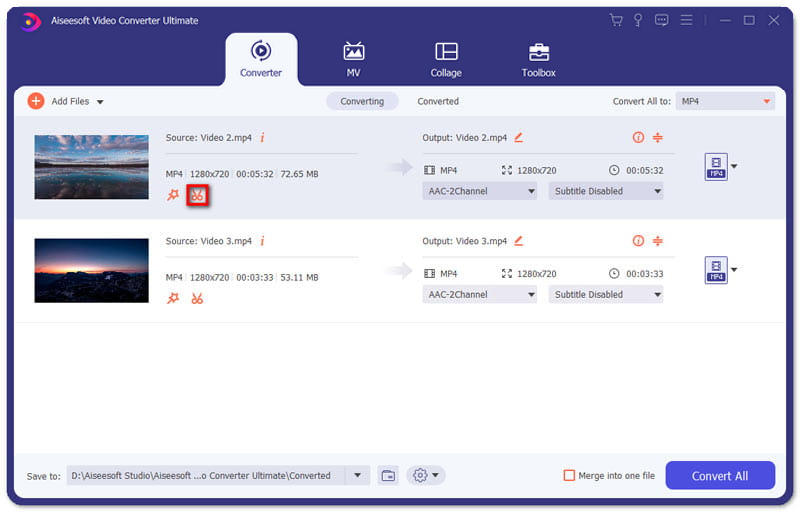
Trin 4. Når du er færdig med redigeringen, kan du flette dem og eksportere det endelige projekt. Du skal vide, at videoerne vil blive flettet i kronologisk rækkefølge i henhold til rækkefølgen i redigeringsgrænsefladen. For at starte samlingen skal du klikke i boksen Merge into One File og derefter klikke på knappen Convert All. Når processen er afsluttet, kan du finde den samlede video i mappen.
Derefter kan du afspille MPG-filerne direkte med MPG MPEG-afspilleren.
Del 2. Sådan tilslutter du dig MPG-filer gratis online
Hvis du vil flette MPG-filer gratis online, kan du bruge Free Online Video Merger. Den enkle og veludformede grænseflade er brugervenlig for alle.
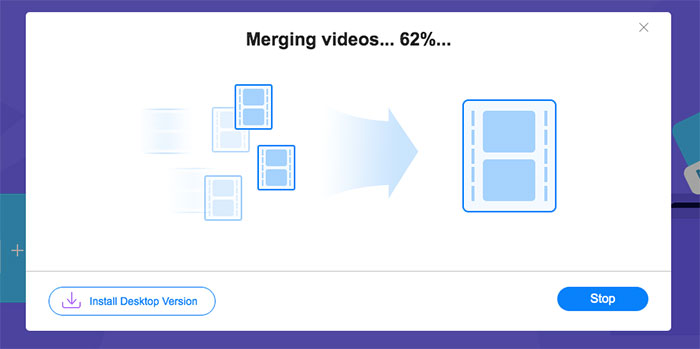
Trin 1. Download startprogrammet og installer fletteværktøjet. Derefter kan du tilføje MPG-filer ved at klikke på + i grænsefladen. Nederst på skærmen kan du justere opløsningen og formatet på den sammenflettede video i menuen. Rækkefølgen på videoerne er kronologisk fra venstre mod højre på skærmen.
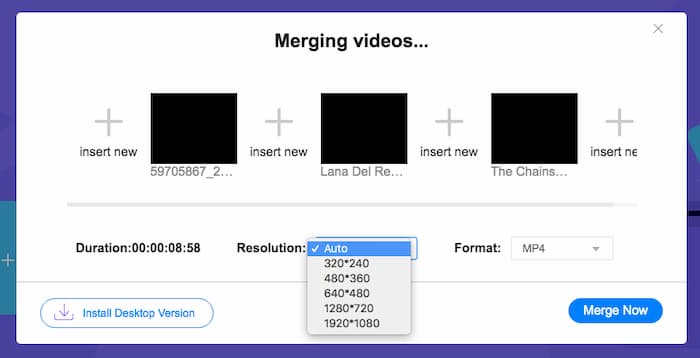
Trin 2. For at starte samlingen skal du klikke på knappen Merge Now. Når sammenfletningen er færdig, kan du finde videoen i standardmappen Download på din computer.
Del 3. Ofte stillede spørgsmål om Join MPG Files
1. Hvordan kan jeg åbne en MPG-videofil?
MPG-videofilen er normalt MPEG-1 og MPEG-2 versioner. MPEG-1 er kompatibel med de fleste almindelige medieafspillere som Windows Media Player og VLC Media Player. MPEG-2 er designet til DVD-videoer. Du kan downloade en tredjeparts DVD-dekoder for at åbne den.
2. Hvad er en MPG-fil?
MPG-filen er en vildt anvendt videofil til at gemme video- og lyddata. Det kan gemme og komprimere store lyd- og videodata i lille størrelse uden at miste kvalitet. Det er standardiseret af Moving Picture Experts Group (MPEG). MPG bruges til at gemme og distribuere film på Internettet. MPG-filer gemmes som PS eller MPEG-PS i et program stream container format.
3. Hvordan kan jeg flette MPG-videofiler gratis?
Der er mange gratis video-sammenføjningsværktøjer på Internettet. Den gratis online video fusion, der er nævnt ovenfor, er et gratis værktøj med en nem og klar grænseflade, der kan imødekomme din efterspørgsel.
Konklusion
Når du vil samle flere MPG-filer til én, har du brug for et professionelt videofletteværktøj. I denne artikel kan du lære, hvordan du bruger videofletteværktøjer til at opfylde dit behov. Hvis du har spørgsmål om værktøjerne til videofletning eller vil vide mere om at samle MPG-filer, så skriv en kommentar nedenfor.
-
 2 ultimative metoder til at deltage i MXF-videoer fra Sony X70
 Hvis du har taget nogle MXF-videoer fra Sony X70, hvad er de bedste metoder til at deltage i MXF-filer? Her er de 2 effektive metoder til at kombinere videoer med høj kvalitet.
-
 2 måder at komprimere video til YouTube
 YouTube-videoer er store og langsomme at uploade? Komprimer bare videofilstørrelsen til mindre på YouTube på 2 måder online og på computeren.
-
 GIF Player - 5 bedste GIF-afspillere til Windows PC, Mac, Android og iPhone
 Hvilket program åbner GIF-filer? Hvordan kan jeg se GIF'er på Android? Har iPhone en GIF-afspiller til at åbne GIF'er? Dette indlæg deler 5 bedste GIF-spillere til dig.
