


 Video Converter Ultimate
 Skærmoptager
 Video reparation
 Sikker download
2 bedste måder at slutte sig til MKV-filer for at se film uforholdsmæssigt
Normalt er de film, du downloader fra Internettet, adskilt i 2 eller 3 MKV-filer, fordi filmfiler altid er store, især i høj kvalitet. Og tv-serien, der er kopieret fra DVD-disken, er altid opdelt i flere MKV-filer. Hvis du er filmentusiast, skal du være nysgerrig efter at lære at tilslutte dig MKV-filer. Du har muligvis forsøgt at ændre den originale kode for at slutte sig til MKV-filer i henhold til instruktionerne fra FFmpeg, men det er for kompliceret og svært for os at lære. I dette tilfælde vil de følgende 2 professionelle værktøjer hjælpe dig med at deltage i MKV-filer nemt og effektivt.

Del 1: Sådan tilmelder du dig MKV-filer gratis online
FVC Free Online Video Merger er det mest effektive videofletningsværktøj, der hjælper dig med gratis at kombinere MKV-filer online. På 3 trin kan du få en fuldstændig MKV-filmfil med undertekster i den rigtige rækkefølge.
- 1. Deltag i to eller flere MKV-filer i en med enkle tre trin gratis online.
- 2. Brug alle funktionerne inklusive tilslutning til MKV-filer uden at downloade software.
- 3. Understøtter forskellige input- og outputformater inklusive MKV-filmfiler.
- 4. Uploadede filer slettes inden for 24 timer for at beskytte dit privatliv.
Trin 1: Åbn FVC Free Online Video Merger, og klik på knappen Upload Files to Merge for at starte plugin’et, og klik derefter på knappen igen for at vælge de MKV-filer, du vil flette.

Trin 2: Klik på knappen insert new for at vælge andre MKV-filer. Vælg derefter 1920x1080-opløsning for at bevare høj kvalitet, og vælg det originale MKV-format for at bevare den oprindelige kodning, hvilket vil sikre, at underteksterne afspilles korrekt.

Trin 3: Klik på knappen Merge Now og vælg den ønskede mappe til at gemme i.

Del 2: Brug videokonverter til at deltage i MKV-filer
Free Online Merger kan opfylde dit behov med få klik uden at downloade software. Men hvis du også har problemer med uordnede undertekster eller lav kvalitet, er FVC Video Converter Ultimate mere professionel end onlinetjenester til at kombinere MKV-filer med høj billed- og lydkvalitet. Derudover understøtter den højere opløsninger, inklusive HD 1080P, 4K og endda 8K.
- 1. Kombiner flere MKV-filer til en uden at miste kvalitet for at bevare seeroplevelsen.
- 2. Deltag MKV-filer i det originale MKV-format med en hvilken som helst kode inklusive H.264, HEVC og XVID.
- 3. Vælg forskellige undertekster og lydkanaler, der passer til dig.
- 4. Understøtter redigering af MKV-videoer ved at tilføje effekter, filtre, vandmærker og beskære området.
Gratis download til Windows 7 eller nyere Sikker download
Gratis download til MacOS 10.7 eller nyere Sikker download
Trin 1: Download FVC Video Converter Ultimate til Windows/Mac og start programmet. Klik derefter på knappen Add Files i konverteringsværktøjet for at vælge alle de MKV-filer, du vil kombinere, i den korrekte rækkefølge.

Trin 2: Klik på pilen ved siden af Convert All to og vælg MKV-format på videolisten. Vælg derefter indstillingen same as source, som vil bevare den oprindelige billed- og lydkvalitet. Hvis du vil afspille MKV-videoer på andre enheder, kan du også vælge andre kompatible formater, såsom MP4, AVI osv.
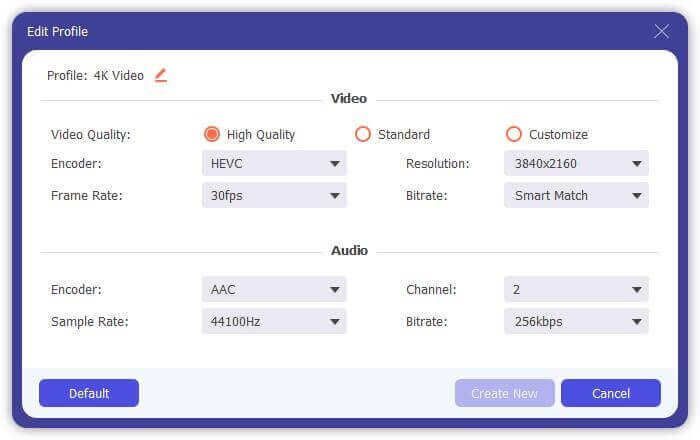
Encoder: Det er bedst at vælge H.264/HEVC-encoder i indstillingerne for at sikre, at filmene afspilles godt på computere eller tv.
Subtitle and Audio Track: Hvis de oprindelige MKV-filmfiler har flere undertekster og lydspor, kan du også vælge det ønskede sprog nederst på hver fil eller fjerne undertekster fra MKV.
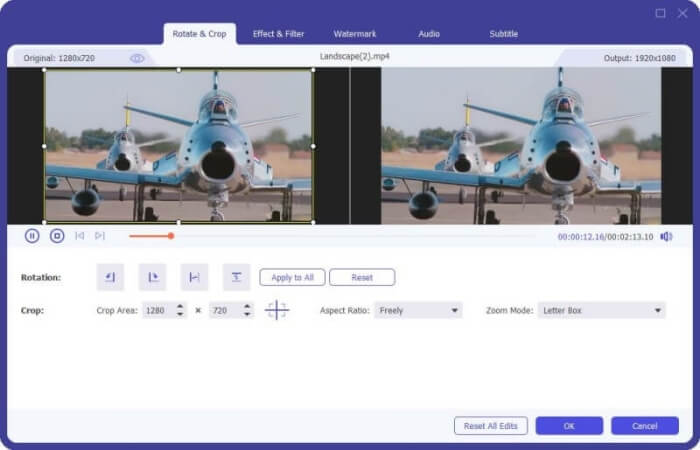
Trin 3: Klik på knappen Edit nederst på filerne; her finder du 5 redigeringsværktøjer, herunder rotation og beskæring af videoer samt tilføjelse af effekter og filtre. På denne måde kan du skabe en bedre film med specialeffekter. Dens værktøjskasse kan komprimere MKV, redigere metadataoplysninger for MKV, konvertere MKV fra 2D til 3D og meget mere.
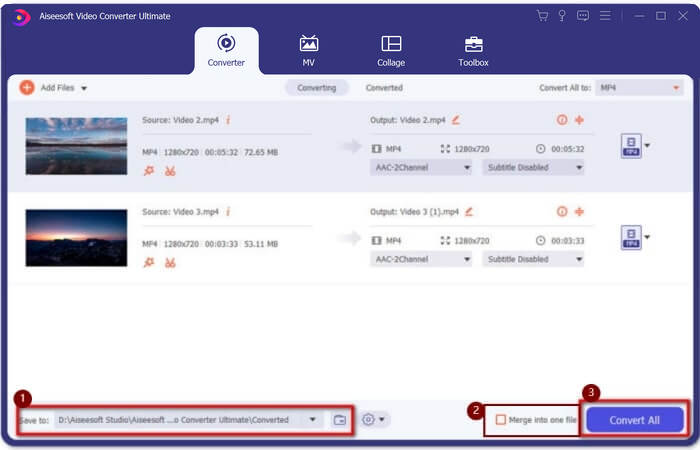
Trin 4: Før du kombinerer alle MKV-videoerne, kan du trække videofilerne op og ned og placere dem det rigtige sted for at justere rækkefølgen. Markér derefter boksen Merge into one file og klik på knappen Convert All for at flette MKV-filerne og gemme den samlede fil i den forudindstillede lagringssti.
Del 3: Ofte stillede spørgsmål om, hvordan du deltager i MKV-filer
1. Hvad er MKV?
Normalt siges det, at MKV er et slags videoformat, men faktisk er MKV et multimediebeholderformat, der kan inkorporere lyd-, video- og undertekstfiler med forskellig kode i en enkelt fil. Således gemmes næsten alle filmene i filer i MKV-format.
2. Kan jeg bruge håndbremse til at slutte mig til MKV-filer?
Nej, det kan du ikke. Håndbremse er bare en slags software til videokonvertering til konvertering af MKV-filer. Hvis du vil deltage i MKV-filer, kan du prøve at bruge gratis online video-joiners eller andre videokonvertere til at løse dit problem.
3. Hvilken videoafspiller understøtter MKV-filmfiler?
MKV-format film har ikke brug for specialiserede videoafspillere for at kunne afspille dem. Du skal dog installere det tilsvarende MKV-dekodningsplugin. På denne måde kan næsten alle videoafspillere inklusive den originale videoafspiller på din computer afspille MKV-filmfiler.
Konklusion
Når du downloader en film til at se, men finder ud af, at disse MKV-filmfiler er opdelt i flere filer. For at se det uophørligt kan du bruge video snedker til at kombinere MKV filer gratis online. Desuden kan brug af en videokonverter også hjælpe med at slutte sig til MKV-filer med høj billed- og lydkvalitet. Velkommen til at efterlade dine spørgsmål om fletning af MKV-filer nedenfor.
-
 Sådan flettes WebM-filer til en tabsfri på computeren
 Når du vil flette WebM-videofiler for at se videoer kontinuerligt eller ønsker at oprette en ny video i henhold til WebM-filerne, er der to effektive måder at deltage i WebM-filer uden at miste kvalitet.
-
 Top 8 MKV-afspillere til at spille MKV-filer med den ønskede undertekst
 Når du vil afspille MKV-videoen med den ønskede undertekst, kan du lære mere om de øverste 8 MKV-filafspillere til PC / Mac og vælge den ønskede efter dit behov.
-
 MKV til MOV - Sådan konverteres MKV til MOV
 Hvordan konverterer jeg MKV til MOV på Mac? Kan iMovie læse MKV? Hvad betyder MOV-format? Dette indlæg fortæller 2 enkle måder at hjælpe dig med at konvertere MKV til MOV med gratis online og professionelle videokonvertere.
