


 Video Converter Ultimate
 Skærmoptager
 Video reparation
Vælg den bedste GIF til AVI-konverter, der er tilgængelig på pc og Mac
Konvertering af dit GIF til AVI-filformat blev muligt ved hjælp af disse utrolige værktøjer. Uden kvalitetstab og på en eller anden måde for at gøre det bedre. Men nogle af de konvertere, du måske bruger, kan ikke give dig den bedste kvalitet, du ønsker at bruge. Så du skal ikke være bekymret, hvis du vil erstatte din GIF med et AVI-format. Konverter din video til et AVI-format uden kvalitetstab ved at følge nedenstående trin og vælg, hvad der er den bedste konverter, du skal bruge.

Del 1. Det gratis og professionelle til at konvertere GIF til AVI med detaljerede trin
1. Gratis måde - FVC gratis video til GIF Maker
FVC Free Video to GIF Maker er den bedste gratis GIF til AVI-konverter leveret af FVC. Du kan også gratis konvertere enhver video eller lyd til et nyt format ved hjælp af dette værktøj. Dette værktøj giver dig specifikt den bedste konverter, som er gratis. Selvom de fleste af de vigtigste funktioner fra premiumversionen ikke er gratis, er det stadig lige så godt til at konvertere. For at vide, hvordan du bruger dette gratis værktøj, skal du følge trinnene nedenfor for at lære, hvordan du konverterer din GIF.
Trin 1. Installer værktøjet på din computer.
Gratis downloadTil Windows 7 eller nyereSikker download
Gratis downloadTil macOS 10.7 eller nyereSikker download
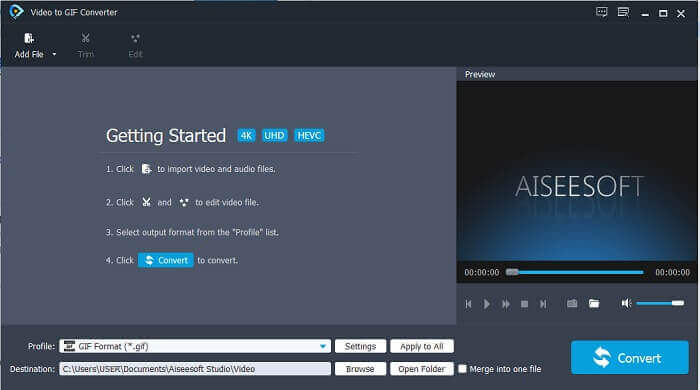
Trin 2. Dette er et eksempel på den grænseflade, du vil se, hvis du allerede har downloadet værktøjet.
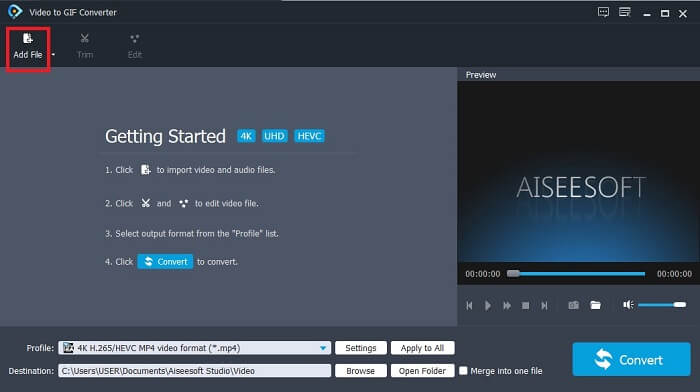
Trin 3. Klik på Add File, og vælg den GIF-fil, du vil konvertere. Hvis filen allerede er valgt, skal du klikke på Open for at indsætte den i grænsefladen.
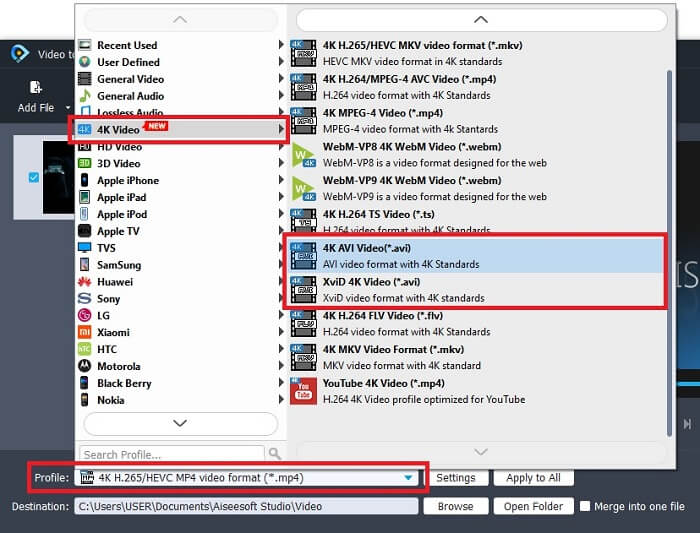
Trin 4. Skift formatet til AVI i Profile. Under 4K Video skal du klikke på AVI-formatet. Hvis alt er klar, skal du klikke på Convert for at starte konverteringen.
Trin 5. Konverteringen af GIF'en vil ikke tage ret lang tid. Og du kan nu nyde dit færdige resultat.
2. Professionel måde - Video Converter Ultimate
Måske spørger du dig selv, hvordan man laver en GIF om til AVI eller omvendt. Og om der findes et særligt værktøj, der gør din konvertering fremragende. Det må være Video Converter Ultimate, fordi det understøtter flere formater end det gratis værktøj og andre premiumkonvertere. Det giver også flere funktioner, som du kan bruge til at forbedre din video eller lyd, så den bliver endnu bedre. Ved blot at bruge denne ultimative konverter kan du vække din GIF til live. Lær, hvordan du konverterer dit GIF-format til et AVI-format uden at miste kvalitet og forbedrer videoen, hvis den bliver en smule sløret. Følg trinnet nedenfor for at lære den rigtige måde at konvertere din yndlings-GIF-fil på.
Trin 1. Klik på download-knappen alt efter dit operativsystem. Installer det på din computers drev, og ændr indstillingerne, før du starter værktøjet.
Gratis download til Windows 7 eller nyere Sikker download
Gratis download til MacOS 10.7 eller nyere Sikker download
Trin 2. Hvis værktøjet allerede kører på din computer, vil du se denne lille ultimate-grænseflade på din skærm, hvilket betyder, at det allerede er startet.
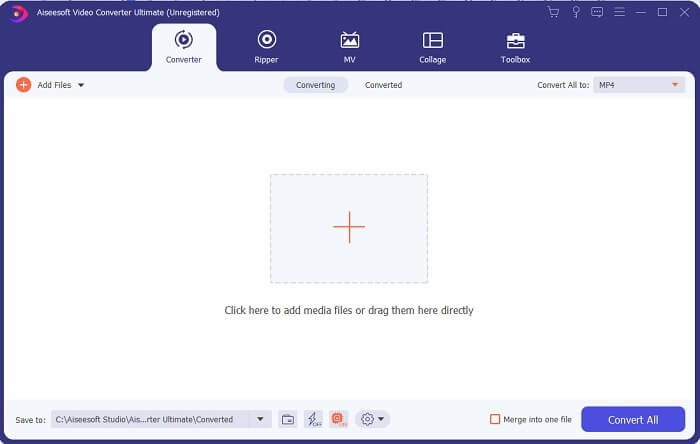
Trin 3. Klik på knappen med plus-tegnet for at tilføje filen, eller du kan også trække filen derhen.
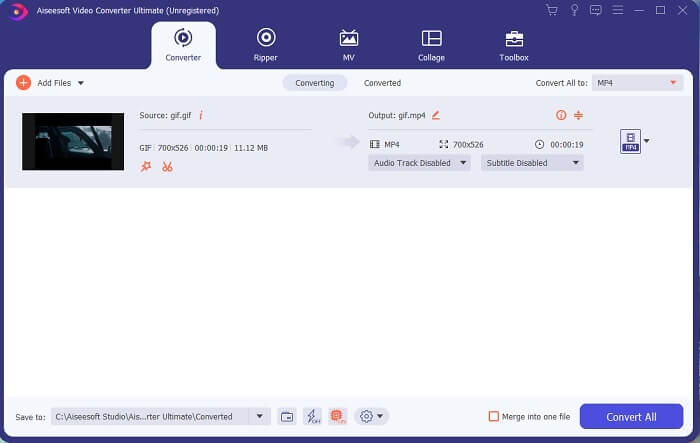
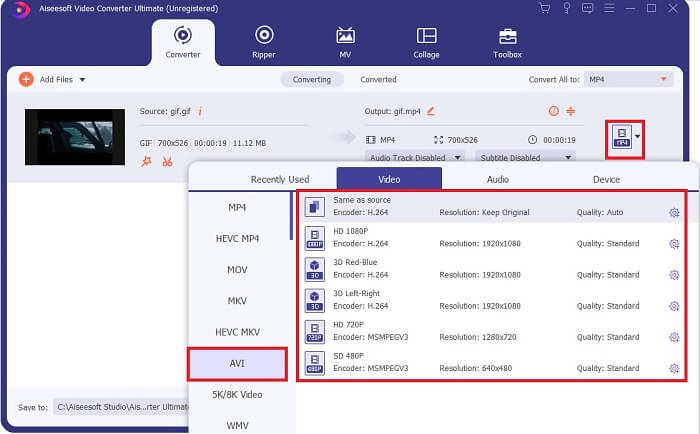
Trin 4. Klik på drop-down-knappen for at ændre formatet og gøre det til AVI. Du kan også vælge encoder, opløsning og kvalitet på outputtet. Når alt er færdigt, skal du klikke på Convert All for at starte konverteringsprocessen.
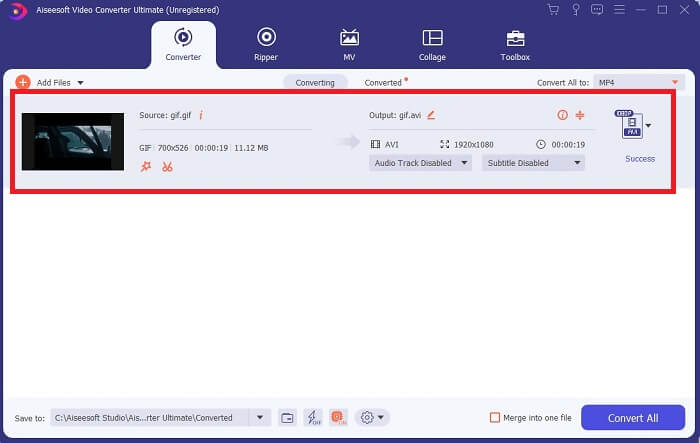
Trin 5. Dette værktøj giver en 30x hurtigere konvertering end det gratis værktøj og 100x hurtigere end det andet værktøj, så forvent ikke at skulle vente længe. Når konverteringen er fuldført, åbnes en filhåndtering automatisk på din skærm.
Bonusværktøj og trin til at forbedre videoen
Ikke alle premiumkonvertere tilbyder denne slags funktion. I nogle tilfælde, hvis du konverterer GIF til AVI, bliver de en smule slørede, fordi den billedhastighed (fps), som GIF'en har, er lavere end AVI'ens. Men der er en måde at forbedre din video til et bedre output. Følg disse trin for at forbedre den video, du allerede har konverteret.
Trin 1. Klik på Video Enhancer i Toolbox i softwaren.
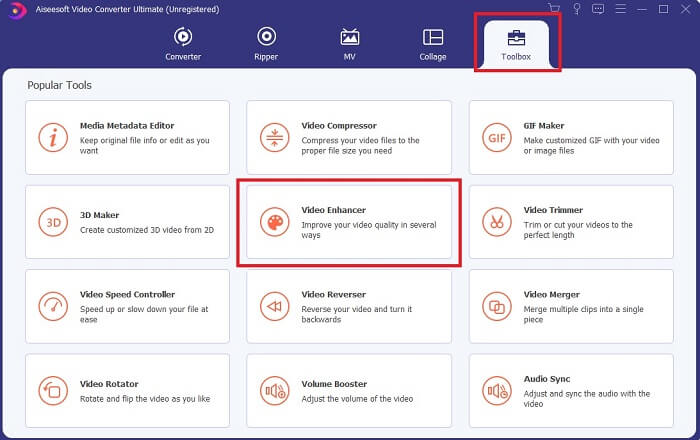
Trin 2. Klik på plus-knappen, og vælg den video, du vil forbedre. Klik på Upscale Resolution for at forbedre kvaliteten af videoen; du kan også markere de andre muligheder for at opgradere videokvaliteten. Klik derefter på Enhance for at starte processen.
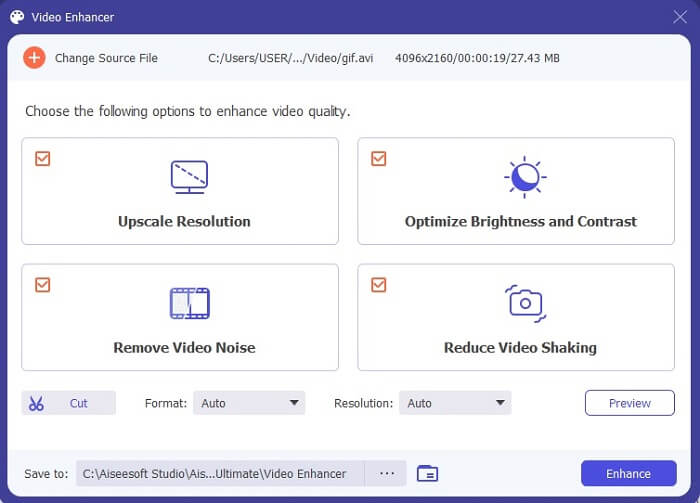
Trin 3. Forbedringen af videoen vil være klar med det samme. Efter forbedringen åbner filhåndteringen automatisk videoen, så du kan se en meget bedre version.
Del 2. Top 3: Bedste online-konvertere tilgængelige på nettet.
1. CloudConvert
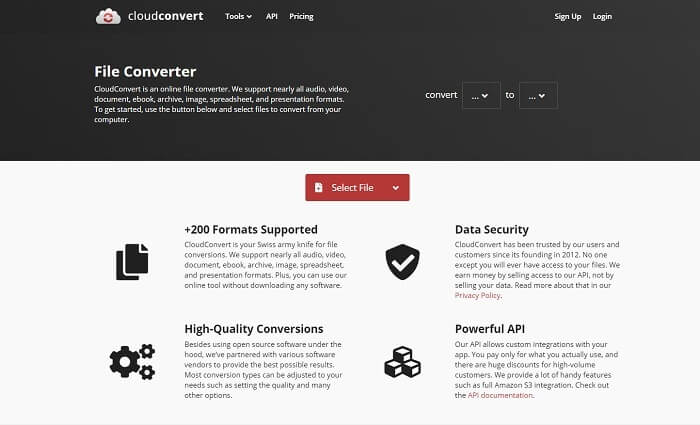
Den bedste GIF til AVI online-konverter er Cloud Convert. Dette værktøj understøtter næsten alle mulige formater til video, lyd, dokumenter, e-bøger, regneark, præsentationer og også billeder. Du kan bruge dette værktøj uden at installere noget, fordi det er et onlineværktøj; det betyder bare, at hvis der ikke er internetforbindelse, kan du ikke bruge dette værktøj – ligesom med de to andre værktøjer nedenfor. Denne webgrænseflade er meget mere informativ end AnyConv. Den har også en meget bedre og mere interaktiv grænseflade at bruge.
2. AnyConv
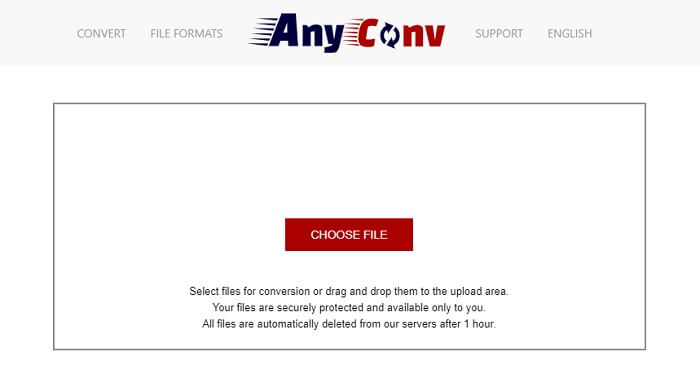
Den sikreste måde at konvertere din video på er ved at bruge AnyConv. Du kan nemt lave din animerede GIF til AVI-format. Det er kendt som den sikreste konverter, fordi det kun er dig, der kan få adgang til dine konverterede filer. Og alle filer, der bliver konverteret med dette onlineværktøj, bliver automatisk slettet efter konverteringen. Værktøjets hjemmeside er lidt uinformativ, så brugen af dette værktøj kan virke forvirrende på grund af manglen på information.
3. online-convert.com
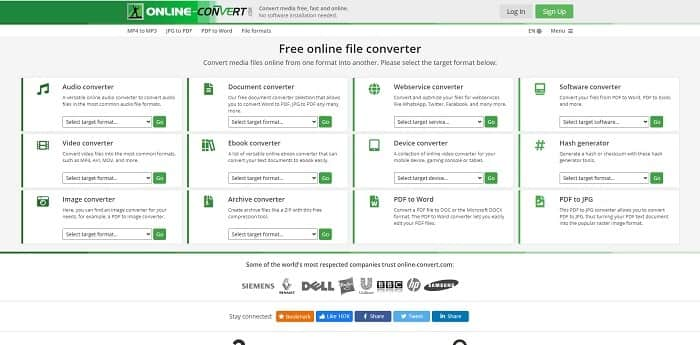
Et andet værktøj, du kan bruge som din konverter, er online-convert.com. Dette værktøj giver brugere eller kunder som dig mulighed for at konvertere enhver video, lyd, billede og mere. Det er også muligt at konvertere webtjenester, enheder og software med dette værktøj. Du kan også bruge det til at konvertere AVI til en animeret GIF eller omvendt. Websiden for værktøjet er informativ; den giver en kort beskrivelse af hvert værktøj og hvordan man bruger dem korrekt. Men grænsefladen er ret kedelig på grund af den grønne farvetone, den giver brugeren.
Del 3. Ofte stillede spørgsmål om GIF til AVI
Hvad er den bedste GIF-cropper, der er tilgængelig i alle software? og hvordan gør man det?
GIF-beskæringsværktøjet giver dig frihed til at beskære din GIF mere præcist. Klik på dette link for at få flere detaljer.
Er AVI-formatet komprimeret eller ukomprimeret?
Det er velkendt, at AVI giver et videoformat i høj kvalitet frem for MPEG eller MOV. Men dette format er ukomprimeret, så forvent en stor filstørrelse. Selv hvis videoen kun er et minut lang, kan den optage mere end 1,5 GB eller endnu mere af din lagerplads. Vil du komprimere dine store AVI-filer, så klik her for at lære mere.
Hvem udviklede AVI?
Udvikleren af AVI-formatet er Microsoft; dens første udgivelse var november 1992.
Konklusion
For at afslutte detaljerne er det kendt, at det er et must at vælge det rigtige værktøj til det rigtige job, især ved konvertering. Fordi det er lidt følsomt at konvertere en fil til et nyt format, hvilket betyder, at hvis du bruger den forkerte konverter, kan du forvente at miste nogle data. Men hvis du bruger Ultimate Converter, kan du konvertere alle filer selv uden internetforbindelse og datatab også. Dette værktøj er det rigtige valg for dig at bruge, fordi det ikke bare er fantastisk til at udføre ét job, og det er også det bedste blandt de andre.
-
 5 bedste muligheder for at optage GIF -format med GIF -optagere til pc og Mac
 Hvad er den bedste GIF -optager, du skal bruge til at optage GIF'er? Listen nedenfor giver bevis på, hvilken der er den bedste skærmoptager.
-
 Sådan konverteres MPG til GIF-format [Online & Offline]
 Vil du udtrykke en meget bedre følelse? Så skal du bruge GIF i stedet. Denne opskrift lærer dig, hvordan du konverterer en MPG-fil til GIF for at udtrykke din følelse meget bedre.
-
 [2021 Opdateret] 9 bedste GIF-editorer til pc, Mac, iOS og Android
 Har du brug for at tilføje et personligt præg på din GIF, så den kan blive mere udtryksfuld? Fortsæt med at læse denne artikel for at vide, hvordan du redigerer og det bedste værktøj til jobbet.
