


 Video Converter Ultimate
 Skærmoptager
 Video reparation
Sådan fremskyndes video på mange mulige måder ved hjælp af iPhone
Du er i gang med at lave den bedste musikvideo i dit skoleprojekt, og du vil vise en livscyklusscene. Du vil spole hele musikvideoen frem ved at øge afspilningshastigheden og gennemføre overgangen fra ung til voksen på en ordentlig måde, men du har kun din telefon til at få det til at lykkes. Du har kun en iPhone – for at være helt præcis – til at øge afspilningshastigheden og redigere hele musikvideoen. iPhone er dog kendt for sin restriktive tilgang til download af apps, fordi nogle af dens apps kræver, at man køber fuld version for at få komplet adgang. Læs videre i denne artikel for virkelig at forstå, hvordan du speeder en video op på iPhone.

Del 1. Bedste måde at fremskynde video på iPhone
Tidligere kendt som iPhone OS er iOS et mobilt styresystem fra Apple Inc., der er udviklet udelukkende til selskabets egen hardware. Det er også kendt for sin eksklusivitet, når det gælder download af apps, i modsætning til Android. iPhone tilbyder dog andre apps, der kan redigere og tilpasse videoklip, og som er tilgængelige i dets styresystem. Nogle af disse apps kan også styre afspilningshastigheden; når vi taler om iPhones videohastighedskontrol, er disse apps nemme at bruge og gratis at downloade på enhver iOS‑enhed. For at vide mere om videohastighedskontrol på iPhone finder du trinene herunder:
Metode 1. Brug iMovie til at fremskynde video på iPhone
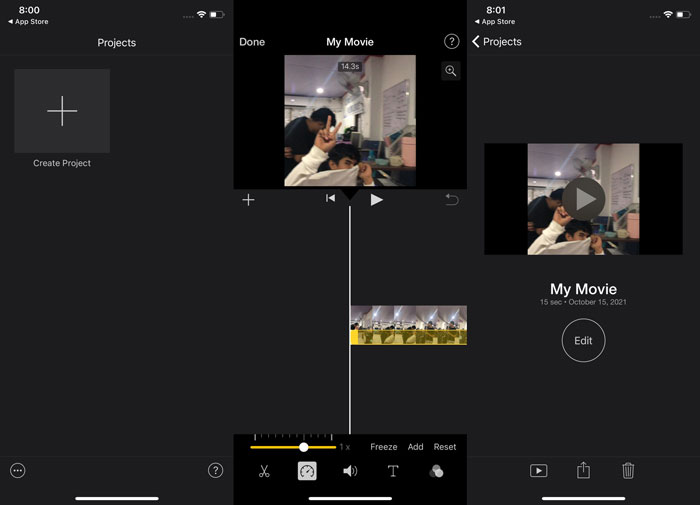
Du kan lave trailere i Hollywood‑stil i 4K‑opløsning med iMovie på din iPhone. Når du har redigeret alle dine videoer, kan du tilføje animerede titler, musik og andre sidste detaljer som filtre og effekter. Apples iMovie‑software gør det nemt at fortælle din historie på en gennemført, professionel måde og derefter dele dit arbejde med venner og familie. iMovie tilbyder funktioner, der kan forbedre din videokvalitet med de mange skabeloner og finpudsningsværktøjer, der er tilgængelige; det introducerer også muligheden for at styre afspilningshastigheden på iPhone. Da de fleste redaktører er nødt til at lægge vægt på de problemer, der præsenteres, er her trinene, du skal følge for at opnå den ønskede hastighed med dette værktøj på iPhone.
Trin 1: Start iMovie‑appen på din iPhone eller iPad. Hvis der vises en oversigt over grænsefladen, skal du vælge Fortsæt. For at begynde på et nyt videoklip skal du gå til siden Projekter og trykke på +‑ikonet. Gå til vinduet Nyt projekt, og vælg Film for at fortsætte.
Trin 2: Tryk på Opret film nederst på skærmen, efter du har valgt en video fra din kamerarulle. Hastighedsværktøjet ligner et speedometer og kan findes ved at trykke på videoklippet i tidslinjen og vente på, at redigeringsværktøjerne vises. Flyt blot den gule nederste skyder for at spole din video frem eller tilbage. Du kan sætte hastigheden op til det dobbelte eller sænke den til en ottendedel af den oprindelige hastighed.
Trin 3: Når alt er på plads, skal du trykke på OK i øverste venstre hjørne af skærmen. For at gemme din færdige video skal du trykke på knappen Del nederst på skærmen og vælge, hvor du vil gemme den.
Metode 2. Brug Videoshop til at fremskynde video på iPhone
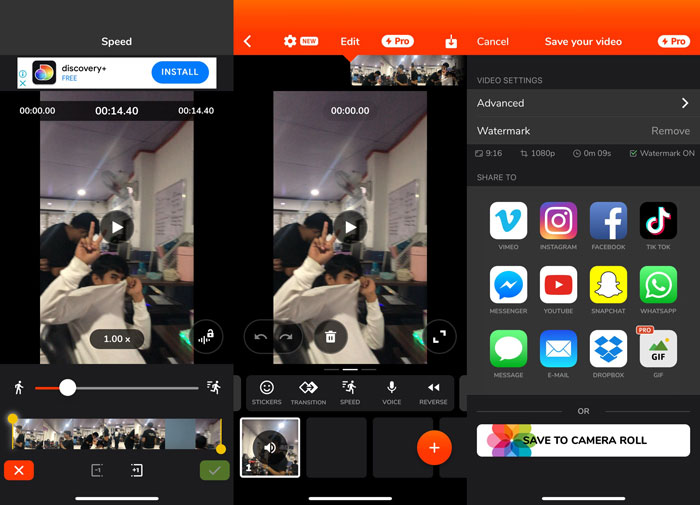
Når det gælder videoredigeringssoftware, er der få bedre muligheder end Videoshop. Med den kan du hurtigt redigere din video ved at tilføje effekter som musik, speak, tekst og billeder. Du kan også hurtigt tilføje imponerende filtre til dine videoer, lave fotoslideshows og redigere, sammenføje, kopiere, indsætte, rotere og vende dine videoer. Derudover kan du også nemt justere videoens afspilningshastighed for at lave fastmotion‑ eller slowmotion‑videoer med denne app. Med blot nogle få enkle trin kan du nu ændre afspilningshastigheden på din video, indtil du opnår den ønskede hastighed. For at lære mere om, hvordan du speeder en video op med Videoshop på iPhone, finder du her en oversigt over trin, du kan følge, så du kan bruge den uden besvær.
Trin 1: Når du første gang åbner videoredigeringen på din iPhone, får du valget mellem at optage en ny video eller importere en tidligere gemt video. Brug videoredigeringen, og der vises en ny grænseflade, når du har tilføjet en videofil til redigeringsvinduet. I den nederste del af videoredigeringen er der en værktøjslinje med en række værktøjer. Stryg eller tryk til venstre og højre på skærmen inden for denne værktøjslinje. Når du har valgt Hastighed, får du vist en menu til styring af videohastigheden.
Trin 2: Med denne videoredigering på en iPhone kan du nemt ændre hastigheden på din video. Afspilningshastigheden kan sænkes eller øges ved at trække hastighedshåndtaget til venstre eller højre. For at få en forhåndsvisning af ændringen skal du trykke på knappen Afspil. Du kan derefter justere videohastigheden igen, indtil du er tilfreds med din tilpassede video.
Trin 3: Gem dit arbejde ved at trykke på knappen Færdig i øverste højre hjørne.
Del 2. Alternativ måde at fremskynde video på iPhone
Hvis du synes, det er svært at overskue alle trinnene i det forrige værktøj, præsenterer denne artikel et alternativ, der hjælper med spørgsmålet om, hvordan man kan speede video op til 2x på iPhone. Du er måske ikke så fortrolig med at bruge iPhone som videoredigeringsværktøj, især når du vil øge afspilningshastigheden på din video. Video Converter Ultimate er det bedste alternativ, du bør overveje, da det gør det muligt at øge hastigheden på din video permanent. Download og brug Video Converter Ultimate som hastighedskontroller til dine videoer. Denne software indeholder en lang række funktioner og værktøjer, som kan forbedre dine redigeringsevner. Den indeholder også et værktøj til Video Speed Controller, som kan løse det problem, mange iOS‑brugere har. Med dette værktøj kan du nu nemt justere hastigheden på din video og producere en god videokvalitet. Derudover kan den ændre hastigheden på din video på få sekunder takket være dens hurtige konverteringsproces. Alt i alt fungerer denne software professionelt med den brugervenlige grænseflade, den tilbyder. Da denne alternative metode er software, som du kun kan tilgå på din computer, skal du lære, hvordan du overfører video fra din iPhone til din computer for at gennemføre denne løsning.
1. For at begynde skal du bruge et USB-kabel til at forbinde din iPhone til en pc.
2. Åbn appen Fotos på din pc ved at klikke på knappen Start og derefter på Fotos.
3. Følg vejledningen på skærmen efter at have valgt Importer fra en USB-enhed. Du har fuldstændig kontrol over, hvad du importerer, og hvor det gemmes. Giv dig selv et pusterum, mens registrerings- og overførselsprocesserne finder sted.
Nu kan du følge trinene nedenfor for at fremskynde dine videoer på din iPhone.
Trin 1: For at køre softwaren på din computer skal du først downloade den ved at klikke på Gratis download på knappen nedenfor. Når du har downloadet den til dit skrivebord, kan du nu installere den og klikke på Start nu for at afslutte installationen.
Gratis download til Windows 7 eller nyere Sikker download
Gratis download til MacOS 10.7 eller nyere Sikker download
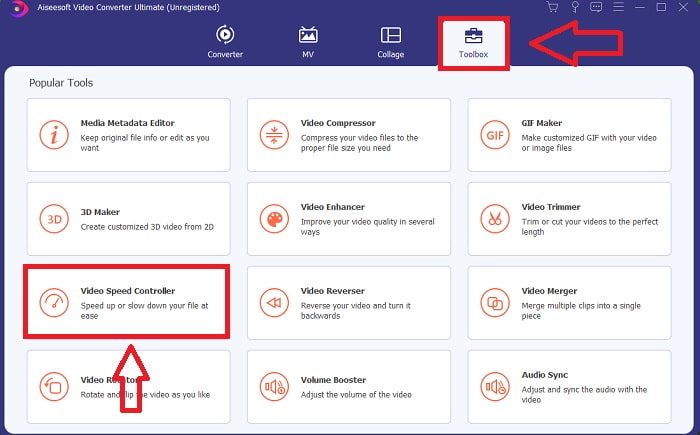
Trin 2: Når softwaren er installeret, skal du starte den, og du vil se konverteringsfasen på softwarens hovedgrænseflade. Gå derefter til funktionen Værktøjskasse. Derfra vil du se forskellige værktøjer, som softwaren tilbyder, og for at justere hastigheden på din video skal du vælge Video Speed Controller.
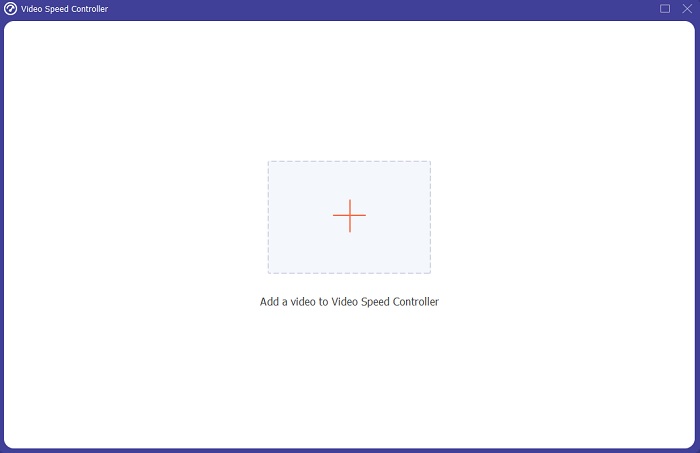
Trin 3: En ny fane vises på skærmen, efter du fortsætter. Start redigeringsprocessen ved at trykke på +-tegnet.
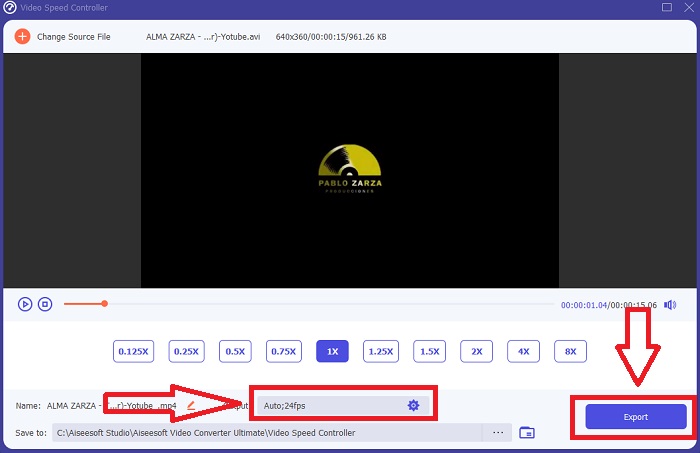
Trin 4: Du kan begynde selve redigeringen ved at vælge, hvor mange gange videoens billedhastighed skal øges eller sænkes for at ændre afspilningshastigheden. Hvis du allerede er tilfreds med hastigheden på din video, kan du nu tilpasse kvaliteten af din outputvideo ved at justere format, opløsning, billedhastighed osv. Du får også mulighed for at omdøbe din videofil.
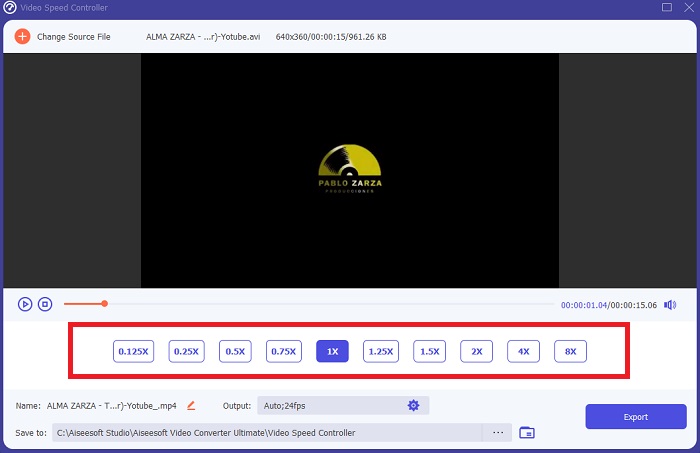
Trin 5: For at gemme dit arbejde skal du klikke på Eksporter og vælge en placering i din computers filsystem.
Relateret:
Del 3. Ofte stillede spørgsmål om, hvordan man fremskynder video på iPhone
Hvordan fungerer en videocontroller?
Videoafspillerens hastighedskontrol bestemmer videoens afspilningshastighed. Når du bruger en medieafspiller til at se en film, afspilles videoen med samme hastighed som en standardvideo. Formålet med videoafspillerens hastighedskontrol er at lade brugeren ændre videoens afspilningshastighed. Nogle af videoerne skal bremses, så du kan følge med i handlingen.
Hvordan ændrer jeg permanent videoafspilningshastighed?
Tænk over, hvor mange trin det tager at ændre afspilningshastigheden på dine videoer. På trods af at videoværktøjer og videoredigeringsværktøjer er let tilgængelige online, er du stadig på udkig efter det bedste værktøj til at løse problemer med afspilningshastigheden med dit videoklip. Adskillige webværktøjer er tilgængelige på internettet, hvoraf nogle er gratis at bruge, men kræver betaling for at låse op for alle funktioner. Video Converter Ultimate, et gratis program til at fremskynde videoer, er dit bedste bud på at få din afspilningshastighed permanent ændret.
Hvordan fremskynder jeg en MP4-video?
Der er adskillige konvertere tilgængelige til download og offline brug. Du kan fremskynde videoafspilning ved at bruge Video Converter Ultimate som et alternativ til andre videokonvertere. Videohastighedsforstærkeren er blot en af de mange tilgængelige funktioner, fordi det er gratis open source-software.
Konklusion
Som jeg har sagt, behøver iPhone-brugere, der drømmer om at løse deres videos afspilningshastighed, ikke købe forskellige værktøjer. Der er mange gratis-at-bruge editorer tilgængelige, som du skal søge; nogle har brug for kritisk forståelse for at bruge det korrekt, men de fleste af dem er tilgængelige. Når vi taler om de bedste tilgængelige værktøjer, anbefaler vi at bruge Video Converter Ultimate til at fremskynde dine videoklip op til 2x den normale hastighed eller endda op til 8x hurtigt. Derudover kan videoen sænkes til en fjerdedel af sin normale hastighed ved hjælp af denne funktion. Denne software har alt, hvad en professionel redaktør ønsker at have, og ved at bruge den, vil du have muligheden for at gøre dig selv til en professionel.
-
 [2 bedste løsninger] Sådan afspilles AVI-film på iPhone/iPad nemt
 Kan du ikke afspille AVI-film på din iPhone/iPad og vil du ikke downloade tredjeparts videoafspillere? Du kan lære 2 effektive måder at konvertere AVI-videoer til afspilning på iPhone.
-
 [Løst] Sådan repareres videoer, der ikke afspilles på iPhone, med detaljerede trin
 Lokale videoer i galleriet kan ikke afspilles på din iPhone via standardvideoafspilleren? Online YouTube -videoer, der ikke afspilles på iPhone, sker altid? Her er 5 løsninger til at hjælpe dig i denne artikel.
-
 Top 5 bedste videospillere til iPhone, du ikke bør gå glip af i 2021
 For at afspille videoer i alle formater og få en bedre seeroplevelse på din iPhone, bør du læse denne artikel og lære om de bedste 5 videospillere til iPhone 12/11/X/8/7/6.
