


 Video Converter Ultimate
 Skærmoptager
 Video reparation
 Sikker download
Rediger MP3 med de bedste værktøjer på Windows, Mac, online og mobiltelefon
MP3 står for MPEG-1 Audio Layer III, og det er en type fil, der gemmer musik i et komprimeret format. Denne slags fil er meget mindre end ukomprimerede musikfiler, hvilket gør dem nemmere at gemme og overføre. Efterhånden som der skabes mere musik, leder folk efter nemme måder at redigere MP3-filer på for at få dem til at lyde bedre. Dette skyldes, at en MP3 kan være bedre end den originale ukomprimerede musik. Problemet er, at redigeringssoftware kan være dyr og kræve en kraftig computer. Heldigvis viser denne guide dig, hvordan du bruger de mest anbefalede MP3‑editorer, så du kan redigere din musik på alle de platforme, du bruger. Så uanset hvad dine behov er, er det bedst at starte her!

Del 1. Bedste valg til at redigere MP3 med All-in-One MP3 Editor
Det første program, der redigerer en MP3‑fil, er det særligt udvalgte Video Converter Ultimate. Ja, det er en mediekonverter, der ikke kun er dedikeret til video, men også til lydfiler. Den lader dig nemt justere lydstyrken op til dobbelt så høj eller ned til en hvisken. Du kan også sætte tempoet op eller ned uden at skulle rode med tekniske indstillinger.
Oven i købet kan den fjerne baggrundsstøj, skære uønskede dele ud, opdele filer i sektioner og endda redigere stemmeoptagelser. Desuden tilbyder det en brugervenlig grænseflade, som, selv hvis du er nybegynder med lydredigering, gør det nemt at gøre alle disse ting i nogle få trin. Du vil også elske den avancerede teknologi, som den tilbyder, såsom hardwareacceleration, NVIDIA, Intel, AMD og de AI-drevne redigeringsværktøjer, som du kan bruge.
Nøglefunktioner:
• Lydkonvertering, der konverterer op til 120x hurtigere.
• Understøttelse af mere end 1000 forskellige formater.
• Opdel, klip og flet lydfiler problemfrit.
• Rediger MP3-længde uden nogen begrænsninger.
• Komprimer lydfiler til den ønskede størrelse.
• Rediger MP3-filens encoder, sample rate, kanal og bitrate.
Gratis download til Windows 7 eller nyere Sikker download
Gratis download til MacOS 10.7 eller nyere Sikker download
Sådan redigerer du lydfiler med FVC
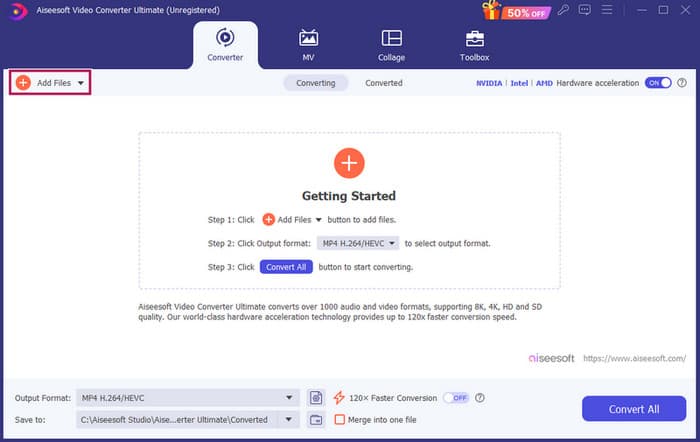
Trin 1. Når softwaren er startet, kan du tilføje MP3‑filer ved at klikke på knappen Add Files. Alternativt kan du trække filerne fra deres placering og slippe dem ind i redigeringsprogrammet.
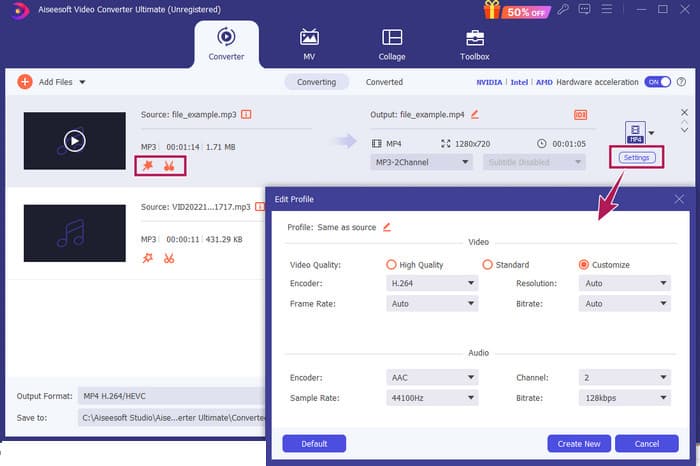
Trin 2. Når filerne er indlæst, kan du få adgang til indstillingerne for lydstyrke og forsinkelse ved at klikke på stjerneknappen på miniaturen. Saks‑knappen bruges til at få adgang til fletning, opdeling og klipning. Og selvfølgelig Settings‑knappen for at få adgang til profilredigeringen.
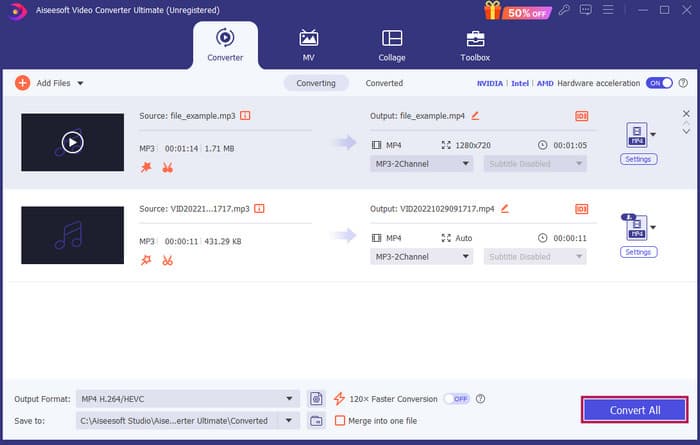
Trin 3. Når du har redigeret filerne, skal du klikke på knappen Convert All. Og sådan redigerer du MP3 på Windows 10 med FVC.
Konklusion: FVC Video Converter Ultimate kan være din løsning, ikke kun til at forbedre eller ændre MP3‑filer, men også et godt værktøj til konvertering. Vi kan lide, hvor enkel og hurtig lydredigeringen er. Selvom de fleste værktøjer i værktøjskassen er til videofiler, ligger der stadig kraftige lydeditorer derinde. Derfor er det vores personligt udvalgte værktøj til effektiv og enkel filredigering, som er bedst til begyndere.
Del 2. Rediger MP3 med Adobe Audition på Windows
Adobe Audition er et af de kendte valg til professionel lydredigering, brugt af både musikere, podcastere og lydteknikere. Det er et velkendt program for at være kraftfuldt, men let at bruge. Desuden kommer det med funktioner som optagelse og redigering af flere lydspor på én gang, tilføjelse af effekter, som du kan høre med det samme, mens du laver dem, og endda et lydbibliotek, du kan bruge i dine projekter. Du kan også tænke på det som en veludviklet opgradering af et ældre program kaldet Cool Edit Pro. Desuden kan du redigere MP3‑filer og tilpasse layoutet, så det passer til dine præferencer, og det giver dig mulighed for at arbejde med op til 40 separate lydspor på samme tid. Der er også mixerpulte‑redigeringsværktøjer og endda et værktøj til at tilføje musikinstrumenter til dit projekt.
Nøglefunktioner:
• Rediger en hel masse lydfiler med kun et enkelt klik.
• Tilføj seje filtre og effekter for at få din lyd til at lyde fantastisk.
• Kombiner forskellige lydspor for at skabe en poleret lyd.
• Ret og forbedre din vokal med kraftfulde værktøjer.
Sådan redigerer du lydfiler med Adobe Audition
Trin 1. Åbn programmet og importer MP3‑filerne ved at gå til File-Open.
Trin 2. For at redigere kan du bruge Waveform Editor til at finredigere et enkelt spor. Til flere lydspor skal du bruge Multitrack Editor.
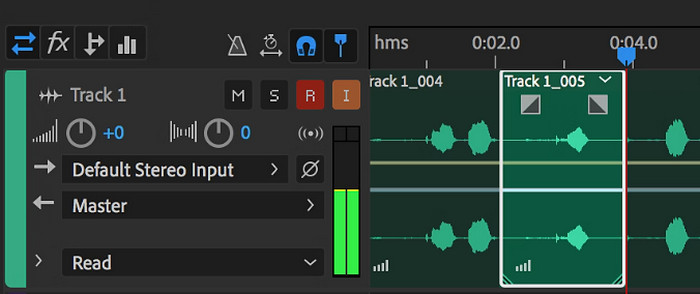
Trin 3. Når du er færdig med redigeringen, kan du udforske programmets andre værktøjer, såsom effekter. Når du har gjort det nødvendige, kan du fortsætte med at gemme lydprojektet. Sådan redigerer du altså MP3 på Windows med Adobe Audition.
Konklusion: Adobe Audition er uden tvivl en fremragende og klassisk lydeditor. Ikke underligt, at mange redaktører stadig holder fast i den. Men for begyndere, der ikke ønsker en krævende navigation, er Adobe Audition måske ikke det bedste valg.
Del 3. Rediger MP3 med iTunes på Mac
iTunes er ligesom din musikmanager, der holder alle dine yndlingssange organiseret på din computer. Forestil dig det som en digital boks, hvor du nemt kan sortere din musiksamling efter kunstner, album eller endda genre. Det lader dig også rette eventuelle manglende oplysninger, såsom sangtitler eller kunstnernavne, så du altid kan finde det, du leder efter. Med denne skråstreg-editor for medieafspiller kan du oprette brugerdefinerede lydspor eller afspilningslister til forskellige stemninger eller aktiviteter, såsom et træningsmix eller en afspilningsliste til at slappe af med.
Den bedste del? iTunes er super brugervenligt. Selvom du ikke er teknisk kyndig, kan du nemt og hurtigt tilføje sange til dit bibliotek, organisere dem pænt og afspille dem uden besvær. Selvom det ikke kan lave smart redigering som de andre programmer, er det et godt valg til grundlæggende opgaver som at trimme uønsket stilhed fra begyndelsen eller slutningen af dine MP3-filer. Vi vil undersøge, hvordan du redigerer MP3 på Mac og Windows i nogle få enkle trin!
Nøglefunktioner:
• Administrerer og opretter et digitalt bibliotek af lydfiler.
• Udover MP3 understøtter den også forskellige lydformater, inklusive WAV, AIFF, Apple Lossless og AAC.
• Det tillader redigering af MP3-filoplysninger som kunstner, album, genre og udgivelsesår.
Sådan redigerer du lydfiler med iTunes
Trin 1. Start programmet og indlæs MP3‑filen. Find sektionen File, og vælg Add File to Library eller en lignende mulighed. Vælg derefter den MP3‑fil, du vil klippe, fra din enhed.
Trin 2. Gå nu til File igen, og vælg Library. Sørg for, at MP3‑filen står på listen der. Højreklik derefter på den, og vælg Get Info.
Trin 3. Nu kan du indstille klippepunkterne. Gå til vinduet Get Info, find Options, og find derefter Start og Stop‑tid. Indstil nu start- og sluttidspunktet for den del, du vil beholde. Når du er færdig, kan du gemme ændringerne ved at klikke på OK‑knappen.
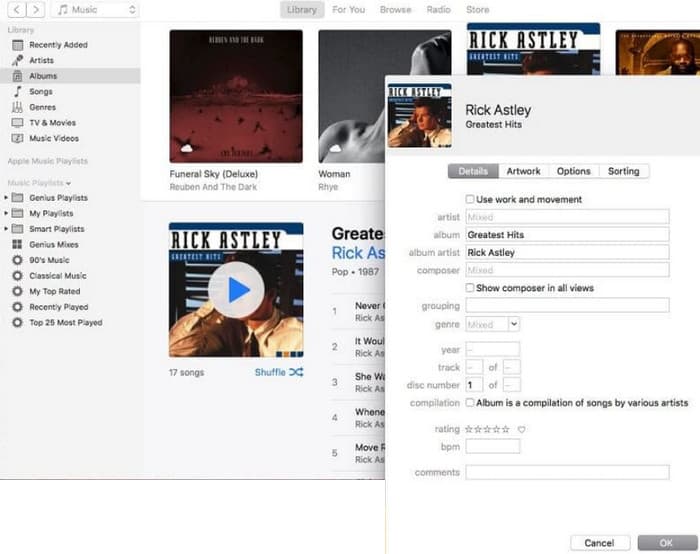
Konklusion: iTunes kan give grundlæggende MP3‑redigering og forbedringer efter behov. Men da det ikke er en dedikeret lydeditor, der kan redigere en MP3 i dybden, kan du blive frustreret over manglen på funktioner.
Del 4. Rediger MP3 med en Online MP3 Editor
Clideo er en lovende MP3‑klipper og editor for dem, der vil bruge en online lydeditor til at klippe deres MP3‑filer. Det er et webværktøj, der fungerer på enhver enhed, så du behøver ikke at downloade software. Clideo lader dig klippe bestemte dele af din lyd ved at angive præcise start- og sluttider eller blot ved at trække markører på skærmen.
Desuden understøtter den forskellige filtyper, så du kan redigere stort set enhver musikfil, du har. Oven i det giver Clideo dig mulighed for at tilføje effekter såsom fade-in og fade-out for en jævnere lydovergang i begyndelsen og slutningen af dit klip. Alt i alt er Clideo et brugervenligt og alsidigt værktøj, der gør redigering af dine lydfiler til en leg.
Nøglefunktioner:
• Skær let uønskede dele af dine lydfiler ud.
• Tilføj fade-in og fade-out effekter.
• Den understøtter forskellige lydformater.
Sådan redigerer du lydfiler med Clideo
Trin 1. Når du er kommet til Clideos officielle side, skal du gå til dets lydklipper.
Trin 2. For at uploade MP3‑filer skal du klikke på knappen Choose File. Når filimporten er gennemført, kan du begynde at redigere den.
Trin 3. Indstil markøren til den ønskede længde, og klik derefter på Export for at gemme ændringerne.
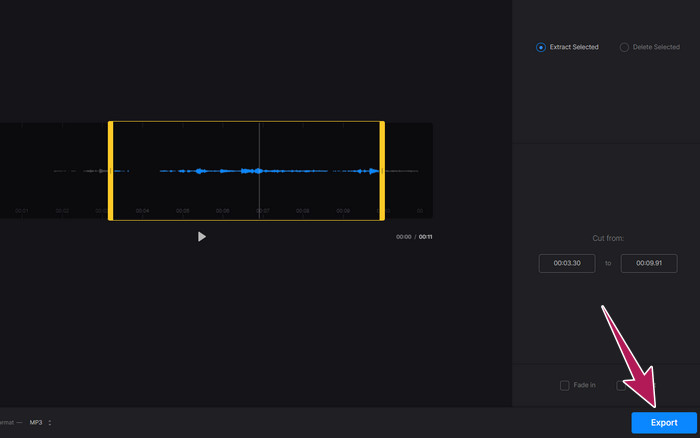
Konklusion: Clideo er et onlineværktøj, der tilbyder flere værktøjer til redigering af MP3‑filer og andre filtyper, herunder videoer. Du skal dog huske, at onlineværktøjer som Clideo kan give usikker sikkerhed, da de er mere sårbare end offlineværktøjer.
Del 5. Rediger MP3 med en mobil APP på iPhone/Android
Den sidste MP3‑editor, jeg anbefaler, er en app, du kan hente på Android og iOS. Den hedder WavePad og har mange funktioner, så den kan virke kompliceret i starten. Med denne app kan du klippe og beskære klip, ændre tonehøjde på din stemme og endda fjerne baggrundsstøj. Desuden kan den redigere MP3 på iPhone og Android med en masse lydeffekter og musik, du kan tilføje til dine optagelser gratis. Den har en indbygget equalizer, som hjælper dig med at få din lyd til at lyde helt rigtig. Udover MP3 fungerer WavePad også med de mest almindelige lydfiltyper.
Nøglefunktioner:
• Klip, kopier, indsæt og tilføj effekter til lyde.
• Understøttelse af forskellige lydformater som MP3, WAV og AIFF.
• Har forskellige lydkvalitetsindstillinger.
Sådan redigerer du lydfiler med WavePad
Trin 1. Start appen, tryk på de tre streger, og vælg File-Import from the Audio-fanerne. Dette giver dig mulighed for at uploade den MP3‑fil, du skal redigere.
Trin 2. Få adgang til redigeringsværktøjerne ved at swipe til højre på værktøjsmulighederne øverst på skærmen.
Trin 3. Når du har gjort dette, kan du trykke på REC‑knappen for at optage den del, du vil beholde fra filen. Gem den derefter og eksporter den til din enhed.
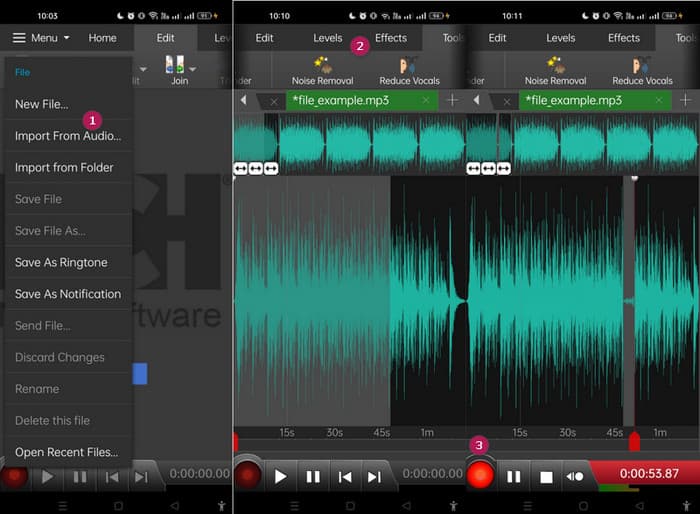
Konklusion: Gratisversionen af WavePad har de fleste funktioner, men der findes en betalt mulighed til $3 om måneden, som også fjerner annoncer og giver adgang til alt, såsom alle lydeffekterne og muligheden for at gemme dine filer i forskellige formater. Dette gør det muligt for dig at redigere MP3‑filer mere avanceret på Android eller iPhone.
Del 6. Ofte stillede spørgsmål om redigering af en MP3
Kan jeg trimme en sang i Apple Music?
Nej. Desværre kan du ikke trimme sange direkte i selve Apple Music.
Har Microsoft en lydeditor?
Der er mange tilgængelige lydredigeringsprogrammer, såsom Audacity til redigering af MP3, som du kan downloade fra Microsoft Store.
Hvordan trimmer jeg en MP3-fil i Windows Media Player?
Desværre har Windows Media Player selv ikke indbyggede redigeringsfunktioner til at klippe MP3‑filer.
Konklusion
Nu ved du i det mindste, hvordan du kan redigere MP3-filer bedre end nogensinde før. Med de bedste lydeditorer, vi anbefaler ovenfor, vil du helt sikkert opnå den lyd, du ønsker! Disse værktøjer giver komplette løsninger til forskellige platforme og sikrer fleksibilitet og bekvemmelighed uanset din enhed eller dit operativsystem. Uanset om du foretrækker et desktopprogram, et onlineværktøj eller en mobilapp, kan du opnå redigeringer i professionel kvalitet med lethed. Fra grundlæggende klipning og sammensmeltning til avancerede effekter og forbedringer kan det rigtige program effektivt forvandle dine MP3‑filer. Udforsk mulighederne, og begynd at finpudse dine lydspor til perfektion allerede i dag.
-
 Top 10 FLV-afspillere til Windows, Mac, iOS og Android i 2024
 FLV-afspiller hjælper dig med let adgang til dine FLV-filer på din Windows-, Mac-, Android-, iOS-enhed. Se de bedste FLV-filafspillere, du kan downloade lige nu.
-
 8 bedste MOV-afspillere til at spille QuickTime MOV-filer med original kvalitet
 Lær bare mere om de 8 bedste MOV-afspillere, der er tilgængelige for både Windows og Mac. Du kan vælge den ønskede og passende til at afspille MOV-filer med den originale kvalitet.
-
 Få din bedste MP4-afspiller til at afspille MP4-filer med høj visuel kvalitet
 Læs og få din bedste MP4-afspiller fra anbefalingerne fra den 10 nyeste MP4-videoafspiller-software. Du kan afspille MP4-videofiler på Windows og Mac uden problemer.
