


 Video Converter Ultimate
 Skærmoptager
 Video reparation
 Sikker download
Sådan konverteres M2TS til iPad-kompatible formater på Windows / Mac / Online
Kan du afspille M2TS direkte på iPad? Desværre er svaret nej. M2TS er ikke kompatibelt med iPad. Hvis du vil afspille M2TS på iPad, skal du installere en M2TS‑afspiller‑app på iPad, eller du kan konvertere M2TS til iPad‑format. Denne artikel vælger tydeligvis den sidstnævnte løsning. Læs videre og lær, hvordan du ændrer videoformat på iPad fra M2TS.

Del 1: Sådan konverteres M2TS til iPad på Windows og Mac
Hvilke formater understøtter iPad? Faktisk accepterer iPad almindelige videoformater H.264, MP4, M4V, MOV, MPEG-4 og M-JPEG. For at sætte M2TS på iPad skal du først konvertere M2TS til iPad-videoformat.
Sådan konverteres M2TS til iPad på Windows gratis
FVC Free M2TS Converter er en batchkonverter fra M2TS til iPad, som er helt gratis at bruge. Du kan batchkonvertere M2TS‑filer til iPad med op til 50x højere hastighed end almindelige M2TS‑konvertere. Det betyder, at det ikke er noget problem, hvis du skal konvertere store M2TS‑videofiler til iPad i bulk. Den gratis M2TS til iPad‑konverter kan håndtere det perfekt.
Derudover kan du flette M2TS‑filer og tilføje temaer, før du konverterer M2TS til iPad. Vinduet til forhåndsvisning i realtid viser dig straks videoeffekterne. Kort sagt kan du redigere og konvertere AVCHD M2TS til iPad på Windows gratis i én arbejdsgang.

Gratis M2TS Converter
113.456+ downloads- Konverter M2TS til iPad H.264, MP4, MOV, MPEG-4 og andre kompatible formater.
- 50x hurtigere hastighed med batchkonverteringsunderstøttelse.
- Oprethold det høje kvalitetsniveau, mens du konverterer til iPad fra alle HD-videokameraer.
- M2TS til iPad-konverteren fungerer med Windows 10/8/7 computer.
Gratis downloadTil Windows 7 eller nyereSikker download
Gratis downloadTil MacOS 10.7 eller nyereSikker download
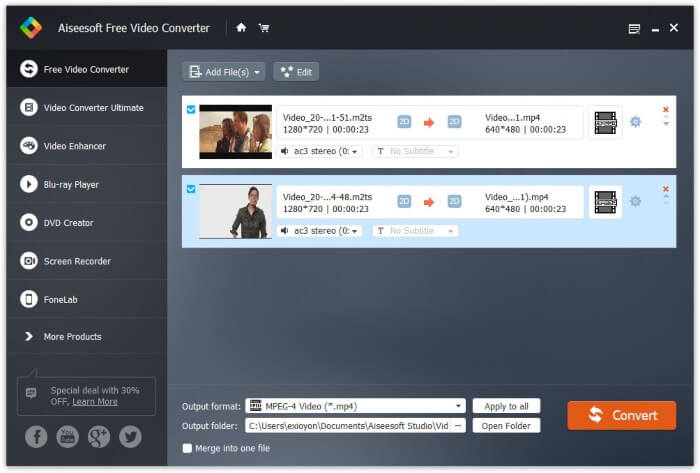
Trin 1: Download, installer og start FVC Free M2TS Converter gratis. Træk og slip M2TS‑filer ind i hovedgrænsefladen.

Trin 2: Fold listen Output format ud nær bunden. For at konvertere M2TS til iPad på Windows kan du indstille outputformatet direkte fra kategorien Apple iPad.

Trin 3: Klik på tandhjulsikonet Settings for at justere video‑encoder, billedhastighed og mere. Klik til sidst på Convert for at konvertere video fra M2TS til iPad‑format.
Sådan konverteres M2TS til iPad på Mac gratis
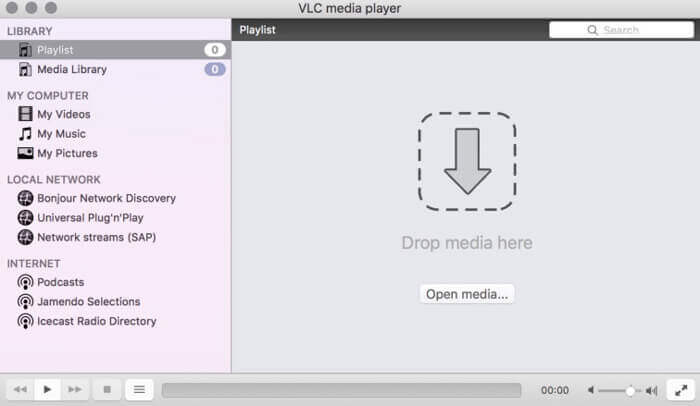
Hvis du vil konvertere M2TS-video til iPad på Mac gratis, kan VLC Media Player være dit gode valg. Det er en gratis og open source M2TS-afspiller og konverter til multiplatform.
Trin 1: Åbn VLC Media Player på Mac. Vælg Convert/Save i rullemenuen Media.
Trin 2: Klik på Add for at importere en M2TS‑fil. Vælg derefter filen, og klik på Open nedenfor for at fortsætte processen.
Trin 3: Klik på Convert/Save nederst for at gå videre til det næste vindue.
Trin 4: Vælg iPad‑format i rullemenuen Profile. Du kan klikke på Tools-ikonet ved siden af for at justere videoindstillingerne.
Trin 5: Klik på Start for at begynde at konvertere M2TS‑filen til iPad på Mac via VLC.
Del 2: Sådan konverteres M2TS til iPad online
For mobilbrugere er det også et godt valg at bruge en online M2TS til iPad-konverter. Du kan konvertere en M2TS-fil til iPad gratis uden krav om download, installation eller registrering.
Trin 1: Åbn en online M2TS til iPad‑konverter, f.eks. FVC Free Online Video Converter.

Trin 2: Download FVC launcher ved at klikke på Add Files to Convert og installér den.

Trin 3: Find den M2TS‑fil på din computer, du vil konvertere. Og glem ikke at vælge formatet.

Trin 4: Klik på Start Converting for at konvertere M2TS til iPad gratis online.
Del 3: Ofte stillede spørgsmål om konvertering af M2TS til iPad
Hvad sker der pludselig ingen lyd i M2TS-filer i iMovie?
M2TS understøttes ikke indbygget af Apple-enheder. Du skal konvertere M2TS til Mac-format for at løse problemet.
Hvordan åbner jeg M2TS-filer på iPhone og iPad?
AVCHD M2TS er ikke kompatibel med iOS-enheder. Hvis du insisterer på at afspille M2TS-videoer på iPad, kan du bruge VLC Media Player-appen til at få videoafspilning.
Enhver god videoafspiller-app til iPad?
Du kan få en større skærm på iPad end iPhone. Så videooplevelsen vil også være bedre. De anbefalede videoafspillere inkluderer PlayerXtreme Media Player, KMPlayer, VLC, AirPlayer og mere. Du kan vælge en hvilken som helst for at få videokontroller fleksibelt.
Det er alt om at konvertere M2TS til iPad med online‑ og offlineværktøjer. Disse M2TS‑videokonvertere er gratis og sikre at bruge. Uanset hvor mange M2TS‑filer du vil konvertere til iPad‑kompatible formater, kan du få den hurtigste hastighed her.
-
 Sådan konverteres M2TS til MP4 uden at reducere kvaliteten
 Vil du konvertere videoen fra HD-videokamera til almindelig MP4? Her er 4 enkle og gratis måder at ændre M2TS-fil til MP4 på Windows og Mac.
-
 Sådan konverteres M2TS til MKV uden at miste kvalitet
 Vil du konvertere M2TS til MKV, mens du opretholder den originale kvalitet? Dette indlæg viser dig gratis og online metoder til at skifte M2TS til MKV tabsfrit.
-
 Hvad er forskellen mellem MTS og M2TS
 Hvad er MTS eller M2TS fil? Hvad er forskellen mellem M2TS og MTS? Hvordan kan jeg se videokameraets optagede MTS- eller M2TS-fil? Find alle svarene i dette indlæg.
